1. Produktet er slutview
The Girafit 3MP 2K Window Camera is an advanced indoor security solution designed for comprehensive home monitoring. It features high-definition video, intelligent detection capabilities, and versatile installation options to keep your property secure.
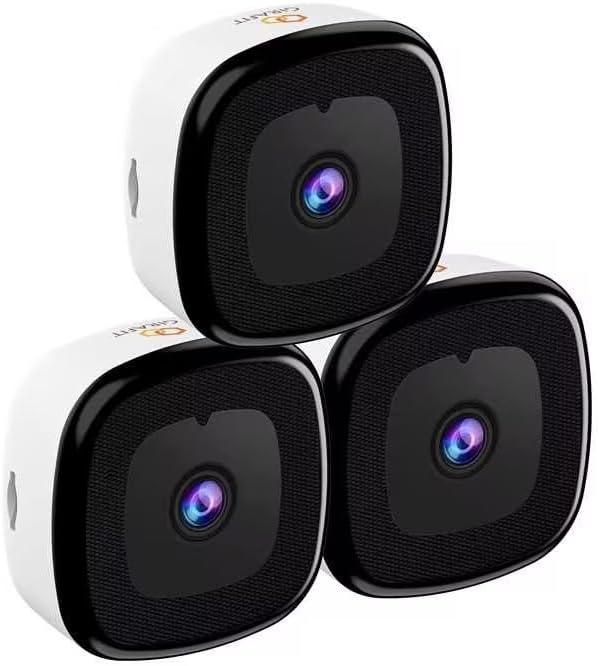
Image: Three Girafit 3MP 2K Window Cameras, showcasindet kompakte design.

Image: The Girafit GRF-W150W camera, highlighting its ability to monitor outside from inside.
2. Nøglefunktioner
- 3MP Ultra-HD Clarity: Delivers sharp and detailed 2K QHD resolution video.
- ChroMax AI Color Night Vision: Provides full-color video even in low-light conditions, offering day-like clarity at night.
- Person & Motion Detection: Advanced AI algorithms accurately detect human figures and general motion, reducing false alarms.
- Dual-band WiFi (2.4GHz & 5GHz): Sikrer stabil og fleksibel netværksforbindelse.
- 24/7 optagelse: Continuous video recording capability to never miss a moment.
- Anti-Glare & Anti-Reflection: AI-enhanced clarity with HDR for vivid and clear pictures, even through glass.
- Optional Local Storage: Supports MicroSD cards up to 128GB (sold separately).
- U.S. Based AWS Cloud: Secure cloud storage option for recorded footage.
- Multi-device & Multi-user Viewing: View up to 4 cameras simultaneously and share access with up to 5 users.

Billede: Overview of key features including dual-band WiFi, cloud storage, and various detection capabilities.

Image: Visual comparison demonstrating the superior clarity of ChroMax AI color night vision compared to traditional night vision modes.

Image: Illustrates the enhanced clarity and reduced glare/reflection provided by Girafit's AI-enhanced HDR technology.

Image: Demonstrates the 2K resolution and 4X zoom capability, showing clear details of a cat house.
3. Hvad er der i æsken
Your Girafit 3MP 2K Window Camera package includes:
- Girafit 3MP 2K Window Camera(s)
- USB Power Adapter
- USB strømkabel
- Mounting Sticker(s)
- Brugervejledning (dette dokument)
4. Opsætning og installation
Follow these steps for quick and easy installation of your Girafit Window Camera:

Image: Step-by-step guide for installing the camera in approximately 5 minutes.
- Clean Window: Ensure both the inside and outside of the window are clean for optimal adhesion and clear viewing.
- Peel off Mounting Sticker: Carefully remove the backing from the mounting sticker.
- Install Sticker: Apply the sticker firmly onto the clean window surface.
- Power on Camera: Connect the camera to power using the included USB adapter and cable.
- Monter kamera: Attach the camera firmly onto the mounting sticker. The camera uses a strong adhesive or Velcro-like material for secure attachment to glass surfaces.
The camera is designed for versatile placement on glass surfaces:

Billede: Eksamples of suitable installation locations, including windows, cupboards, fish tanks, and office glass walls.
Appopsætning
To complete the setup and begin viewfølg disse trin:

Image: Visual guide for connecting the camera to the app and Wi-Fi.
- Tilslut til strøm: Sørg for, at dit kamera er tændt.
- Download Girafit APP: Søg efter and download the official Girafit app from the iOS App Store or Google Play Store.
- Tilslut kamera til Wi-Fi: Enjoy hassle-free setup with Bluetooth. No need to scan QR codes. Follow the in-app instructions to connect your camera to your home Wi-Fi network (supports 2.4GHz & 5GHz).
- Starte Viewing: Once connected, you can immediately access live view and playback through the app.
5. Betjeningsvejledning
Levende View og optagelse
Access the Girafit app to view live footage from your camera. The camera supports 24/7 continuous recording, ensuring all activity is captured.

Image: Demonstrates 24/7 continuous recording and person detection capabilities, showing viewing and detection angles.

Image: Illustrates the motion detection feature, showing a notification on a smartphone when a person is detected.
Multi-Device and Multi-User Access
The Girafit app allows you to manage multiple cameras and share access with family members or trusted individuals.

Image: Shows the capability to view up to 4 cameras simultaneously and share access with up to 5 users.

Image: Depicts multiple users accessing the camera feed from their respective devices.
Sirenealarm
Activate the built-in siren alarm through the app to deter intruders or alert others to suspicious activity.

Image: Shows the camera's siren alarm feature being activated to deter a potential intruder.
6. Vedligeholdelse
To ensure optimal performance and longevity of your Girafit 3MP 2K Window Camera, follow these maintenance guidelines:
- Rengøring af linser: Tør forsigtigt kameralinsen af med en blød, fnugfri klud for at fjerne støv eller pletter. Undgå slibende rengøringsmidler.
- Overflade rengøring: Clean the camera's body with a dry or slightly damp klæde. Brug ikke skrappe kemikalier.
- Firmwareopdateringer: Regularly check the Girafit app for available firmware updates to ensure your camera has the latest features and security enhancements.
- Kabelinspektion: Periodically inspect the power cable for any signs of wear or damage. Replace if necessary.
- Monteringstjek: Ensure the camera remains securely mounted to the window. Re-apply the mounting sticker if it shows signs of loosening.
7. Fejlfinding
If you encounter any issues with your Girafit 3MP 2K Window Camera, refer to the following common problems and solutions:
| Problem | Mulig årsag | Løsning |
|---|---|---|
| Kamera offline | Ingen strøm; Wi-Fi afbrudt; Routerproblem | Check power connection; Restart camera; Restart router; Reconnect Wi-Fi in app. |
| Dårlig videokvalitet | Dirty lens; Weak Wi-Fi signal; Obstruction | Clean lens; Move camera closer to router or use 5GHz band; Remove obstructions. |
| Bevægelsesdetektion virker ikke | Settings incorrect; Environmental factors | Check detection settings in app; Adjust sensitivity; Ensure clear view. |
| Uklart nattesyn | External light interference; Dirty window | Ensure no strong lights directly facing camera; Clean window thoroughly. |
| Kan ikke oprette forbindelse til app | Incorrect Wi-Fi password; App version outdated | Verify Wi-Fi password; Update app to latest version; Reset camera and try again. |
If the issue persists after trying these solutions, please contact Girafit customer support for further assistance.
8. Specifikationer
| Feature | Detalje |
|---|---|
| Model | GRF-W150W |
| Opløsning | 3MP (2K QHD) |
| Forbindelse | 2.4 GHz og 5 GHz Wi-Fi |
| Nattesyn | ChroMax AI Color Night Vision |
| Opdagelse | Person & Motion Detection |
| Opbevaringsmuligheder | MicroSD (up to 128GB, sold separately), U.S. Based AWS Cloud |
| Anbefalet brug | Indendørs sikkerhed |
| ASIN | B0DKFP9GYQ |
| Først tilgængelig | 21. oktober 2024 |
9. Garanti og support
Girafit products are designed for reliability and performance. For specific warranty details, please refer to the warranty card included with your product or visit the official Girafit website. If you require technical support, have questions about your product, or need assistance with troubleshooting, please contact our customer support team through the following channels:
- Online support: Visit the Girafit official webwebsted med ofte stillede spørgsmål, supportartikler og kontaktformularer.
- E-mail support: Refer to your product packaging or the Girafit webwebstedet for den dedikerede support-e-mailadresse.
Please have your product model number (GRF-W150W) and purchase information ready when contacting support to ensure a swift resolution.


