Indledning
Thank you for choosing the SOAR NCAA Sport True Wireless Earbuds V.5. This manual provides detailed instructions for the proper setup, operation, and maintenance of your earbuds. Please read this manual thoroughly before use to ensure optimal performance and longevity of your device.
Pakkens indhold
- SOAR NCAA Sport True Wireless Earbuds V.5 (Left and Right)
- Bærbart opladningsetui
- USB Type-C opladerkabel
- Extra Ear Gels (various sizes)
- Brugervejledning (dette dokument)
Produkt overview
Familiarize yourself with the components of your SOAR True Wireless Earbuds.

Image: The SOAR NCAA Sport True Wireless Earbuds V.5, featuring the TCU Horned Frogs logo, are shown both inside their open charging case and as a single earbud outside the case. The closed charging case lid is also displayed, highlighting the team logo.

Image: A diagram highlighting the functional aspects of the earbuds, including sweat resistance, secure fit ear hooks, the portable charging case, clear call quality, and intuitive one-touch controls.
- høretelefoner Left and Right earbuds with integrated controls and ear hooks for a secure fit.
- Opladningsetui: Stores and recharges the earbuds.
- LED-indikatorer: Provide status updates for charging and pairing.
- Multi-function Button/Touch Control: Til styring af afspilning, opkald og stemmeassistent.
- Mikrofon: Indbygget til håndfri opkald.
Opsætning
1. Opladning af øretelefoner og etuiet
- Oplad ørepropperne og opladningsetuiet helt inden første brug.
- Placer ørepropperne i opladningsetuiet. Sørg for, at de er korrekt isat.
- Tilslut USB Type-C-kablet til opladningsporten på etuiet, og den anden ende til en USB-strømkilde (f.eks. computer, vægadapter).
- The LED indicators on the case and/or earbuds will show charging status. Refer to the LED indicator section for details.
- Once fully charged, disconnect the charging cable. A full charge provides over 10 hours of music and talk time.
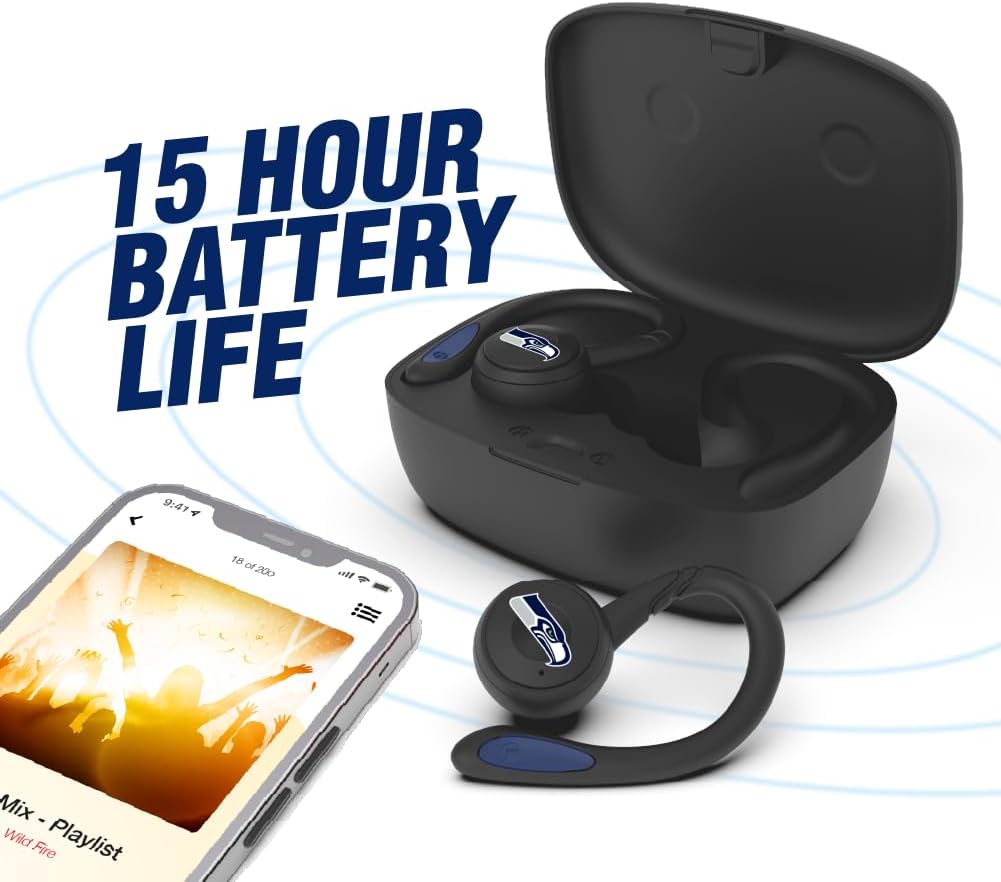
Image: The earbuds are shown within their charging case, positioned beside a smartphone playing music, emphasizing the extended battery life for continuous audio enjoyment.
2. Parring med en Bluetooth-enhed
- Sørg for, at øretelefonerne er opladet.
- Åbn opladningsetuiet. Ørepropperne går automatisk i parringstilstand, og deres LED-indikatorer blinker (f.eks. skiftevis blå og rød).
- Aktiver Bluetooth på din enhed (smartphone, tablet osv.).
- Søg efter available Bluetooth devices. You should see "SOAR Earbuds V.5" or a similar name appear in the list.
- Select the earbuds from the list to connect. Once connected, the LED indicators on the earbuds will stop flashing or show a solid blue light, and you will hear an audible confirmation.
- Hvis parringen mislykkes, skal du slukke øretelefonerne, deaktivere Bluetooth på din enhed og gentage trinnene.
Betjeningsvejledning
Tænd/sluk
- Tænd: Open the charging case, or press and hold the multi-function button on each earbud for approximately 3 seconds.
- Sluk: Place the earbuds back into the charging case and close the lid, or press and hold the multi-function button on each earbud for approximately 5 seconds.
Musikafspilning
- Afspil/pause: Tryk enkeltvis på multifunktionsknappen på begge øretelefoner.
- Næste nummer: Dobbelttryk på multifunktionsknappen på den højre øreprop.
- Forrige nummer: Dobbelttryk på multifunktionsknappen på den venstre øreprop.
- Lydstyrke op: Triple tap the multi-function button on the right earbud.
- Skrue ned for lyden: Triple tap the multi-function button on the left earbud.
Opkaldsstyring
- Besvar/afslut opkald: Tryk enkeltvis på multifunktionsknappen på begge øretelefoner.
- Afvis opkald: Tryk og hold multifunktionsknappen på begge øretelefoner nede i 2 sekunder.
Stemmeassistent
- Aktiver stemmeassistent: Press and hold the multi-function button on either earbud for 2 seconds (when not on a call).
Opretholdelse
- Rensning: Brug en blød, tør og fnugfri klud til at rengøre ørepropperne og opladningsetuiet. Brug ikke skrappe kemikalier eller slibende materialer.
- Øregeler: Regularly remove and clean the ear gels with a damp klud. Sørg for, at de er helt tørre, før du sætter dem på igen.
- Opbevaring: Når ørepropperne ikke er i brug, skal de opbevares i deres opladningsetui for at beskytte dem og holde dem opladede. Opbevares køligt og tørt, væk fra direkte sollys og ekstreme temperaturer.
- Vandtæthed: The earbuds are sweat resistant, but not waterproof. Avoid submerging them in water or exposing them to heavy rain.
Fejlfinding
| Problem | Løsning |
|---|---|
| Ørepropperne tænder ikke. | Sørg for, at ørepropperne er opladet. Placer dem i opladningsetuiet, og tilslut etuiet til strøm. |
| Øretelefoner parres ikke med enheden. |
|
| Kun én øretelefon virker. |
|
| Dårlig lydkvalitet eller afbrydelser. |
|
Specifikationer
| Feature | Detalje |
|---|---|
| Modelnummer | NCAA-TWS5-TXC |
| Forbindelse | Bluetooth 5.0 |
| Wireless Range | Op til 30 fod (9 meter) |
| Batterilevetid | Over 10 hours (music & talk time per charge) |
| Opladningsport | USB Type-C |
| Kontroltype | Touch Control / Multi-function Button |
| Mikrofon | Indbygget |
| Materiale | Plast |
| Vægt | Approximately 140 g (total item weight) |
Garanti og support
For warranty information and customer support, please refer to the official SOAR product webwebstedet eller kontakt din forhandler. Gem din købsbevis i tilfælde af garantikrav.
For yderligere hjælp, besøg venligst: www.soar.com (Note: This is a placeholder link. Please refer to the actual product packaging or manufacturer's website for accurate support information.)


