1. Introduktion
Tak for købetasing the SOAR XL ShockBox BTH6 Wireless Bluetooth Speaker. This speaker is designed to provide high-quality audio with versatile connectivity options, including Bluetooth 5.0, AM/FM radio, USB, and Aux inputs. Its portable and shockproof design, combined with dynamic multicolor LED lights, makes it suitable for various environments. Please read this manual carefully to ensure proper use and maintenance of your device.
2. Produktet er slutview
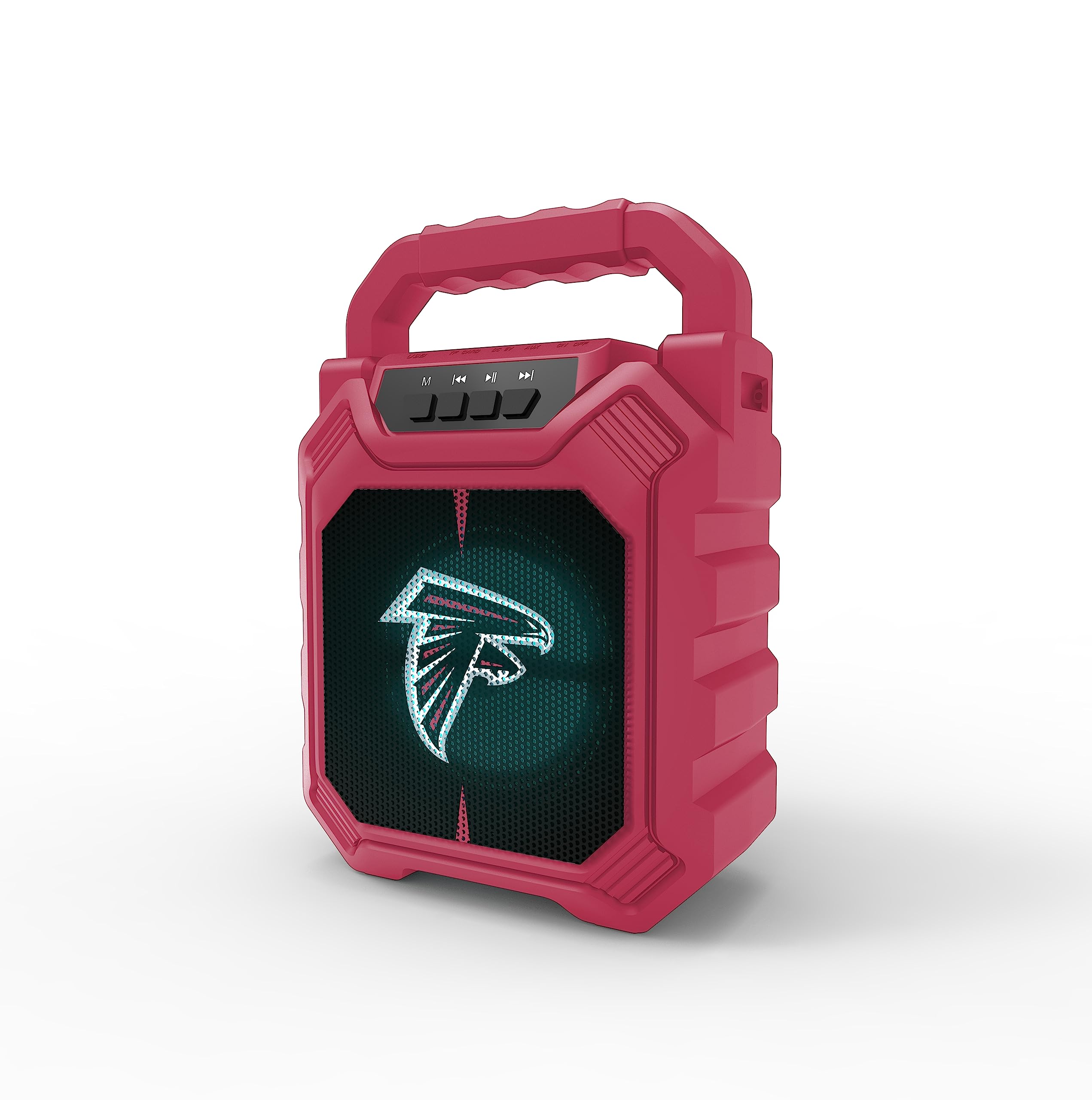
Billede 1: Forside view of the SOAR XL ShockBox BTH6 Wireless Bluetooth Speaker, featuring the Atlanta Falcons logo.
Nøglefunktioner:
- Bluetooth 5.0-forbindelse: For seamless wireless audio streaming.
- Flere lydindgange: Supports AM/FM radio, USB, and Aux connections.
- Bærbart design: Features a convenient top handle and shockproof construction.
- Lang batterilevetid: Provides over 5 hours of playback on a single charge.
- Dynamiske LED-lys: Multicolor LED lights pulse with the music.
- True Wireless Stereo (TWS): Tilslut to højttalere for forbedret stereolyd.
3. Betjeningselementer og porte

Image 2: Top panel of the speaker, illustrating the control buttons and various input ports.
Knap funktioner:
- Power knap: Press and hold to turn the speaker ON/OFF. Short press to switch modes (Bluetooth, FM, USB, Aux).
- 'M' (Tilstand)-knap: Short press to cycle through input modes (Bluetooth, FM Radio, USB, Aux).
- Forrige nummer / Lydstyrke ned: Short press for previous track (in Bluetooth/USB mode). Press and hold to decrease volume.
- Afspil/pause knap: Short press to play or pause audio. In FM mode, short press to auto-scan and save stations.
- Næste nummer / Lydstyrke op: Short press for next track (in Bluetooth/USB mode). Press and hold to increase volume.
Indgangsporte:
- Mikro-USB-opladningsport: Til opladning af højttaleren.
- USB-port: Til afspilning af lyd fra et USB-flashdrev.
- Aux-in Port (3.5mm): Til tilslutning af eksterne lydenheder via et AUX-kabel.
- MicroSD -kortplads: For playing audio from a MicroSD card.
4. Opsætning og drift
4.1 Opladning af højttaleren
- Connect the provided micro-USB cable to the charging port on the speaker.
- Tilslut den anden ende af kablet til en USB-strømadapter (medfølger ikke) eller en computers USB-port.
- Opladningsindikatorlampen lyser. Når den er fuldt opladet, kan lampen skifte farve eller slukke.
- En fuld opladning giver over 5 timers spilletid.
4.2 Tænd/sluk
- To turn ON, press and hold the Power button until you hear an audible prompt.
- To turn OFF, press and hold the Power button again until the speaker powers down.
4.3 Bluetooth -parring
- Tænd højttaleren. Den vil automatisk gå i Bluetooth-parringstilstand, hvilket indikeres af et blinkende LED-lys og en hørbar meddelelse.
- Aktiver Bluetooth på din enhed (smartphone, tablet osv.) og søg efter tilgængelige enheder.
- Select "SOAR BTH6" from the list of devices.
- Når højttaleren er parret, vil den udsende en hørbar bekræftelse, og LED-lyset vil holde op med at blinke.
- Højttaleren genopretter automatisk forbindelsen til den sidst parrede enhed, når den tændes, hvis enheden er inden for rækkevidde, og Bluetooth er aktiveret.
4.4 FM-radiofunktion
- Turn on the speaker and press the 'M' (Mode) button until you enter FM Radio mode.
- For at automatisk scanne og gemme tilgængelige FM-stationer skal du trykke kort på knappen Afspil/Pause. Højttaleren scanner og gemmer stationer automatisk.
- Brug knapperne Forrige spor og Næste spor til at navigere mellem gemte stationer.
4.5 USB and Aux Input
- USB-indgang: Sæt et USB-flashdrev i USB-porten. Højttaleren skifter automatisk til USB-tilstand og begynder at afspille lyd. files.
- Aux input: Connect an external audio device (e.g., MP3 player) to the Aux-in port using a 3.5mm audio cable. Press the 'M' button to switch to Aux mode.
4.6 LED-lystilstande

Image 3: The speaker displaying its dynamic LED lights in a vibrant setting.
The speaker features dynamic multicolor LED lights that pulse to the rhythm of the music. These lights activate automatically when the speaker is in use. There are no user-adjustable modes for the LED lights; they are designed to enhance the audio experience visually.
4.7 Ægte trådløs stereo (TWS) parring

Image 4: Two SOAR XL ShockBox BTH6 speakers paired together for True Wireless Stereo (TWS) sound.
To achieve a wider soundstage, you can pair two SOAR XL ShockBox BTH6 speakers together using the TWS function:
- Ensure both speakers are turned OFF.
- Turn ON both speakers. They will enter Bluetooth pairing mode.
- On one of the speakers (this will be your primary speaker), double-press the 'M' (Mode) button. The speakers will attempt to connect to each other.
- Once successfully paired, you will hear an audible confirmation. The LED lights on both speakers will synchronize.
- Tilslut nu din enhed til den primære højttaler via Bluetooth som beskrevet i afsnit 4.3. Lyden afspilles i stereo gennem begge højttalere.
5. Vedligeholdelse
- Rensning: Brug en blød, tør klud til at rengøre højttalerens yderside. Brug ikke slibende rengøringsmidler eller opløsningsmidler.
- Opbevaring: Opbevar højttaleren et køligt, tørt sted væk fra direkte sollys og ekstreme temperaturer.
- Batteripleje: For at forlænge batteriets levetid skal du oplade højttaleren regelmæssigt, selvom den ikke bruges hyppigt. Undgå at aflade batteriet helt i længere perioder.
- Vandtæthed: While designed to be durable, avoid submerging the speaker in water.
6. Fejlfinding
| Problem | Mulig løsning |
|---|---|
| Højttaleren tænder ikke. | Ensure the battery is charged. Connect the speaker to a power source using the micro-USB cable. |
| Kan ikke parres via Bluetooth. | Make sure the speaker is in Bluetooth mode and within range (approx. 10 meters). Turn off and on your device's Bluetooth. Forget "SOAR BTH6" from your device's Bluetooth list and try pairing again. |
| Ingen lyd eller lav lydstyrke. | Kontrollér lydstyrken på både højttaleren og din tilsluttede enhed. Sørg for, at den korrekte inputtilstand er valgt. |
| FM-radiomodtagelsen er dårlig. | Adjust the speaker's position. Ensure you are in an area with good signal strength. |
| TWS-parring mislykkes. | Ensure both speakers are fully charged and not connected to any other Bluetooth devices. Follow the TWS pairing steps carefully. |
7. Specifikationer
| Feature | Detalje |
|---|---|
| Modelnummer | BTH6 (Variant: NFL-BTH6-DLPH) |
| Bluetooth version | 5.0 |
| Lydindgange | Bluetooth, AM/FM Radio, USB, Aux-in, MicroSD |
| Spilletid | Over 5 hours (per charge) |
| Opladningsport | Mikro-USB |
| Fabrikant | Prime Brands Group Inc. |
| Dato først tilgængelig | 6. september 2023 |
8. Officiel produktvideo
Video 1: En officiel produktvideoasing the features and dynamic LED lights of the SOAR BTH6 Wireless Bluetooth Speaker.
9. Garanti og support
For warranty information and customer support, please refer to the documentation included with your product or contact the manufacturer, Prime Brands Group Inc., directly. Details regarding specific warranty periods and support procedures are typically provided at the point of purchase or on the manufacturer's official webwebsted.


