
 Netværksvideo
Kamera serie
Hurtig startvejledning
 1SO 9001:2008
1SO 14001:2004
Klasse Il
Tak fordi du valgte vores produkter.
Læs brugervejledningen omhyggeligt, inden du bruger dette produkt.
This user manual will provide you with instructions for correct installation and operation.
Kameradimension
 Enhed: mm


Interface


| Indikatorstatus | Forklare |
| Blåt lys tændt | Kamera ikke tilsluttet |
| Blue Light flashing fast | Netværksforbindelsesfejl |
| Blue Light flashing slowly | Netværksforbindelse ok |

| Indikatorstatus | Forklare |
| Rødt lys er altid tændt | Starter op |
| Rødt lys blinker | Netværksfejl |
| Blåt lys er altid tændt | Venter på forbindelse |
| Blåt lys blinker | Arbejder normalt |

| Indikatorstatus | Forklare |
| Rødt lys er altid tændt | Starter op |
| Rødt lys blinker | Netværksfejl |
| Blåt lys er altid tændt | Venter på forbindelse |
| Blåt lys blinker | Arbejder normalt |

| Indikatorstatus | Forklare |
| Rødt lys er altid tændt | Starter op |
| Rødt lys blinker | Netværksfejl |
| Blåt lys er altid tændt | Venter på forbindelse |
| Blåt lys blinker | Arbejder normalt |

| Indikatorstatus | Forklare |
| Rødt lys er altid tændt | Starter op |
| Rødt lys blinker | Netværksfejl |
| Blåt lys er altid tændt | Venter på forbindelse |
| Blåt lys blinker | Arbejder normalt |
| Blåt lys blinker hurtigt | Opkald |
Installation

Opmærksomhed: Installed on the ceiling, please ensure the ceiling can bear at lest four times the weight of equipment.


Hurtig betjening
- Strømforsyning til udstyrstilslutning
Connect the AC Adapter to the camera and to an electrical socket. When the indicator light in the blue light state and Speaker broadcast started successfully. I’ s means that the startup is completed and the network configuration is performed. - Download og installer mobil APP
Scan the QR code below to download the APP and the client may search for “EasyLive plus” in the app store. Then complete according to the instructions.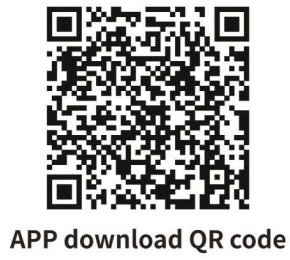 http://www.myviewcloud.com/wsp2p/download/download.jsp
 - Kontoregistrering og login
Open EasyLive Plus ,click the registration button in the account login interface, and enter the E-mail address and verify according to the prompts code to complete registration and login. - Quick configuration of camera connection WIFI
Connect your phone to Wi-Fi network, and open EasyLive Plus click “Add new device”, select “WIFl camera”, and scan the QR code of the camera bottom sticker or the box sticker, complete the addition of the device camera according to the prompts, as shown in the figure There are two ways to add:
(1) Wireless connection, the camera connects to the router through WiFi wireless network;
(2) Wired connection, the camera is connected to the router through the network cable;
The two adding methods can be completed according to the mobile APP prompt.

Note: When selecting wireless connection and wired connection, the router needs to connect
Internet, the camera is connected to the Internet after the addition is successful
Sikkerhedsinstruktion
These instructions are intended to ensure that user can use the product correctly to avoid danger and property loss. Please carefully read this guidance and keep it for future reference before operating the device.
The manual is designed to instruct users to facilitate installation. The interface in details depends on the exact product.
The latest version will be updated regularly according to the software and hardware improvement of our product.
Updated information will be updated in the latest version of this manual without prior notice.
Forholdsreglerne er opdelt i "Advarsler" og "Forsigtighedsregler".
 Advarsler
Følg disse sikkerhedsforanstaltninger for at forhindre alvorlig personskade eller død.
- Input voltage bør opfylde både SELV (Safety Extra Low Voltagog).
- Contact the distributor for abnormal operation. Do Not disassemble or modify the devices in any way.
- Moisture must be avoided for indoor devices in case of fire and electric shock.
- Installer udstyret i loftet for at sikre, at det kan modstå mindst 4 gange udstyrets vægt.
 Forsigtig
Følg disse forholdsregler for at forhindre potentiel personskade eller materiel skade.
- 0riginal package must be used for shipment and management to avoid high pressure, high vibration and imprisonments.
- Undgå direkte kontakt med billedsensoren. Dæk støvhætten til, når den ikke er i brug.
- Do not aim the camera at the extra bright places (light, sunlight, laser) in case of affecting the endurance of CMOS at the same time.
- Anbring ikke kameraet i ekstremt varmt, koldt, støvet eller damp steder, og udsæt den ikke for høj elektromagnetisk stråling.
- For at undgå varmeakkumulering kræves god ventilation til driftsmiljøet.
- Ensure that the installation location is kept at a sufficient distance from the surrounding electromagnetic sensitive equipment to prevent electromagnetic interference.
- Keep the camera away from liquid while on using. Original package during shipment is strongly recommended.
- Enhver udskiftning af enhedens batteri eller brug af en forkert type kan forårsage uoprettelig skade på enheden.
- Modify the default login password when first login the device to avoid the loss caused by weak password.
- When the Micro SD is used, it is recommended to use a special video surveillance.
Micro SD card to avoid after sales maintenance arising from the rapid damage of ordinary Micro SD cards.
Ansvarsfraskrivelse
- Virksomheden har gjort sit bedste for at sikre fuldstændigheden og nøjagtigheden af indholdet i manualen. Ved enhver tvivl eller tvist henvises til virksomhedens endelige forklaring.
- Virksomheden vil holde indholdet af denne manual opdateret i overensstemmelse med produktforbedringer og vil med jævne mellemrum forbedre eller opdatere de produkter eller procedurer, der er beskrevet i denne manual. Det opdaterede indhold vil blive afspejlet i den seneste version af denne manual uden forudgående varsel.
- Indholdet i denne manual er kun til reference og vejledning for brugerne. Det er ikke garanteret, at det er nøjagtigt det samme som det faktiske produkt. Det faktiske produkt har forrang.
- De dele, komponenter og tilbehør, der er nævnt i denne manual, er kun til illustrationsformål og repræsenterer ikke konfigurationerne for din købte model.
Advarsler
Forsigtighed: Risiko for eksplosion, hvis batteriet udskiftes med en forkert type udskiftning af et batteri med en forkert type, der kan omgå en beskyttelse (f.eks.ample, in the case of some lithium battery types); disposal of a battery into fire or a hot oven, or mechanically crushing or cutting of a battery, that can result in an explosion; leaving a battery in an extremely high temperature surrounding environment that can result in an explosion or the leakage of flammable liquid or gas; a battery subjected to extremely low air pressure that may result in an explosion or the leakage of flammable liquid or gas
Garantikort
Tak, fordi du har valgt vores produkter. Dette garantikort er vores virksomheds højtidelige forpligtelse over for dig, og baseret på dette leverer virksomheden dig standardgarantitjenester. Det anbefales kraftigt, at du læser instruktionerne omhyggeligt, inden du bruger produktet, og betjener det korrekt.
Garantipolitik
Garantien gælder med det medfølgende garantikort.
Eftersalgsservicepolitik
This warranty is applicable to the product from the date of purchase, but the official original purchase certificate shall be provided.
Hvis det officielle originale købsbevis ikke kan fremvises, eller registreringen (dato, varenavn) ikke er tydelig, vil virksomheden definere garantiperioden baseret på produktoplysningerne.
Eftersalgsservicepolitik
- According to the national regulations, users enjoy the warranty services for the quality problems within the warranty period.
- The followings shall not be covered by the warranty:
- Overskridelse af garanti
- Fysisk skade på grund af forkert brug eller opbevaring
- Failure or damage caused during transport, loading/unloading or handling .
- Reparation eller modifikation udført af ikke-professionelle
- Fejl eller skade forårsaget af uagtsomhed, overtrædelse af driftsregler eller forkert betjening
- Fejl eller skade forårsaget af force majeure-faktorer (brand, jordskælv, lynnedslag)
- No warranty over accessories such as fuse and battery
- Produkter, der ikke vedligeholdes af virksomheden

7X24 high-quality service
The company reserves the right of final evaluation of product failure
 https://m.facebook.com/tiandyoverseas/
https://www.youtube.com/channel/UCMvwIj9o5KZHgY53wIrfSbQ
en.tiandy.com
Tiandy Technologies Co.,Ltd.
No.8 ,Haitai Huake Rd2 ( Huayuan ) ,Binhai
Hi -Tech Zone ,Tianjin 300384 China
Dokumenter/ressourcer
 | Netværksvideokamera |
Referencer
- Brugermanualmanual.tools