Indledning
Thank you for choosing the JONR H2 PRO MAX Wet Dry Vacuum Cleaner. This manual provides essential information for the safe and efficient operation, maintenance, and troubleshooting of your appliance. Please read this manual thoroughly before using the product and retain it for future reference.
Vigtige sikkerhedsinstruktioner
WARNING: To reduce the risk of fire, electric shock, or injury, read all instructions before use.
- Betjen altid apparatet på en tør, plan overflade.
- Nedsænk ikke apparatet i vand eller andre væsker.
- Hold hår, løstsiddende tøj, fingre og alle dele af kroppen væk fra åbninger og bevægelige dele.
- Brug kun som beskrevet i denne manual. Brug kun producentens anbefalede tilbehør.
- Må ikke anvendes med en beskadiget ledning eller stik. Hvis apparatet ikke fungerer som det skal, er blevet tabt, beskadiget, efterladt udendørs eller tabt i vand, skal det returneres til et servicecenter.
- Håndter ikke stikket eller apparatet med våde hænder.
- Stik ikke genstande ind i åbninger. Må ikke bruges med blokerede åbninger; holdes fri for støv, fnug, hår og alt, hvad der kan reducere luftstrømmen.
- Vær ekstra forsigtig ved rengøring på trapper.
- Må ikke bruges til at opsamle brændbare eller brændbare væsker, såsom benzin, eller brug i områder, hvor de kan være til stede.
- Tag ikke noget op, der brænder eller ryger, såsom cigaretter, tændstikker eller varm aske.
- Undgå utilsigtet start. Sørg for, at kontakten er i slukket position, før du tilslutter batteripakken, løfter eller bærer apparatet.
- Genoplad kun med den oplader, der er specificeret af producenten.
- Under dårlige forhold kan der komme væske ud af batteriet; undgå kontakt. Hvis der kommer kontakt ved et uheld, skylles med vand. Hvis væske kommer i kontakt med øjnene, søg desuden lægehjælp.
Pakkens indhold
Kontroller, at alle komponenter er til stede og i god stand ved udpakning.
- JONR H2 PRO MAX Main Unit
- Håndter samling
- Opladningsdock
- Strømadapter
- Cleaning Solution (Starter Bottle)
- Rengøringsbørste
- Tilbehørsholder
- Brugermanual
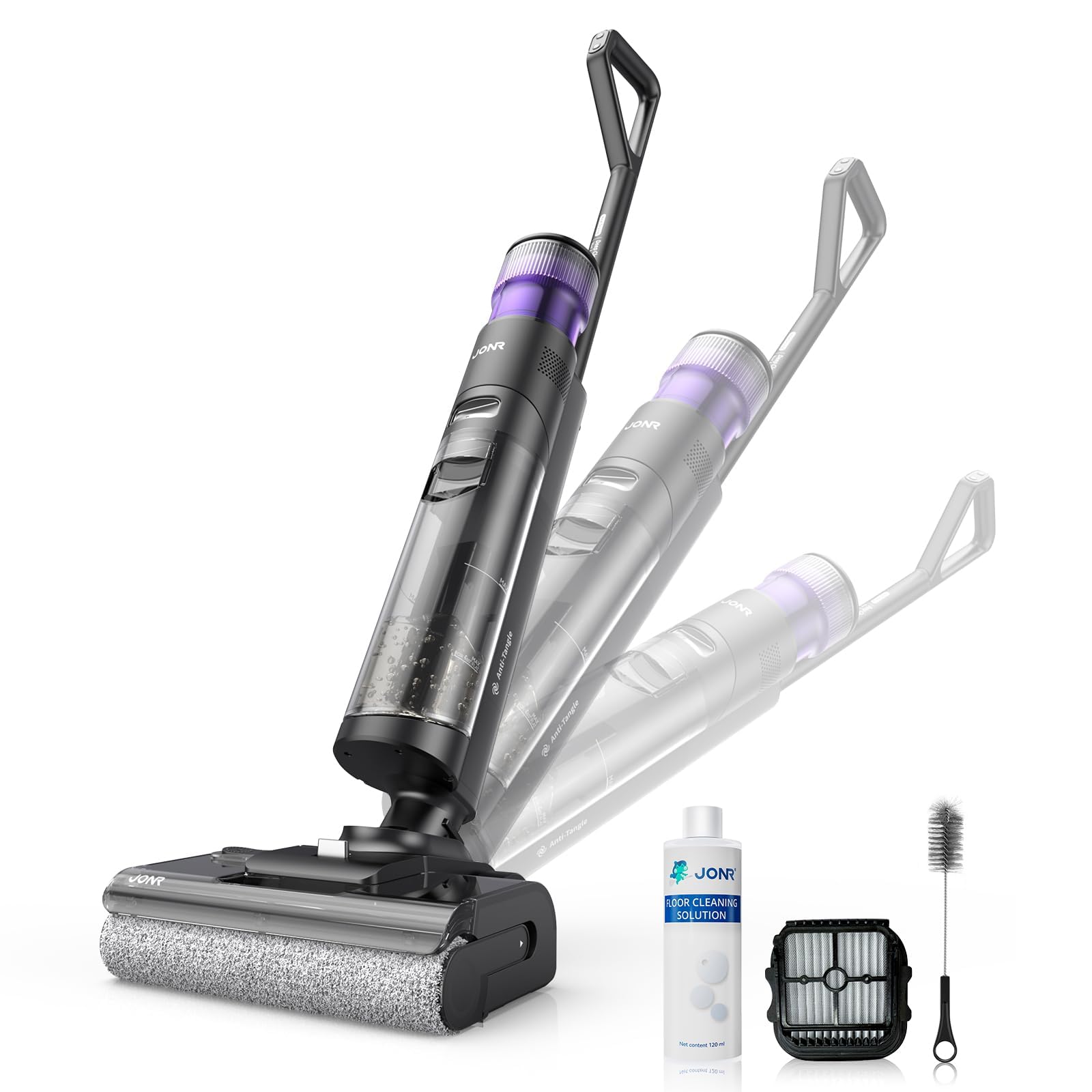
Image: JONR H2 PRO MAX Wet Dry Vacuum Cleaner and its included accessories. This image shows the main unit, handle, charging dock, and various cleaning tools.
Produktdiagram
Familiarize yourself with the parts of your JONR H2 PRO MAX.
- Renvandstank (CWT)
- Snavset vandtank (DWT)
- Knap til frigørelse af håndtag
- Skærm
- Power knap
- Knap til valg af tilstand
- Selvrensende knap
- Børsterulledæksel
- Penselrulle
- Opladning af kontakter
- Opladningsdock

Image: Labeled diagram illustrating the main parts of the JONR H2 PRO MAX Wet Dry Vacuum Cleaner, including tanks, buttons, and brush roll area.
Opsætning
1. Håndtagssamling
- Insert the handle assembly into the main unit until you hear a click, ensuring it is securely locked.
- To disassemble, press the handle release button and pull the handle upwards.
2. Opladning af batteriet
- Place the main unit onto the charging dock, ensuring the charging contacts align.
- Tilslut strømadapteren til opladningsdocken, og sæt den i en stikkontakt.
- The display screen will indicate charging status. A full charge takes approximately 4 hours.
- For optimal batterilevetid skal enheden oplades helt inden første brug.

Image: The JONR H2 PRO MAX Wet Dry Vacuum Cleaner positioned on its charging dock, with the power adapter connected.
3. Filling the Clean Water Tank (CWT)
- Press the CWT release button and remove the tank.
- Open the tank cap and fill with clean tap water. For enhanced cleaning, add a small amount of JONR cleaning solution (do not exceed the MAX line).
- Close the cap securely and reinsert the CWT into the main unit until it clicks into place.
Betjeningsvejledning
1. Tænd/sluk
- Press the Power Button to turn the unit on. The display screen will illuminate.
- Press the Power Button again to turn the unit off.
2. Selecting Cleaning Mode
The JONR H2 PRO MAX offers multiple cleaning modes:
- Automatisk tilstand: Default mode for general cleaning. The unit automatically adjusts suction and water flow based on floor dirt detection.
- Max tilstand: Giver maksimal sugeevne og vandgennemstrømning til meget snavsede områder.
- Sugetilstand: Til støvsugning af væsker uden at dispensere vand.
Press the Mode Selection Button to cycle through the available cleaning modes. The selected mode will be displayed on the screen.
3. Cleaning Your Floors
- Tilt the main unit back to engage the brush roll and start cleaning.
- Move the unit slowly forward and backward over the desired area.
- The unit will dispense water and cleaning solution, scrub the floor, and vacuum up dirty water simultaneously.
- The display screen provides real-time information such as battery level, current mode, and dirty water tank status.

Image: The JONR H2 PRO MAX Wet Dry Vacuum Cleaner actively cleaning a hard floor surface, demonstrating its wet and dry cleaning capabilities.
Opretholdelse
Regular maintenance ensures optimal performance and extends the lifespan of your JONR H2 PRO MAX.
1. Emptying and Cleaning the Dirty Water Tank (DWT)
- After each use, or when the DWT full indicator appears, remove the DWT.
- Open the DWT lid and carefully pour out the dirty water.
- Rinse the DWT thoroughly with clean water. Clean the filter inside the DWT if necessary.
- Allow the DWT and filter to air dry completely before reassembling.
2. Selvrensende funktion
- Place the unit on the charging dock. Ensure the CWT has sufficient clean water.
- Press the Self-Cleaning Button. The unit will perform an automatic cleaning cycle for the brush roll and internal pipes.
- After the self-cleaning cycle, empty and clean the DWT.
- The hot air drying function will then activate to dry the brush roll, preventing odors.

Image: The JONR H2 PRO MAX Wet Dry Vacuum Cleaner on its charging dock, with indicators suggesting the self-cleaning cycle is active.
3. Rengøring af børsterullen
- Turn off the unit and remove it from the charging dock.
- Open the brush roll cover.
- Remove the brush roll. Use the provided cleaning brush to remove any hair, debris, or tangled material.
- Skyl børsterullen under rindende vand.
- Allow the brush roll to air dry completely before reinstalling. Ensure it is properly aligned.
4. Rengøring af filteret
- The filter is located within the DWT. Remove it and rinse under clean water.
- Lad filteret lufttørre helt, før det sættes i igen.
- Replace the filter every 3-6 months, or as needed, for optimal performance.
Fejlfinding
Se dette afsnit for almindelige problemer og deres løsninger.
| Problem | Mulig årsag | Løsning |
|---|---|---|
| Enheden tænder ikke. | Batteriet er afladet. | Oplad enheden helt. |
| Enheden tænder ikke. | Tænd/sluk-knappen er ikke trykket korrekt ind. | Sørg for, at tænd/sluk-knappen er trykket fast. |
| Dårligt sug. | Dirty Water Tank (DWT) is full. | Empty and clean the DWT. |
| Dårligt sug. | Brush roll or air path is clogged. | Clean the brush roll and check for blockages in the air path. |
| Dårligt sug. | Filteret er snavset eller tilstoppet. | Rengør eller udskift filteret. |
| Vand udleveres ikke. | Clean Water Tank (CWT) is empty. | Refill the CWT. |
| Vand udleveres ikke. | CWT not installed correctly. | Ensure the CWT is securely in place. |
| Unit leaks water. | Tanks not properly sealed or installed. | Check that both CWT and DWT are correctly installed and their caps are sealed. |
| Ubehagelig lugt. | Dirty Water Tank (DWT) needs cleaning. | Empty and thoroughly clean the DWT after each use. Run self-cleaning cycle. |
Specifikationer
| Modelnavn | H2 PRO MAX |
| Mærke | JONR |
| Strømkilde | Batteridrevet (trådløs) |
| Batteritype | Lithium-ion |
| Opladningstid | Cirka 4 timer |
| Wattage | 200 watt |
| Renvandstankkapacitet | 850 milliliter |
| Støjniveau | 80 decibel |
| Produktdimensioner | 10.6 cm L x 9 cm B x 44 cm H |
| Varens vægt | 16.97 pund |
| Filtertype | Svamp |
| Speciel funktion | Hot Air Drying, Tangle-Free Brush Roll, Smart Hard Floor Cleaner |
Garanti og support
JONR products are manufactured to high-quality standards. For warranty information, technical support, or service inquiries, please contact JONR customer service.
Please visit the official JONR webwebstedet eller se din købsdokumentation for specifikke garantivilkår og kontaktoplysninger.
Bemærk: Gem din købskvittering som købsbevis i tilfælde af garantikrav.