1. Introduktion
Tak for købetasing the Azkoeesy 180cm High Gloss LED TV Cabinet. This manual provides essential information for the safe assembly, operation, and maintenance of your new furniture. Please read these instructions carefully before beginning assembly and retain them for future reference.
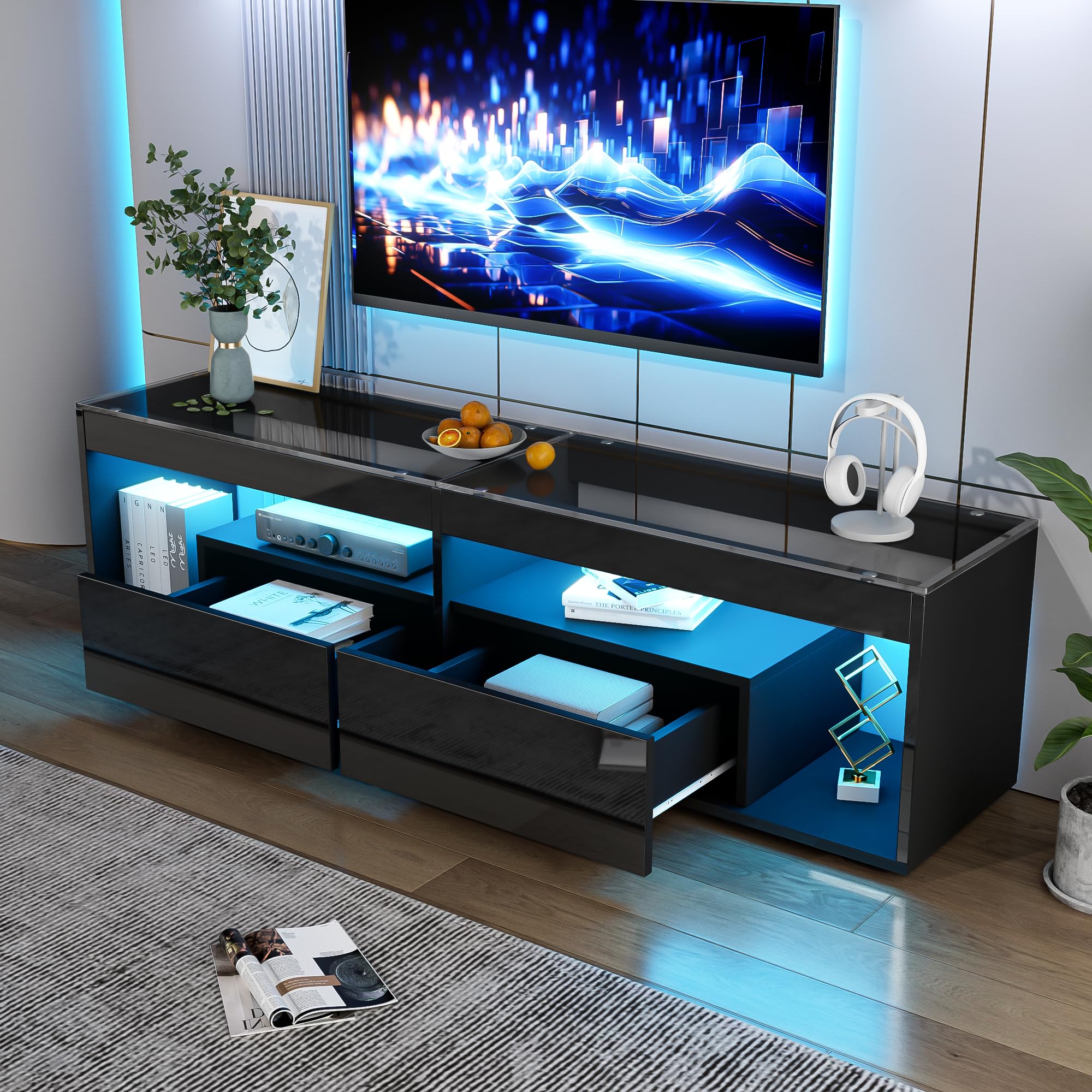
Image 1.1: The Azkoeesy 180cm High Gloss LED TV Cabinet with blue LED lighting.
2. Sikkerhedsoplysninger
- Sørg for, at alle komponenter er til stede og ubeskadigede før montering. Brug ikke beskadigede dele.
- Saml enheden på en blød, ren overflade for at forhindre ridser.
- Spænd ikke skruerne for hårdt under monteringen for at undgå at beskadige materialet.
- This TV cabinet is designed for indoor use only.
- Overskrid ikke den maksimale bæreevne på 60 kg.
- Hold små dele og emballagematerialer væk fra børn.
- The unit is not waterproof. Avoid exposure to excessive moisture.
3. Pakkens indhold
Your Azkoeesy TV cabinet is delivered in two packages. Please verify that all components and hardware are present before starting assembly.
- Cabinet panels (particle board, tempered glass)
- 2 skuffer
- LED lighting strip with USB connector
- Fjernbetjening til LED-belysning
- Samlebeslag (skruer, dyvler, forbindelsesstykker)
- Illustreret monteringsvejledning
4. Opsætning og montering
The TV cabinet is delivered partially assembled and requires final assembly. Follow the included illustrated instructions step-by-step for proper installation.
4.1. Forberedelse
- Pak alle komponenter ud, og læg dem på en ren, blød overflade for at forhindre ridser.
- Identify all parts against the parts list in the separate assembly instructions.
- Ensure you have the necessary tools (e.g., screwdriver, hammer - not included).
4.2. Monteringstrin
Refer to the detailed, illustrated assembly instructions provided in the package for specific steps. General steps include:
- Assemble the main frame of the TV cabinet.
- Install the tempered glass top panel.
- Assemble and insert the two drawers into their designated compartments.
- Attach the LED lighting strip to the designated areas (drawer panels and top/bottom pull bars) using its self-adhesive backing.
- Connect the LED lighting USB cable to a suitable USB power source (e.g., TV USB port, USB wall adapter).
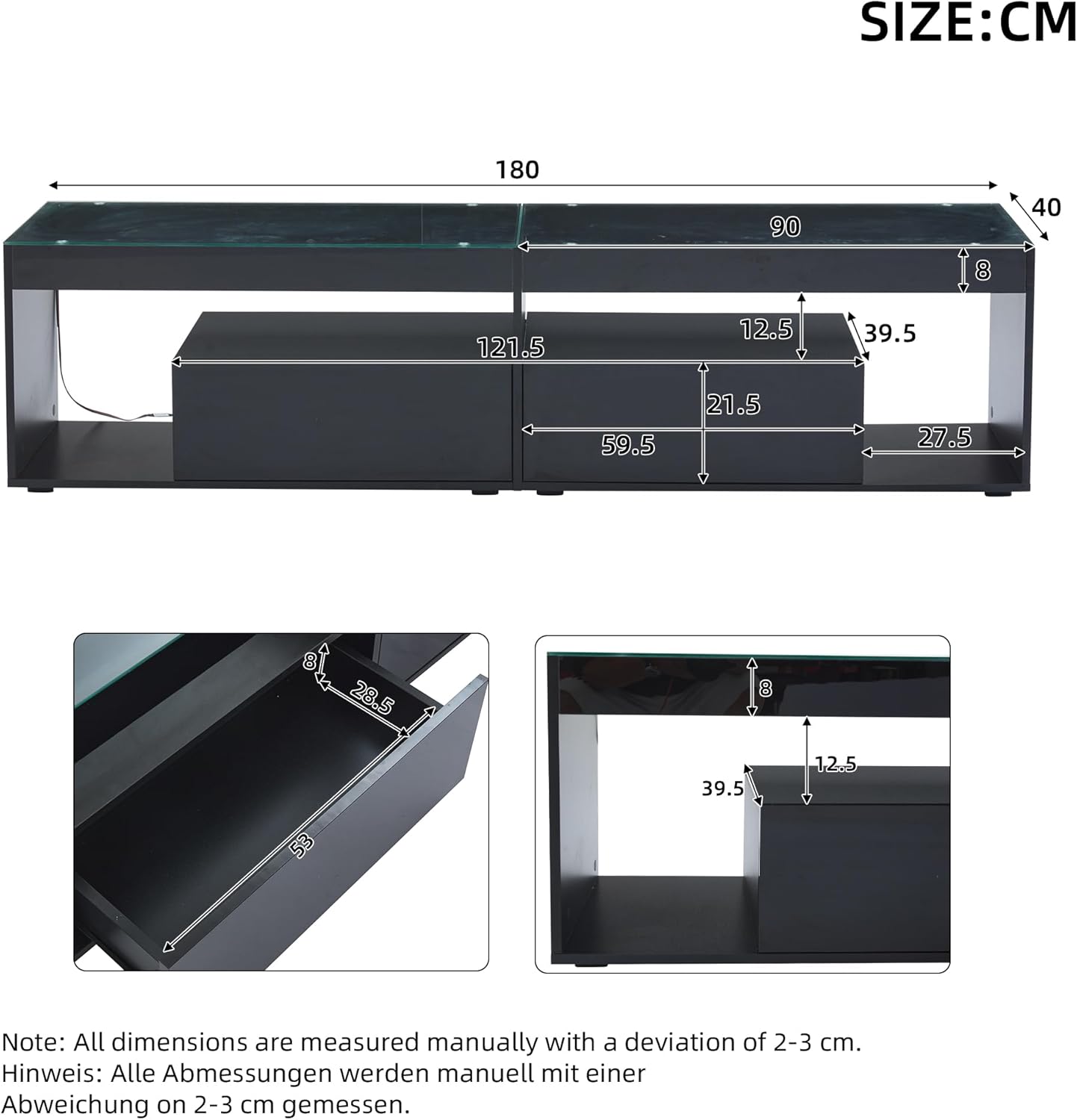
Image 4.1: Product dimensions for planning your space.

Image 4.2: Key features including glass panels, LED strips, and storage options.
5. Betjeningsvejledning
5.1. LED-lysstyring
The integrated LED lighting can be controlled via a remote control or a smartphone application.
5.1.1. Betjening af fjernbetjening
Use the provided remote control to turn the LED lights on/off, change colors (16 colors available), and select from 4 flash effects. Ensure the USB power source is connected for the LEDs to function.

Image 5.1: LED remote control and USB power connection.
5.1.2. Smartphone App Control (LotusLantern)
- Download appen: Scan the QR code provided in the separate LED instruction manual to download the "LotusLantern" app for iOS or Android devices.
- Åbn appen: Launch the LotusLantern application on your smartphone.
- Aktiver Bluetooth: If prompted, allow the app to activate Bluetooth on your device. Bluetooth must be enabled for the app to connect to the LED lighting.
- Forbinde: The app should automatically detect and connect to the LED lighting strip. You can then control colors, brightness, and effects directly from your phone.
6. Vedligeholdelse og pleje
6.1. Rensning
To clean the TV cabinet, wipe surfaces with a soft, damp cloth. Avoid using harsh chemicals, abrasive cleaners, or excessive moisture, as these can damage the high-gloss finish and materials.
6.2. Beskyttende film
The high-gloss surfaces of the cabinet may come with a protective film. Carefully peel off this film after assembly to reveal the pristine glossy finish.

Image 6.1: Cleaning and protective film removal.
7. Fejlfinding
- LED lights not turning on:
- Sørg for, at USB-kablet er korrekt tilsluttet en fungerende strømkilde.
- Kontroller om batteriet i fjernbetjeningen skal udskiftes.
- Verify the LED strip is properly attached and not damaged.
- App not connecting to LEDs:
- Sørg for, at Bluetooth er aktiveret på din smartphone.
- Ensure the LED lights are powered on.
- Restart the LotusLantern app and try again.
- Ensure your phone is within close proximity to the TV cabinet.
- Cabinet unstable after assembly:
- Check all screws and connections to ensure they are tightened correctly (but not overtightened).
- Sørg for, at skabet er placeret på en plan, jævn overflade.
8. Specifikationer
| Modelnummer | N625P283137138W |
| Mærke | Azkoeesy |
| Dimensioner (L x B x H) | 180 x 40 x 46 cm |
| Vægt | 42 kg |
| Materiale | Particle board, Tempered glass |
| Farve | Sort |
| Maks. Belastningskapacitet | 60 kg |
| Antal skuffer | 2 |
| Antal hylder | 2 (åbne rum) |
| LED belysning | Yes, 16 colors, 4 flash effects, remote and app control |
| Tv -størrelse kompatibilitet | Op til 70 tommer |
| Plejevejledning | Tør af med annonceamp klæde |
9. Garanti og support
For any questions, missing parts, or issues regarding your Azkoeesy TV cabinet, please contact the seller or manufacturer directly. Refer to your purchase documentation for specific warranty details and contact information.