1. Introduktion
Welcome to the user manual for your new Motorola G57 Power 5G smartphone. This guide provides essential information to help you set up, operate, maintain, and troubleshoot your device. Please read this manual thoroughly to ensure optimal performance and longevity of your smartphone.
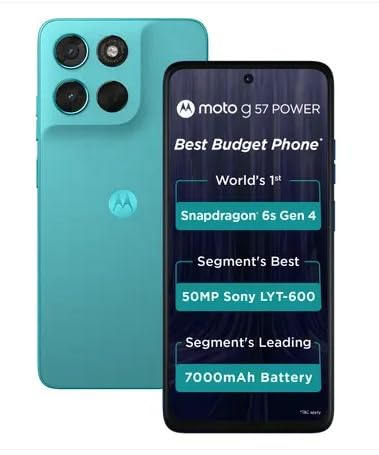
Billede 1.1: Forside og bagside view of the Motorola G57 Power 5G.
2. Opsætning
2.1 Unboxing
Når du åbner pakken, skal du sørge for, at alle komponenter er til stede:
- Motorola G57 Power 5G-smartphone
- Oplader (kan variere afhængigt af region)
- USB kabel
- SIM-bakkeudkasterværktøj
- Hurtig startvejledning
2.2 Installation af SIM -kort
- Find SIM-kortbakken på siden af din enhed.
- Sæt SIM-kortbakkens udløserværktøj ind i det lille hul ved siden af bakken, og tryk forsigtigt, indtil bakken springer ud.
- Place your Nano-SIM card(s) and/or microSD card (if supported) into the tray with the gold contacts facing down. Ensure they are correctly seated.
- Sæt forsigtigt bakken tilbage i telefonen, indtil den klikker på plads.
2.3 Første opstart og opsætning
- Tryk og hold tænd/sluk-knappen nede, indtil Motorola-logoet vises.
- Følg vejledningen på skærmen for at vælge dit sprog, oprette forbindelse til et Wi-Fi-netværk, og log ind med din Google-konto.
- You will be guided through setting up security features like fingerprint unlock or face unlock, and data transfer from an old device.
3. Betjening af din enhed
3.1 Display og navigation
The Motorola G57 Power 5G features a 6.72-inch FHD+ display with a 120Hz refresh rate for smooth visuals and up to 1050 nits peak brightness for clear outdoor visibility. Navigation is primarily through Android's intuitive gesture system or traditional on-screen buttons, configurable in settings.
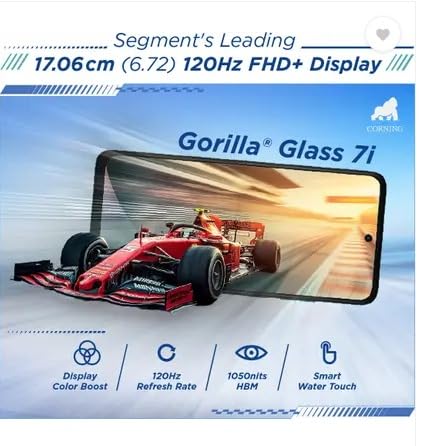
Image 3.1: The Motorola G57 Power 5G's 120Hz FHD+ display.
3.2 Kamerabrug
Din enhed er udstyret med et alsidigt kamerasystem:
- Hovedkamera: 50MP LYT-600 sensor for high-resolution photos.
- Ultravidvinkelkamera: 8MP til optagelse af større scener.
- Forreste kamera: 8 MP til selfies og videoopkald.
Utilize the camera app to switch between modes (Photo, Portrait, Video, Pro, etc.), adjust settings, and apply filters. The integrated moto ai features enhance image processing for improved results.

Image 3.2: Rear camera module of the Motorola G57 Power 5G.
3.3 Batteristyring
The Motorola G57 Power 5G features a large 7000mAh silicon carbon battery, designed for extended usage. It supports 33W TurboPower fast charging. To optimize battery life:
- Juster skærmens lysstyrke.
- Disable unused connectivity features (Wi-Fi, Bluetooth, GPS).
- Luk baggrundsapplikationer.
- Utilize battery saver modes.
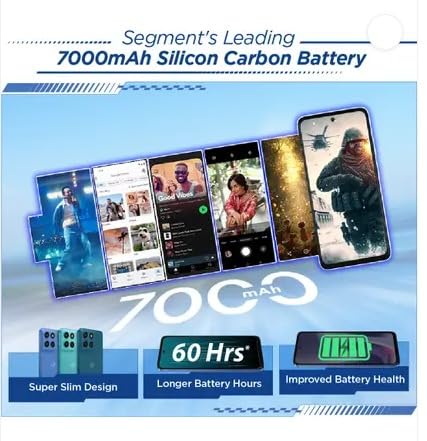
Image 3.3: Visual representation of the 7000mAh battery.
3.4 Forbindelse
Your device supports 5G cellular networks for high-speed data. It also includes Bluetooth for connecting to accessories and Wi-Fi for internet access. Manage these connections through the Quick Settings panel or the Settings app.
3.5 Software and Updates
The Motorola G57 Power 5G runs on Android 16, with a promised upgrade to Android 17 and three years of security updates. Regularly check for and install software updates to ensure your device has the latest features and security patches. Navigate to Indstillinger> System> Systemopdateringer.
4. Vedligeholdelse
4.1 Rengøring af din enhed
To clean your phone, use a soft, lint-free cloth. Avoid abrasive materials or harsh chemicals. For the screen, a screen cleaner specifically designed for electronics can be used. Ensure no liquids enter ports.
4.2 Softwarevedligeholdelse
- Regularly update your operating system and applications.
- Clear cache and data for apps that consume excessive storage.
- Perform periodic backups of your important data.
4.3 Lagerstyring
The device comes with 128GB of internal storage. To manage storage effectively:
- Slet unødvendigt files og apps.
- Move photos and videos to cloud storage or an external device.
- Brug 'Files' app or 'Storage' section in settings to identify and manage large files.
5. Fejlfinding
5.1 Almindelige problemer og løsninger
- Enheden tænder ikke: Sørg for, at batteriet er opladet. Tilslut den til opladeren i mindst 15 minutter, og prøv derefter at tænde den.
- Apps der går ned eller fryser: Close the app and reopen it. If the issue persists, clear the app's cache and data (Settings > Apps > [App Name] > Storage > Clear cache/Clear data).
- Dårlig netværksforbindelse: Check if airplane mode is off. Restart your device. Verify your SIM card is properly inserted.
- Langsom ydeevne: Close background apps, clear storage, and restart your device.
5.2 Fabriksindstilling
A factory reset will erase all data from your phone and restore it to its original factory settings. This can resolve persistent software issues but should be used as a last resort after backing up all important data.
- Gå til Indstillinger > System > Nulstillingsindstillinger.
- Vælge Slet alle data (gendan fabriksindstillinger).
- Bekræft din beslutning, og indtast din pinkode/adgangskode, hvis du bliver bedt om det.
6. Specifikationer
| Feature | Specifikation |
|---|---|
| Model | Motorola G57 Power 5G |
| Operativsystem | Android 16 (upgradeable to Android 17) |
| Processor | Snapdragon 6s Gen 4 |
| VÆDDER | 8 GB LPDDR4X |
| Intern opbevaring | 128 GB UFS 2.2 |
| Vise | 6.72-inch FHD+ LCD, 120Hz refresh rate, up to 1050 nits brightness |
| Bagkamera | 50MP LYT-600 (Main) + 8MP (Ultrawide) |
| Forreste kamera | 8 MP |
| Batteri | 7000mAh Silicon Carbon, 33W TurboPower charging |
| Forbindelse | 5G, Bluetooth, Wi-Fi |
| Dimensioner (L x B x H) | 16.62 x 7.65 x 0.86 cm |
| Vægt | 210.6 g |
| Holdbarhed | IP64 dust and splash resistance, MIL-STD 810H tested |
7. Sikkerheds- og lovgivningsmæssige oplysninger
Please refer to the separate safety and regulatory guide included with your device for important information regarding safe usage, disposal, and compliance with local regulations. Always use approved accessories to prevent damage or injury.
8. Garanti og support
Your Motorola G57 Power 5G comes with a limited warranty. For detailed warranty terms, conditions, and to register your product, please visit the official Motorola support website. For technical assistance or service, contact Motorola customer support.
Du kan finde flere oplysninger og supportressourcer på Motorola-butik på Amazon.


