Indledning
This manual provides essential information for setting up, operating, and maintaining your Acer Nitro V 16 AI Gaming Laptop. Please read this manual thoroughly to ensure optimal performance and longevity of your device.

Billede: Forside view of the Acer Nitro V 16 AI Gaming Laptop, showcasing dens skærm og tastatur.
Opsætning
Hvad er der i æsken
Ved udpakning skal du kontrollere, at alle komponenter er til stede:
- Acer Nitro V 16 AI Gaming Laptop
- Strømadapter/oplader
- iCarp Type-C 3-in-1 Hub (USB 3.0, HDTV 4K Output, Type-C PD)

Image: The included iCarp Type-C 3-in-1 Hub, providing additional connectivity options.
Første gang tændt
- Connect the power adapter to the laptop's DC-in jack and a power outlet.
- Åbn den bærbare computers låg.
- Tryk på tænd/sluk-knappen for at tænde for den bærbare computer.
- Følg instruktionerne på skærmen for at fuldføre den indledende Windows 11 Home-opsætning.
Forbindelse
The Acer Nitro V 16 AI offers a comprehensive selection of ports for various peripherals and external devices.
- USB-A 3.2: Three ports for connecting standard USB devices.
- USB-C 4: One port for high-speed data transfer and display output.
- HDMI 2.1: Til tilslutning til eksterne skærme eller tv'er.
- RJ45 Gigabit Ethernet: Til kablet netværksforbindelse.
- Headset-stik: Til lydindgang/udgang.
- MicroSD -kortplads: Til udvidelse af lagerplads eller overførsel af data fra hukommelseskort.
- Kensington -lås: For fysisk sikkerhed.

Billede: Venstre side view of the laptop detailing the various input/output ports.
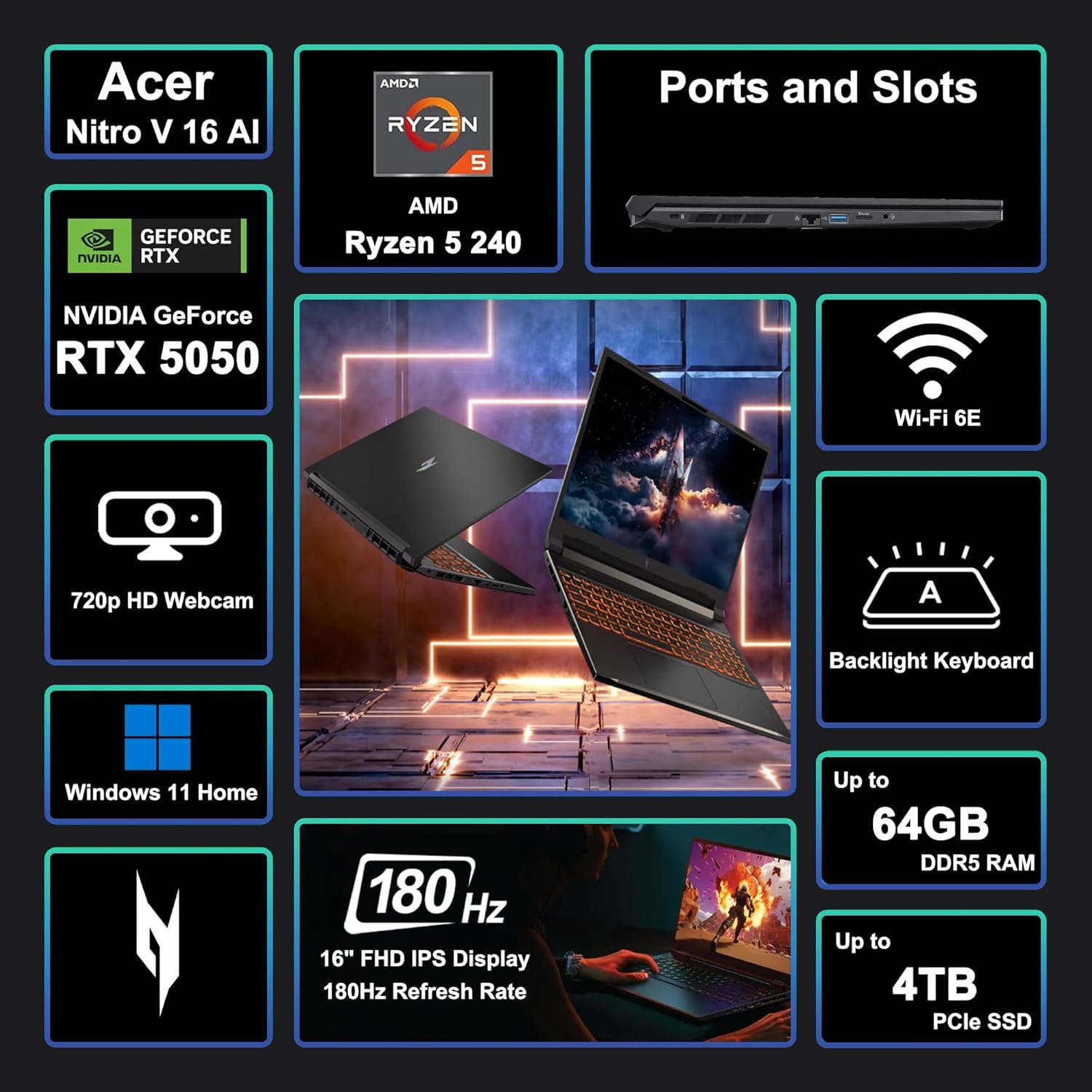
Image: A visual summary of key features and specifications of the Acer Nitro V 16 AI.
Betjening af din bærbare computer
Displayfunktioner
The laptop features a 16-inch WUXGA (1920 x 1200) IPS display with a 180Hz refresh rate, providing smooth visuals for gaming and other demanding applications.

Image: Visual representation of the difference between 60Hz and 180Hz refresh rates, highlighting smoother motion at higher rates.
Tastatur og touchpad
The integrated keyboard is backlit, enhancing visibility in low-light conditions. The touchpad provides precise navigation and supports multi-touch gestures.

Image: Close-up of the backlit keyboard, showing key layout and illumination.
Ydelse overståetview
The Acer Nitro V 16 AI is equipped with an AMD Zen 4 Hexa-Core Ryzen 5 240 Processor and a dedicated NVIDIA GeForce RTX 5050 8GB Graphic card, alongside 32GB of RAM and a 1TB SSD, ensuring robust performance for gaming, content creation, and multitasking.

Image: Details of the AMD Ryzen 5 240 processor, highlighting its core count, threads, cache, and clock speed.

Image: Information about the NVIDIA GeForce RTX 5050 GPU, emphasizing its capabilities for gaming and creative tasks.
Kølesystem
The laptop incorporates an advanced cooling system designed to maintain optimal temperatures during intensive use, preventing thermal throttling and ensuring consistent performance.
Batterilevetid
The 76Wh battery provides several hours of usage depending on the workload. For prolonged high-performance tasks like gaming or video editing, it is recommended to keep the laptop connected to the power adapter.
Opretholdelse
- Rensning: Brug en blød, fnugfri klud til at rengøre skærmen og ydersiden. Undgå skrappe kemikalier.
- Softwareopdateringer: Opdater regelmæssigt dit operativsystem og dine drivere for at sikre sikkerhed og ydeevne.
- Ventilation: Ensure the laptop's vents are clear and unobstructed to prevent overheating.
- Batteripleje: Undgå at aflade batteriet helt ofte. Ved langtidsopbevaring skal batteriet oplades til ca. 50-60%.
Fejlfinding
- Ingen strøm: Sørg for, at strømadapteren er korrekt tilsluttet, og at stikkontakten fungerer.
- Visningsproblemer: Check external monitor connections if applicable. Update graphics drivers.
- Ydeevneforsinkelse: Close unnecessary applications. Check for background processes consuming resources. Ensure proper ventilation.
- Forbindelsesproblemer: For Wi-Fi, restart your router and the laptop. For wired connections, check the Ethernet cable.
Specifikationer
| Feature | Detalje |
|---|---|
| Mærke | acer |
| Modelnavn | Acer Nitro V 16 AI |
| Skærmstørrelse | 16 tommer |
| Skærmopløsning | 1920 x 1200 pixels (WUXGA) |
| Opdateringshastighed | 180 Hz |
| Processor | AMD Zen 4 Hexa-Core Ryzen 5 240 (4.3 GHz base, up to 5GHz boost) |
| VÆDDER | 32GB DDR5 |
| Opbevaring | 1TB SSD |
| Grafik coprocessor | NVIDIA GeForce RTX 5050 8GB |
| Operativsystem | Windows 11 Home |
| Trådløs type | Wi-Fi 6E (802.11ax) |
| Havne | 3x USB-A 3.2, 1x USB-C 4, 1x HDMI 2.1, 1x RJ45, Headset Jack, MicroSD Card Reader |
| Batteri | 76Wh |
| Varens vægt | 5.38 pund |
| Produktmål (LxBxH) | 10.9 x 14.2 x 0.96 tommer |

Image: Physical dimensions and weight of the Acer Nitro V 16 AI laptop.
Garanti og support
For garantioplysninger og teknisk support henvises til den dokumentation, der følger med dit produkt, eller besøg den officielle Acer-supportside. webwebsted. Beskyttelsesplaner kan være tilgængelige for udvidet dækning.


