1. Introduktion
This manual provides detailed instructions for the assembly, operation, and maintenance of your FLEXISPOT CyberX 71-Inch RGB LED Electric Gaming Standing Desk. Please read this manual thoroughly before use to ensure proper function and safety. Keep this manual for future reference.
2. Sikkerhedsoplysninger
- Sørg for, at alle komponenter er forsvarligt fastgjort før brug.
- Overskrid ikke den maksimale lastekapacitet på 160 kg.
- Hold børn og kæledyr væk fra skrivebordet under højdejustering.
- Avoid placing liquids directly on the desk surface without a cup holder to prevent spills and potential damage to electronics.
- Do not disassemble or modify the desk's electrical components. Contact customer support for service.
- Ensure power cables are properly managed to prevent tripping hazards or damage.
3. Pakkens indhold
Kontroller, at alle dele er til stede, før monteringen påbegyndes. Hvis der mangler eller er beskadigede dele, bedes du kontakte kundesupport.
- Desktop (1)
- Desk Legs with Dual Motors (2)
- Crossbar/Frame Components
- Gamepad-Style Joystick Controller (1)
- Strømadapter og kabler
- Cable Organizer (1)
- Kopholder (1)
- Rotating Headphone Stand (1)
- Monteringshardware (skruer, værktøj)

4. Opsætning og montering
Assembly is straightforward and typically takes approximately 45 minutes. It is recommended to have assistance due to the weight of the components.
4.1 Rammesamling
- Pak alle komponenter ud, og læg dem på en ren, plan overflade.
- Attach the crossbar components to the desk legs using the provided hardware. Ensure all screws are tightened securely.
- Connect the motor cables to the main control hub.
4.2 Desktop Attachment
- Carefully place the desktop upside down on a soft, protective surface.
- Position the assembled frame onto the desktop, aligning the pre-drilled holes.
- Secure the desktop to the frame using the provided screws. Ensure the cable management tray and control box are properly positioned before fully tightening the desktop.
4.3 Installation af tilbehør
- Attach the cup holder and rotating headphone stand to the desired locations on the desktop edges.
- Install the cable organizer and cable management tray underneath the desktop.
- Connect the RGB LED strips to the designated ports on the control hub.

4.4 Assembly Video Reference
For a visual guide on the assembly process, refer to the following video:
5. Betjeningsvejledning
5.1 Højdejustering
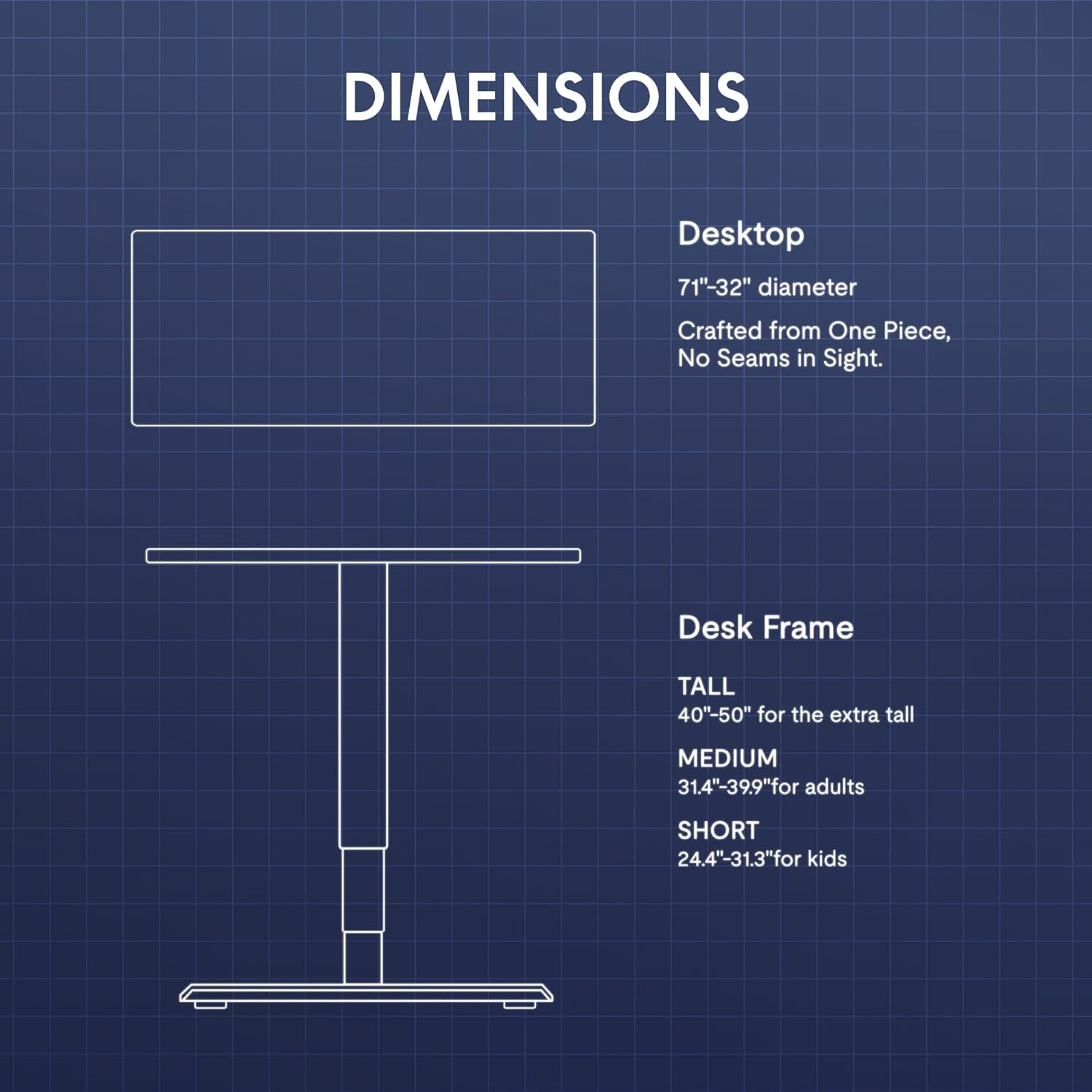
The desk features a gamepad-style joystick controller for intuitive height adjustment. The 3-stage legs allow for a lifting range from 24.4 inches to 50 inches.
- Justering af højde: Use the joystick to move the desk up or down. The LED display will show the current height.
- Hukommelsesforudindstillinger: The controller includes three memory presets (1, 2, 3). To save a height, adjust the desk to the desired level, press the 'M' button, then press the desired preset number (1, 2, or 3). To recall a saved height, simply press the corresponding preset number.

5.2 RGB LED-belysning
The desk features integrated 3-sided RGB LED strips to enhance your workspace ambiance.
- Ændring af farver: Use the left/right controls on the joystick to cycle through various RGB lighting colors and effects.

5.3 Video Demonstrating Operation
Observe the desk's operation, including height adjustment and RGB lighting, in the following video:
6. Funktioner overview
- Immersive RGB LED Lighting: Integrated 3-sided RGB LED strips provide dynamic lighting.
- Gamepad-Style Joystick Controller: Features an LED display with multi-color RGB lighting and 3 memory presets for height adjustment.
- Dual Motor Powerful Lift: Crafted with aerospace-grade steel and dual motors, supporting up to 352 lbs with smooth, quiet height adjustments.
- Extended 3-Stage Height Range: 24.4"–50" lifting range for superior stability and accommodation of various user heights.
- Carbon Fiber Texture Desktop: A durable and aesthetically pleasing-overflade.
- Integreret kabelhåndtering: Includes a cable organizer and a cable management tray to keep wires tidy.
- Praktisk tilbehør: Features a removable cup holder and a rotating headphone stand.

7. Vedligeholdelse
- Rensning: Tør skrivebordets overflade af med en blød,amp klud. Undgå slibende rengøringsmidler eller stærke kemikalier.
- Inspektion: Kontrollér regelmæssigt alle skruer og forbindelser for at sikre, at de er stramme.
- Kabelstyring: Regularly inspect cables for wear or damage and ensure they are neatly organized to prevent interference with desk movement.
8. Fejlfinding
| Problem | Mulig årsag | Løsning |
|---|---|---|
| Skrivebordet bevæger sig ikke | Strømkabel frakoblet; Overbelastning; Motorfejl | Check power connections; Reduce weight on desk; Unplug for 10 seconds and replug. |
| Ujævn højdejustering | Obstruction; Sensor issue | Clear any obstructions; Perform a reset (refer to controller instructions). |
| RGB-lys virker ikke | RGB cable disconnected; Controller issue | Check RGB cable connections to the control hub; Ensure controller is powered. |
Hvis problemerne fortsætter, bedes du kontakte kundesupport.
9. Specifikationer
| Feature | Detalje |
|---|---|
| Mærke | FLEXISPOT |
| Model | CyberX |
| Desktop dimensioner | 71 cm B x 32 cm D |
| Højdeområde | 24.4" - 50" |
| Belastningskapacitet | Op til 352 lbs |
| Motortype | Dobbeltmotor, 3-Stage ben |
| Særlige funktioner | RGB LED Lighting, Gamepad-Style Joystick Controller, Memory Presets, Cable Management, Cup Holder, Headphone Stand |
| Materiale | Træ (top), metal (bund) |
| Farve | White Frame + White Top |
| Montering påkrævet | Ja |
10. Garanti og support
The FLEXISPOT CyberX desk comes with a 5-year coverage on the frame and motors, and a 3-year protection on electronics and the controller. This warranty covers manufacturing defects and ensures reliable operation under normal use.
For technical support, warranty claims, or any inquiries, please contact FLEXISPOT customer service through their official webwebstedet eller forhandleren, hvor produktet blev købt.


