1. Introduktion
This manual provides detailed instructions for the VENTION 15-in-1 USB-C Docking Station. It covers product features, setup procedures, operational guidelines, and troubleshooting tips to ensure optimal performance and user experience. Please read this manual thoroughly before using the device.
2. Produktet er slutview
The VENTION 15-in-1 USB-C Docking Station is designed to expand the connectivity of your laptop, transforming a single USB-C port into multiple ports for various peripherals, external displays, and network connections. It features a robust aluminum alloy shell for optimal heat dissipation and a 360° rotatable, detachable base for flexible placement.
2.1. Havnelayout
The docking station offers a comprehensive array of ports to meet diverse connectivity needs:
- 2 x 4K@60Hz HDMI Ports
- 1 x 4K@60Hz DisplayPort (DP)
- 1 x 10Gbps USB-C Port (Data)
- 2 x 10Gbps USB-A Ports (USB 3.2 Gen 2)
- 1 x USB 3.0 Port (5Gbps)
- 2 x USB 2.0 Ports (480Mbps)
- 1 x 100W Power Delivery (PD) Port (Input)
- 1 x PC Host Port (USB-C connection to laptop)
- 1 x 3.5mm Audio Port (Microphone/Audio Jack)
- 1 x SD-kortlæser
- 1 x TF kortlæser
- 1 x RJ45 Gigabit Ethernet Port

2.2. Designfunktioner
- Optimal Heat Dissipation: Constructed with an aluminum alloy shell to efficiently dissipate heat, ensuring stable performance during extended use.
- Skridsikre puder: Equipped with anti-slip pads for stability on various surfaces.
- Detachable and Rotatable U-shaped Stand: The docking station features a versatile stand that allows for 360° rotation for optimal viewing angles and can be detached for minimalist use or portability.

3. Opsætningsvejledning
Follow these steps to set up your VENTION 15-in-1 USB-C Docking Station:
- Bekræft kompatibilitet med bærbare computere: Ensure your laptop's USB-C port supports DisplayPort Alternate Mode (Alt Mode) for video output and Power Delivery for charging. Laptops with Thunderbolt 3/4 ports are also compatible.
- Tilslutning til strøm (valgfrit, men anbefalet): For optimal performance and laptop charging, connect a 100W Power Delivery (PD) charger (not included) to the PD input port on the docking station.
- Tilslut til bærbar computer: Use the included USB-C 4.0 cable to connect the docking station's "PC HOST" port to your laptop's USB-C or Thunderbolt port.
- Tilslut eksterne skærme: Connect your monitors to the HDMI and/or DisplayPort (DP) outputs on the docking station using appropriate cables (not included). Refer to Section 4.1 for display configuration details.
- Tilslut ydre enheder: Plug in your USB devices (keyboard, mouse, external drives), Ethernet cable, audio devices, and SD/TF cards as needed.


4. Betjeningsvejledning
4.1. Display Configuration (Dual/Triple Monitors)
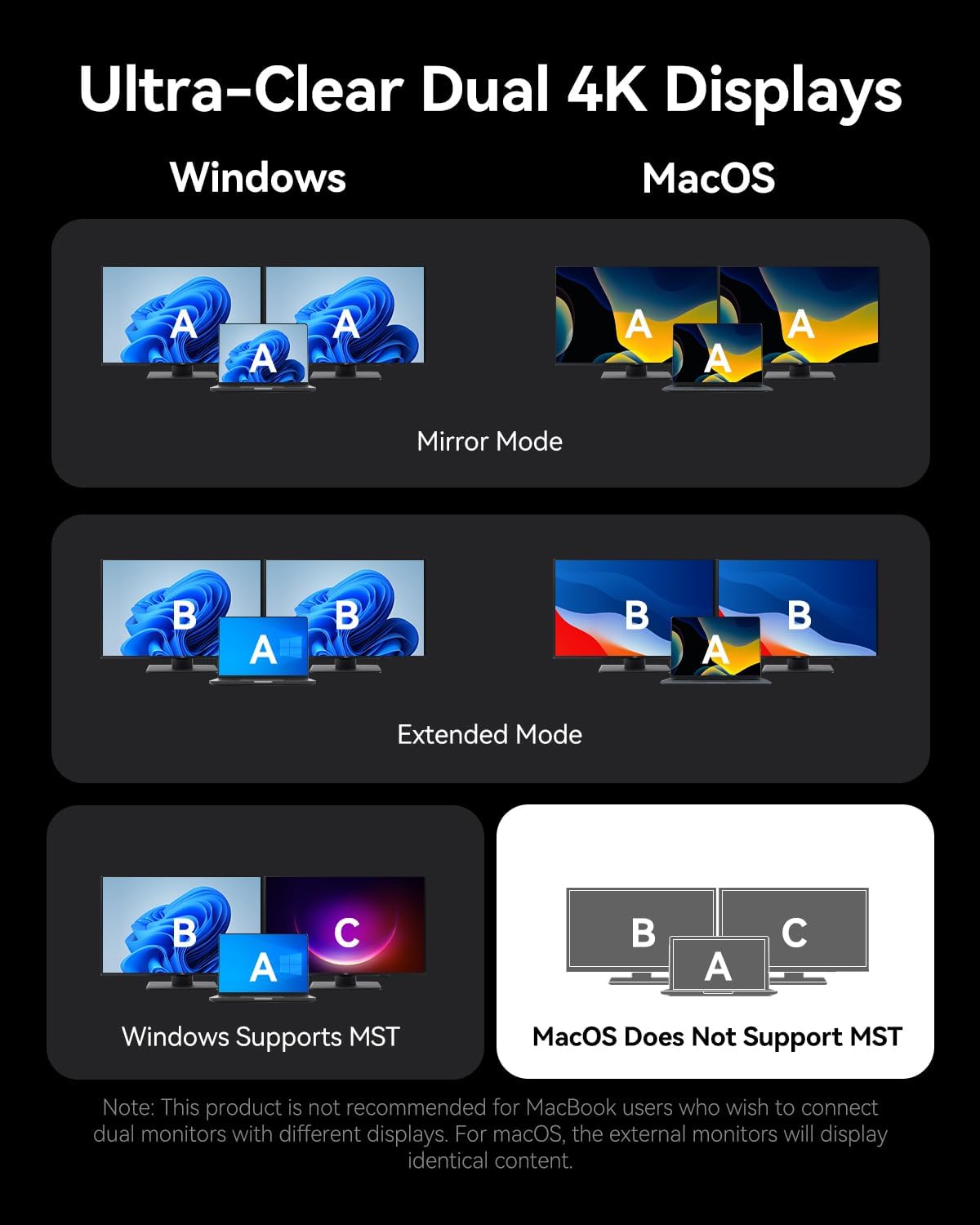
The docking station supports connecting up to three external monitors via its two HDMI ports and one DisplayPort. The display behavior varies depending on your operating system:
For Windows-systemer:
- Dobbelte skærme: Understøtter op til 4K@30Hz.
- Triple Monitors: Supports up to 1080P@60Hz.
- Windows systems support Multi-Stream Transport (MST) mode, allowing for extended displays where each monitor shows different content (A-B-C or A-B-B).
For macOS-systemer:
- Single, Dual, or Triple Monitors: Supports up to 4K@60Hz for each display.
- macOS systems only support Single-Stream Transport (SST) mode. This means all external monitors will mirror the content of your laptop's display (A-A-A) or mirror each other while extending from the laptop (A-B-B). Extended displays with different content on each external monitor are not supported.
Note: For screen mirroring or extending, please use your own HDMI/DP cables. The included USB-C cable is for charging and data transfer, not video output.

4.2. Dataoverførsel
Dockingstationen giver mulighed for højhastigheds dataoverførsel:
- USB 3.2 Gen 2 Ports (USB-A & USB-C): Offers speeds up to 10Gbps for rapid file transfers with compatible devices.
- USB 3.0-port: Provides speeds up to 5Gbps.
- USB 2.0-porte: Suitable for connecting peripherals like keyboards and mice with speeds up to 480Mbps.
- SD/TF-kortpladser: Supports simultaneous reading and writing of SD and TF cards, ideal for photographers and content creators.

4.3. Opladning af strømforsyning (PD)
The dedicated 100W PD input port allows you to charge your laptop while using the docking station. Connect a compatible 100W USB-C power adapter to this port. The docking station will pass through up to 85W to your laptop, reserving power for its own operation.
4.4. Gigabit Ethernet
Connect an Ethernet cable to the RJ45 port for a stable and high-speed wired network connection, supporting speeds of 10Mbps, 100Mbps, and 1000Mbps (1 Gigabit).
4.5. Lydforbindelse
The 3.5mm audio port supports both microphone input and audio output, allowing you to connect headphones, speakers, or a headset for communication and multimedia.
5. Kompatibilitet
The VENTION 15-in-1 USB-C Docking Station is compatible with a wide range of devices that feature a full-featured USB-C port or Thunderbolt 3/4 port. This includes, but is not limited to:
- MacBook Pro (2016-2021)
- MacBook Air (2018-2021)
- MacBook (2015-2021)
- Dell XPS 13/15
- HP Laptops
- Lenovo Laptops
- Surface Book 2 / Surface Go
- iPad Pro / iPad Air (with USB-C)
- Other laptops with full-featured USB-C or Thunderbolt 3/4 ports.
Important: Ensure your laptop's USB-C port supports DisplayPort Alternate Mode for video output and Power Delivery for charging functionality.

6. Fejlfinding
Hvis du støder på problemer med din dockingstation, kan du bruge følgende almindelige løsninger:
- Ingen skærmoutput:
- Sørg for, at din bærbare computers USB-C-port understøtter DisplayPort Alternative Mode.
- Check all video cables (HDMI/DP) are securely connected and functional.
- Verify your monitor input source is correctly selected.
- Prøv at tilslutte én skærm ad gangen for at isolere problemet.
- Genstart din bærbare computer, og tilslut dockingstationen igen.
- Bærbar computer oplader ikke:
- Ensure a compatible 100W PD power adapter is connected to the docking station's PD input port.
- Bekræft, at din bærbare computers USB-C-port understøtter strømforsyning.
- Check the USB-C cable connecting the docking station to your laptop is securely plugged in.
- USB-enheder genkendes ikke:
- Sørg for, at dockingstationen er korrekt tilsluttet din bærbare computer.
- Prøv at tilslutte USB-enheden til en anden port på dockingstationen.
- Tilslut USB-enheden direkte til din bærbare computer for at bekræfte, at den fungerer.
- Problemer med Ethernet-forbindelse:
- Kontroller Ethernet-kabelforbindelsen til både dockingstationen og din router/modem.
- Bekræft netværksindstillingerne på din bærbare computer.
- Test Ethernet-kablet med en anden enhed, hvis det er muligt.
If problems persist, please contact VENTION customer support for further assistance.
7. Specifikationer
| Feature | Specifikation |
|---|---|
| Model | B0FX459ZTN |
| Havne | 2x HDMI (4K@60Hz), 1x DP (4K@60Hz), 1x USB-C (10Gbps), 2x USB-A (10Gbps), 1x USB 3.0 (5Gbps), 2x USB 2.0 (480Mbps), 1x PD (100W), 1x PC Host, 1x 3.5mm Audio, 1x SD, 1x TF, 1x RJ45 Gigabit Ethernet |
| Strøm levering | 100W Input, up to 85W Output to Laptop |
| Dataoverførselshastighed | USB 3.2 Gen 2: 10Gbps, USB 3.0: 5Gbps, USB 2.0: 480Mbps |
| Ethernet hastighed | 10/100/1000 Mbps |
| Materiale | Aluminiumslegering |
| Dimensioner | 7.91 x 6.81 x 2.44 tommer |
| Vægt | 1.78 pund |
| Farve | Sort |
8. Vedligeholdelse
To ensure the longevity and optimal performance of your VENTION 15-in-1 USB-C Docking Station, follow these maintenance guidelines:
- Rensning: Brug en blød, tør og fnugfri klud til at rengøre dockingstationens yderside. Undgå at bruge flydende rengøringsmidler, aerosoler eller opløsningsmidler.
- Opbevaring: Opbevar dockingstationen et køligt, tørt sted væk fra direkte sollys og ekstreme temperaturer.
- Håndtering: Undgå at tabe enheden eller udsætte den for kraftige stød. Forsøg ikke at skille dockingstationen ad, da dette vil ugyldiggøre garantien.
- Kabelstyring: Organize cables to prevent tangling and strain on the ports.
9. Garanti og support
The VENTION 15-in-1 USB-C Docking Station comes with a 12 måneders garanti fra købsdatoen. Denne garanti dækker fabrikationsfejl og funktionsfejl under normal brug.
Pakken indeholder:
- 1 x USB-C Docking Station (15-in-1)
- 1 x 360-Degree Rotatable Base
- 1 x USB-C 4.0 kabel
- 1 x brugermanual

For any questions, technical support, or warranty claims, please contact VENTION customer service. Refer to the contact information provided on the product packaging or the official VENTION webwebsted.
10. Officiel produktvideo
Watch the official product video for a visual guide on the VENTION 15-in-1 USB-C Docking Station's features and usage:


