1. Introduktion
This manual provides essential information for the safe and efficient operation of your Thomson 43FT2S15 FHD LED Smart TV. Please read this manual thoroughly before using the television and retain it for future reference.
2. Sikkerhedsoplysninger
Følg altid grundlæggende sikkerhedsforanstaltninger, når du bruger dette produkt, for at reducere risikoen for brand, elektrisk stød og personskade.
- Udsæt ikke TV'et for regn eller fugt.
- Bloker ikke ventilationsåbninger.
- Sørg for korrekt jordforbindelse til netledningen.
- Placer ikke tv'et på en ustabil vogn, stativ, stativ, beslag eller bord.
- Tag stikket ud af tv'et under tordenvejr eller når det ikke bruges i længere perioder.
- Overlad al service til kvalificeret servicepersonale.
3. Pakkens indhold
Bekræft, at alle nedenstående varer er inkluderet i din pakke:
- Thomson 43FT2S15 FHD LED Smart TV
- Strømadapter
- Fjernbetjening
- Brugervejledning (dette dokument)
- Garantikort

Billede: Forside view of the Thomson 43FT2S15 Smart TV.
4. Opsætning
4.1 Fysisk installation
The Thomson 43FT2S15 TV is designed for table mounting. Ensure the TV is placed on a stable, flat surface.

Image: Diagram showing the dimensions of the Thomson 43FT2S15 Smart TV. The screen size is 109 cm (43 inches) diagonally, with a width of 95 cm and height of 60 cm (including stand). The depth is 6 cm.
Dimensioner (B x H x D): 95 cm x 60 cm x 6 cm (without stand, depth is 6 cm). The screen diagonal is 109 cm (43 inches).
4.2 Tilslutning af enheder
Connect your external devices to the appropriate ports on the TV. Refer to the diagram below for port locations.
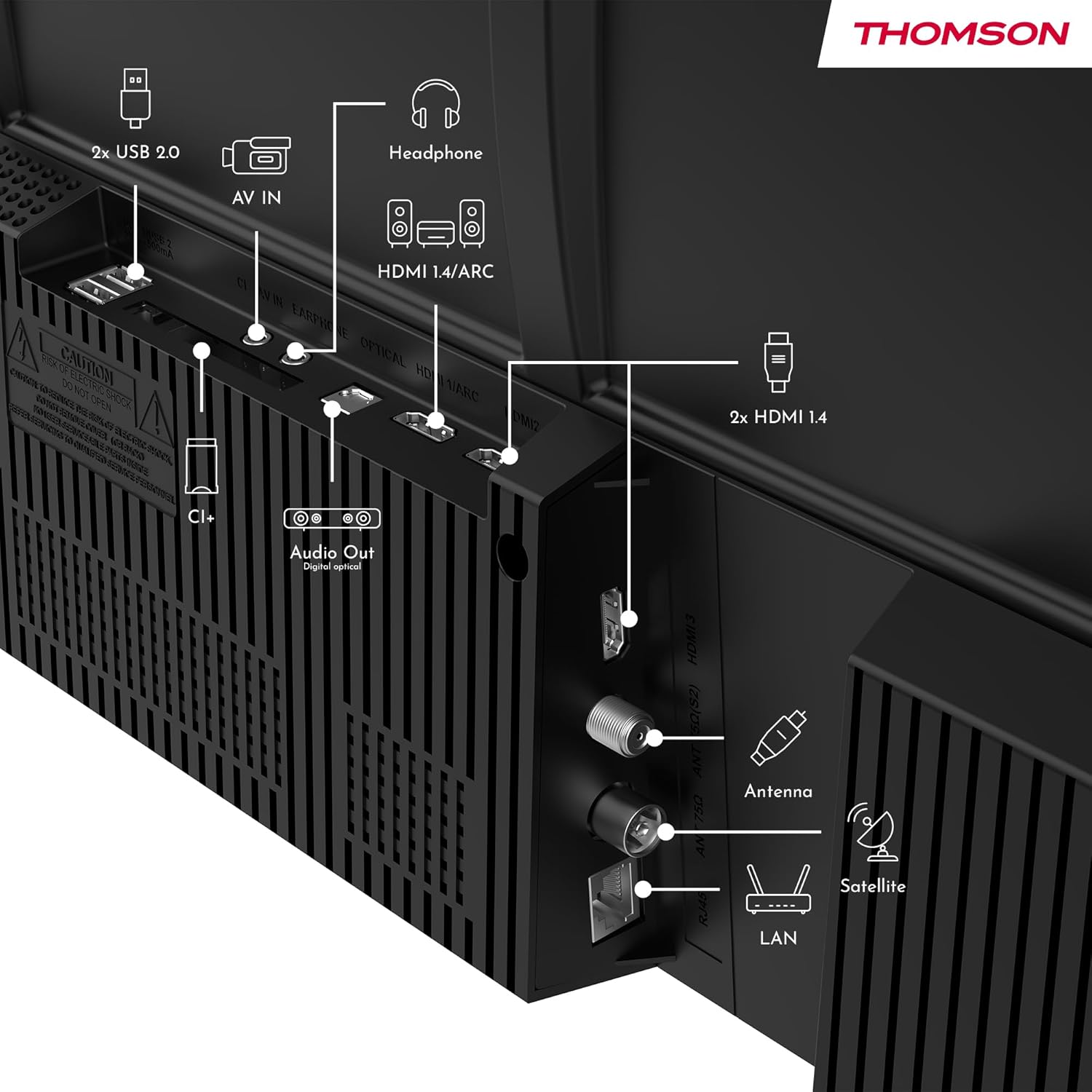
Billede: Bagside view of the Thomson 43FT2S15 Smart TV showing various connection ports. These include 2x USB 2.0, AV IN, Headphone out, HDMI 1.4/ARC, Optical Audio Out, CI+, Antenna (DVB-T2/C), Satellite (DVB-S2), and LAN (Ethernet).
- HDMI: Connect external devices like Blu-ray players, game consoles, or set-top boxes. The TV has 2 HDMI 1.4 ports, one with ARC support.
- USB: For connecting USB storage devices. The TV has 2 USB 2.0 ports.
- Antenne/Satellit: Connect your terrestrial or satellite antenna for live TV.
- LAN (Ethernet): Til en kablet internetforbindelse.
- Wi-Fi: Til trådløs internetforbindelse.
- Bluetooth: Til tilslutning af kompatibelt trådløst tilbehør.
- Lydudgang (optisk): Til tilslutning til et eksternt lydsystem.
- Hovedtelefoner: Til tilslutning af hovedtelefoner.
- CI+ slot: For inserting a Conditional Access Module (CAM) for encrypted channels.
5. Betjeningsvejledning
5.1 Tænd/sluk
Connect the power adapter to the TV and a power outlet. Press the power button on the remote control to turn the TV on or off.
5.2 TiVo OS og smarte funktioner
Your Thomson Smart TV is powered by TiVo OS, which integrates live TV, streaming applications, and on-demand services into a single, intuitive interface. Personalized recommendations help you discover new content.

Image: The Thomson Smart TV displaying the TiVo OS interface with various streaming apps like Netflix, Canal+, Prime Video, YouTube, and Disney+.
5.3 Stemmekontrol
Use the TiVo Voice Control feature to navigate channels, open applications, or search for content across different platforms using voice commands. The remote control includes a microphone for this function.

Image: The Thomson Smart TV remote control highlighting the voice control microphone, backlit buttons, and direct access buttons for streaming services.
5.4 Wireless Display
Mirror content from your smartphone, tablet, or laptop to the TV screen using the Wireless Display function. This allows for easy sharing of videos, photos, and applications.
5.5 Lyd- og videoforbedringer
- Dolby Audio: Experience enhanced sound quality with Dolby Audio, providing clear dialogue and immersive, multi-dimensional effects.

Image: A Thomson Smart TV displaying content with visual representations of sound waves, indicating the Dolby Audio feature.
- HDR10: Enjoy sharper contrast and lifelike colors with HDR10 technology, revealing details in both bright highlights and deep shadows.

Image: A split-screen comparison showing the difference between SDR (Standard Dynamic Range) and HDR10 (High Dynamic Range) image quality on a Thomson Smart TV, demonstrating improved contrast and color.
5.6 Fjernbetjening
The ergonomic remote control features backlit buttons for easy navigation in low light conditions. It also includes direct access buttons for popular streaming services such as Netflix, YouTube, Prime Video, Disney+, and Canal+.
6. Vedligeholdelse
For at sikre dit TV's levetid og optimale ydeevne skal du følge disse vedligeholdelsesretningslinjer:
- Rengøring af skærmen: Tør forsigtigt skærmen af med en blød, fnugfri klud. Brug en skærmrens, der er specielt designet til tv'er, til genstridige pletter, og påfør den på kluden, ikke direkte på skærmen.
- Rengøring af kabinettet: Brug en blød, tør klud til at tørre tv-kabinettet af. Brug ikke slibende rengøringsmidler eller opløsningsmidler.
- Ventilation: Sørg for, at ventilationsåbningerne på bagsiden af tv'et ikke er blokerede for at forhindre overophedning.
- Strømledning: Kontrollér regelmæssigt strømkablet for skader. Kontakt kvalificeret servicepersonale for udskiftning, hvis det er beskadiget.
7. Fejlfinding
Hvis du støder på problemer med dit tv, kan du se følgende almindelige fejlfindingstrin:
- Ingen strøm:
- Check if the power cord is securely connected to the TV and the power outlet.
- Sørg for, at stikkontakten fungerer ved at tilslutte en anden enhed.
- Prøv at trykke på tænd/sluk-knappen på selve tv'et, ikke kun på fjernbetjeningen.
- Intet billede/lyd:
- Bekræft, at den korrekte inputkilde er valgt (f.eks. HDMI 1, antenne).
- Kontrollér alle kabelforbindelser mellem tv'et og eksterne enheder.
- Adjust the volume and ensure the TV is not muted.
- Fjernbetjeningen virker ikke:
- Udskift batterierne i fjernbetjeningen.
- Sørg for, at der ikke er nogen forhindringer mellem fjernbetjeningen og tv'ets IR-sensor.
- Smart TV Features Not Working (Wi-Fi/Apps):
- Check your internet connection. Restart your router if necessary.
- Go to the TV's network settings to ensure it's connected to Wi-Fi or Ethernet.
- Prøv at genstarte tv'et.
For more complex issues, please contact customer support or refer to the manufacturer's webwebsted.
8. Specifikationer
Key technical specifications for the Thomson 43FT2S15 FHD LED Smart TV:
| Feature | Specifikation |
|---|---|
| Mærke | Thomson |
| Model | 43FT2S15 |
| Skærmstørrelse | 43 tommer (109 cm) |
| Displayteknologi | LED |
| Opløsning | 1920 x 1080 (FHD) |
| Opdateringshastighed | 60 Hz |
| Aspektforhold | 16:9 |
| Operativsystem | TiVo OS |
| Lydteknologi | Dolby Audio (Dolby Atmos encoding) |
| HDR-understøttelse | HDR10 |
| Forbindelse | Wi-Fi, Ethernet, Bluetooth, 2x HDMI 1.4 (1x ARC), 2x USB 2.0, Optical Audio Out, AV In, Headphone, CI+ |
| Tunere | DVB-T2/C/S2 (Triple Tuner) |
| Understøttede internettjenester | Netflix, YouTube, Prime Video, Disney+, Canal+, Browser |
| Dimensioner (produkt) | 6 x 95 x 60 cm; 6.5 kg |
| Energieffektivitetsklasse | E |

Image: Energy efficiency label for the Thomson 43FT2S15 Smart TV, showing an energy class of E and energy consumption of 42 kWh/1000h (SDR) and 46 kWh/1000h (HDR).
For detaljerede produktoplysninger henvises til EPREL-databasen: https://eprel.ec.europa.eu/qr/1969521
9. Garanti og support
Your Thomson 43FT2S15 TV comes with a warranty. Please refer to the included Warranty Card for specific terms and conditions.
For teknisk support eller serviceforespørgsler, kontakt venligst producenten:
- Fabrikant: Strømview GmbH
- Webwebsted: www.streamview.com
- E-mail: kontakt@streamview.com
- Telefon: +4318900066
Please have your model number (43FT2S15) and purchase information ready when contacting support.


