Indledning
Welcome to the EMPIRE GAMING K243 Mechanical Gaming Keyboard user manual. This guide provides comprehensive instructions for setting up, operating, and maintaining your new keyboard. The K243 is designed for gamers and typists seeking a responsive and durable input device with customizable RGB lighting.
Featuring 111 AZERTY layout keys, MX Red mechanical switches, N-Key Rollover (NKRO) anti-ghosting, and a detachable USB-C cable, the K243 offers a premium experience across multiple platforms, including PC and gaming consoles.

Figure 1: EMPIRE GAMING K243 Mechanical Gaming Keyboard
Opsætning
Pakkens indhold
- EMPIRE GAMING K243 Mechanical Gaming Keyboard
- Aftageligt USB-C kabel
Tilslutning af tastaturet
- Locate the USB-C port on the back of your K243 keyboard.
- Tilslut den ene ende af det medfølgende USB-C-kabel til tastaturets USB-C-port.
- Connect the other end of the USB-C cable to an available USB-A port on your computer or gaming console.
- The keyboard is plug-and-play; no additional drivers are required for basic functionality.
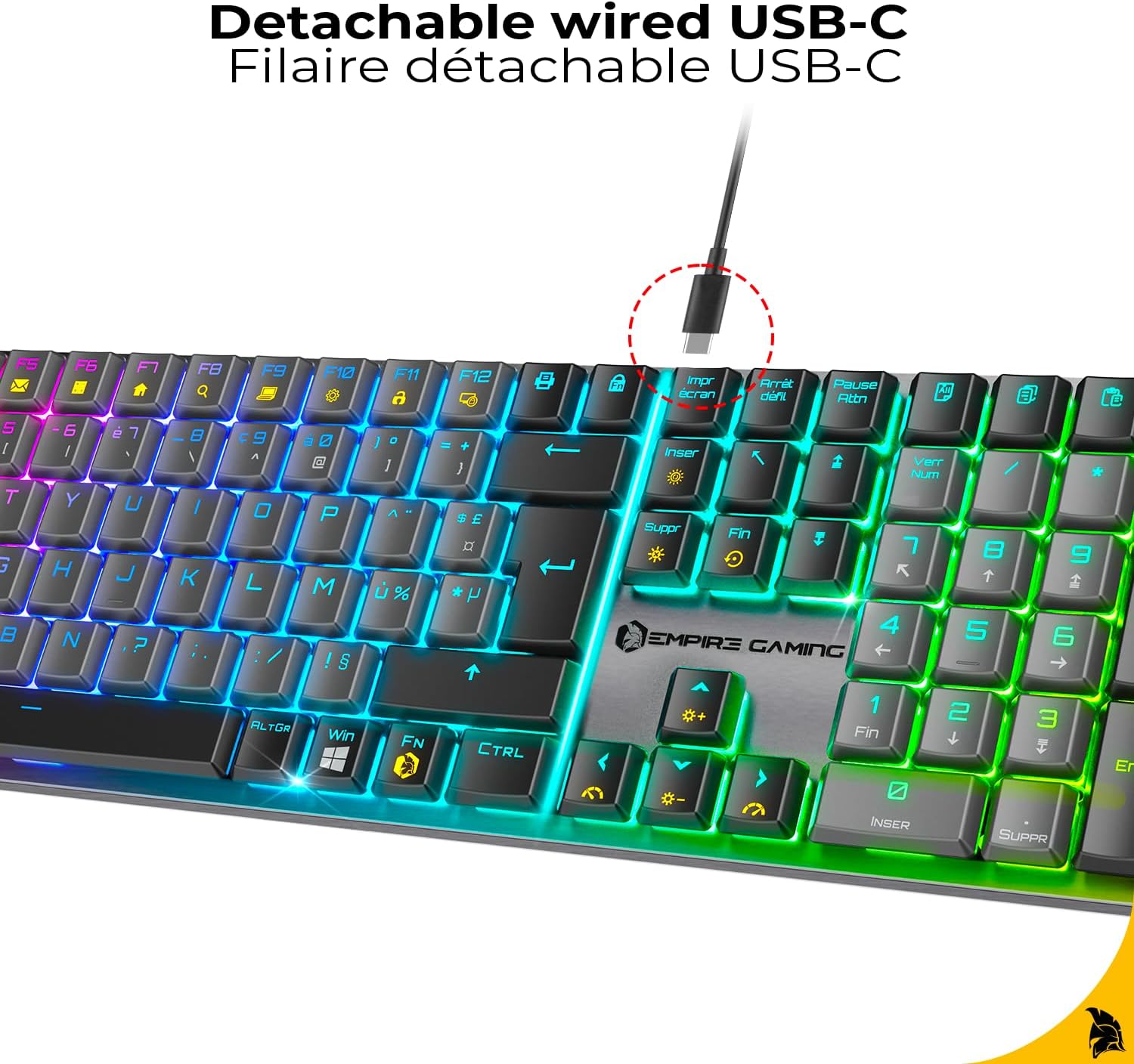
Figure 2: Detachable USB-C Cable Connection
Kompatibilitet
The EMPIRE GAMING K243 keyboard is compatible with:
- PC (Windows-operativsystemer)
- PlayStation 5 (PS5)
- PlayStation 4 (PS4)
- Xbox-konsoller
The keyboard features an AZERTY layout, optimized for French-speaking users.

Figure 3: AZERTY Keyboard Layout
Betjeningsvejledning
Mechanical MX Red Switches
The K243 is equipped with MX Red mechanical switches, known for their linear travel and low actuation force. This provides a smooth, precise, and responsive typing experience, ideal for both competitive gaming and extended typing sessions. The switches are designed for durability and consistent performance.

Figure 4: MX Red Mechanical Switches
N-Key Rollover (NKRO) Anti-Ghosting
The keyboard features N-Key Rollover (NKRO) technology, ensuring that every keystroke is registered accurately, even when multiple keys are pressed simultaneously. This anti-ghosting feature is crucial for fast-paced gaming, preventing missed inputs and ensuring maximum precision.

Figure 5: NKRO Anti-Ghosting
RGB lysstyring
The K243 keyboard offers dynamic RGB backlighting with 24 predefined effects. All lighting adjustments are made directly on the keyboard using function key combinations, without the need for additional software.
- Skift belysningstilstand: Trykke Fn + Ins to cycle through the 24 predefined RGB effects.
- Skift lysfarve: Trykke Fn + Del to change the color within certain lighting modes.
- Juster lysstyrke: Trykke Fn + ↑ (Pil op) for at øge lysstyrken, og Fn + ↓ (Pil ned) for at mindske lysstyrken.
- Adjust Effect Speed: Trykke Fn + ← (Venstre pil) to decrease effect speed, and Fn + → (Højre pil) for at øge effekthastigheden.
- Lås Windows-nøgle: Trykke Fn + Win to disable the Windows key, preventing accidental presses during gaming.

Figure 6: Customizable RGB Effects
Opretholdelse
Rengøring af dit tastatur
To ensure the longevity and optimal performance of your EMPIRE GAMING K243 keyboard, regular cleaning is recommended:
- Afbryde: Always disconnect the keyboard from your device before cleaning.
- Fjernelse af støv: Use a can of compressed air to blow away dust and debris from between the keycaps. Hold the can upright to prevent propellant discharge.
- Overflade rengøring: Gently wipe the keycaps and keyboard surface with a soft, lint-free cloth lightly damprengøres med vand eller en mild, ikke-slibende rengøringsopløsning. Undgå for meget fugt.
- Genstridige pletter: For stubborn stains, a cotton swab lightly dampened with isopropyl alcohol can be used on individual keycaps.
- Tørring: Ensure the keyboard is completely dry before reconnecting it to your device.
Do not immerse the keyboard in water or use harsh chemicals, as this can damage the electronic components.
Fejlfinding
If you encounter issues with your EMPIRE GAMING K243 keyboard, please refer to the following common troubleshooting steps:
| Problem | Mulig løsning |
|---|---|
| Tastaturet reagerer ikke. |
|
| RGB-belysningen virker ikke eller sidder fast. |
|
| Nøglerne registreres ikke korrekt (ghosting). |
|
| Windows key is not working. |
|
Specifikationer
| Feature | Detalje |
|---|---|
| Mærke | EMPIRE GAMING |
| Model | K243 |
| Forbindelse | Kablet USB-C (aftagelig) |
| Tastaturtype | Mekanisk |
| Switch Type | MX Red |
| Nøglelayout | AZERTY (FR) |
| Antal nøgler | 111 |
| Anti-Ghosting | N-Key Rollover (NKRO) |
| Baggrundsbelysning | RGB with 24 Predefined Effects |
| Kompatible enheder | PC, PS5, PS4, Xbox |
| Dimensioner (L x B x H) | 42.8 x 11.9 x 2.4 cm (16.85 x 4.69 x 0.94 tommer) |
| Vægt | 665 g (1.47 lbs) |
| Strømkilde | USB-strøm |
| Inkluderede komponenter | Keyboard, USB-C Cable |

Figur 7: Tastaturets dimensioner
Garanti og support
Producentens garanti
The EMPIRE GAMING K243 Mechanical Gaming Keyboard comes with a 2 års producentgaranti fra købsdatoen. Denne garanti dækker materiale- og fabrikationsfejl ved normal brug. Gem venligst din købsbevis i tilfælde af garantikrav.
Garantien dækker ikke skader forårsaget af misbrug, ulykker, uautoriserede ændringer eller eksterne årsager såsom strømstød.
Kundesupport
For technical assistance, warranty claims, or any questions regarding your EMPIRE GAMING K243 keyboard, please contact EMPIRE GAMING customer support through their official webwebstedet eller den forhandler, hvor du købte produktet.
You can typically find contact information on the brand's official webwebsted: www.empire-gaming.com


