1. Introduktion
Thank you for choosing the LOEWE Leo Wireless Headphones. These premium headphones are designed to deliver an exceptional audio experience with advanced features such as Hi-Res Audio, adaptive noise cancellation, and real-time voice translation. This manual provides essential information for setting up, operating, and maintaining your headphones to ensure optimal performance and longevity.
2. Pakkens indhold
Before use, please verify that all items are present in the package:
- LOEWE Leo Wireless Headphones
- USB-C ladekabel
- AUX to USB-C Audio Cable
- Lædertaske
- Hård bæretaske
- Cable Pouch
- Brugervejledning (dette dokument)
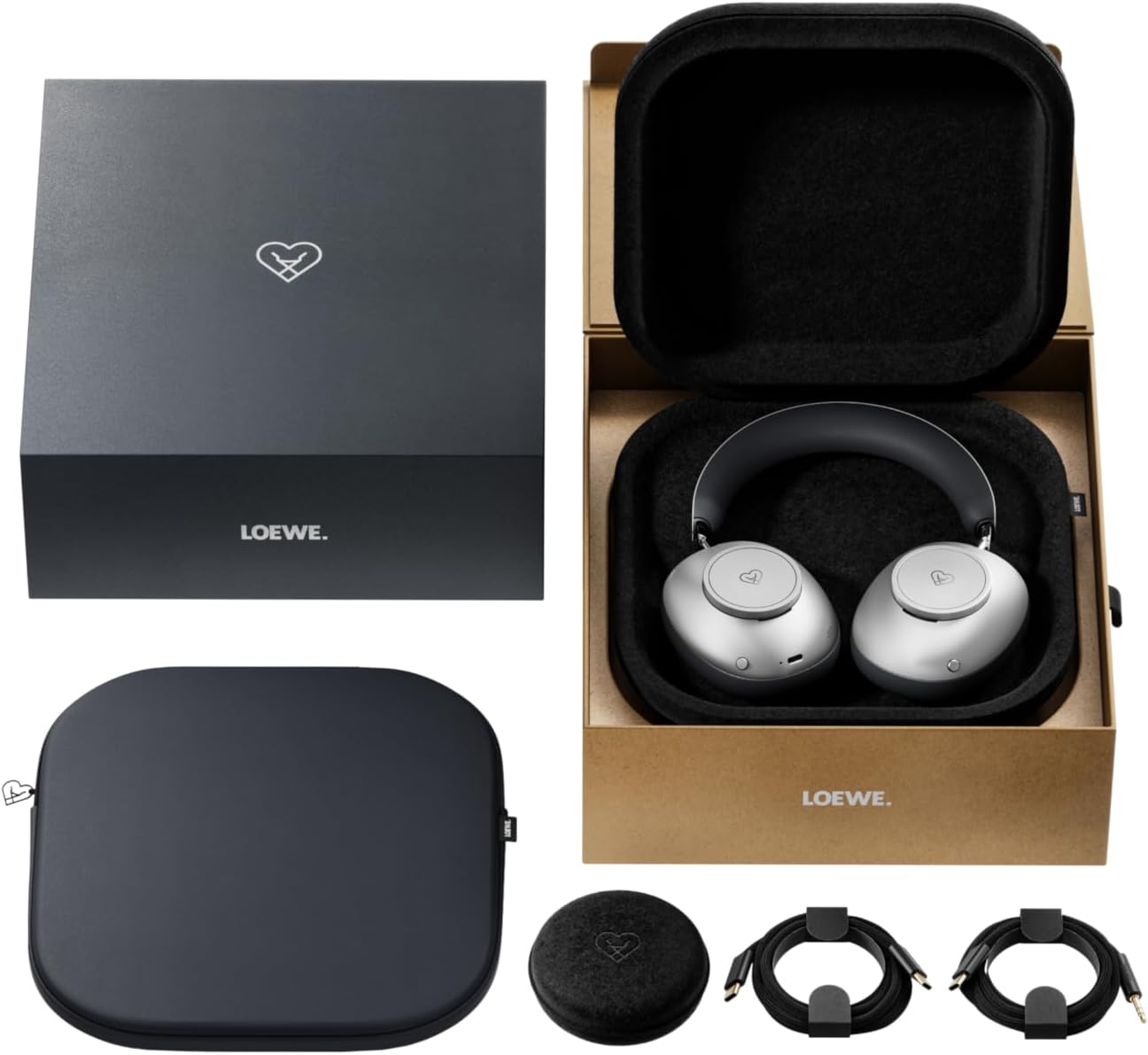
Image: The LOEWE Leo Wireless Headphones package contents, showing the headphones, USB-C cable, AUX cable, leather case, hard case, and cable pouch.
3. Produktet er slutview
Familiarize yourself with the physical components and controls of your LOEWE Leo headphones.

Billede: Forside view of the LOEWE Leo Wireless Headphones, showcasinørekopperne og hovedbøjlen.
3.1. Betjeningselementer og porte
The headphones feature intuitive controls for easy operation:
- Kontrolknapper: Two precision-crafted rotary wheels for volume adjustment and navigation.
- Handlingsknapper: Dedicated buttons for playback control, ANC modes, and voice translation activation.
- USB-C-port: Til opladning og kablet lydforbindelse.
- 3.5 mm jack: For traditional wired audio connection.

Billede: Detaljeret view of the earcup, highlighting the control dial, USB-C port, and 3.5mm audio jack.
4. Kom godt i gang
4.1. Opladning af hovedtelefonerne
Before first use, fully charge your LOEWE Leo headphones. A full charge provides up to 65 hours of continuous playback.
- Tilslut det medfølgende USB-C-opladerkabel til USB-C-porten på hovedtelefonerne.
- Tilslut den anden ende af kablet til en kompatibel USB-strømadapter (medfølger ikke) eller en computers USB-port.
- The LED indicator on the headphones will show the charging status. It will typically turn off or change color once fully charged.
4.2. Tænd/sluk
- For at tænde: Tryk på tænd/sluk-knappen og hold den nede i cirka 3 sekunder, indtil LED-indikatoren lyser.
- For at slukke: Tryk på tænd/sluk-knappen og hold den nede i cirka 3 sekunder, indtil LED-indikatoren slukker.
4.3. Bluetooth-parring
The LOEWE Leo headphones utilize Bluetooth Low Energy (BLE) for faster pairing and reduced power consumption.
- Sørg for, at hovedtelefonerne er slukket.
- Press and hold the Power button for approximately 5 seconds until the LED indicator flashes rapidly, indicating pairing mode.
- Aktiver Bluetooth på din enhed (smartphone, tablet, computer) og søg efter tilgængelige enheder.
- Select "LOEWE Leo" from the list of found devices.
- Når den er tilsluttet, holder LED-indikatoren op med at blinke og forbliver konstant blå.
4.4. Kablet forbindelse
For a wired audio experience, use the supplied AUX to USB-C cable.
- Connect the USB-C end of the AUX cable to the headphones.
- Connect the 3.5mm end of the AUX cable to your audio source's 3.5mm jack.
- Hovedtelefonerne skifter automatisk til kablet tilstand.
5. Betjening af dine hovedtelefoner
5.1. Lydafspilning og lydstyrkekontrol
Use the control dials and action buttons for managing your audio:
- Lydstyrke op/ned: Rotate the designated control dial.
- Afspil/pause: Press the central action button once.
- Næste nummer: Double-press the central action button.
- Forrige nummer: Triple-press the central action button.

Image: Close-up of the earcup's control dial, used for volume and navigation.
5.2. Adaptiv støjreduktion (ANC)
The LOEWE Leo features advanced adaptive noise cancellation that continuously analyzes your environment and adjusts in real-time.
- Aktivér/deaktiver ANC: Press the dedicated ANC button once.
- Gennemsigtighedstilstand: Press the ANC button twice to allow ambient sounds to pass through, enhancing situational awareness.

Image: Illustration of the adaptive noise cancellation feature, depicting sound wave management.
5.3. Real-time Voice Translation
Communicate across language barriers with the integrated real-time voice translation feature.
- Ensure your headphones are connected to a device with internet access and the LOEWE companion app installed.
- Activate the translation feature via the dedicated button or the companion app.
- Speak into the headphone's microphone. The translated audio will be played back in real-time.

Image: Earcup detail showing the microphone for voice input and the 'leo' icon, representing the real-time translation function.
5.4. Dolby Atmos and Spatial Audio
Experience immersive sound with Dolby Atmos and spatial audio support. This feature is automatically enabled when compatible content is played through a connected device that supports these audio technologies.
6. Vedligeholdelse og pleje
6.1. Rensning
- Tør hovedtelefonerne af med en blød, tør og fnugfri klud.
- Brug ikke slibende rengøringsmidler, alkohol eller kemiske opløsningsmidler.
- Keep moisture away from openings.
6.2. Batteripleje
- Undgå at aflade batteriet helt ofte.
- Store the headphones in a cool, dry place when not in use for extended periods.
- The battery is user-replaceable, contributing to the product's longevity.
6.3. Modular Design
The LOEWE Leo headphones feature a durable modular design with replaceable components, such as ear cushions and headbands. This design allows for easy replacement of worn parts, extending the product's lifespan.

Image: The modular construction of the LOEWE Leo headphones, showing detachable earcups and headband for maintenance or replacement.
7. Fejlfinding
If you encounter issues with your LOEWE Leo headphones, refer to the following common solutions:
- Ingen strøm: Sørg for, at hovedtelefonerne er fuldt opladet. Tilslut dem til en strømkilde med USB-C-kablet.
- Ingen lyd:
- Kontroller lydstyrkeniveauet på både hovedtelefonerne og din tilsluttede enhed.
- Ensure the headphones are properly paired via Bluetooth or the AUX cable is securely connected.
- Prøv at genstarte både hovedtelefonerne og lydkildeenheden.
- Bluetooth afbrydelse:
- Ensure the headphones are within the Bluetooth range of your device (typically 10 meters).
- Deaktiver og genaktiver Bluetooth på din enhed, og prøv derefter at parre igen.
- Clear the LOEWE Leo from your device's Bluetooth history and pair again.
- ANC fungerer ikke effektivt:
- Sørg for, at ørekopperne slutter godt til dine ører. Juster pasformen om nødvendigt.
- Verify that ANC is activated.
- Voice Translation Issues:
- Tjek din enheds internetforbindelse.
- Ensure the LOEWE companion app is up-to-date and configured correctly.
- Tal tydeligt og i et moderat tempo.
If problems persist, please contact LOEWE customer support.
8. Specifikationer
| Feature | Beskrivelse |
|---|---|
| Modelnavn | Leo |
| Modelnummer | 64641J10 |
| Forbindelsesteknologi | Wireless (Bluetooth), Wired |
| Trådløs kommunikation | Bluetooth lavenergi (BLE) |
| Lydfunktioner | Hi-Res Audio, Dolby Atmos, Spatial Audio |
| Støjreduktion | Adaptive Noise Reduction (ANC) |
| Særlige funktioner | Real-time Voice Translation, Modular Design with Replaceable Components |
| Batterilevetid | Op til 65 timer (ca.) |
| Kontroltype | Button Control, Rotary Dials |
| Kompatible enheder | Cellular Phone, Tablet, Computer, Laptop |
| Vægt | 3 Kilograms (product weight as listed, may include packaging) |
9. Garanti og support
9.1. Producentens garanti
The LOEWE Leo Wireless Headphones come with a 2 års producentgarantiDenne garanti dækker materiale- og fabrikationsfejl ved normal brug. Gem venligst din købsbevis i tilfælde af garantikrav.
For specific terms and conditions of the warranty, please refer to the warranty card included in your product packaging or visit the official LOEWE webwebsted.
9.2. Kundesupport
For technical assistance, troubleshooting, or warranty inquiries, please contact LOEWE customer support through their official webwebstedet eller kontaktoplysningerne i din produktdokumentation.
Online ressourcer: Visit the official LOEWE webwebsted med ofte stillede spørgsmål, softwareopdateringer og yderligere supportressourcer.


