Indledning
Thank you for choosing the Soundcore Nebula P1 Portable GTV Projector. This manual provides essential information for setting up, operating, and maintaining your device. Please read it thoroughly before use to ensure optimal performance and safety.

The Soundcore Nebula P1 Portable GTV Projector shown with its main unit and two detachable speakers.
Hvad er der i æsken
- Nebula P1 Projector
- CC kabel
- Adapter
- Fjernbetjening
- AAA batteri
- Hurtig startvejledning
Opsætningsvejledning
1. Første opstart
Connect the projector to a power source using the provided C-C cable and adapter. The projector requires an external power supply for operation. The detachable speakers have built-in batteries and can be charged via Pogo Pin or Type-C.
2. Opsætning af fjernbetjening
Insert the AAA battery into the remote control. The remote allows for navigation, volume control, voice commands, and direct access to streaming services.
3. Basic Projection
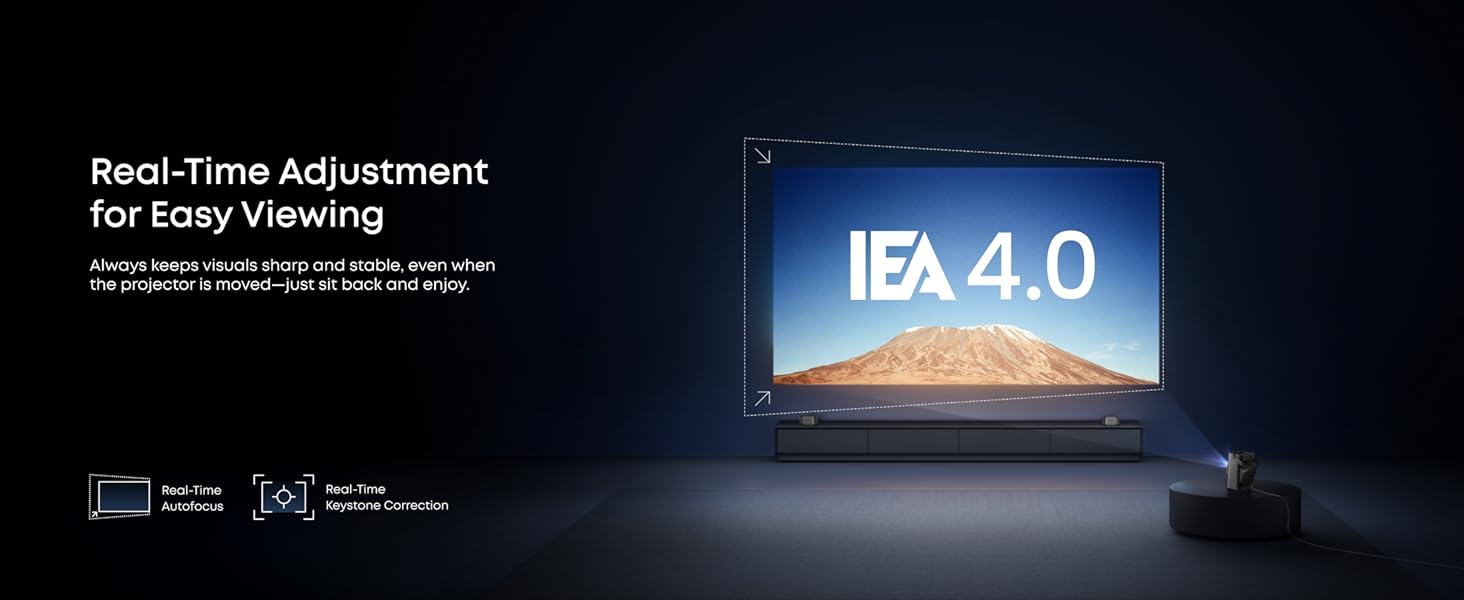
Place the projector on a stable surface. The Nebula P1 features real-time autofocus and keystone correction for effortless viewing. The dual-arm 130° built-in gimbal allows for flexible angle adjustment with enhanced stability.

The projector's built-in gimbal allows for flexible projection angles, including ceiling projection.

Real-time autofocus and keystone correction ensure a sharp and aligned image even when the projector is moved.
Betjeningsvejledning
1. Google TV-grænseflade
The Nebula P1 runs on Google TV, providing access to over 400,000+ movies and shows, including official Netflix. Navigate the interface using the remote control or the Nebula Connect app.

The Google TV interface offers a wide selection of streaming services directly on the projector.
2. Detachable Speakers
The dual detachable speakers provide immersive True 2.0 Surround Sound. They can be flexibly placed anywhere for sound perfectly tuned to your location. The speakers offer up to 20 hours of playtime on a full charge.

The Nebula P1 projector with its detachable speakers, offering flexible audio placement.
3. Forbindelse
The projector supports HDMI 2.1 (eARC), AUX-OUT, USB-A, and USB-C for connecting external devices like laptops, smartphones, USB drives, headphones, or game consoles. It also works with Google Cast and Nebula Cast.
The rear panel of the Nebula P1 showing its various connectivity options for external devices.
Nøglefunktioner
- Immersive True 2.0 Surround Sound: Dual detachable speakers deliver a wider soundstage for a more immersive, room-filling sound. Flexibly place the speakers anywhere you like for sound perfectly tuned to the location.
- Exceptional Brightness and Lasting Clarity: Enjoy brilliant, clear visuals with 650 ANSI Lumens and 1080P Full HD resolution. Maintains consistently crystal-clear images over time.
- Compact Portable Design with Big Screen: Lightweight body with an integrated carry handle lets you take your entertainment anywhere. Enjoy a stunning 180" max projection indoor or outdoor with up to 20 hours of speaker playtime. Note: Projector has no built-in battery; an external power supply is required.
- Ubesværet Viewing with Instant Adjustment: With real-time autofocus and keystone correction, pictures are perfectly aligned even when moved. Dual-arm 130° built-in gimbal enables flexible angle adjustment with enhanced stability for shake-free images.
- Google TV with Endless Streaming Choices: Enjoy over 400,000+ movies and shows via Google TV, including official Netflix—no sideloading or dongles required.

The Nebula P1 offers a brighter and sharper display compared to standard projectors.

Experience immersive 2.0 surround sound with the Nebula P1's detachable speakers.
Specifikationer
| Feature | Detalje |
|---|---|
| Mærke | Soundcore |
| Modelnummer | D2431 |
| Varens vægt | 6.93 pund |
| Produktdimensioner | 4.9 x 5.1 x 11.1 tommer |
| Farve Navn | Grå |
| Særlige funktioner | Auto Focus, Auto Obstacle Avoidance, Built-In Wi-Fi |
| Anbefalede anvendelser | Hjemmebiograf |
| Forbindelsesteknologi | Wi-Fi |
| Skærmopløsning | 1920 x 1080 (1080P Full HD) |
| Lysstyrke | 650 ANSI Lumens |
| Sund | 20W Truly 2.0 Surround Sound, Dolby Audio |
| Operativsystem | Google TV (with Official Netflix) |
Produktvideoer
First Detachable Speaker Projector - Soundcore Nebula P1
Denne video giver en overview of the Soundcore Nebula P1, highlighting its unique detachable speaker design and core functionalities.
Nebula P1 has detachable wireless speakers
A short video demonstrating the detachable wireless speakers of the Nebula P1 and their flexible placement options.
Cool Design & Features
This video showcases the overall design and various features of the Nebula P1 projector.
Opretholdelse
- Rensning: Use a soft, lint-free cloth to clean the projector lens and body. Avoid abrasive cleaners or solvents.
- Opbevaring: Store the projector in a cool, dry place when not in use. Protect it from dust and extreme temperatures.
- Batteripleje: For optimal speaker battery life, avoid fully discharging the batteries frequently. Charge them regularly.
Fejlfinding
- Ingen strøm: Ensure the projector is properly connected to an external power source. Check the power adapter and cable for damage.
- Sløret billede: The projector features real-time autofocus. If the image remains blurry, try moving the projector slightly to trigger autofocus or manually adjust focus via settings.
- Ingen lyd: Check the volume settings on the projector and the remote. Ensure the detachable speakers are properly connected or paired. If using external audio, verify connections.
- Forbindelsesproblemer: For Wi-Fi or Bluetooth problems, try restarting the projector and your network devices. Ensure the Nebula Connect app is updated.
Garanti & Support
Your Soundcore Nebula P1 Projector comes with a limited warranty. For detailed warranty information, product support, or service inquiries, please refer to the official Soundcore webwebstedet eller kontakt kundesupport. Gem din købskvittering til garantikrav.


