1. Introduktion
Tak fordi du valgte JOYO JAM Buddy II, en alsidig og bærbar 10W elektrisk guitar-combo. ampDenne alt-i-én-enhed kombinerer 14 amp modeller, 9 effekter, en trommemaskine, looper, OTG-optagelse og Bluetooth-forbindelse i et kompakt design. Denne manual indeholder vigtige oplysninger om opsætning, betjening og vedligeholdelse for at sikre optimal ydeevne og levetid for din enhed.
2. Produktet er slutview
JOYO JAM Buddy II er designet til guitarister, der søger et kraftfuldt, men bærbart øve- og performanceværktøj. Med en vægt på kun 940 g leverer dens håndfladestørrelse en fyldig, afbalanceret lyd gennem to 2-tommer full-range højttalere og en basradiator. Et intuitivt LED-display og en multifunktionsknap giver nem kontrol over alle parametre.
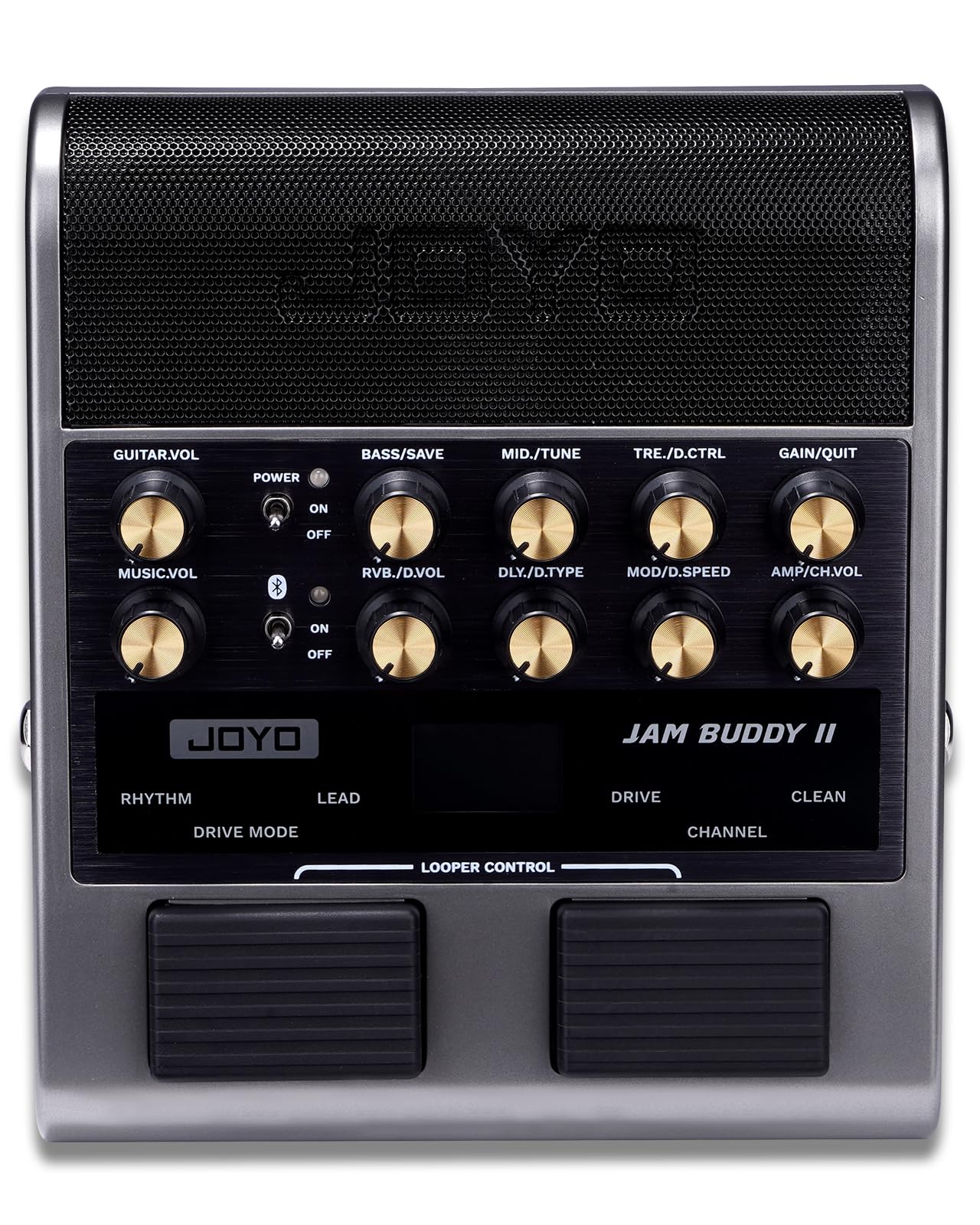
Figur 2.1: Forside view af JOYO JAM Buddy II.
3. Opsætning
Før du bruger din JAM Buddy II, skal du sørge for, at den er tilstrækkeligt opladet. Tilslut din elektriske guitar, og tænd for enheden.
3.1 Tænd/sluk
Find tænd/sluk-knappen på kontrolpanelet. Slå den til 'ON' for at tænde enheden. Strømindikator-LED'en lyser. Sluk enheden ved at slå den til 'OFF'.
3.2 Tilslutning af din guitar
Sæt din guitars 6.35 mm instrumentkabel i 'INPUT'-stikket på siden af JAM Buddy II.

Figur 3.1: Side view af JAM Buddy II med input/output-porte.
3.3 Bluetooth -parring
Sådan tilslutter du en Bluetooth-lydkilde (f.eks. smartphone, tablet) til backingtracks:
- Sørg for, at Bluetooth-knappen på JAM Buddy II er i 'ON'-positionen.
- Aktiver Bluetooth på din lydenhed, og søg efter 'JAM BUDDY II'.
- Vælg 'JAM BUDDY II' for at parre. Bluetooth-indikator-LED'en på enheden bekræfter forbindelsen.

Figur 3.2: JAM Buddy II med en smartphone monteret til øvelse.
3.4 OTG-forbindelse til optagelse
For direkte optagelse til en telefon eller computer:
- Tilslut det medfølgende USB Type-C-kabel til 'OTG'-porten på JAM Buddy II.
- Tilslut den anden ende af USB Type-C-kablet til din smartphone eller computer.
- Enheden vil blive genkendt som en lydgrænseflade, der muliggør direkte optagelse, livestreaming eller oprettelse af indhold.
4. Betjeningselementer og brugerflade
JAM Buddy II har et brugervenligt kontrolpanel med knapper, kontakter og et LED-display for intuitiv betjening.

Figur 4.1: Detaljeret view af kontrolpanelet.
4.1 Knapper og kontakter
- GUITAR.VOLUMEN: Justerer lydstyrken på din guitar.
- MUSIC.VOL: Justerer lydstyrken på Bluetooth-lydindgangen.
- BAS/GEM: Styrer basfrekvensen. Tryk for at gemme de aktuelle indstillinger.
- MELLEM/MELDING: Styrer mellemfrekvensen. Tryk for at aktivere tuneren.
- TRE/D.CTRL: Styrer diskantfrekvensen. Tryk for at aktivere trommemaskinens kontroller.
- GIN/QUIT: Justerer forstærkningsniveauet. Tryk for at afslutte bestemte menuer.
- RVB/D.VOLUM: Vælger rumklangstype og justerer dens parametre.
- DLY/D.TYPE: Vælger forsinkelsestypen og justerer dens parametre.
- MOD/D.HASTIGHED: Vælger modulationseffekttypen og justerer dens parametre.
- AMP/CH.VOL: Vælger Amp Modellerer og justerer kanalvolumen.
- Afbryderen: Slår enheden til/fra.
- Bluetooth switch: Slår Bluetooth-forbindelse til/fra.
4.2 Fodkontakter
- Højre fodpedal (kanal): Skifter mellem CLEAN- og OVERDRIVE-kanalerne.
- Venstre fodpedal (køretilstand): Når den er i OVERDRIVE-kanalen, skifter den mellem RHYTHM- og LEAD-underkanalerne.
- Looper-kontrol: Tryk begge fodkontakter ned samtidigt for at aktivere looper-funktionerne (optagelse, stop, overdub, clear).
4.3 LED-display
Det centrale LED-display giver visuel feedback på udvalgte amp modeller, effekter, trommemønstre, tunerstatus og parameterjusteringer. Multifunktionsknapperne (tryk og drej) giver mulighed for intuitiv navigation og finjustering af indstillinger.
Video 4.1: En detaljeret guide til de komplette kontroller og opsætning af JOYO JAM Buddy II.
5. Betjeningsvejledning
5.1 Amp Modeller og effekter
JAM Buddy II tilbyder 14 amp modeller og 9 indbyggede effekter (Mod, Delay, Reverb) til at forme din tone.
- Vælger Amp Modeller: Drej på AMP/CH.VOLUMEN knappen til at gennemse de 14 amp modeller vist på LED-skærmen.
- Justering af tone: Brug BASS, MID, og DISKANT knapper til præcis 3-bånds EQ-kontrol. GEVINST knappen justerer inputforstærkningen.
- Valg af effekter: Drej på RVB/D.VOL, DLY/D.TYPE, eller MOD/D.HASTIGHED knapper til at vælge og justere parametre for henholdsvis rumklang, delay og moduleringseffekter. Ved at trykke på disse knapper kan du redigere parametrene dybere.
- Kanaler: Enheden har 3 uafhængige kanaler: Clean, Rhythm og Lead. Du kan gemme brugerdefinerede tone- og trommeindstillinger for hver kanal ved hjælp af hukommelsesfunktionen med et enkelt tryk (tryk på BAS/GEM knop).
Video 5.1: Demonstration af forskellige amp modeller og effekter på JOYO JAM Buddy II.
5.2 Trommemaskine og looper
Gør din øvelse bedre med den indbyggede trommemaskine og looper.
- Trommemaskine: JAM Buddy II indeholder 36 trommemønstre. Tryk på TRE/D.CTRL drejeknap for at få adgang til trommemaskinens kontroller. Drej drejeknappen for at vælge mønstre, justere lydstyrke og tempo (BPM).
- Looper: 30-sekunders looperen giver mulighed for improvisation og lagdeling. Aktiver looperen ved at trykke på begge fodpedaler samtidigt.
5.3 tuner
Den indbyggede tuner hjælper med præcis guitarstemning. Tryk på MELLEM/STEMME drejeknap for at aktivere tunerfunktionen. LED-displayet viser tuninginformation.
6. Forbindelse
JAM Buddy II tilbyder alsidige tilslutningsmuligheder til forskellige scenarier.
- Hovedtelefonudgang: Tilslut hovedtelefoner til 3.5 mm hovedtelefonstikket for at øve lydløst.
- Balanceret output og line-out: Tilslut til en mixer, et lydkort eller et PA-system via de balancerede output- og line out-porte. ampforstærket lyd.
- Linie ind: Brug Line In-stikket til at tilslutte eksterne lydkilder.
7. Strøm og batteri
JAM Buddy II drives af et genopladeligt, internt lithium-ion-batteri.
- Batterilevetid: Giver op til 5 timers spilletid på en fuld 3-timers opladning.
- Opladning: Oplad enheden med det medfølgende USB Type-C-kabel, der er tilsluttet 'CHARGE'-porten.
- Automatisk sluk: Enheden slukker automatisk efter 20 minutters inaktivitet for at spare på batteriet.
8. Vedligeholdelse
For at sikre din JAM Buddy II's lange levetid og optimale ydeevne, skal du følge disse vedligeholdelsesretningslinjer:
- Rensning: Brug en blød, tør klud til at rengøre enhedens yderside. Undgå at bruge slibende rengøringsmidler eller opløsningsmidler.
- Opbevaring: Opbevar enheden et køligt, tørt sted væk fra direkte sollys og ekstreme temperaturer.
- Håndtering: Håndter enheden forsigtigt for at undgå fysisk skade. Undgå at tabe den eller udsætte den for kraftige stød.
9. Fejlfinding
Hvis du støder på problemer med din JAM Buddy II, kan du se følgende almindelige fejlfindingstrin:
- Ingen lyd: Kontrollér alle kabelforbindelser (guitar, udgang, hovedtelefoner). Sørg for, at lydstyrkeknapperne (GUITAR.VOL, AMP/CH.VOL) er skruet op. Kontroller, at enheden er tændt og opladet.
- Problemer med Bluetooth-forbindelse: Sørg for, at Bluetooth-knappen er tændt, og at enheden er i parringstilstand. Glem enheden på din lydkilde, og forsøg at parre igen.
- Opladningsproblemer: Brug det originale USB Type-C-kabel og en kompatibel strømadapter. Kontroller opladningsporten for snavs.
- Kontroller, der ikke reagerer: Prøv at genstarte enheden. Hvis problemet fortsætter, skal du kontakte kundesupport.
10. Specifikationer
| Feature | Specifikation |
|---|---|
| Varens vægt | 2.8 pund |
| Produktdimensioner | 7.09 x 6.18 x 2.36 tommer |
| Output Wattage | 10 watt |
| Batterier | 1 produktspecifikt polymerbatteri kræves (inkluderet) |
| Type opladningsport | USB Type-C |
| Kompatible enheder | Elguitar, mixer, PA-system, PC, telefon |
| Connector Type | 3.5 mm jack, 6.35 mm jack |
| Materiale Type | Acrylonitrilbutadienstyren, metal, aluminiumlegering |
11. Hvad er der i æsken
JAM Buddy II-pakken indeholder følgende:
- JAM BUDDY II Elektrisk Guitar Amplivligere
- Telefonholder i metal
- USB Type-C kabel
- Brugervejledning
12. Garanti og support
JOYO TECHNOLOGY er forpligtet til at levere digitale produkter af høj kvalitet til musikundervisning. Hvis du oplever problemer med produktet, bedes du se dine ordreoplysninger og kontakte sælgeren, JoyoDirect, for at få hjælp. De vil med glæde hjælpe.


