1. Introduktion og overview
The JOYO JAM Buddy II is an all-in-one portable electric guitar amplifier and multi-effects pedal designed for practice, performance, and creative applications. This compact unit features dual 2-inch full-range speakers, a bass radiator, and an intuitive LED display with multi-function controls. It offers a wide range of tonal options and connectivity features for guitarists of all levels.
2. Hvad er der i æsken
- JAM BUDDY II Electric Guitar Amplivligere
- Metal phone mount
- USB Type-C kabel
- Brugervejledning

Image: The JAM Buddy II amplifier, metal phone mount, USB-C cable, and owner's manual laid out next to the product box.
3. Produktet er slutviewBetjeningselementer og porte
3.1 Betjeningselementer på frontpanelet

Billede: Nærbillede view of the JOYO JAM Buddy II's front panel, showing all knobs, switches, and the LED display.
- GUITAR.VOL: Adjusts the input volume for your guitar.
- MUSIC.VOL: Adjusts the volume for Bluetooth audio playback.
- STRØM (TÆND/SLUK): Toggles the unit's power.
- BLUETOOTH (ON/OFF): Activates/deactivates Bluetooth connectivity.
- BASS/SAVE: Controls bass EQ. Press and hold to save current settings.
- MID/TUNE: Controls mid-range EQ. Press to activate the built-in tuner.
- TRE/D.CTRL: Controls treble EQ. Press to access drum machine controls.
- GAIN/QUIT: Adjusts gain for amp models. Press to exit current menu/mode.
- RVB/D.VOL: Adjusts Reverb effect level. In drum mode, controls drum volume.
- DLY/D.TYPE: Adjusts Delay effect level. In drum mode, selects drum pattern type.
- MOD/D.SPEED: Adjusts Modulation effect level. In drum mode, controls drum tempo (BPM).
- AMP/CH.VOL: Vælger amp model/channel. Adjusts channel volume.
- LED display: Shows current settings, amp models, effects, and tuner information.
- RHYTHM/LEAD (Footswitch): Toggles between Rhythm and Lead drive modes.
- DRIVE/CLEAN (Footswitch): Toggles between Drive and Clean channels.
- LOOPER CONTROL: Foot switches are used for looper functions (record, play, stop).
3.2 Porte på bagpanelet

Billede: Nærbillede view of the JOYO JAM Buddy II's rear panel, highlighting all input and output ports.
- INPUT (6.35mm): Guitar input (Mono channel).
- OUTPUT (6.35mm TRS): Balanced output to PA/Mixer/Audio Interface (Mono).
- HEADPHONE (3.5mm): Til stille øvelse.
- LINE IN (3.5mm): For playback audio (Stereo).
- LINE OUT (3.5mm): To speaker/PA (Stereo).
- OTG TYPE-C: For record/stream/USB audio playback (Stereo).
- CHARGE TYPE-C: USB-C charging (Power adapter not included).
4. Opsætningsvejledning
4.1 Første opstart og opladning
- Connect the JAM Buddy II to a USB-C power source using the provided USB Type-C cable. The unit has a built-in rechargeable Polymer battery.
- En fuld opladning tager cirka 3 timer og giver op til 5 timers spilletid.
- To power on, toggle the POWER switch to the 'ON' position.
4.2 Connecting Your Guitar and Audio Devices
- Plug your electric guitar into the 6.35mm INPUT jack.
- For silent practice, connect headphones to the 3.5mm HEADPHONE output.
- To connect to external speakers or a PA system, use the 3.5mm LINE OUT or the balanced 6.35mm OUTPUT.
- For playing along with backing tracks, connect an external audio source to the 3.5mm LINE IN jack or pair via Bluetooth.
4.3 Using the Phone Mount
- Attach the metal phone mount to the designated slots on the JAM Buddy II.
- Place your smartphone or tablet on the mount for convenient viewing of tabs, lessons, or backing tracks.
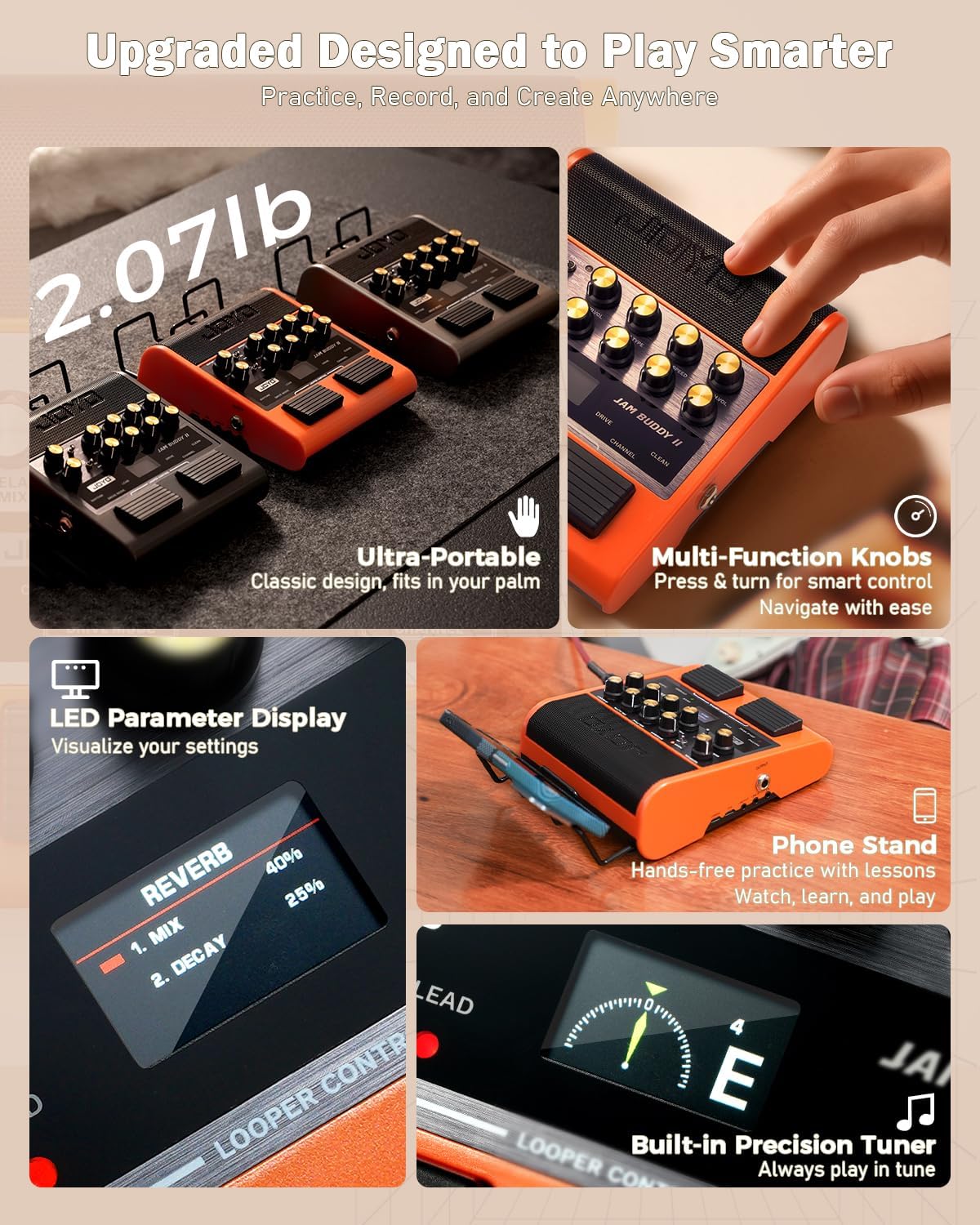
Image: The JAM Buddy II showing the LED display and a smartphone mounted for practice.
5. Betjeningsvejledning
5.1 Basic Operation: Channels and Volume
- Brug DRIVE/CLEAN footswitch to toggle between the Clean and Drive channels.
- When on the Drive channel, use the RHYTHM/LEAD footswitch to switch between Rhythm and Lead drive modes.
- Adjust your guitar's output volume with the GUITAR.VOL knop.
- Adjust the overall channel volume with the AMP/CH.VOL knop.
Video: A detailed guide on the complete controls and setup of the JOYO JAM Buddy II, demonstrating how to use its various functions.
5.2 Amp Modeller og effekter
- The JAM Buddy II features 14 amp head models and 9 built-in effects (Modulation, Delay, Reverb).
- Drej på AMP/CH.VOL knob to cycle through different amp models. The LED display will show the selected model.
- Tilpasse BASS/SAVE, MID/TUNE, og TRE/D.CTRL knobs to shape your tone.
- Tilpasse RVB/D.VOL, DLY/D.TYPE, og MOD/D.SPEED knobs to control the parameters of the respective effects.
- To access advanced amp settings (HPF, LPF, High, Mid, Low), press and hold the AMP/CH.VOL knob. Use the multi-function knob to navigate and adjust parameters.

Image: The JAM Buddy II highlighting its 14 professional amp models and deep tone editing capabilities.

Image: The JAM Buddy II displaying its 9 studio-grade effects, 36 drum patterns, and 30-second looper.
Video: A sound demonstration of the JOYO JAM Buddy II, showcasing its various amp modeller og effekter.
5.3 Drum Machine and Looper
- Tryk på TRE/D.CTRL knob to enter the drum machine interface.
- Drej på DLY/D.TYPE knob to select from 36 drum patterns.
- Adjust the drum volume with the RVB/D.VOL knob and tempo (BPM) with the MOD/D.SPEED knop.
- The looper function allows for up to 30 seconds of recording. Use the footswitches for record, play, and stop operations (refer to manual for specific combinations).
5.4 OTG Recording and Bluetooth Playback
- Connect your phone or computer to the OTG TYPE-C port using the provided USB-C cable for direct recording or live streaming.
- Skift til BLUETOOTH switch to 'ON' to activate Bluetooth. Pair with your device for wireless audio playback.
- Brug MUSIC.VOL knob to adjust the volume of the Bluetooth audio independently.

Image: The JAM Buddy II connected to a smartphone for OTG recording and showing Bluetooth pairing.
5.5 Saving Presets and Tuner Function
- To save your current amp and effect settings, press and hold the BASS/SAVE knob. The LED display will confirm saving.
- Tryk på MID/TUNE knob to activate the built-in tuner. The display will show the note and tuning accuracy.
6. Vedligeholdelse
- Keep the unit clean by wiping with a soft, dry cloth. Avoid using abrasive cleaners or solvents.
- Store the JAM Buddy II in a dry place away from extreme temperatures and direct sunlight.
- Ensure all cables are properly connected and not strained to prevent damage.
- The unit features an auto power-off function after 20 minutes of inactivity to conserve battery life.
7. Fejlfinding
- Ingen lyd: Check guitar cable connections, volume knobs (GUITAR.VOL, AMP/CH.VOL), and ensure the unit is powered on. Verify external speaker/headphone connections.
- Dårlig lydkvalitet: Check guitar and cable integrity. Adjust EQ settings (BASS, MID, TRE) and GAIN. Ensure effects levels are not excessively high.
- Problemer med Bluetooth-forbindelse: Ensure the BLUETOOTH switch is ON. Unpair and re-pair the device. Check the distance between the JAM Buddy II and the Bluetooth device.
- Enhed oplader ikke: Verify the USB-C cable and power source are functioning correctly. Ensure the cable is fully inserted into the CHARGE port.
- Tuneren svarer ikke: Ensure your guitar is properly plugged in and the MID/TUNE knob is pressed to activate the tuner.
8. Specifikationer
| Varens vægt | 1.87 pund |
| Produktdimensioner | 7.09 x 6.18 x 2.36 tommer |
| Output Wattage | 10 watt |
| Batteritype | Polymer (1 included) |
| Strømkilde | Elektrisk med ledning, batteridrevet |
| Kompatible enheder | Electric guitar, Mixer, PA system, PC, Phone |
| Connector Type | 3.5 mm jack, 6.35 mm jack |
| Materiale Type | Acrylonitrile Butadiene Styrene (ABS), Metal, aluminum alloy |
9. Garanti og support
JOYO Technology provides customer support for product issues. Please refer to your purchase documentation or contact the seller directly for warranty information and assistance.
For yderligere hjælp, besøg venligst JOYO Official Store on Amazon.


