Indledning
This manual provides comprehensive instructions for the TOZO OpenWear T13051 Open Ear Headphones. Designed for comfort and situational awareness, these headphones feature an open-ear design, adjustable ear hooks, and advanced audio technology. Please read this manual thoroughly to ensure proper use and optimal performance of your device.
Hvad er der i æsken
Bekræft, at alle nedenstående varer er inkluderet i din pakke:
- OpenWear Earbuds (Left and Right)
- Opladningsetui
- Brugermanual
- USB-C® (A til C) kabel (20")
- Hurtig guide
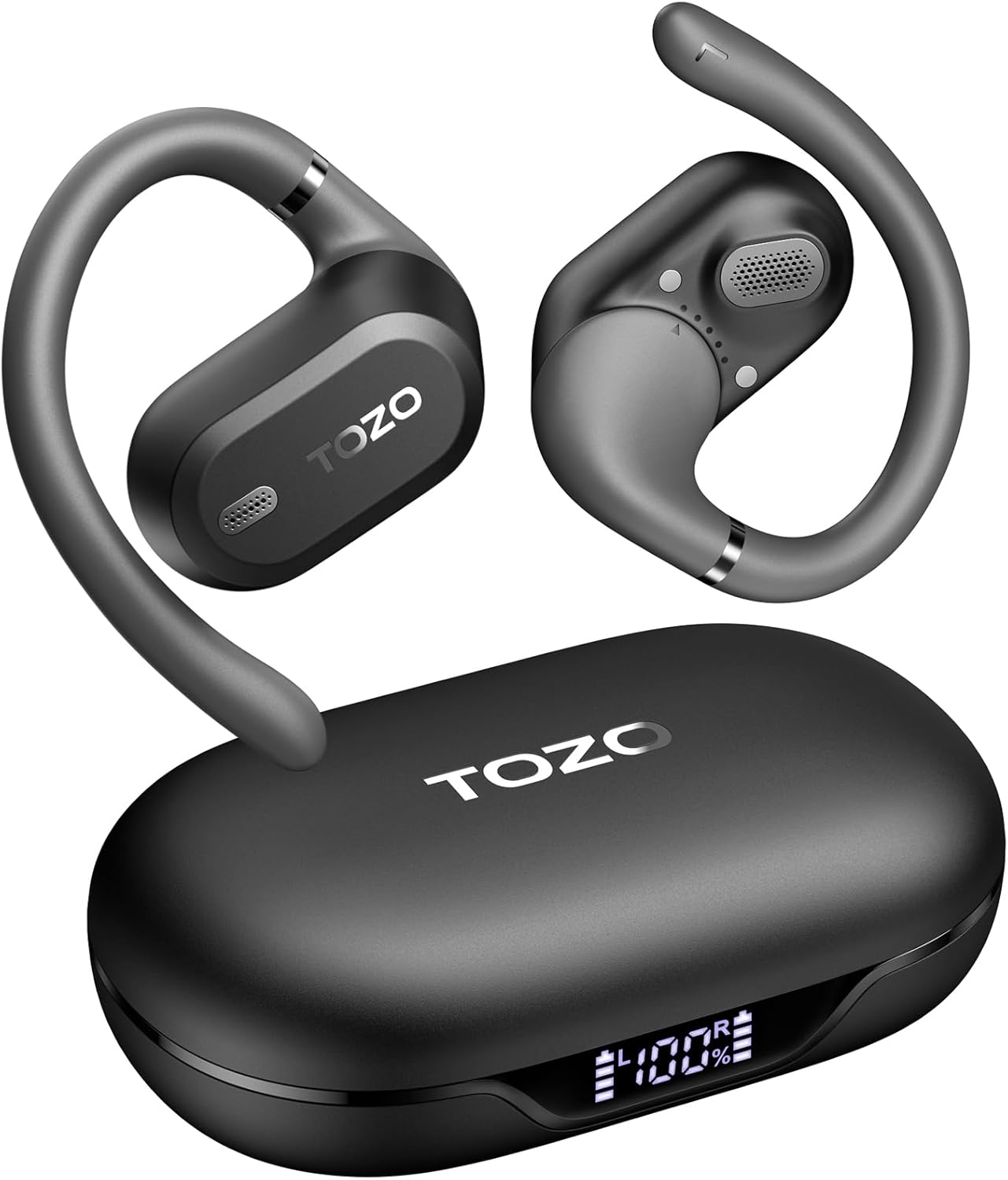
Image: TOZO OpenWear T13051 Open Ear Headphones and Charging Case. The image displays the two black open-ear earbuds with their flexible ear hooks, alongside their matching black charging case. The charging case features a digital display on the front.
Produkt overview
Komponenter
The TOZO OpenWear headphones are designed with user comfort and sound quality in mind. Each earbud features a main body housing the audio components and a flexible ear hook for secure placement.

Billede: Nærbillede view of a TOZO OpenWear earbud, highlighting the internal 14.2mm dynamic driver and speaker grille. The image emphasizes the audio technology for clear sound and bass.
Kontrolelementer
Each earbud is equipped with touch-sensitive controls for managing audio playback, calls, and other functions. Specific control gestures can be customized via the TOZO App.
Video: En overview of the TOZO OpenWear Open Ear Headphones. The video demonstrates the physical design, including the flexible ear hooks and the charging case, providing a general introduction to the product's appearance and features.
Opsætning
Opladning af hovedtelefoner
Oplad hovedtelefonerne og opladningsetuiet helt inden første brug.
- Place the earbuds into the charging case. Ensure they are correctly seated; magnets will guide them into position.
- Tilslut USB-C-kablet til opladningsporten på etuiet og en strømkilde.
- Det digitale display på opladningsetuiet viser batteriprocententage for the case and individual earbuds (L/R).
- A 10-minute charge provides approximately 2 hours of playtime. A full charge offers up to 38 hours of total playtime with the charging case.

Image: The TOZO OpenWear charging case open, showing the earbuds inside and a digital display indicating "38 hrs" of extended battery life, "630 songs", and "38 meetings". This highlights the long battery performance.
Image: A close-up of the TOZO OpenWear charging case's digital display, showing the battery levels for the left earbud (L), the charging case (center percentage), and the right earbud (R).
Parring med din enhed
- Åbn opladningsetuiet. Ørepropperne går automatisk i parringstilstand.
- Aktiver Bluetooth på din enhed (smartphone, tablet, bærbar computer).
- Søg efter "TOZO OpenWear" in the list of available Bluetooth devices and select it to connect.
- Når forbindelsen er oprettet, vil en stemmemeddelelse bekræfte den gennemførte parring.
Image: A TOZO OpenWear earbud shown next to a smartphone displaying its Bluetooth settings, with "TOZO OpenWear" listed as a connected device. The charging case is also visible in the background.
Brugsanvisning
The TOZO OpenWear headphones feature a dual-axis adjustable design for a personalized and secure fit. Proper placement is crucial for both comfort and sound quality.
- Gently place the earbud over your ear, positioning the main body in front of your ear canal.
- Adjust the flexible ear hook to rest comfortably and securely behind your ear.
- Utilize the dual-axis rotation to adapt the earbud's angle both horizontally and vertically until it sits comfortably and the sound is clear.
- Ensure the speaker grille is positioned to direct sound towards your ear canal without blocking it.

Image: A diagram illustrating the dual-axis adjustment feature of the TOZO OpenWear ear hooks. It shows how the ear hook can rotate 40 degrees horizontally and 75 degrees vertically to adapt to different ear shapes for enhanced comfort and stability.

Image: A woman wearing a TOZO OpenWear earbud, demonstrating the comfortable and breathable fit of the open-ear design for all-day wear. The earbud sits gently on the ear without entering the ear canal.
Betjeningsvejledning
Grundlæggende kontrol
The earbuds feature touch controls for various functions. Refer to the Quick Guide for detailed touch gestures. Common functions include:
- Afspil/pause: Et enkelt tryk på begge øretelefoner.
- Næste nummer: Dobbelttryk på den højre øreprop.
- Forrige nummer: Dobbelttryk på den venstre øreprop.
- Lydstyrke op: Tryk tre gange på den højre øreprop.
- Skrue ned for lyden: Tryk tre gange på den venstre øreprop.
- Besvar/afslut opkald: Et enkelt tryk på begge øretelefoner.
- Afvis opkald: Tryk på en af øretelefonerne, og hold den nede i 2 sekunder.
Lav latenstilstand
Activate low-latency mode for an enhanced audio-visual synchronization, ideal for gaming and video playback. This mode reduces audio delay to 60ms.
- Refer to the TOZO App or Quick Guide for specific instructions on activating/deactivating low-latency mode.
TOZO App Features
Download the official TOZO App for a personalized audio experience. The app allows you to:
- Access 16 custom EQ settings to fine-tune your sound.
- Receive and install firmware updates for improved performance.
- Control various features and settings of your OpenWear headphones.

Image: Screenshots of the TOZO App interface, demonstrating features such as 5 types of EQ sound modes, firmware updates, and detailed EQ adjustment options for a personalized listening experience.
Opretholdelse
Rensning
Regelmæssig rengøring hjælper med at opretholde optimal ydeevne og hygiejne.
- Tør ørepropperne og opladningsetuiet af med en blød, tør og fnugfri klud.
- Undgå at bruge slibende materialer, opløsningsmidler eller aerosolspray.
- Opladningsetuiet må ikke nedsænkes i vand.
Opbevaring
Always store the headphones in their charging case when not in use to protect them and ensure they remain charged.
Vandtæthed (IPX6)
The TOZO OpenWear headphones are rated IPX6 water-resistant, meaning they can withstand high-pressure water jets from any direction. This makes them suitable for workouts and outdoor activities where sweat and splashes may occur.
- The IPX6 rating applies to the earbuds only, not the charging case.
- Do not intentionally submerge the earbuds in water for extended periods.
- Sørg for, at ørepropperne er tørre, før du sætter dem tilbage i opladningsetuiet, for at forhindre skader.
Fejlfinding
If you encounter any issues, try the following solutions:
- Ingen lyd: Ensure earbuds are charged, properly paired, and volume is adjusted.
- Parringsproblemer: Turn off Bluetooth on your device, place earbuds in case, close and reopen, then try pairing again. Forget "TOZO OpenWear" from your device's Bluetooth list and re-pair.
- Ubehagelig pasform: Adjust the dual-axis ear hooks as described in the "Wearing Instructions" section.
- Opladningsproblemer: Check the USB-C cable and power source. Ensure earbuds are correctly seated in the case.
If issues persist, please refer to the official TOZO website for detailed FAQs or contact customer support.
Specifikationer
| Feature | Specifikation |
|---|---|
| Modelnavn | OpenWear T13051 |
| Mærke | TOZO |
| Forbindelsesteknologi | Trådløs (Bluetooth 5.4) |
| Øreplacering | Åbent øre |
| Audio driver størrelse | 14.2 mm dynamisk driver |
| Batterilevetid (ørepropper) | Op til 8.5 timer (enkelt opladning) |
| Samlet batterilevetid (med etui) | Op til 38 timer |
| Opladningstid (hurtig opladning) | 10 minutter i 2 timers spilletid |
| Vandmodstand | IPX6 (kun øretelefoner) |
| Lav latenstilstand | 60 ms |
| Kontroltype | Berøring, app-kontrol |
| Kompatible enheder | IOS/Android mobile phones, tablets, laptops |
| Varens vægt | 1.38 ounces (i alt) |
Garanti og support
TOZO products come with a standard manufacturer's warranty. For specific warranty details, registration, or to access customer support, please visit the official TOZO webwebsted:
You can also find additional support resources, FAQs, and contact information on their official webwebsted.


