1. Introduktion
Thank you for choosing the pTron Bassbuds Trendz Open Ear Wireless Earbuds. These earbuds are designed to provide a comfortable and pressure-free listening experience while keeping you aware of your surroundings. Featuring 14.2mm dynamic drivers, Bluetooth v6.0 connectivity, and AI-ENC for clear calls, these earbuds offer up to 45 hours of total playtime with the charging case. This manual provides detailed instructions for setup, operation, and maintenance to ensure optimal performance.
2. Pakkens indhold
- pTron Bassbuds Trendz Open Ear Wireless Earbuds
- Opladningsetui
- USB Type-C opladerkabel
- Brugermanual
3. Produktet er slutview
The pTron Bassbuds Trendz feature an open-ear design for comfort and situational awareness. They are equipped with advanced audio and connectivity technologies.

Image: pTron Bassbuds Trendz Open Ear Wireless Earbuds and their charging case.
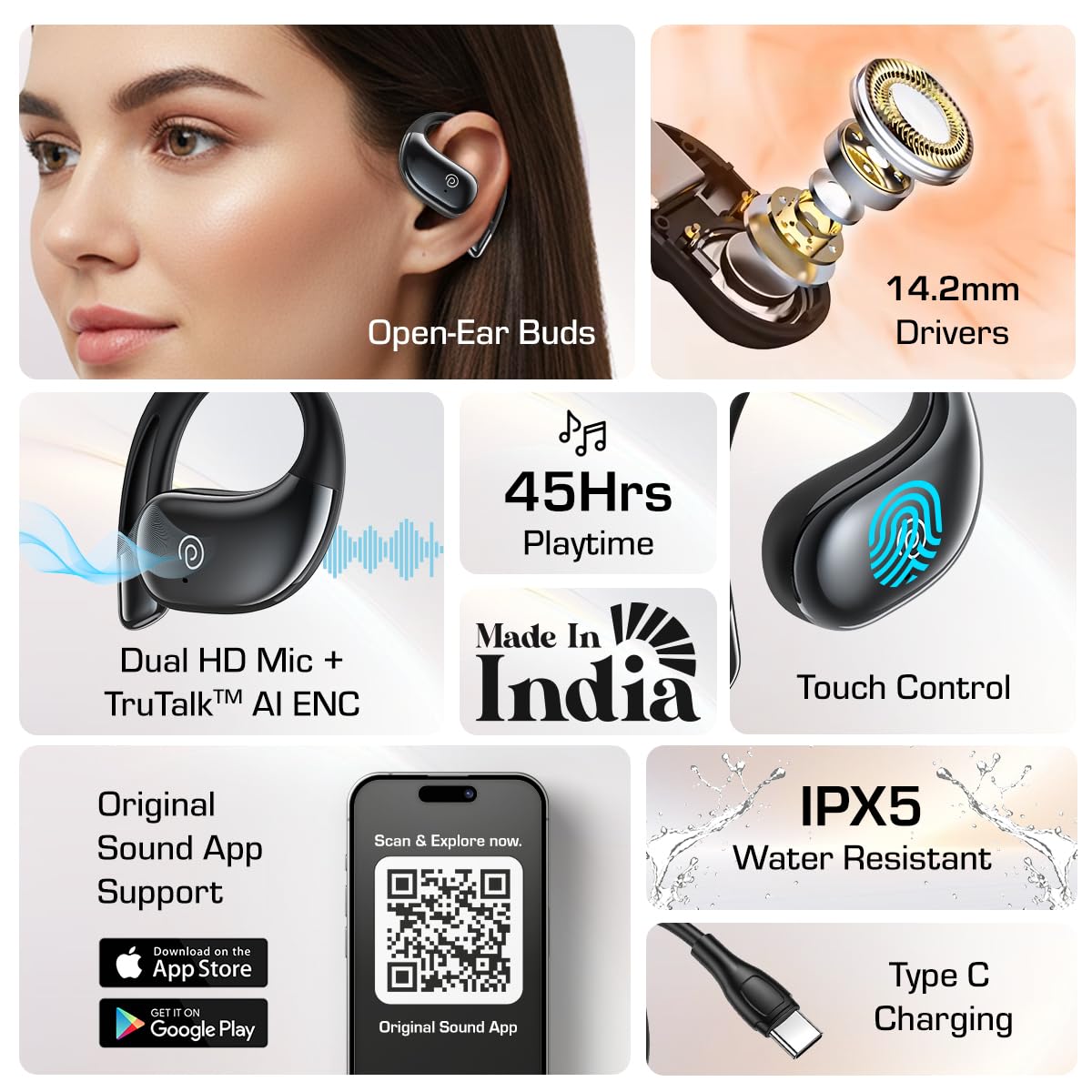
Billede: Overview of key features including open-ear design, 14.2mm drivers, 45 hours playtime, Dual HD Mic, Touch Control, App Support, IPX5 water resistance, and Type-C charging.
3.1. SafeBeats Open-Ear Design
The SafeBeats design ensures a comfortable and pressure-free fit, allowing you to remain aware of your surroundings during use, which is ideal for outdoor activities.

Image: A person wearing the pTron Bassbuds Trendz, highlighting the open-ear design for safe listening.
3.2. Audio Drivers
Each earbud is equipped with a 14.2mm dynamic driver, engineered to deliver clear stereo sound quality. For the best audio experience and minimal sound leakage, it is recommended to keep the volume between 60%-70%.

Billede: En eksploderet view illustrating the internal components of the 14.2mm dynamic driver.
4. Opsætning
4.1. Opladning af øretelefoner og etuiet
Before first use, fully charge the earbuds and the charging case. Use the provided Type-C USB cable to connect the charging case to a power source. The earbuds will charge automatically when placed inside the case.
- Batterilevetid: Ørepropperne tilbyder op til 45 timers samlet spilletid med opladningsetuiet.
- Opladningsindikator: Refer to the LED indicators on the case for charging status.

Image: A visual representation of the 45-hour total playtime provided by the earbuds and their charging case.
4.2. Parring med en enhed
The pTron Bassbuds Trendz utilize Bluetooth v6.0 for quick and stable wireless connectivity.
- Sørg for, at øretelefonerne er opladet.
- Åbn opladningsetuiet. Ørepropperne går automatisk i parringstilstand.
- Aktiver Bluetooth på din enhed (smartphone, tablet, bærbar computer).
- Søg efter available Bluetooth devices and select "pTron Bassbuds Trendz" from the list.
- Once connected, you will hear an audio prompt, and the earbuds' indicator lights will change.

Image: A close-up graphic highlighting the advanced Bluetooth V6.0 chip for quick and stable wireless connection.
5. Betjeningsvejledning
5.1. Tryk på Kontrolelementer
The earbuds feature intuitive touch controls for managing audio playback, calls, and voice assistant functions.
- Afspil/pause: Et enkelt tryk på begge øretelefoner.
- Næste nummer: Dobbelttryk på den højre øreprop.
- Forrige nummer: Dobbelttryk på den venstre øreprop.
- Besvar/afslut opkald: Et enkelt tryk på begge øretelefoner.
- Afvis opkald: Tryk på en af øretelefonerne, og hold den nede i 2 sekunder.
- Aktiver stemmeassistent: Tryk tre gange på en af øretelefonerne.
5.2. Call Management with AI-ENC
The Bassbuds Trendz are equipped with Dual HD Microphones and AI-ENC (Environmental Noise Cancellation) technology to ensure crystal-clear calls by reducing background noise.

Image: A person making a call with the earbuds, illustrating the TruTalk AI-ENC feature for clear communication.
5.3. Original Sound App Support
Enhance your listening experience by downloading the 'Original Sound' app. The app allows you to customize touch controls, choose or create sound EQs, and switch between game and music modes.

Image: A smartphone screen displaying the 'Original Sound' app interface with a QR code for easy download. Scan the QR code or visit ptron.in/pages/original-sound-app at downloade.
6. Pleje og vedligeholdelse
- Rensning: Rengør regelmæssigt ørepropperne og opladningsetuiet med en blød, tør klud. Undgå at bruge skrappe kemikalier eller slibende materialer.
- Vandtæthed: The earbuds are IPX5 water resistant, meaning they can withstand splashes and sweat. Do not submerge them in water or expose them to heavy rain.
- Opbevaring: Opbevar øretelefonerne i deres opladningsetui, når de ikke er i brug for at beskytte dem og holde dem opladet.
- Temperatur: Undgå at udsætte ørepropperne for ekstreme temperaturer (varme eller kolde), da dette kan påvirke batteriets levetid og ydeevne.
7. Fejlfinding
- Ørepropper parrer ikke: Ensure both earbuds are charged and out of the case. Turn off and on your device's Bluetooth, then try pairing again. If issues persist, reset the earbuds (refer to the app or pTron support for specific reset instructions).
- Ingen lyd fra den ene øreprop: Place both earbuds back in the charging case, close it, then open it again. Ensure they are properly connected to your device.
- Opladningsproblemer: Check the Type-C cable and power adapter. Ensure the charging contacts on the earbuds and inside the case are clean and free of debris.
- Dårlig opkaldskvalitet: Ensure the earbuds are positioned correctly. Check for strong Bluetooth signal. Use the 'Original Sound' app to verify settings.
- Touch-kontroller reagerer ikke: Sørg for, at dine fingre er rene og tørre. Prøv at genstarte ørepropperne ved at lægge dem i etuiet og tage dem ud igen.
8. Specifikationer
| Feature | Specifikation |
|---|---|
| Modelnavn | Bassbuds Trendz |
| Forbindelsesteknologi | Trådløs (Bluetooth) |
| Bluetooth version | 6.0 |
| Bluetooth rækkevidde | 10 meter |
| Audio driver type | Dynamisk Driver |
| Audio driver størrelse | 14.2 millimeter |
| Batterilevetid | 45 timer (med opladningsetui) |
| Kontrolmetode | Røre |
| Mikrofon | Dual HD Mic with AI-ENC |
| Vandmodstandsniveau | IPX5 |
| Materiale | Acrylonitril Butadien Styren (ABS) |
| Varens vægt | 57 gram |
| Produktdimensioner | 8.5 x 6 x 2.8 cm |
9. Garanti og support
The pTron Bassbuds Trendz come with a 6 måneders producentgaranti on manufacturing defects from the date of purchase.
For customer support, inquiries, or warranty claims, please contact:
- Fabrikant: PALRED ELECTRONICS PVT. LTD.
- Kundeservicekontakt: 040-67138888
- E-mail support: Support@ptron.in


