Indledning
Thank you for choosing the LEMEGA MS5 Premium Internet Radio. This device offers a comprehensive audio experience, combining Internet Radio, FM Radio, a CD player, Bluetooth 5.3 streaming, Spotify HiFi, and Podcast playback. It features a 2.4" full-color display, 50 presets, dual alarms, and can be controlled via the OKTIV App or the included remote control. This manual will guide you through the setup, operation, and maintenance of your MS5 unit.
Sikkerhedsoplysninger
- Læs alle instruktioner omhyggeligt før brug.
- Gem denne vejledning til fremtidig reference.
- Udsæt ikke enheden for regn, fugt eller ekstreme temperaturer.
- Sørg for ordentlig ventilation; bloker ikke ventilationsåbninger.
- Brug kun den strømadapter, der følger med enheden.
- Forsøg ikke at skille enheden ad eller ændre den. Overlad al service til kvalificeret personale.
- Undgå at placere enheden i nærheden af varmekilder såsom radiatorer, varmeapparater, komfurer eller andre apparater (herunder ampløftere), der producerer varme.
- Beskyt netledningen mod at blive trådt på eller klemt, især ved stik, stikkontakter og det sted, hvor de kommer ud af apparatet.
Pakkens indhold
Kontroller venligst, at alle nedenstående varer er til stede i din pakke:
- LEMEGA MS5 Internet Radio Unit
- Strømadapter
- Instruktionsbog
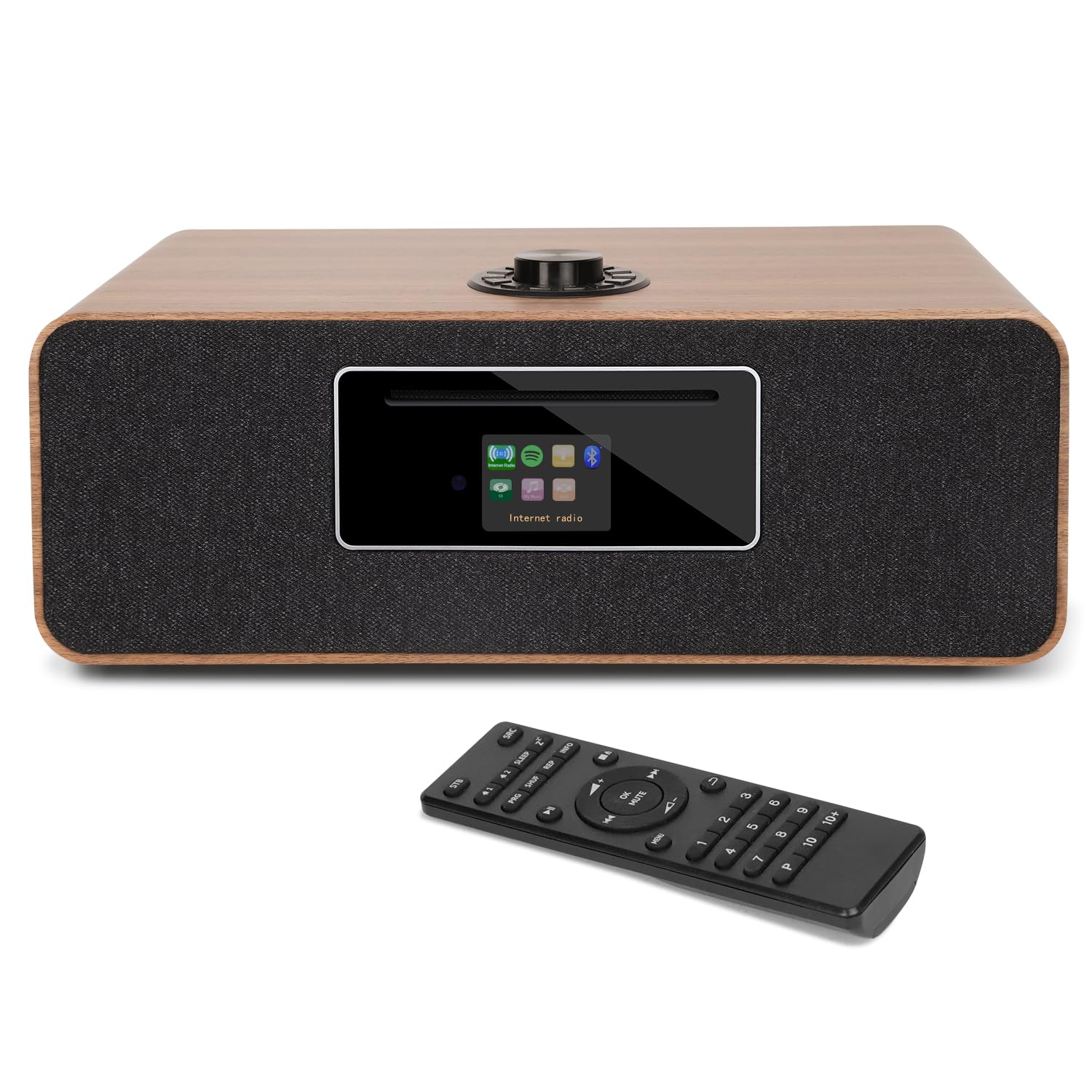
- Fjernbetjening
Produkt overview
Frontpanel
The front panel features the CD slot, the 2.4" full-color display, and primary control buttons.

Billede: Front view of the LEMEGA MS5 unit, showcasing the CD player slot, the central display, and the speaker grilles on either side. A CD is shown partially inserted.
Bagpanel
The rear panel provides various connectivity options including power input, USB port, AUX input, and the FM antenna connection.

Billede: Bag view of the LEMEGA MS5 unit, highlighting the extendable FM antenna, DC power input, USB port, and AUX input/output jacks.
Øverste kontroller
The top of the unit features a multi-function rotary knob for navigation and volume control.
Billede: Top-down view of the LEMEGA MS5, focusing on the prominent rotary control knob located on the top surface.
Opsætning
- Udpakning: Tag forsigtigt enheden og alt tilbehør ud af emballagen.
- Placering: Place the MS5 on a stable, flat surface away from direct sunlight, heat sources, and moisture. Ensure adequate ventilation around the unit.
- Tilslut FM-antenne: Extend the telescopic FM antenna located on the rear of the unit for optimal FM reception.
- Strømtilslutning: Connect the supplied power adapter to the DC 12V input on the rear of the MS5, then plug the adapter into a wall outlet. The unit will power on automatically or enter standby mode.
- Initial Setup Wizard: Upon first power-on, the unit will guide you through an initial setup wizard. Follow the on-screen prompts to set language, time format, and connect to your Wi-Fi network.
- Use the rotary knob to navigate menus and adjust settings. Press the knob to confirm selections.
- For Wi-Fi setup, select your network from the list and enter the password using the on-screen keyboard.
Betjeningsvejledning
Tænd/sluk og standby
Tryk på Magt button on the unit or remote control to switch between On and Standby modes.
Valg af tilstand
Brug Mode button on the remote or navigate through the main menu on the unit to select desired audio sources: Internet Radio, FM Radio, CD, Bluetooth, USB, or AUX.
Internet radio
- Vælge Internet radio mode.
- Browse stations by location, genre, or search by name using the rotary knob and display.
- Press the rotary knob to select a station.
- For at gemme en forudindstilling skal du trykke på og holde Forudindstillet button on the remote or the corresponding button on the unit. Follow the on-screen instructions to assign it to one of the 50 available preset slots.
FM radio
- Vælge FM radio mode.
- Brug Tune buttons on the remote or rotate the main knob to manually tune to a station.
- For automatisk scanning skal du trykke og holde nede Tune button or follow the on-screen menu option.
- Gem forudindstillinger som beskrevet for internetradio.
CD-afspiller
- Vælge CD mode.
- Gently insert a CD into the CD slot on the front panel. The unit will automatically load and begin playback.
- Brug Afspil/pause, Stop, Spring fremad, og Spring baglæns buttons on the unit or remote control to manage playback.
- The MS5 supports CD, CD-R, and CD-RW discs.
Bluetooth streaming
- Vælge Bluetooth mode. The unit will enter pairing mode, indicated on the display.
- Aktiver Bluetooth på din mobile enhed (smartphone, tablet, bærbar computer), og søg efter tilgængelige enheder.
- Vælg "LEMEGA MS5" from the list to pair. Once connected, you can stream audio from your device to the MS5.
Spotify HiFi & Podcast Player
- Spotify Connect: Ensure your MS5 is connected to the same Wi-Fi network as your Spotify-enabled device. Open the Spotify app on your device, select a song, and then choose the MS5 from the "Devices Available" list to stream directly.
- Podcast Player: Access the Podcast Player through the main menu. Browse and select podcasts. The unit supports bookmarking and following features.
USB-afspilning
Indsæt et USB-flashdrev med MP3-lyd files into the USB port on the rear panel. Select USB mode to browse and play your music files.
AUX-indgang
Tilslut en ekstern lydenhed (f.eks. MP3-afspiller, smartphone) til AUX IN port on the rear panel using a 3.5mm audio cable. Select AUX tilstand for at afspille lyd fra den tilsluttede enhed.
OKTIV App Control
Download OKTIV App from your device's app store. Ensure your smartphone/tablet is connected to the same Wi-Fi network as your MS5. Open the app and follow the instructions to connect and control all functions of your MS5 wirelessly.
Dual Alarm & Sleep Timer
- Indstilling af alarmer: Få adgang til Alarm settings through the system menu. You can set two independent alarms with options for weekday/weekend modes, alarm source (FM, Internet Radio, CD, or buzzer), and volume.
- Sleep timer: Få adgang til Sleep Timer function through the system menu. Set a duration (e.g., 15, 30, 60 minutes) after which the unit will automatically switch to standby mode.
Opretholdelse
- Rensning: Brug en blød, tør klud til at rengøre enhedens yderside. Brug ikke slibende rengøringsmidler, voks eller opløsningsmidler.
- Vedligeholdelse af CD-afspiller: Handle CDs by their edges to avoid fingerprints and scratches. Use a clean, lint-free cloth to wipe CDs from the center outwards.
- Opbevaring: Hvis enheden opbevares i længere tid, skal den tages ud af stikkontakten og opbevares et køligt og tørt sted.
Fejlfinding
| Problem | Mulig årsag | Løsning |
|---|---|---|
| Ingen strøm | Strømadapteren er ikke tilsluttet, eller der er en defekt stikkontakt. | Ensure the power adapter is securely connected to the unit and a working power outlet. Try a different outlet. |
| Ingen lyd | Volume too low; Mute activated; Incorrect source selected; Faulty audio cable (AUX). | Increase volume. Check if the unit is muted. Ensure the correct audio source is selected. If using AUX, check the cable connection. |
| Internetradioen forbinder ikke | Incorrect Wi-Fi password; Weak Wi-Fi signal; Router issue. | Verify Wi-Fi password. Move the unit closer to the router or check router status. Re-run Wi-Fi setup. |
| Bluetooth-parring mislykkedes | MS5 not in pairing mode; Device too far; Bluetooth disabled on source device. | Ensure MS5 is in Bluetooth pairing mode. Keep devices within range. Enable Bluetooth on your source device and re-scan. |
| CD'en afspiller ikke | CD'en er isat forkert; Disken er snavset eller ridset; Diskformatet understøttes ikke. | Re-insert CD correctly. Clean the disc. Ensure it is a supported format (CD, CD-R, CD-RW). |
| Audio fading at low volume (below 13) | Potential firmware or hardware characteristic. | This behavior has been reported by some users. If consistent, try to operate at volume levels 13 or higher. If the issue persists and affects usability, contact customer support. |
Specifikationer
| Feature | Detalje |
|---|---|
| Modelnummer | MS5 |
| Produktdimensioner | 15 x 9 x 5.51 tommer (38.1 x 22.86 x 14 cm) |
| Varens vægt | 12 pund (5.44 kg) |
| Forbindelsesteknologi | Bluetooth 5.3, USB, Wi-Fi |
| Tuner-teknologi | Internetradio, FM-radio |
| Speciel funktion | Built-In Clock, Dual Alarm, Sleep Timer, Spotify Connect, Podcast Player, OKTIV App Control |
| Vise | 2.4" Full Colour Display |
| Forudindstillinger | 50 (for radio stations & podcast episodes) |
| Strømkilde | Strømadapter |
| Understøttede diskformater | CD, CD-R, CD-RW |
Garanti og support
For warranty information, please refer to the warranty card included with your product or visit the official LEMEGA webwebsted.
If you encounter any issues or have questions regarding your LEMEGA MS5, please contact LEMEGA customer support for assistance.
- Online support: Visit the LEMEGA webwebsted for ofte stillede spørgsmål og supportressourcer.
- Kontakte: Refer to the contact information provided in your product packaging or on the LEMEGA webwebsted.


