1. Introduktion
This manual provides essential information for the safe and efficient operation of your Thomson 43UF4S35 43-inch 4K UHD Smart LED TV with Fire TV. Please read this manual thoroughly before using your television and retain it for future reference. This television combines a stunning 4K UHD display with the intuitive Fire TV operating system, offering integrated Alexa voice control, Apple AirPlay support, and comprehensive connectivity options for a complete entertainment experience.
2. Sikkerhedsoplysninger
Overhold følgende sikkerhedsforanstaltninger for at forhindre brand, elektrisk stød eller personskade:
- Udsæt ikke TV'et for regn eller fugt.
- Sørg for tilstrækkelig ventilation; bloker ikke ventilationsåbningerne.
- Placer ikke tv'et på en ustabil vogn, stativ, stativ, beslag eller bord.
- Beskyt netledningen mod at blive trådt på eller klemt.
- Tag stikket ud af tv'et under tordenvejr eller når det ikke bruges i længere perioder.
- Overlad al service til kvalificeret servicepersonale.
3. Pakkens indhold
Kontroller, at alle varer er til stede i emballagen:
- Thomson 43UF4S35 43-inch 4K UHD Smart LED TV
- Strømadapter
- Strømkabel
- Fjernbetjening (med batterier)
- TV-bord (2 stk.)
- Brugervejledning (dette dokument)
4. Fysisk overview
4.1. Dimensioner

Billede: Front view of the Thomson 43UF4S35 TV with key dimensions labeled in centimeters. The TV measures 97 cm in width, 60 cm in total height with the stand, and has a screen height of 56 cm. The TV's depth is 9 cm, and the stand's depth is 27 cm.

Billede: Side profile of the Thomson 43UF4S35 TV, illustrating its slim design and the attached stand.
4.2. Bagpaneltilslutninger

Billede: Detaljeret view of the rear connection panel of the Thomson 43UF4S35 TV. Ports are clearly labeled for Audio Out, CI+ slot, Headphone jack, three HDMI 2.1 inputs, LAN (Ethernet) port, Satellite input, Antenna input, and two USB 2.0 ports.
- LYD UD: Til tilslutning af eksterne lydsystemer.
- CI+: Common Interface Plus slot for conditional access modules (CAM) to decrypt pay-TV channels.
- HOVEDTELEFONER: 3.5 mm stik til tilslutning af hovedtelefoner.
- 3x HDMI 2.1: High-Definition Multimedia Interface inputs for connecting devices like Blu-ray players, game consoles, or set-top boxes.
- LAN: Ethernet-port til kablet netværksforbindelse.
- SATELLIT: Input for satellite dish connection (DVB-S2).
- ANTENNE: Input for terrestrial antenna connection (DVB-T2) or cable TV (DVB-C).
- 2x USB 2.0: Universal Serial Bus ports for connecting USB storage devices for media playback or software updates.
5. Opsætning
5.1. Montering af stativ
- Placer forsigtigt tv'et med forsiden nedad på en blød, flad overflade for at forhindre, at skærmen beskadiges.
- Attach the two stand pieces to the designated slots on the bottom of the TV using the provided screws. Ensure they are securely fastened.
- Løft tv'et oprejst, og placer det på en stabil, plan overflade.
5.2. Tilslutning af strøm
Connect the power adapter to the TV's power input, then plug the power cable into a wall outlet. The TV will enter standby mode.
5.3. Initial Setup (Fire TV)
- Tryk på tænd/sluk-knappen på fjernbetjeningen for at tænde for tv'et.
- Følg instruktionerne på skærmen for at vælge dit sprog, oprette forbindelse til et Wi-Fi-netværk, og log ind på din Amazon-konto.
- The Fire TV interface will guide you through setting up live TV channels (via the Triple Tuner) and installing your favorite streaming applications.
- Opret bruger profiles for personalized recommendations and settings.
6. Betjening af tv'et
6.1. Fjernbetjening

Billede: The Bluetooth remote control for the Thomson 43UF4S35 TV, featuring a central navigation pad, number buttons, and dedicated quick access buttons for popular streaming services like Netflix, Prime Video, Amazon Music, and an Alexa voice control button.
The included Bluetooth remote control allows for easy navigation. It features dedicated buttons for quick access to popular streaming services such as Netflix, Prime Video, and Amazon Music. The central navigation pad is used for menu selection and browsing.
6.2. Fire TV-grænseflade

Billede: A visual representation of the Fire TV home screen, displaying a selection of streaming applications and options for multiple user profiles, indicating the personalized nature of the interface.
The Fire TV operating system provides a user-friendly interface for accessing streaming services, live TV, and apps. Navigate using the remote control to browse content, launch applications, and manage settings. User profiles can be created to tailor recommendations and settings for different household members.
6.3. Alexa Stemmestyring
Press the Alexa button on your remote control and speak your commands. You can ask Alexa to:
- Søg efter film eller tv-serier.
- Start applikationer.
- Styr smart home-enheder.
- Check the weather or get information.
6.4. Apple AirPlay
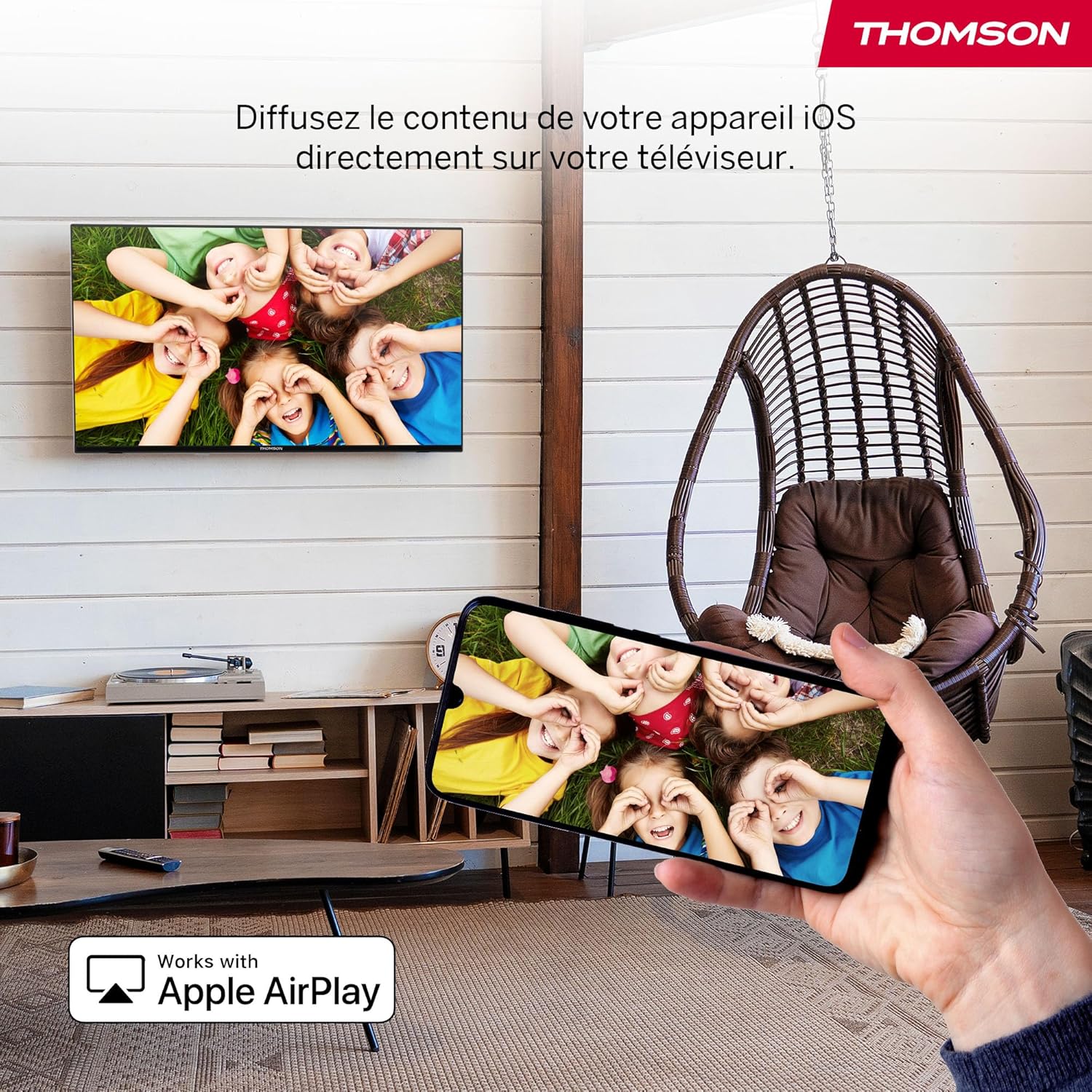
Billede: An illustration of Apple AirPlay in use, showing content from an iPhone being wirelessly streamed or mirrored to the Thomson TV, enabling seamless content sharing from iOS devices.
The TV supports Apple AirPlay, allowing you to stream content directly from your iPhone, iPad, or Mac. Ensure your Apple device and the TV are connected to the same Wi-Fi network. Select the AirPlay icon on your Apple device and choose your Thomson TV from the list of available devices.
6.5. Tredobbelt tuner
The integrated Triple Tuner supports DVB-C (cable), DVB-S2 (satellite), and DVB-T2 (terrestrial antenna) signals. Connect your preferred signal source to the corresponding input on the rear panel. During initial setup or via the TV settings, you can scan for available channels.
6.6. Smart Home-dashboard

Billede: A view of the Smart Home Dashboard accessible on the Thomson TV, presenting an organized interface for managing and controlling various smart home devices, including cameras and lighting, directly from the television screen.
Access the integrated Smart Home Dashboard to control compatible connected devices in your home. This feature allows you to manage smart lights, cameras, and other smart appliances directly from your TV screen.
7. Picture and Sound
7.1. 4K UHD with Dolby Vision

Billede: A side-by-side comparison illustrating the visual difference between Standard Dynamic Range (SDR) and Dolby Vision. The Dolby Vision image on the right displays significantly improved contrast, brighter highlights, and more vibrant colors in a landscape scene.
Experience exceptional clarity with 4K UHD resolution, offering four times the detail of Full HD. Dolby Vision further enhances the visual experience by providing superior brightness, contrast, and color accuracy, bringing scenes to life with stunning realism.
7.2. Dolby Atmos Sound
Billede: A visual representation of the Dolby Atmos audio experience, showing sound waves expanding from the television screen to envelop viewers, suggesting a multi-dimensional and immersive sound environment.
Dolby Atmos delivers rich, multi-dimensional sound that flows around you, creating an immersive audio experience. For the full effect, connect your TV to a compatible Dolby Atmos sound system.
8. Forbindelse
Your Thomson TV offers a variety of connection options:
- HDMI: Connect up to three HDMI devices for high-definition audio and video.
- USB: Use the two USB 2.0 ports to play media from USB drives or for service updates.
- LAN (Ethernet): For en stabil kablet internetforbindelse.
- Wi-Fi: Connect wirelessly to your home network for streaming and online features.
- Bluetooth: Pair Bluetooth-enabled devices such as headphones or soundbars.
- CI+: Insert a Conditional Access Module for encrypted digital TV services.
9. Vedligeholdelse
For at sikre dit TV's levetid og optimale ydeevne:
- Rensning: Gently wipe the screen with a soft, dry, lint-free cloth. For stubborn marks, use a screen-specific cleaner applied to the cloth, not directly to the screen. Clean the TV body with a soft, dry cloth.
- Ventilation: Sørg for, at ventilationsåbningerne på bagsiden af tv'et ikke er blokerede.
- Softwareopdateringer: The Fire TV system will periodically check for and install software updates automatically when connected to the internet.
10. Fejlfinding
Hvis du støder på problemer, kan du bruge følgende almindelige løsninger:
| Problem | Mulig løsning |
|---|---|
| Ingen strøm | Check if the power cable is securely connected to the TV and the wall outlet. Ensure the outlet is functioning. |
| Intet billede, men der er lyd | Bekræft, at den korrekte inputkilde er valgt. Kontroller forbindelserne til eksterne enheder. |
| Ingen lyd, men der er billede | Check volume levels and mute settings. Ensure external audio devices are correctly connected and powered on. |
| Fjernbetjening virker ikke | Replace batteries. Ensure there are no obstructions between the remote and the TV. Re-pair the Bluetooth remote if necessary (refer to Fire TV settings). |
| Kan ikke oprette forbindelse til Wi-Fi | Sørg for, at din router er tændt og fungerer. Indtast Wi-Fi-adgangskoden igen. Prøv at genstarte både tv'et og routeren. |
| Dårlig billedkvalitet | Check antenna/cable/satellite connections. Adjust picture settings (brightness, contrast, sharpness). Ensure the content source is high quality. |
11. Specifikationer
| Feature | Detalje |
|---|---|
| Mærke | Thomson |
| Modelnummer | 43UF4S35 |
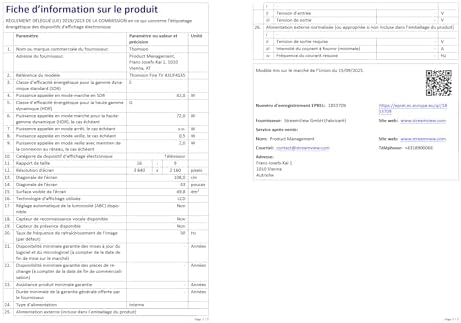
| Skærmstørrelse | 43 tommer (109 cm) |
| Opløsning | 4K UHD (3840 x 2160) |
| Displayteknologi | LCD |
| Opdateringshastighed | 50 Hz |
| Operativsystem | Brand TV |
| Særlige funktioner | Dolby Vision, Dolby Atmos, Alexa Voice Control, Apple AirPlay, Smart Home Dashboard |
| Forbindelse | Wi-Fi, Bluetooth, Ethernet (LAN), 3x HDMI 2.1, 2x USB 2.0, CI+, Audio Out, Headphones, Satellite, Antenna |
| Triple Tuner | DVB-C, DVB-S2, DVB-T2 |
| Farve | Sort |
| Aspektforhold | 16:9 |
| Produktmål (D x B x H) | 9 cm x 97 cm x 60 cm |
| Inkluderede komponenter | Power Adapter, Power Cable, Remote Control, Stand, User Manual |
| Fabrikant | STRØMVIEW GMBH |
| Oprindelsesland | Kalkun |
12. Garanti og support
Your Thomson 43UF4S35 TV comes with a 3 års producentgarantiDenne garanti dækker materiale- og fabrikationsfejl ved normal brug. Gem venligst din købsbevis i tilfælde af garantikrav.
For technical support, troubleshooting assistance, or warranty service, please contact your retailer or the manufacturer, STREAMVIEW GMBH. Refer to your purchase documentation for specific contact details.


