1. Introduktion
Thank you for choosing the FNIRSI BTM-24 Car Battery Tester. This device is designed to accurately measure the health, voltage, and internal resistance of 12V and 24V automotive batteries. It performs comprehensive diagnostics including cranking, load, and charging tests to ensure optimal battery performance and vehicle operation. This manual provides detailed instructions for safe and effective use of your BTM-24 tester.
2. Sikkerhedsoplysninger
Please read all safety warnings and instructions before using this product to prevent injury or damage to the device or vehicle.
- Brug altid øjenbeskyttelse, når du arbejder i nærheden af batterier.
- Ensure proper ventilation when testing batteries, as they can emit explosive gases.
- Undgå gnister eller åben ild i nærheden af batteriet.
- The FNIRSI BTM-24 features reverse polarity and overvoltage protection. However, always ensure correct connection of the clamps: rød clamp to positive (+) terminal og sort clamp to negative (-) terminal.
- Do not touch conductive metal parts of the clamps during operation to prevent electric shock.
- Hold enheden tør og ren. Udsæt den ikke for regn eller fugt.
- Forsøg ikke at skille testeren ad eller ændre den. Overlad al service til kvalificeret personale.
3. Produktet er slutview
The FNIRSI BTM-24 is a compact and user-friendly battery tester equipped with a 2.4-inch color screen and intuitive controls.
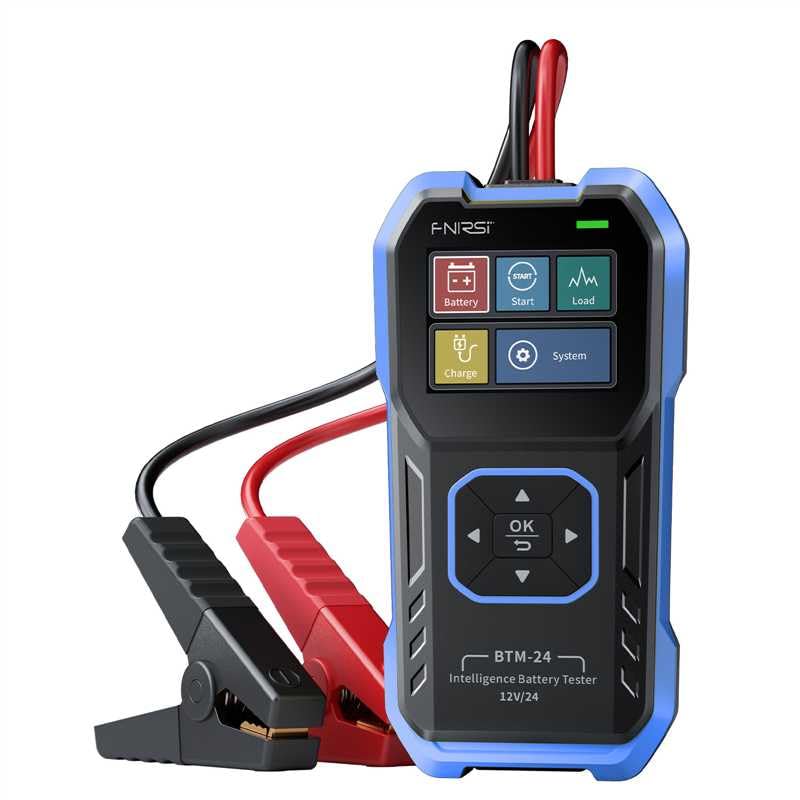
Billede 1: FNIRSI BTM-24 Car Battery Tester. The device features a blue and black casing, a color display, and integrated red (positive) and black (negative) battery clamps. The screen shows icons for Battery, Start, Load, Charge, and System functions, along with navigation buttons (OK, Up, Down, Left, Right).
3.1. Komponenter og kontroller
- 2.4 tommer farveskærm: Displays test results, menus, and settings.
- Navigationsknapper:
- OK knap: Bekræfter valg eller åbner menuer.
- Up/Down/Left/Right Buttons: Naviger gennem menuer og muligheder.
- Integrated Test Cables: Durable cables with insulated red (positive) and black (negative) clamps.
- Type-C port: Til firmwareopdateringer.
- Sammenklappelig stativ: For stable support during use.
- Rear Wall-Mounting Option: Til praktisk opbevaring.
4. Opsætning
- Klargør batteriet: Sørg for, at batteripolerne er rene og fri for korrosion. Rengør dem om nødvendigt med en stålbørste.
- Tilslut testeren:
- Tilslut rød positiv (+) clamp til batteriets positive pol.
- Tilslut sort negativ (-) clamp til den negative terminal på batteriet.
Testeren tænder automatisk, når den er korrekt tilsluttet.
- Startskærm: The device will display the main menu, offering various test options.
5. Betjeningsvejledning
Navigate through the menus using the Up/Down/Left/Right buttons and confirm selections with the OK button.
5.1. Batteritest
This test measures battery health (%), voltage, og indre modstand.
- From the main menu, select "Battery" and press OK.
- Select the battery type (e.g., Regular Flooded, AGM Spiral/Flat, GEL, EFB, LAB/EV LAB).
- Select the battery standard (e.g., CCA, IEC, EN, DIN, JIS#, GB) and input the rated CCA value.
- The tester will perform the analysis and display results such as voltage, internal resistance, and battery health (%). The health status will be indicated as "Good," "Fair," or "Low."
5.2. Cranking Test (Start Test)
This test checks the engine's starting performance by analyzing the battery's ability to deliver current during ignition.
- From the main menu, select "Start" and press OK.
- Følg instruktionerne på skærmen for at starte køretøjets motor.
- The tester will record the minimum cranking voltage and the time taken to start the engine.
- Results will indicate the cranking status, helping to diagnose potential starter or battery issues.
5.3. Opladningstest
This test evaluates the vehicle's charging system, including the alternator and regulator.
- From the main menu, select "Charge" and press OK.
- Follow the on-screen instructions, which typically involve starting the engine and revving it to a specified RPM.
- The tester will monitor the charging voltage, displaying minimum, maximum, and dynamic voltage readings, often with a waveform view for detaljeret analyse.
- The results will indicate if the charging system is functioning correctly or if there are issues like overcharging or undercharging.
5.4. Load Test
This test assesses the battery's ability to maintain voltage under a simulated load.
- From the main menu, select "Load" and press OK.
- The tester will guide you through applying a load (e.g., turning on headlights or other accessories).
- It will monitor the minimum and dynamic voltage under load, often with a waveform view.
- The results help determine if the battery can adequately support the vehicle's electrical demands.
5.5. Systemindstillinger
Access system settings to customize the device.
- From the main menu, select "System" and press OK.
- Options may include language selection, display brightness, day/night UI themes, and viewing device information.
6. Vedligeholdelse
- Rensning: Tør enheden af med en blød, tør klud. Brug ikke slibende rengøringsmidler eller opløsningsmidler.
- Opbevaring: Opbevar testeren et køligt, tørt sted væk fra direkte sollys og ekstreme temperaturer.
- Kabelpleje: Undersøg testkablerne og clamps regularly for damage. Do not use if insulation is cracked or wires are exposed.
- Firmwareopdateringer: Kontroller jævnligt producentens website for firmware updates. Use the Type-C port to update the device as instructed.
7. Fejlfinding
| Problem | Mulig årsag | Løsning |
|---|---|---|
| Enheden tænder ikke. | Incorrect battery connection; battery completely dead. | Sørg for, at clamps are securely connected to the correct battery terminals (+ to +, - to -). If the battery is completely discharged, the tester may not power on. Try charging the battery first. |
| Unøjagtige testresultater. | Dirty battery terminals; incorrect battery type/standard selected. | Clean battery terminals. Verify that the correct battery type and standard (e.g., CCA) are selected in the tester's menu. |
| "Reverse Polarity" error. | Clamps connected to the wrong terminals. | Afbryd straks strømmenamps and reconnect them correctly: red to positive (+), black to negative (-). The device has protection, but correct connection is essential. |
| Skærmen fryser eller fungerer ikke korrekt. | Midlertidig softwarefejl. | Disconnect the tester from the battery for a few seconds, then reconnect. If the issue persists, check for firmware updates. |
8. Specifikationer
| Feature | Detalje |
|---|---|
| Model | BTM-24 |
| VoltagRækkevidde | 12V / 24V |
| CCA rækkevidde | 0-2000 CCA |
| Understøttede batterityper | Regular Flooded, AGM Spiral/Flat, GEL, EFB, LAB/EV LAB |
| Understøttede standarder | CCA, IEC, EN, DIN, JIS#, GB |
| Vise | 2.4 tommer farveskærm |
| Forbindelse | Type-C port for firmware updates |
| Beskyttelse | Reverse polarity, overvoltage |
| Produktdimensioner | 6.22 x 3.27 x 1.06 tommer |
| Varens vægt | 11.68 ounce |
| Fabrikant | FNIRSI |
9. Garanti og support
For warranty information, technical support, or service inquiries, please refer to the official FNIRSI webwebstedet eller kontakt deres kundeserviceafdeling. Gem din købskvittering til garantikrav.
Visit the official FNIRSI Store: FNIRSI Technology Store


