XIAOMI Redmi 15C

XIAOMI Redmi 15C 4G LTE brugermanual

Model: Redmi 15C (25078RA3EL)

Indledning

Welcome to the user manual for your new XIAOMI Redmi 15C 4G LTE smartphone. This guide provides essential information on setting up, operating, maintaining, and troubleshooting your device. Please read this manual carefully to ensure optimal performance and longevity of your phone.

The Redmi 15C features a quad-curved design for comfortable handling, IP64 dust and water resistance, a 50MP AI dual camera system, and creative AI tools for effortless editing. It is powered by a massive 6000mAh (typ) battery with 33W turbo charging, designed for extended use.

Hvad er der i æsken

Upon unboxing your XIAOMI Redmi 15C, please verify that all the following items are included:

  • XIAOMI Redmi 15C Smartphone
  • 33W vægoplader
  • Adapter
  • Telefon etui

Opsætning

1. Oprindelig enhed overview

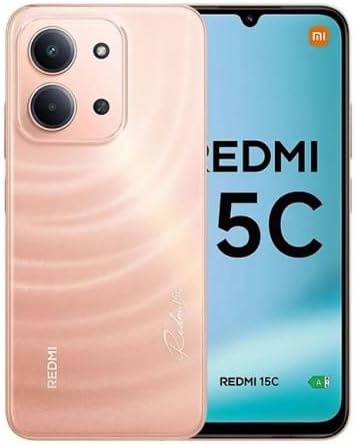
XIAOMI Redmi 15C smartphone in Twilight Orange, showing the front display and the rear camera module.

This image displays the XIAOMI Redmi 15C smartphone in Twilight Orange. The front shows the large display, while the back highlights the camera module and the phone's color. This provides a visual reference for the device's appearance.

Familiarize yourself with the physical layout of your new phone, including button placement, ports, and camera locations.

2. SIM-kort installation

The Redmi 15C supports Dual Nano SIM cards and one Micro SD card. Ensure your carrier is compatible with the device's network bands before installation.

Carrier compatibility chart for XIAOMI Redmi 15C, showing T-Mobile, Mint, Tello, Ultra, and outside USA as compatible, and Verizon, AT&T, Xfinity, Boost, Virgin, Visible, Cricket, and other CDMA carriers as not compatible.

This image illustrates the carrier compatibility for the XIAOMI Redmi 15C. It clearly lists compatible carriers (T-Mobile, Mint, Tello, Ultra, and outside USA networks) and incompatible carriers (Verizon, AT&T, Xfinity, Boost, Virgin, Visible, Cricket, and other CDMA carriers). This is crucial for users to verify network support.

  1. Find SIM-kortbakken på siden af ​​din telefon.
  2. Sæt SIM-kortudløserværktøjet (eller en lille papirclips) ind i det lille hul ved siden af ​​bakken, og skub forsigtigt, indtil bakken springer ud.
  3. Place your Nano SIM card(s) and/or Micro SD card into the designated slots on the tray, ensuring the gold contacts face downwards.
  4. Skub forsigtigt bakken tilbage i telefonen, indtil den klikker på plads.

3. Tænd/sluk

  • For at tænde: Tryk og hold tænd/sluk-knappen nede, indtil Xiaomi-logoet vises.
  • For at slukke: Tryk på tænd/sluk-knappen og hold den nede, indtil tænd/sluk-menuen vises, og vælg derefter "Sluk".
  • For at genstarte: Tryk på tænd/sluk-knappen og hold den nede, indtil tænd/sluk-menuen vises, og vælg derefter "Genstart".

Betjening af din enhed

1. Grundlæggende navigation

Your Redmi 15C runs on Xiaomi HyperOS based on Android 15. Navigation is primarily touch-based:

  • Tryk på: For at vælge et element eller åbne en app.
  • Stryg: Til at rulle gennem skærme eller lister.
  • At klemme: For at zoome ind eller ud på fotos og web sider.
  • Langt tryk: For at få adgang til kontekstmenuer eller flytte ikoner.

2. Kamerabrug

The phone features a 50MP main camera and an 8MP front camera.

  • Åbn appen "Kamera" fra din startskærm eller appskuffe.
  • Switch between photo, video, portrait, and other modes using the options at the bottom of the screen.
  • Tryk på udløserknappen for at tage et billede eller starte/stoppe videooptagelse.
  • Utilize features like HDR mode, Soft-light ring (front camera), and AI tools for enhanced photography.

Rear camera video recording supports 1080p (1920x1080) HD at 30 fps and 720p (1280x720) HD at 30 fps. Front camera video recording also supports 1080p and 720p HD at 30 fps.

3. Forbindelse

  • Wi-Fi: Gå til Indstillinger > Wi-Fi to connect to available networks. Supports 2.4GHz and 5GHz.
  • Bluetooth: Gå til Indstillinger > Bluetooth to pair with other Bluetooth devices (version 5.1).
  • GPS: Enheden understøtter GPS, AGPS, GLONASS, Beidou og Galileo for præcise positionsbestemmelsestjenester.
  • 3.5 mm hovedtelefonstik: Located on the device for wired audio accessories.

4. Batteristyring

Your Redmi 15C is equipped with a 6000mAh (typ) battery and supports 33W turbo charging.

  • Use the included 33W charger for optimal charging speed.
  • For at tjekke batteriforbruget, gå til Indstillinger > Batteri.
  • Enable battery saver modes to extend battery life when needed.

Opretholdelse

1. Rengøring af din enhed

Sådan bevarer du telefonens udseende og funktionalitet:

  • Brug en blød, fnugfri klud til at tørre skærmen og kabinettet af.
  • Undgå at bruge skrappe kemikalier, slibende rengøringsmidler eller aerosolspray.
  • Til genstridige pletter, let dampRengør kluden med vand eller en skærmrenser beregnet til elektronik.

2. Softwareopdateringer

Regelmæssige softwareopdateringer giver nye funktioner, sikkerhedsforbedringer og fejlrettelser. Det anbefales at holde din enheds software opdateret.

  • Connect your phone to a stable Wi-Fi network.
  • Gå til Indstillinger > Om telefonen > Systemopdatering for at søge efter og installere tilgængelige opdateringer.

3. Lagerstyring

Your device comes with 128GB of internal storage. You can expand this using a Micro SD card.

  • For at tjekke lagerforbruget, gå til Indstillinger > Lager.
  • Ryd cachen regelmæssigt, slet unødvendige filer files, and uninstall unused apps to free up space.

Fejlfinding

1. Almindelige problemer og løsninger

SpørgsmålMulig løsning
Telefonen tænder ikkeSørg for, at batteriet er opladet. Tilslut den til opladeren i mindst 10 minutter, og prøv derefter at tænde den.
Apps går ned eller fryserRyd appens cache (Indstillinger > Apps > [Appnavn] > Lager > Ryd cacheHvis problemet fortsætter, skal du geninstallere appen.
Dårligt netværkssignalCheck SIM card installation. Ensure you are in an area with network coverage. Restart the phone. Verify carrier compatibility (refer to Setup section).
Batteriet aflades hurtigtReduce screen brightness, close background apps, disable unnecessary features like GPS or Bluetooth when not in use. Check battery usage in settings to identify power-hungry apps.

2. Fabriksindstilling

A factory reset will erase all data on your phone and restore it to its original factory settings. This can resolve persistent software issues but should be used as a last resort.

  • Backup your data: Before proceeding, back up all important data to a cloud service or computer.
  • Gå til Indstillinger > Om telefonen > Fabriksindstilling.
  • Følg instruktionerne på skærmen for at bekræfte nulstillingen.

Specifikationer

Below are the detailed technical specifications for the XIAOMI Redmi 15C (Model: 25078RA3EL).

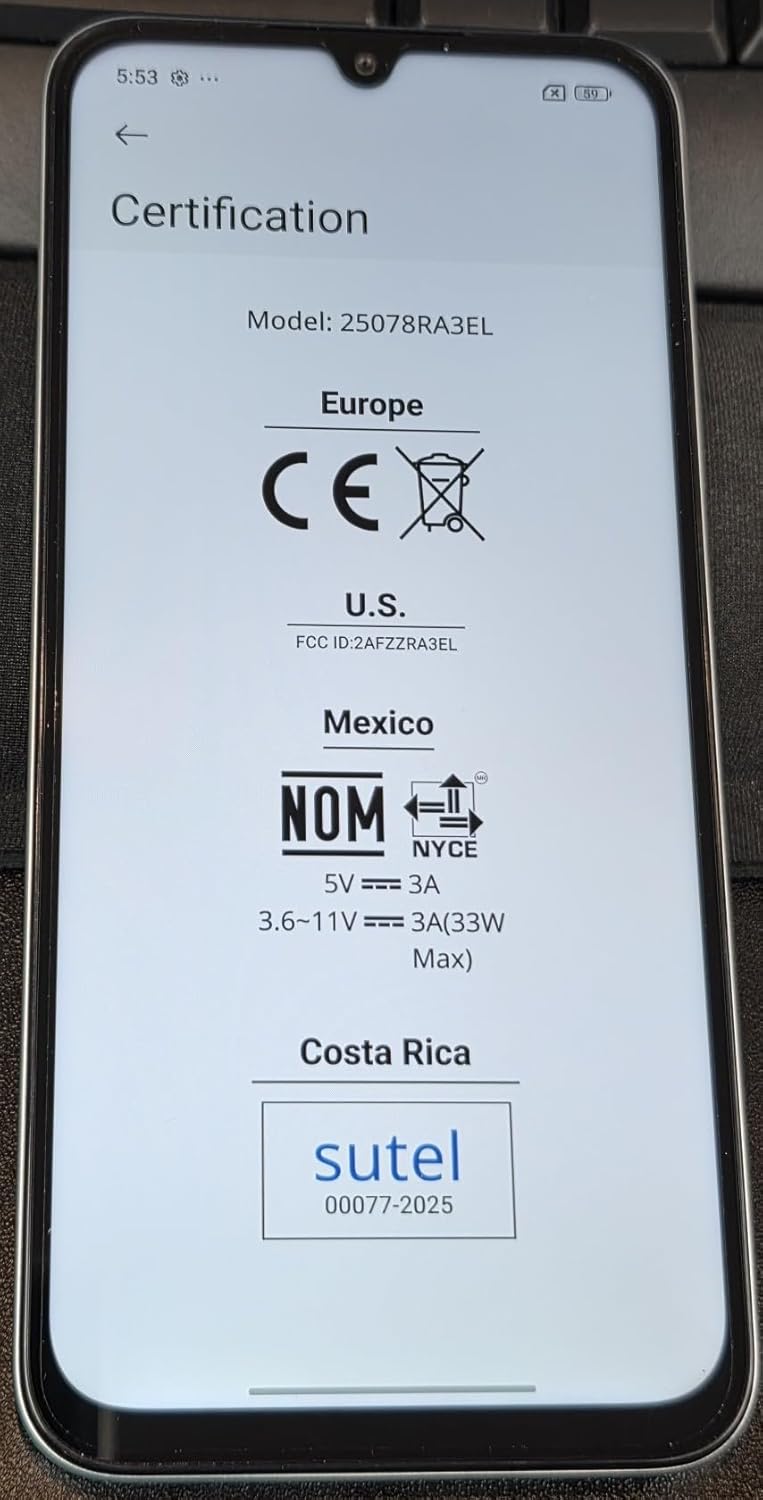
Certification details for XIAOMI Redmi 15C, showing Europe CE, US FCC ID: 2AFZZRA3EL, Mexico NOM, and Costa Rica Sutel certifications.

This image displays the certification information for the XIAOMI Redmi 15C, including CE for Europe, FCC ID: 2AFZZRA3EL for the US, NOM for Mexico, and Sutel for Costa Rica. This confirms the device's compliance with various regional regulatory standards.

FeatureDetalje
ModelnavnRedmi 15C (25078RA3EL)
OperativsystemXiaomi HyperOS baseret på Android 15
ProcessorOcta Core Helio G81 2.0 GHz, GPU Mali-G52 MC2
Vise6.9 Inches FHD+ DotDisplay, 720 x 1600 Resolution, 120Hz Refresh Rate (up to 144Hz for supported apps), 288Hz Touch Sampling Rate, 700nits (typ) / 850 nits HBM Brightness
VÆDDER4 GB
Intern opbevaring128 GB (kan udvides via Micro SD)
Bagkamera50MP main camera (5P lens, f/1.8) + Auxiliary lens
Forreste kamera8 MP (f/2.0)
Batteri6000mAh (typ) Nonstandard Battery, 33W Turbo Charging
ForbindelseWi-Fi (2.4GHz | 5GHz), Bluetooth 5.1, GPS (AGPS, GLONASS, Beidou, Galileo), USB Type-C
Network Bands (USA)Only Works on TMOBILE - MiNT IN THE USA Market (Previous sim card activated). Outside USA: 4G VoLTE Worldwide Unlocked Dual Nano sim. 2G: GSM:2/3/5/8; 3G: WCDMA:1/5/8; 4G: LTE FDD: 1/2/3/4/5/7/8/20/28; 4G: LTE TDD: 38/40/41.
SensorerBageste fingeraftrykssensor, AI-ansigtsoplåsning, Nærhedssensor, Omgivende lyssensor, Accelerometer
Lydstik3.5 mm
Dimensioner7 x 4 x 2 tommer (pakkemål)
Vægt6 ounce
FarveTwilight Orange
CertificeringerTÜV Rheinland Low Blue Light (Software Solution) Certified, TÜV Rheinland Circadian Friendly Certified, TÜV Rheinland Flicker Free Certified, FCC ID: 2AFZZRA3EL

Garanti og support

For detaljerede garantioplysninger og kundesupport henvises til den officielle XIAOMI-side. webwebstedet eller kontakt deres kundeservice direkte. Specifikke garantivilkår kan variere afhængigt af region og forhandler.

You can visit the official XIAOMI store for more information: XIAOMI Officiel Butik

Relaterede dokumenter - Redmi 15C

Preview Guía de Inicio Rápido Redmi 15C: Configuración, Seguridad og Regulación
Officiel start på en smartphone Redmi 15C, der er en konfigurationsplads, sikkerhedsforskrifter, informationsregulering af UE og FCC, og dispositive karakteristika.
Preview Guía de Inicio Rápido y Tarjeta de Garantía Redmi 15C
Officiel start og garanti for smartphone Xiaomi Redmi 15C, inklusiv information om sikkerhed, regler og detaljer om garanti.
Preview Xiaomi Redmi Note 10S hurtigstartguide
Kom godt i gang med din Xiaomi Redmi Note 10S med denne hurtigstartguide. Lær om opsætning, MIUI, funktioner til dobbelt SIM-kort, sikkerhedsforanstaltninger og juridiske oplysninger.
Preview Xiaomi Redmi 5A brugervejledning
Omfattende brugervejledning til Xiaomi Redmi 5A-smartphonen, med detaljerede oplysninger om opsætning, MIUI-funktioner, SIM-kortadministration, dobbelte SIM-funktioner, sikkerhedsforanstaltninger, miljømæssig bortskaffelse, overholdelse af EU- og FCC-regler og SAR-eksponeringsoplysninger.
Preview Xiaomi Redmi 4x Global brugermanual - Opsætning og funktioner
Omfattende brugermanual til Xiaomi Redmi 4x Global, der dækker installation af SIM-kort, enhedsopsætning, betjening, sikkerhedsforanstaltninger og EU-overensstemmelse.
Preview Redmi Note 11 Pro hurtigstartguide | Xiaomi
Officiel hurtigstartguide til Xiaomi Redmi Note 11 Pro-smartphonen. Lær om opsætning, MIUI, brug af SIM-kort, sikkerhedsforanstaltninger, bortskaffelse af WEEE, EU- og FCC-regler, SAR-oplysninger og produktspecifikationer.