1. Introduktion
This manual provides essential information and instructions for the safe and efficient use of your XIAOMI Redmi 15C 4G LTE smartphone. Please read this manual thoroughly before using your device to ensure optimal performance and longevity. Keep this manual for future reference.
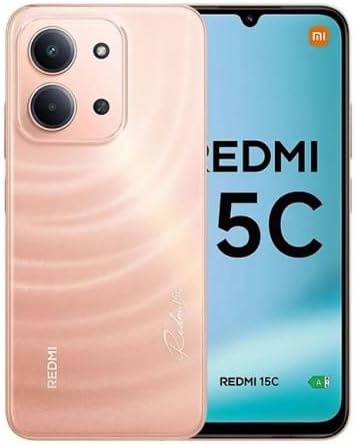
Figur 1: XIAOMI Redmi 15C Smartphone. This image displays the front and back of the Redmi 15C in Twilight Orange, highlighting its design and camera module.
2. Hvad er der i æsken
Upon opening your XIAOMI Redmi 15C package, verify that all items are present:
- XIAOMI Redmi 15C Smartphone
- 33W vægoplader
- USB Type-C-kabel (adapter)
- Telefon etui
- SIM-udkastningsværktøj (kan være inkluderet)
- Hurtigstartguide (kan være inkluderet)
3. Opsætning
3.1. Installation af SIM-kort og MicroSD-kort
The Redmi 15C supports Dual Nano SIM cards and one MicroSD card for expanded storage.
- Find SIM-kortbakken på siden af din enhed.
- Sæt SIM-kortudkastningsværktøjet i det lille hul ved siden af bakken, og tryk godt ned, indtil bakken springer ud.
- Placer dit/dine Nano SIM-kort og/eller MicroSD-kort i de dertil beregnede stik på bakken, og sørg for, at de gyldne kontakter vender nedad. Se diagrammet på bakken for korrekt retning.
- Sæt forsigtigt bakken tilbage i telefonen, indtil den klikker på plads.
Important Carrier Compatibility Information:

Figur 2: Carrier Compatibility. This chart indicates that the Redmi 15C is compatible with T-Mobile, Mint, Tello, Ultra, and other networks outside the USA. It is NOT compatible with Verizon, AT&T, Xfinity, Boost, Virgin, Visible, Cricket, or other CDMA carriers.
For USA users, this device is primarily compatible with T-Mobile, Mint, and Tello networks. It supports 4G VoLTE worldwide. Please verify compatibility with your specific carrier before use.
3.2. Første opstart og opsætning
- Tryk og hold tænd/sluk-knappen nede, indtil XIAOMI-logoet vises.
- Følg vejledningen på skærmen for at vælge dit sprog og din region og oprette forbindelse til et Wi-Fi-netværk.
- Log ind med din Google-konto, eller opret en ny for at få adgang til Google-tjenester og Play Butik.
- Set up security features such as a PIN, pattern, password, fingerprint, or AI face unlock.
4. Betjening af din enhed
4.1. Skærmfunktioner
The Redmi 15C features a 6.9-inch FHD+ DotDisplay with a resolution of 720x1600 pixels. Key display characteristics include:
- Opdateringshastighed: Up to 120Hz (adjustable up to 144Hz for supported applications).
- Berør Sampling sats: Up to 288Hz for responsive interaction.
- Lysstyrke: 700 nits (typical), 850 nits (HBM).
- Øjenkomfort: TÜV Rheinland Low Blue Light, Circadian Friendly, and Flicker Free Certified for reduced eye strain.
4.2. Kamerabrug
The device is equipped with a 50MP AI dual camera system on the rear and an 8MP front camera.
- Bagkamera: 50MP main lens (f/1.8) with an auxiliary lens. Supports 1080p HD video recording at 30 fps.
- Forreste kamera: 8MP lens (f/2.0). Features include filmCamera, HDR mode, Soft-light ring, Portrait mode, and Time-lapse. Supports 1080p HD video recording at 30 fps.
To access the camera, tap the Camera icon on your home screen or lock screen. Select modes like Photo, Video, Portrait, or More for additional options.
4.3. Batteri og opladning
The Redmi 15C is powered by a 6000mAh (typical) battery and supports 33W turbo charging.
- Use the included 33W wall charger and USB Type-C cable for optimal charging speed.
- Avoid using non-certified chargers or cables to prevent damage to the device.
- The device is designed for worry-free use for up to 2 days on a single charge under typical usage conditions.
4.4. Forbindelse
Your device offers various connectivity options:
- Mobil: Dual Nano SIM support for 4G LTE (FDD and TDD bands).
- Wi-Fi: Understøtter 2.4 GHz og 5 GHz Wi-Fi-netværk.
- Bluetooth: Bluetooth 5.1 til tilslutning af trådløst tilbehør.
- GPS: Integrated GPS, AGPS, GLONASS, Beidou, and Galileo for precise location services.
- Lydstik: Standard 3.5 mm hovedtelefonstik.
4.5. Sikkerhedsfunktioner
Enhance your device security with:
- Bageste fingeraftrykssensor: Lås din telefon op hurtigt og sikkert med dit fingeraftryk.
- AI-ansigtslåsning: Brug ansigtsgenkendelse til at låse din enhed op.
- PIN/Mønster/Adgangskode: Standard lock screen security options.
5. Vedligeholdelse
5.1. Softwareopdateringer
Regularly update your device's operating system (Xiaomi HyperOS based on Android 15) to ensure optimal performance, security, and access to new features.
- Gå til Indstillinger > Om telefonen > Systemopdatering for at søge efter og installere tilgængelige opdateringer.
- Ensure your device has sufficient battery charge and a stable internet connection before starting an update.
5.2. Rengøring af din enhed
To clean your Redmi 15C:
- Brug en blød, fnugfri klud.
- Undgå at bruge skrappe kemikalier, slibende rengøringsmidler eller trykluft.
- The device has an IP64 dust and water resistance rating, meaning it is protected from dust ingress and splashing water from any direction. However, it is not waterproof; avoid submerging it in water.
5.3. Lagerstyring
Your device comes with 256GB of internal storage and 8GB of RAM. You can expand storage using a MicroSD card.
- Ryd regelmæssigt cache og unødvendige filer files for at opretholde ydeevnen.
- Manage applications and media files to optimize storage space.
6. Fejlfinding
This section addresses common issues you might encounter with your Redmi 15C.
6.1. Enheden tændes ikke
- Sørg for, at batteriet er opladet. Tilslut opladeren, og vent et par minutter, før du forsøger at tænde.
- Tryk og hold tænd/sluk-knappen nede i mindst 10-15 sekunder for at fremtvinge en genstart.
6.2. Poor Network Signal or No Service
- Kontroller, om dit SIM-kort er isat korrekt.
- Verify that your carrier is compatible with the device (refer to Section 3.1).
- Genstart enheden.
- Gå til Settings > SIM cards & mobile networks and ensure your SIM is enabled and network settings are correct.
6.3. Hurtig batteridræning
- Reducer skærmens lysstyrke.
- Luk ubrugte programmer, der kører i baggrunden.
- Deaktiver Wi-Fi, Bluetooth eller GPS, når de ikke er i brug.
- Tjek batteriforbruget i Indstillinger > Batteri til at identificere strømkrævende apps.
6.4. Apps der går ned eller fryser
- Ryd cachen for den problematiske app (Indstillinger > Apps > [Appnavn] > Lager > Ryd cache).
- Opdater appen til den nyeste version fra Google Play Butik.
- Hvis problemet fortsætter, skal du afinstallere og geninstallere appen.
7. Specifikationer
Detailed technical specifications for the XIAOMI Redmi 15C (Model 25078RA3EL):
| Feature | Specifikation |
|---|---|
| Modelnavn | Redmi 15C (25078RA3EL) |
| Operativsystem | Xiaomi HyperOS baseret på Android 15 |
| Processor | Octa Core Helio G81 (2.0GHz) |
| GPU | Mali-G52 MC2 |
| Vise | 6.9-inch FHD+ DotDisplay |
| Opløsning | 720 x 1600 pixels |
| Opdateringshastighed | Up to 120Hz (144Hz for supported apps) |
| VÆDDER | 8 GB |
| Intern opbevaring | 256 GB |
| Udvidelig opbevaring | MicroSD (dedicated slot) |
| Bagkamera | 50MP Main (f/1.8) + Auxiliary lens |
| Forreste kamera | 8 MP (f/2.0) |
| Batterikapacitet | 6000 mAh (typisk) |
| Opladning | 33W turboopladning (USB Type-C) |
| Forbindelse | 4G LTE, Wi-Fi (2.4 GHz/5 GHz), Bluetooth 5.1, GPS (AGPS, GLONASS, Beidou, Galileo) |
| SIM-type | Dobbelt nano-SIM-kort |
| Lydstik | 3.5 mm |
| Sensorer | Bageste fingeraftrykssensor, AI-ansigtslåsning, nærhedssensor, omgivende lyssensor, accelerometer |
| Dimensioner | 7 x 4 x 2 tommer (pakke) |
| Vægt | 6 ounce |
| Støv- og vandtæthed | IP64 |
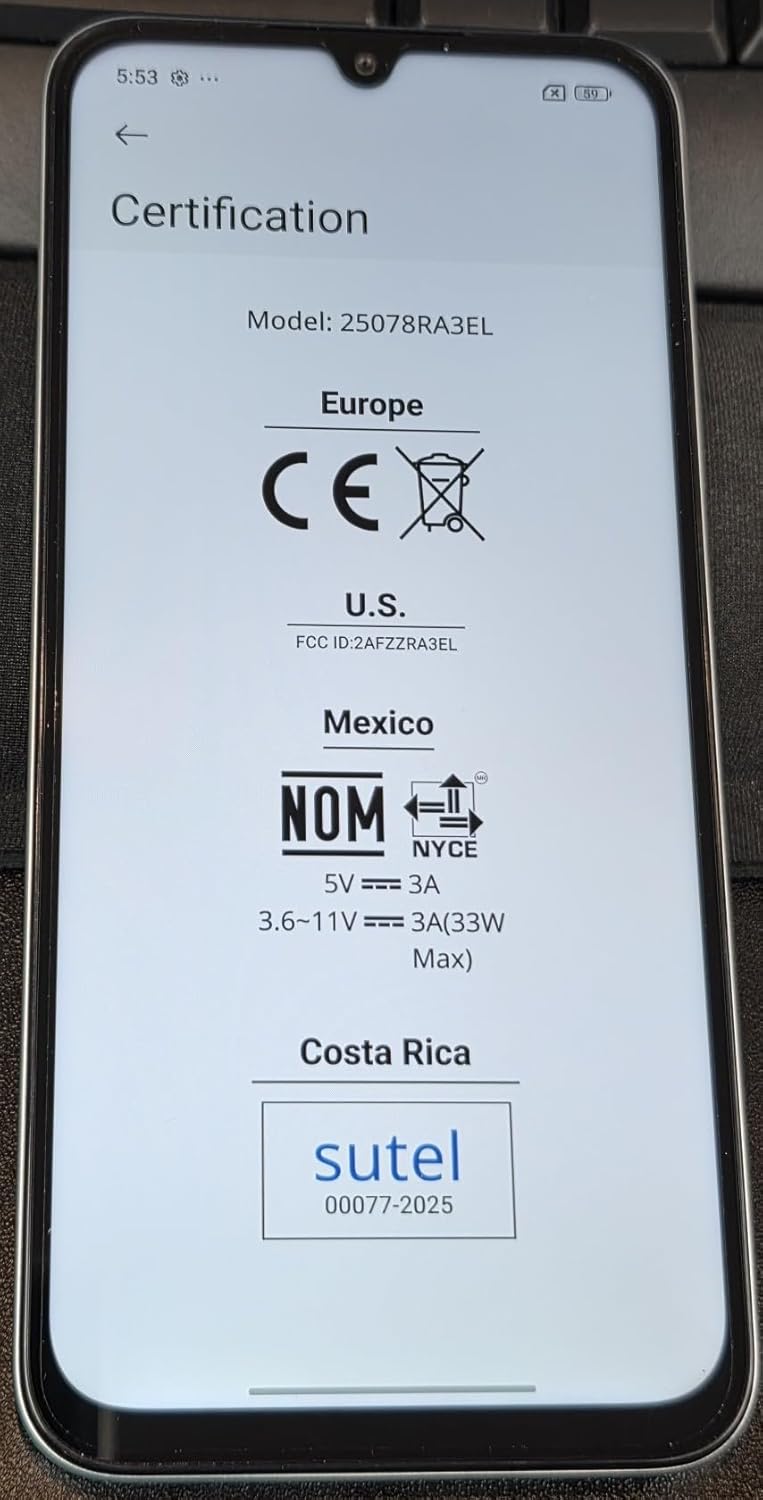
Figur 3: Device Certifications. This image displays the regulatory compliance information for the Redmi 15C, including CE for Europe, FCC ID: 2AFZZRA3EL for the U.S., NOM for Mexico, and Sutel for Costa Rica.
8. Sikkerhedsoplysninger
Overhold venligst følgende sikkerhedsretningslinjer:
- Forsøg ikke at adskille eller modificere enheden.
- Brug kun godkendte opladere og tilbehør.
- Undgå at udsætte enheden for ekstreme temperaturer, direkte sollys eller væsker.
- Bortskaf enheden og dens batteri på en ansvarlig måde i henhold til lokale regler.
- Hold en sikker afstand til medicinsk udstyr, når du bruger telefonen.
9. Garanti og support
For warranty information and customer support, please refer to the warranty card included in your product package or visit the official XIAOMI website. You can also contact XIAOMI customer service for assistance with your Redmi 15C.
Fabrikant: Xiaomi
Modelnummer: Redmi 15C (25078RA3EL)
Dato først tilgængelig: 7. august 2025
For yderligere hjælp, besøg venligst Official XIAOMI Store on Amazon.


