1. Introduktion
This manual provides essential information for the proper setup, operation, and maintenance of your XIAOMI Redmi 15C 4G LTE smartphone. Please read this guide thoroughly to ensure optimal performance and longevity of your device.
2. Pakkens indhold
Bekræft, at alle varer er til stede i din produktemballage:
- XIAOMI Redmi 15C 4G LTE Smartphone
- 33W vægoplader
- Adapter
- Telefon etui
- SIM-udkastningsværktøj (kan være inkluderet)
- Hurtigstartguide (kan være inkluderet)
3. Enhed overview
Gør dig bekendt med de fysiske komponenter på din Redmi 15C smartphone.

Billede 3.1: For og bag view of the XIAOMI Redmi 15C smartphone. The image displays the device's 6.9-inch screen, the front camera notch, and the rear camera module with two lenses and a flash.
- Forreste display: 6.9-tommer FHD+ DotDisplay.
- Forreste kamera: Placeret øverst i midten af displayet.
- Bagkameramodul: Contains the 50MP main camera and an auxiliary lens.
- Power knap: Typically on the right side, often integrated with the fingerprint sensor.
- Lydstyrkeknapper: Located near the power button.
- USB Type-C-port: Til opladning og dataoverførsel, placeret i bunden.
- 3.5 mm hovedtelefonstik: Til lydudgang.
- SIM/MicroSD-kortslot: Located on the side for inserting SIM cards and expandable storage.
4. Opsætningsvejledning
4.1. Isætning af SIM- og MicroSD-kort
- Find SIM-kortbakken på siden af enheden.
- Sæt SIM-kortudkastningsværktøjet i det lille hul ved siden af bakken, og tryk forsigtigt, indtil bakken springer ud.
- Place your Nano SIM cards (up to two) and/or a MicroSD card into the designated slots on the tray. Ensure the gold contacts face downwards.
- Sæt forsigtigt bakken tilbage i telefonen, indtil den klikker på plads.
4.2. Første opstart og opladning
- Tryk og hold tænd/sluk-knappen nede, indtil XIAOMI-logoet vises.
- Følg vejledningen på skærmen for at fuldføre den indledende opsætning, herunder valg af sprog, Wi-Fi-forbindelse og opsætning af Google-konto.
- To charge the device, connect the provided 33W wall charger and USB Type-C cable to the phone's charging port. The device supports 33W turbo charging.
4.3. Network Compatibility (USA Users)
For users in the USA, this device is primarily compatible with specific carriers. Please review kompatibilitetsoplysningerne nedenfor:

Billede 4.1: Network compatibility chart. The chart indicates that the device is compatible with T-Mobile, Mint, Tello, and Ultra in the USA, and generally compatible outside the USA. It is NOT compatible with Verizon, AT&T, Xfinity, Boost, Virgin, Visible, Cricket, or other CDMA carriers.
Compatible USA Carriers: T-Mobile, Mint, Tello, Ultra (requires previous SIM card activation).
Not Compatible USA Carriers: Verizon, AT&T, Xfinity, Boost, Virgin, Visible, Cricket, and other CDMA carriers.
The device supports 4G VoLTE worldwide and operates on the following bands:
- 2G GSM: 2/3/5/8
- 3G WCDMA: 1/5/8
- 4G LTE FDD: 1/2/3/4/5/7/8/20/28
- 4G LTE TDD: 38/40/41
5. Betjeningsvejledning
5.1. Grundlæggende navigation
- Tænd/sluk: Tryk på tænd/sluk-knappen og hold den nede. Vælg 'Sluk' eller 'Genstart'.
- Skærmlås/lås op: Press the Power button briefly. Use fingerprint, face unlock, or PIN/pattern/password to unlock.
- Lydstyrkekontrol: Brug knapperne for lydstyrke op/ned.
- Startskærm: Swipe up from the bottom of the screen (if using gestures) or tap the Home button (if using navigation bar).
5.2. Skærmindstillinger
Your Redmi 15C features a 6.9-inch FHD+ DotDisplay with a resolution of 720x1600 pixels. Key display features include:
- Opdateringshastighed: Up to 120Hz for smoother visuals.
- Lysstyrke: 700 nits (typical), 850 nits (HBM).
- Øjenkomfort: TÜV Rheinland Low Blue Light, Circadian Friendly, and Flicker Free Certified for reduced eye strain.
5.3. Kamerabrug
The device is equipped with a 50MP AI dual camera system on the rear and an 8MP front camera.
- Bagkamera: 50MP main lens (f/1.8) with an auxiliary lens. Supports 1080p HD video recording at 30 fps.
- Forreste kamera: 8MP (f/2.0). Features include filmCamera, HDR mode, Soft-light ring, Portrait mode, and Time-lapse. Supports 1080p HD video recording at 30 fps.
- For at åbne kameraet skal du trykke på ikonet for Kamera-appen på din startskærm eller låseskærm.
5.4. Batteristyring
The Redmi 15C is powered by a large 6000mAh (typical) battery, designed for extended usage. To optimize battery life:
- Utilize the built-in battery saver modes.
- Reducer skærmens lysstyrke eller aktiver adaptiv lysstyrke.
- Luk ubrugte programmer, der kører i baggrunden.
- Deaktiver Wi-Fi, Bluetooth eller GPS, når de ikke er i brug.
5.5. Sikkerhedsfunktioner
Enheden tilbyder flere sikkerhedsmuligheder:
- Bageste fingeraftrykssensor: Registrer dine fingeraftryk for hurtig og sikker oplåsning.
- AI-ansigtslåsning: Brug dit ansigt til at låse enheden op.
- PIN, mønster, adgangskode: Standard Android-sikkerhedsindstillinger.
5.6. Forbindelse
The Redmi 15C supports various connectivity options:
- Wi-Fi: Understøtter 2.4 GHz og 5 GHz båndene.
- Bluetooth: Version 5.1.
- GPS: Includes GPS, AGPS, GLONASS, Beidou, and Galileo for accurate location services.
- Note: Det gør denne enhed IKKE inkluderer NFC-funktionalitet.
6. Vedligeholdelse
6.1. Rengøring af din enhed
- Brug en blød, fnugfri klud til forsigtigt at tørre telefonens skærm og kabinet af.
- Undgå at bruge skrappe kemikalier, slibende rengøringsmidler eller aerosolspray.
- Ensure no moisture enters ports or openings.
6.2. Softwareopdateringer
Regularly check for and install system updates to ensure your device has the latest features, security patches, and performance improvements. You can usually find this option in Settings > About phone > System update.
7. Fejlfinding
This section addresses common issues you might encounter with your Redmi 15C.
7.1. Enheden tændes ikke
- Sørg for, at batteriet er opladet. Tilslut opladeren, og vent et par minutter, før du forsøger at tænde.
- Tryk og hold tænd/sluk-knappen nede i mindst 10-15 sekunder for at fremtvinge en genstart.
7.2. Poor Network Signal or No Service
- Kontroller, at dit SIM-kort er isat korrekt.
- Check if your carrier is compatible with the device (refer to Section 4.3).
- Genstart enheden.
- Go to Settings > SIM cards & mobile networks and ensure your SIM is enabled and network settings are correct.
- Try moving to an area with better network coverage.
7.3. Apps der går ned eller fryser
- Luk og åbn appen igen.
- Ryd appens cache og data (Indstillinger > Apps > [Appnavn] > Lager > Ryd cache/Ryd data).
- Sørg for, at appen er opdateret til den seneste version.
- Genstart din telefon.
7.4. Hurtig batteridræning
- Review battery usage in Settings > Battery to identify power-hungry apps.
- Reducer skærmens lysstyrke og varigheden af skærmens timeout.
- Disable background app refresh for non-essential applications.
- Sørg for, at din enheds software er opdateret.
8. Specifikationer
Detailed technical specifications for the XIAOMI Redmi 15C smartphone:
| Feature | Specifikation |
|---|---|
| Modelnavn | Redmi 15C (25078RA3EL) |
| Operativsystem | Xiaomi HyperOS baseret på Android 15 |
| Processor | Octa Core Helio G81 2.0GHz (GPU Mali-G52 MC2) |
| Vise | 6.9 Inches FHD+ DotDisplay, 720 x 1600 Resolution |
| Opdateringshastighed | Op til 120 Hz |
| VÆDDER | 4 GB |
| Intern opbevaring | 128 GB |
| Bagkamera | 50MP Main (f/1.8) + Auxiliary lens |
| Forreste kamera | 8 MP (f/2.0) |
| Batterikapacitet | 6000 mAh (typisk) |
| Opladning | 33W Turbo Charging (33W wall charger included) |
| Forbindelse | Wi-Fi (2.4GHz | 5GHz), Bluetooth 5.1, GPS, AGPS, GLONASS, Beidou, Galileo |
| Lydstik | 3.5 mm |
| Sikkerhed | Rear Fingerprint Sensor, AI Face Unlock |
| Dimensioner (pakke) | 7 x 4 x 2 tommer |
| Varens vægt | 6 ounce |
| FCC ID | 2AFZZRA3EL |
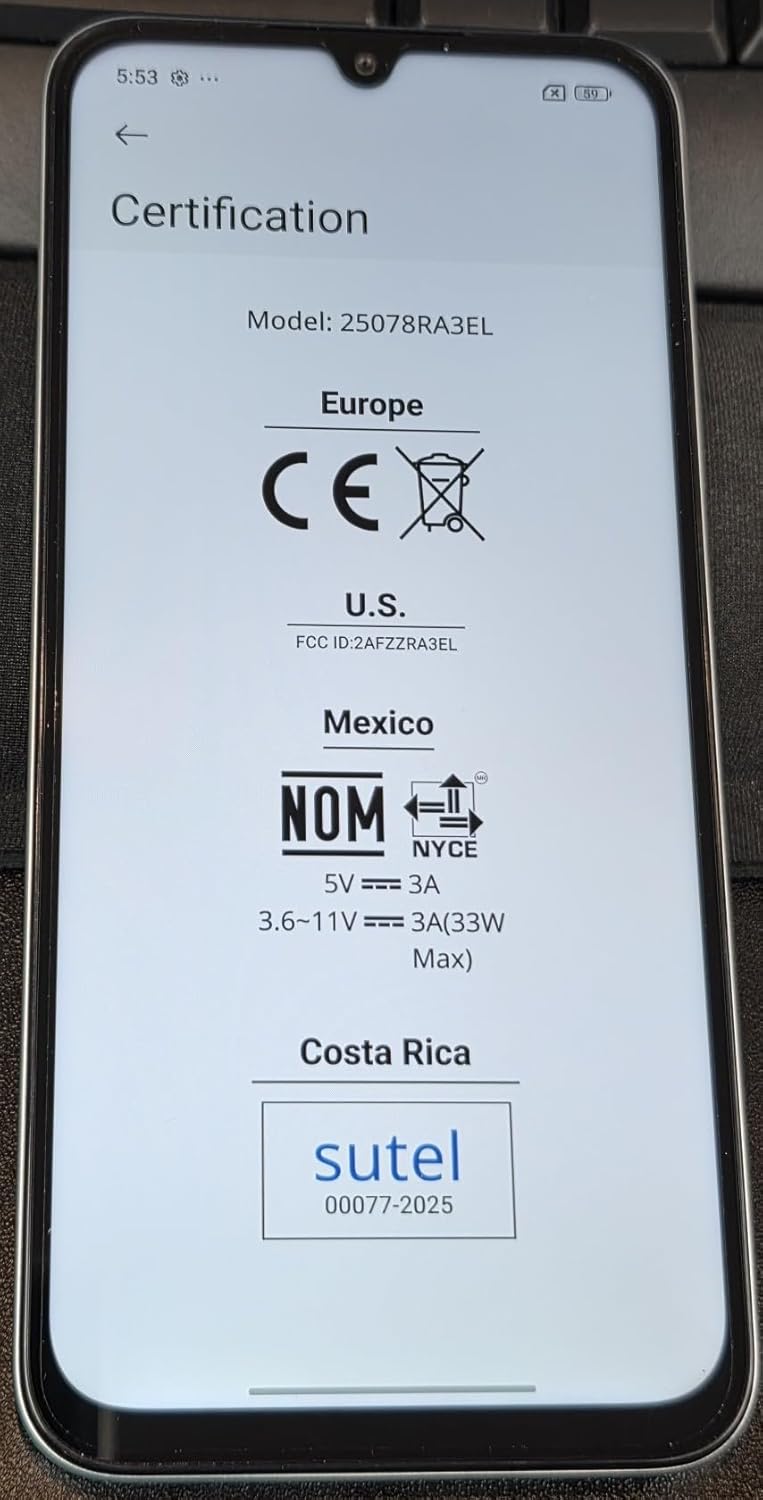
Billede 8.1: Screen displaying certification details for the XIAOMI Redmi 15C, including Model: 25078RA3EL, CE mark for Europe, FCC ID: 2AFZZRA3EL for U.S., NOM for Mexico, and SUTEL for Costa Rica.
9. Sikkerhedsoplysninger
Overhold følgende sikkerhedsretningslinjer for at forhindre skader på din enhed eller personskade på dig selv:
- Udsæt ikke enheden for ekstreme temperaturer, direkte sollys eller overdreven fugtighed.
- Brug kun godkendte opladere og tilbehør.
- Undgå at tabe enheden eller udsætte den for kraftige stød.
- Forsøg ikke selv at skille enheden ad eller reparere den. Kontakt autoriseret servicepersonale.
- Bortskaf enheden og dens batteri på en ansvarlig måde i henhold til lokale regler.
10. Garanti og support
For warranty information, please refer to the warranty card included with your purchase or visit the official XIAOMI website. Support resources, including FAQs and contact information, can also be found on the manufacturer's official support pages.
Always purchase from authorized retailers to ensure valid warranty coverage.


