Indledning
This manual provides detailed instructions for the setup, operation, and maintenance of your GUSTARD R30 Fully-Discrete R2R Network Streamer DAC. Please read this manual thoroughly before using the device to ensure optimal performance and longevity.
Pakkeliste
Når du åbner pakken, skal du kontrollere, at alle følgende varer er inkluderet:
- GUSTARD R30 Mainframe
- Strømledning
- USB kabel
- Fjernbetjening
- Garantikort

Frontpanel overview
The front panel of the GUSTARD R30 features essential controls and a display for real-time status and operations.
- Power knap: Toggles between standby and active states. The R30 can remain in standby mode when the rear power switch is ON.
- Visningsområde: Shows the current input channel, encoding format, and sampling rate. Displays menu items when in the setup menu.
- Lydstyrke display: Indicates the current volume level, ranging from -63.5dB to 0dB. 'FIXED' indicates bypass mode. Displays menu options during configuration.
- '-' Knap: Normally decreases volume. Cycles through options in the menu.
- Gear knap: Short press switches inputs. Long press enters/exits the menu. Short press navigates items in the menu.
- '+'-knap: Normally increases volume. Cycles through options in the menu.

Bagpanel overview
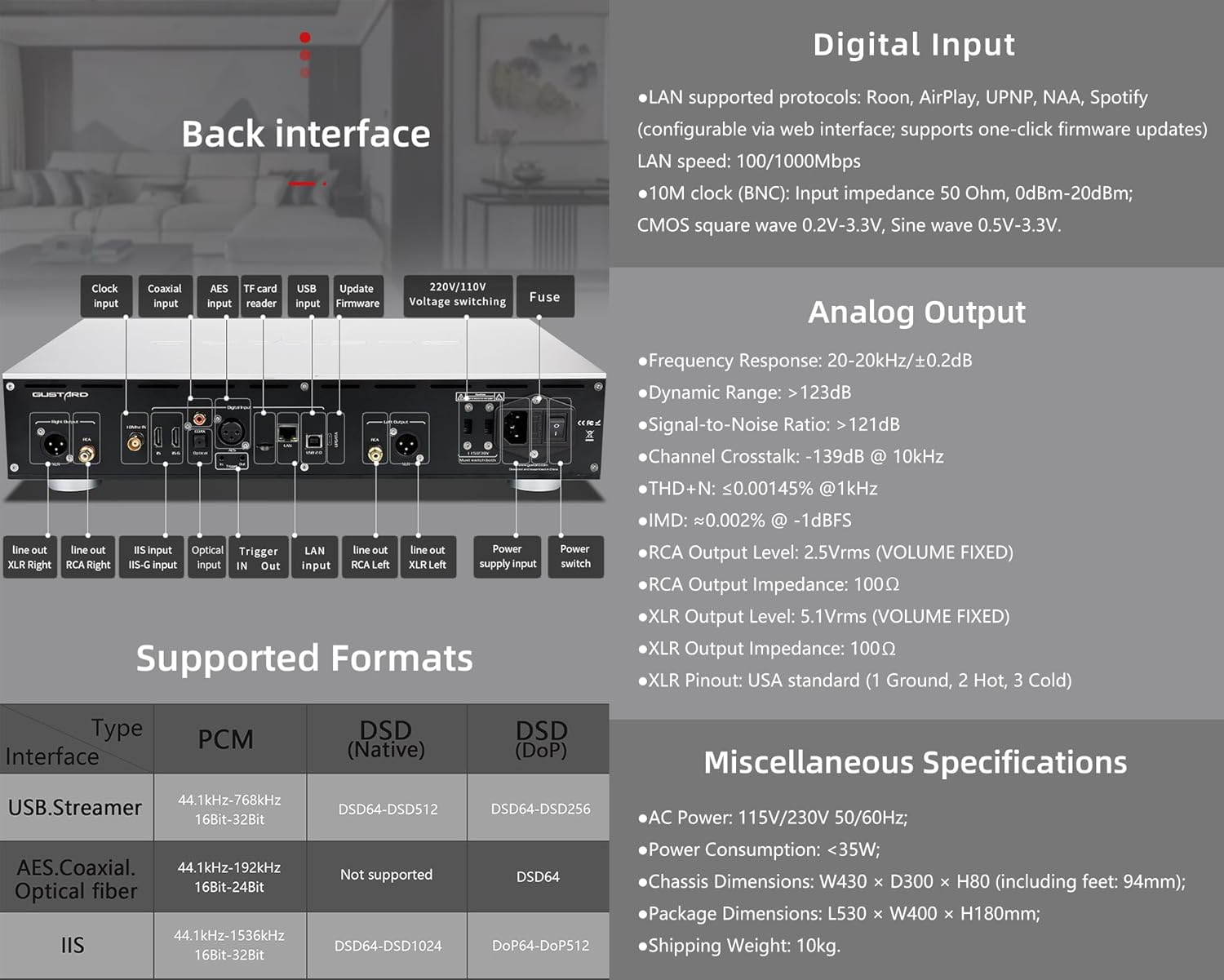
The rear panel provides various input and output connections for the GUSTARD R30.
- Urinput: For external 10MHz clock synchronization.
- Koaksial indgang: Digital lydindgang.
- AES input: Digital lydindgang.
- USB-indgang: For connecting to a computer or other USB audio source.
- LAN-indgang: For network streaming functionality.
- TF-kortlæser: Til firmwareopdateringer.
- Opdater firmware: USB-port til firmwareopdateringer.
- 220V/110V Voltage Skift: Selector for power voltage.
- Sikring: Strømsikring.
- Line Out XLR Right/Left: Balancerede analoge lydudgange.
- Line Out RCA Right/Left: Ubalancerede analoge lydudgange.
- IIS Input (IIS-G): Digital audio input with Gustard pinout.
- Optisk indgang: Digital lydindgang.
- Trigger ind/ud: For 12V trigger control.
- Strømforsyningsindgang: AC-strømtilslutning.
- Afbryderen: Hovedstrømknap.
Important: Ensure both voltage-kontakterne er indstillet til samme lydstyrketage når 220V/110V-volumenet er i drifttage switch, otherwise, it may damage the internal transformer upon powering on.
Skærm- og panelkontroller
The R30 utilizes a large OLED display for real-time status monitoring and functional operations. The diagram below illustrates the main interface display states.
1. OLED-skærm
The display shows the input channel, external clock indication, encoding format, sampling rate, and volume.
2. Input Channel Selection
R30 har 7 indgangskanaler. På hovedgrænsefladen skifter hvert tryk på gearknappen gennem de tilgængelige kanaler i denne rækkefølge: COAX → AES → OPT → USB → STREAMER → IIS(G) → IIS(M*).
***Note: IIS(G) is for fixed Gustard pinout configuration and cannot be adjusted. IIS(M*) supports adjustable pinout configuration.
3. Lydstyrkejustering
- When the main interface is displayed, pressing the "+" or "-" buttons directly adjusts the analog volume attenuation function of the passive preampDæmpningen varierer fra 0 dB til -63.5 dB (i alt 63.5 dB dæmpning).
- Pressing "+" at 0dB activates Fixed Output mode (bypassing attenuation circuit), displaying 'FIXED' indicator.
- When 'FIXED' is displayed, pressing "-" first exits bypass mode before controlling the attenuation level.

Opsætningsmenu
On the main screen, long press the Gear Button to enter the settings menu (hereinafter referred to as the menu button). In this state, the menu button can sequentially switch the menu items to be modified. "+" and "-" buttons are used to adjust the currently selected menu options. When the screen is in the settings menu, long press the menu button again to return to the main screen.
Menustruktur:
- PCM FILTER
- DSD FILTER
- NEJ MODUS
- REF CLOCK
- IIS MODE
- FASE
- TRIGGER CH.
- TRIGGER VOL.
- VISE

Menufunktioner
Få adgang til menuen ved at trykke på Menu-knappen på hovedgrænsefladen. Hver menupunkt er beskrevet nedenfor.
1. PCM FILTER (PCM Digital Filter Adjustment)
R30 anvender en egenudviklet højtydende PCM-oversampLing digitalt filtermodul med tre filtertyper:
- VIVID (Default): Similar to the FAST roll-off type of traditional digital filter, but with better ringing characteristics, very small pre-ringing, and fast convergence post-ringing. It aims for a broad soundstage and sound restoration. Recommended for most music styles.
- GENTLE: Similar to the SLOW roll-off type of traditional digital filter, offering a soft listening experience.
- SAMMENSATTE: A hybrid digital filter, balancing characteristics between Vivid and Gentle for a good listening experience.
2. DSD FILTER (DSD Digital Filter Adjustment)
DSD-filteret har 4 indbyggede båndbreddeindstillinger: 47K (Default), 50K, 60K, 70K.
3. NOS-TILSTAND (Ingen oversampling Filter Mode)
When enabled, the PCM signal bypasses the oversampling filter entirely, decoded straight through the R-2R decoder module. This preserves micro-details and timing integrity. When enabled, there may be a slight clicking sound when the playback data format switches between PCM and DSD.
- DISABLE (Default)
- AKTIVER
4. REF CLOCK (Reference Clock Selection)
The GUSTARD-K2, low-noise clock synthesizer, achieves ultra-low jitter performance. The R30 offers two clock options:
- INTERNAL (Default): Uses the built-in OCXO internal reference.
- EXT. 10MHz: Selects an external 10MHz reference source. It is recommended to connect to GUSTARD C16 or C18 reference 10M master clocks.
If the external clock is lost, powered off, or its frequency deviation is greater than +/-150ppm, "EXT ERR" will be displayed and flash.
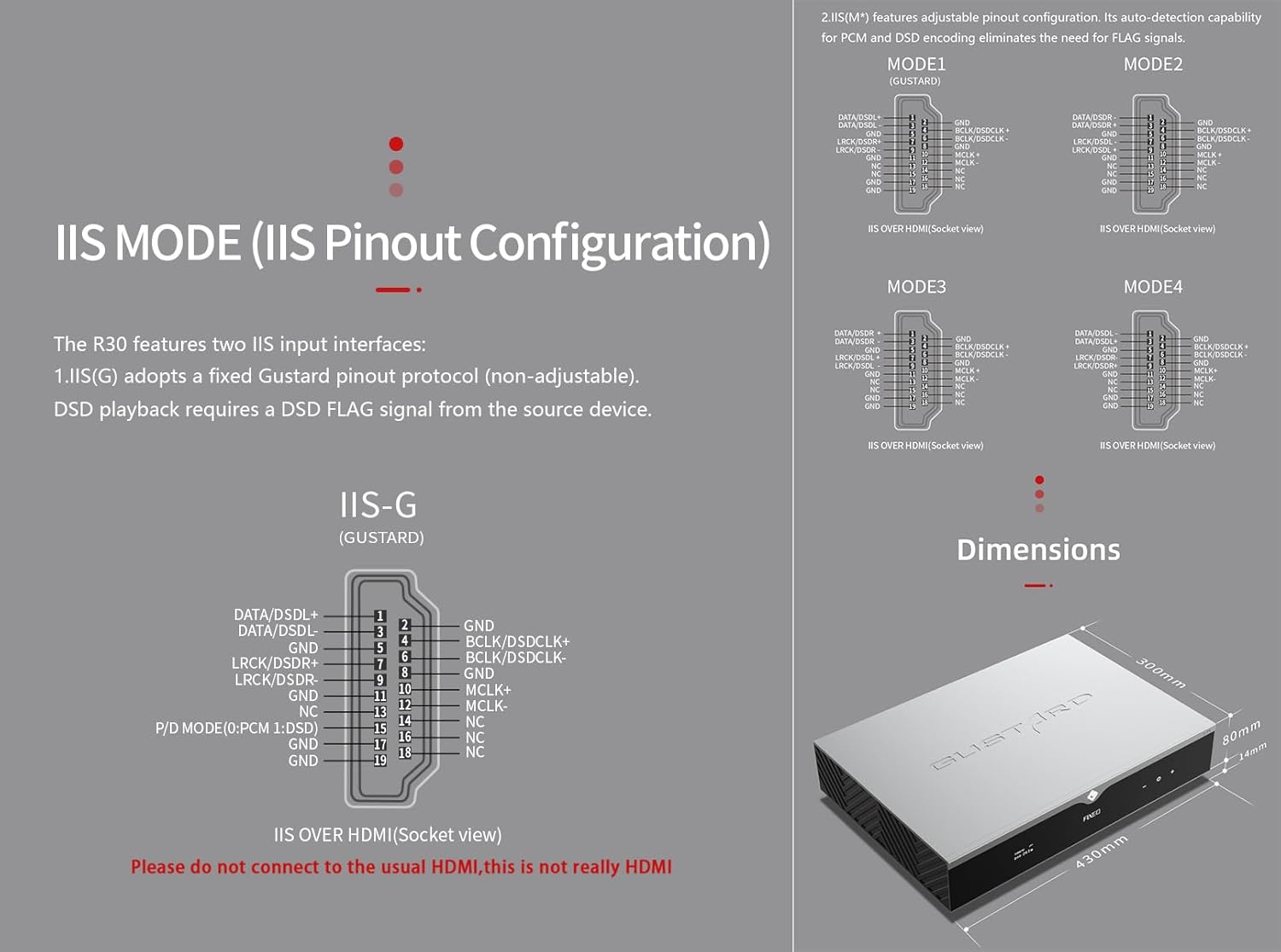
5. IIS MODE (IIS Pinout Mode Selection)
R30 har to IIS-inputgrænseflader:
- IIS(G): Fixed Gustard pinout protocol (non-adjustable). DSD playback requires a DSD FLAG signal from the source device.
- IIS(M*): Features adjustable pinout configuration. Its auto-detection capability for PCM and DSD encoding eliminates the need for FLAG signals.
IIS(M*) adjustable Pinout mode IIS input has four Pinouts: MODE1 (Default), MODE2, MODE3, MODE4. MODE1 is compatible with the GUSTARD mode. If you are connecting to a GUSTARD front end such as U12, U16, U18, S16, S26, etc., you can match them with MODE1, which is the former works in the Gustard output mode.
Please do not connect to the usual HDMI, this is not really HDMI.
6. PHASE (Phase Setting)
Denne funktion tilbyder to muligheder:
- NON-inverted (Default): When non-inverted, the RCA output of R30 is normal phase, and the XLR balanced output is American standard polarity output (1 ground, 2 hot, 3 cold).
- Omvendt: When inverted, only the RCA output is reverse phase, and the XLR balanced output is Japanese/European standard polarity output (1 ground, 2 cold, 3 hot).
7. TRIGGER CH. (Linkage Trigger Start Channel Selection)
The R30 can be triggered by an external 12V linkage signal and automatically turn on from standby mode. When the 12V trigger signal ceases or drops to 0V, automatic standby activation occurs. When the R30 is working, it is switched to the input channel of this setting by the 12V trigger linkage signal.
- LAST (Default): The input channel that was in use before entering standby last time.
- Other options include COAX, AES, OPT, USB, STREAMER, IIS(G), IIS. Selecting any channel activates it upon receiving a 12V trigger signal.
8. TRIGGER VOL. (Link Trigger Boot Volume Selection)
R30 kan tændes fra standby via et eksternt 12V triggersignal og automatisk indstilles til det valgte lydstyrkeniveau. Alternativt skifter et 12V triggersignal udgangen til den forudindstillede lydstyrke under drift. Denne indstilling konfigurerer udgangslydstyrken efter triggeraktivering.
- LAST (Default): The volume used before entering standby.
- FAST: Fixed full-scale output bypassing attenuation.
- -20dB: Output at a volume attenuated to -20dB.
- -30dB: Output at a volume attenuated to -30dB.
- -40dB: Output at a volume attenuated to -40dB.
9. DISPLAY (Screen Brightness Settings)
Long-term high-brightness use of OLED screens can cause screen burn-in or ghosting. Therefore, the R30 is designed to always select automatic screen off, or manually select automatic screen off, which can also reduce interference.
- AUTO (Default): Automatically reduce brightness.
- AUTO OFF: Automatically turn off the screen.
Infrarød fjernbetjening
Når du betjener DAC-produkter, skal du trykke på DAC-knappen og holde den nede i over 3 sekunder for at aktivere DAC-kontroltilstand. AMP/STREAM-tilstande styrer andre Gustard-produkter.
- Standby: Press once to activate R30 from standby. Press once during operation to enter standby.
- Menu: Press to access R30's setup menu.
- Blok med 4 retningstaster: Up/Down navigates menu items. Left/Right adjusts selected options. Center press activates/deactivates mute.
- Tilbage: Returns to main interface.
- Vol-: Decreases output volume on main interface.
- Vol+: Increases output volume on main interface.
Bemærkninger:
- Operational range varies with angle.
- Obstructions between remote and sensor may cause malfunction.
- Remove batteries if unused for more than 1 month.
- Thoroughly clean battery compartment if leakage occurs.
- May accidentally trigger other IR-controlled devices.

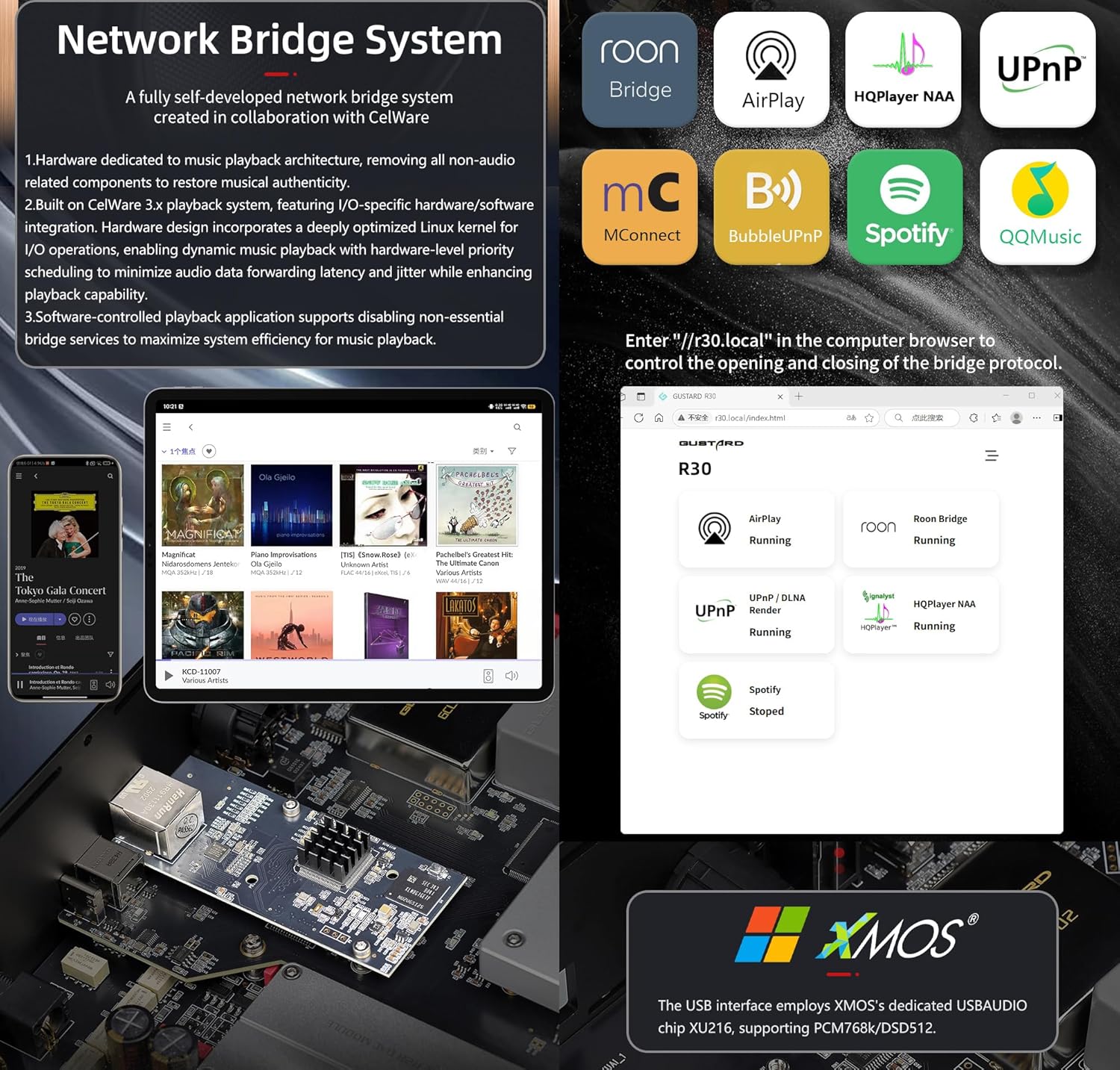
Hurtigstart til Network Bridge Streamer
After connecting R30's RJ45 port to your local network:
- Select the STREAMER channel and await system boot (approximately 1 minute, until "DSD 24.5MHz" appears).
- Access R30's configuration page via: http://R30.local (as shown below). Disable unused streaming protocols on the web grænseflade for at maksimere systemets effektivitet. Firmwareopdateringer udføres også her.
(Mobile/tablet operation pending until dedicated app release)
You can turn off streaming protocols that are not frequently used through the web page to maximize system music playback performance. At the same time, the online upgrade of the Streamer is also operated on the web side.
(Når den dedikerede Streamer-app er startet, kan ovenstående handlinger udføres i appen)
Official Product Video: GUSTARD R30 - User Manual
Produktspecifikationer
Digital Input Support Formats:
| Type | PCM | DSD (Native) | DSD (DoP) |
|---|---|---|---|
| USB.Streamer | 44.1kHz-768kHz 16Bit-32Bit | DSD64-DSD512 | DSD64-DSD256 |
| AES.Coaxial.Optical fiber | 44.1kHz-192kHz 16Bit-24Bit | Ikke understøttet | DSD64 |
| IIS | 44.1kHz-1536kHz 16Bit-32Bit | DSD64-DSD1024 | DoP64-DoP512 |
Analog output:
- Frekvensrespons: 20-20kHz/±0.2dB
- Dynamisk område:> 123dB
- Signal / støj-forhold:> 121dB
- Kanaloverhør: -139dB @ 10kHz
- THD+N: ≤ 0.00145% @1kHz
- IMD: ≈0.002% @ -1dBFS
- RCA-udgangsniveau: 2.5 Vrms (fast lydstyrke)
- RCA-udgangsimpedans: 100Ω
- XLR-udgangsniveau: 5.1 Vrms (fast lydstyrke)
- XLR-udgangsimpedans: 100Ω
- XLR-pinout: USA-standard (1 jord, 2 varm, 3 kold)
Andre specifikationer:
- AC Power: 115V/230V 50/60Hz
- Strømforbrug: <35W
- Chassis Dimensions: W430 × D300 × H80 (including feet: 92mm)
- Package Dimensions: L530 × W400 × H180mm
- Shipping Weight: 10kg (with package)
- 10MHz BNC Input: Input impedance 50 Ohm, 0dBm-20dBm; CMOS square wave 0.2V-3.3V, Sine wave 0.5V-3.3V.
- Trigger: IN- 12V Typ. OUT- 12V Typ.
Garantibetingelser
Thank you for choosing GUSTARD HIFI products. To safeguard your rights and interests, please read the following warranty terms carefully. You can promptly obtain comprehensive after-sales service provided by GUSTARD.
Produktgaranti
You will enjoy a 2-year free warranty and lifetime maintenance after the date of purchasing GUSTARD's HIFI product.
* Producenten bærer kun fragt fra det kinesiske fastland. En del af fragten og skat genereret fra udlandet vil blive løst af brugeren med forhandlerens forhandling.
Gratis garantiservice
GUSTARD R30 from the purchasing-datoen i den gratis garantiperiode, brugeren bruger produktet normalt, og produktet fejler på grund af komponentkvalitet eller produktionsproblemer.
Ud over garantiservicen
Belonging to one of the following circumstances, products are no longer provided warranty service:
- Produkter fra købsdatoen har overskredet en forudbestemt garantiperiode.
- Model, stregkoder og købsdato stemmer ikke overens med det faktiske produkt og garantibeviset.
- Without GUSTARD technician permission, unauthorized modifications to the circuit, components or self-repaired product.
- Skader forårsaget af uimodståelige naturkræfter.
- Ud over den tilladte anvendelse af miljøskader.
- Beskadigelse på grund af forkert brug eller forkert opbevaring. Herunder, men ikke begrænset til: voltage er for høj til at brænde kredsløbene eller komponenterne; støder og resulterer i beskadigelse af skallen eller indre; skader på grund af vand, olie, væske og overdreven støv; produktoxidation eller korrosion mv.
- Ud over garantiperioden, såsom en individuel komponentskade, udseende på grund af menneskelig skade, fører firmware-modifikationer til, at uautoriserede brugere ikke kan arbejde. GUSTARD forpligter sig til at tage rimelige vedligeholdelsesgebyrer (undtagen komponenter i store områder eller printplader, der er brændt uden reparation). Fragt- og vedligeholdelsesomkostninger, materialeomkostninger skal brugeren bære.
Kontaktoplysninger
Fabrikant: Shenzhen Goshide Technology Co., LTD
Adresse: Room 302, Building 1, No. 28, Huimin 1st Road, Guanlan Sub-district, Longhua District, Shenzhen City, Guangdong Province
Tlf.: +86-18682080102
Webwebsted: http://www.gustard.com
E-mail: service@gustard.com


