Indledning
Thank you for choosing the Oraimo SpaceBuds N OTW-626N True Wireless Earbuds. This manual provides detailed instructions on how to set up, operate, and maintain your earbuds to ensure optimal performance and longevity. Please read this manual carefully before using the product and retain it for future reference.
Pakkens indhold
- Oraimo SpaceBuds N OTW-626N True Wireless Earbuds (L/R)
- Opladningsetui
- USB Type-C opladerkabel
- Ørespidser (S/M/L)
- Brugermanual
Produkt overview
Familiarize yourself with the components of your Oraimo SpaceBuds N.
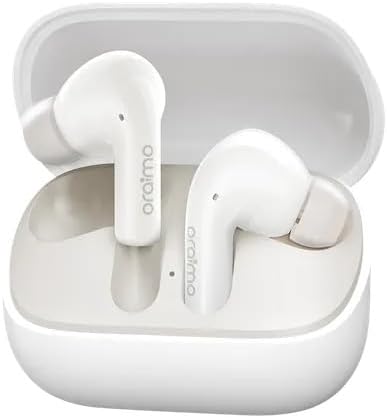
An image showing the Oraimo SpaceBuds N OTW-626N true wireless earbuds, white in color, resting inside their open charging case. The earbuds feature the 'oraimo' logo on their stems. This image illustrates the earbuds and their charging case.
- høretelefoner Left and Right earbuds with touch control areas.
- Opladningsetui: Stores and charges the earbuds, with a Type-C charging port.
- LED-indikator: Viser opladningsstatus og batteriniveau.
- Mikrofon: For klare opkald.
Opsætning
1. Opladning af øretelefoner og etuiet
- Indledende opkrævning: Oplad ørepropperne og opladningsetuiet helt inden første brug.
- Opladning af etuiet: Connect the USB Type-C cable to the charging port on the case and a power source. The LED indicator will show charging status.
- Opladning af øretelefoner: Placer ørepropperne i opladningsetuiet. De vil automatisk begynde at oplade. LED-indikatorerne på ørepropperne viser deres opladningsstatus.
2. Parring med din enhed
- Tænd: Open the charging case. The earbuds will automatically power on and enter pairing mode. The LED indicator on one earbud will flash white, indicating it's ready to pair.
- Aktiver Bluetooth: Aktiver Bluetooth på din enhed (smartphone, tablet osv.).
- Vælg enhed: Søg efter "Oraimo SpaceBuds N" in the list of available Bluetooth devices and select it to connect.
- Tilslutningsbekræftelse: Once successfully paired, you will hear an audible confirmation, and the LED indicators on the earbuds will turn off or show a steady light.
- Genforbindelse: Efter den første parring opretter ørepropperne automatisk forbindelse til den sidst parrede enhed, når de tages ud af etuiet.
Betjeningsvejledning
Tænd/sluk
- Tænd: Åbn opladningsetuiet, eller tryk og hold på berøringsområdet på begge øretelefoner i 2 sekunder.
- Sluk: Placer ørepropperne tilbage i opladningsetuiet, og luk låget, eller tryk og hold på berøringsområdet på begge ørepropper i 5 sekunder.
Tryk på kontrolelementer
The Oraimo SpaceBuds N feature intuitive touch controls on each earbud.
| Fungere | Handling |
|---|---|
| Afspil/pause musik | Et enkelt tryk på begge øretelefoner |
| Næste spor | Dobbelttryk på den højre øreprop |
| Forrige spor | Dobbelttryk på den venstre øreprop |
| Besvar/afslut opkald | Et enkelt tryk på begge øretelefoner |
| Afvis opkald | Tryk og hold nede på en af øretelefonerne i 2 sekunder |
| Aktiver Voice Assistant | Tryk tre gange på begge øretelefoner |
| Skift ANC/Transparenstilstand | Press and hold on the left earbud for 2 seconds |
Aktiv støjafbrydelse (ANC)
The Oraimo SpaceBuds N feature Active Noise Cancellation to reduce ambient noise.
- Aktiver ANC: Press and hold the touch control area on the left earbud for 2 seconds. You will hear a voice prompt confirming ANC activation.
- Gennemsigtighedstilstand: Repeat the action to switch to Transparency Mode, which allows you to hear your surroundings.
- Normal tilstand: Repeat the action again to return to normal mode (ANC off).
Opretholdelse
Rensning
- Brug en blød, tør og fnugfri klud til at rengøre ørepropperne og opladningsetuiet.
- Brug ikke skrappe kemikalier, rengøringsopløsningsmidler eller stærke rengøringsmidler.
- Regularly clean the ear tips and mesh to prevent wax buildup, which can affect sound quality.
Opbevaring
- Når ørepropperne ikke er i brug, skal de altid opbevares i deres opladningsetui for at beskytte dem og holde dem opladede.
- Opbevares køligt og tørt, væk fra ekstreme temperaturer og direkte sollys.
Fejlfinding
| Problem | Løsning |
|---|---|
| Øretelefoner parrer ikke |
|
| Kun én øretelefon virker |
|
| Dårlig lydkvalitet |
|
| Øretelefoner oplader ikke |
|
Specifikationer
| Feature | Detalje |
|---|---|
| Model | OTW-626N |
| Forbindelse | Bluetooth 5.3 |
| Støjkontrol | Aktiv støjafbrydelse (ANC) |
| Øreplacering | In Ear |
| Vandmodstand | IPX4 (sved- og stænkbestandig) |
| Opladningsport | USB Type-C |
| Spilletid | Op til 40 timer (med opladningsetui) |
| Farve (ifølge specifikation) | Sort |
| Fabrikant | Oraimo |
| Oprindelsesland | Egypten |
Garanti og support
Oraimo products are designed to meet high quality standards. For warranty information, technical support, or customer service inquiries, please refer to the warranty card included in your package or visit the official Oraimo webwebsted.


