1. Introduktion
This manual provides comprehensive instructions for the installation, operation, and maintenance of your 70mai 4K T800+Hardwire Kit UP03 3-Channel Dash Cam. This advanced dash camera system offers front, rear, and interior recording capabilities, featuring dual 4K (Front/Rear 3840×2160P) and 1080P interior resolution. Equipped with dual Sony IMX678 STARVIS 2 sensors and 3-channel HDR, it ensures clear footage in various lighting conditions. The included Hardwire Kit UP03 enables 24-hour parking surveillance.
For optimal performance and safety, please read this manual thoroughly before using the device.
2. Pakkens indhold
Bekræft, at alle nedenstående varer er til stede i din pakke:
- 70mai T800 Main Dash Cam Unit
- Rear Camera (for exterior rear view)
- Interior Camera (for cabin view)
- 70mai Hardwire Kit UP03
- 512 GB MicroSD-kort
- Strømkabel
- USB datakabel
- Elektrostatiske klistermærker
- Varmebestandigt klæbemiddel
- Kobensværktøj
- Brugervejledning (dette dokument)

Billede: Overview of the 70mai T800 dash cam, showing the main unit, rear camera, interior camera, hardwire kit, and a 512GB microSD card.
3. Opsætning og installation
3.1 Klargøring af MicroSD-kortet
The included 512GB MicroSD card is pre-formatted for immediate use. If using a different card, ensure it is a high-endurance card (Class 10 or U3 recommended) and format it within the dash cam's settings before first use.
3.2 Installation af hoveddashcam
- Rengør forruden, hvor dashcam'et skal monteres.
- Apply the electrostatic sticker to the windshield, ensuring no air bubbles.
- Attach the dash cam mount with the heat-resistant adhesive to the electrostatic sticker.
- Slide the main dash cam unit onto the mount.
- Adjust the lens angle to ensure a clear view af vejen forude.
3.3 Installation af bagkamera
Install the rear camera on the rear windshield, ensuring it has a clear view. Connect the rear camera cable to the main dash cam unit. Route the cable neatly along the vehicle's headliner and pillars using the crowbar tool to tuck it away.
3.4 Interior Camera Installation
Mount the interior camera on the main dash cam unit or near it, ensuring it captures the cabin area effectively. Connect its cable to the designated port on the main unit.

Image: Visual representation of the 3-channel dash cam setup, illustrating the front 4K, rear 4K, and interior 1080P camera views.
3.5 Hardwire Kit UP03 Installation (for Parking Mode)
The Hardwire Kit UP03 is essential for enabling the 24-hour parking surveillance features. Professional installation is recommended for this component.
- Identificér din bils sikringsboks.
- Connect the red wire (ACC) to a fuse that is only powered when the ignition is on.
- Connect the yellow wire (VCC+) to a constant power fuse (always on).
- Connect the black wire (GND) to a metal part of the vehicle's chassis for grounding.
- Connect the Hardwire Kit's output to the main dash cam unit's power input.
Advarsel: Incorrect installation of the hardwire kit can damage your vehicle's electrical system or the dash cam. Consult a qualified technician if you are unsure.

Image: The 70mai Hardwire Kit UP03, showing the VCC+, GND, and ACC wires for connection to the vehicle's fuse box.
4. Betjening
4.1 Tænd/sluk
The dash cam will automatically power on and begin recording when your vehicle's ignition is turned on (if connected via the standard power cable or ACC wire of the hardwire kit). It will power off automatically when the ignition is turned off.
4.2 Optagelsestilstande
- Loop-optagelse: The dash cam continuously records in short segments (e.g., 1, 3, or 5 minutes). When the memory card is full, the oldest unlocked footage is overwritten.
- G-sensor (nødoptagelse): I tilfælde af et pludseligt sammenstød eller en kollision registrerer den indbyggede G-sensor automatisk hændelsen og låser det aktuelle videosegment, hvilket forhindrer, at det overskrives af loop-optagelsen.
- Parking Surveillance (Requires Hardwire Kit UP03): When the vehicle is parked and the ignition is off, the dash cam enters parking mode. It can detect collisions and suspicious activity (AI Motion Detection) and record time-lapse videos to conserve storage.
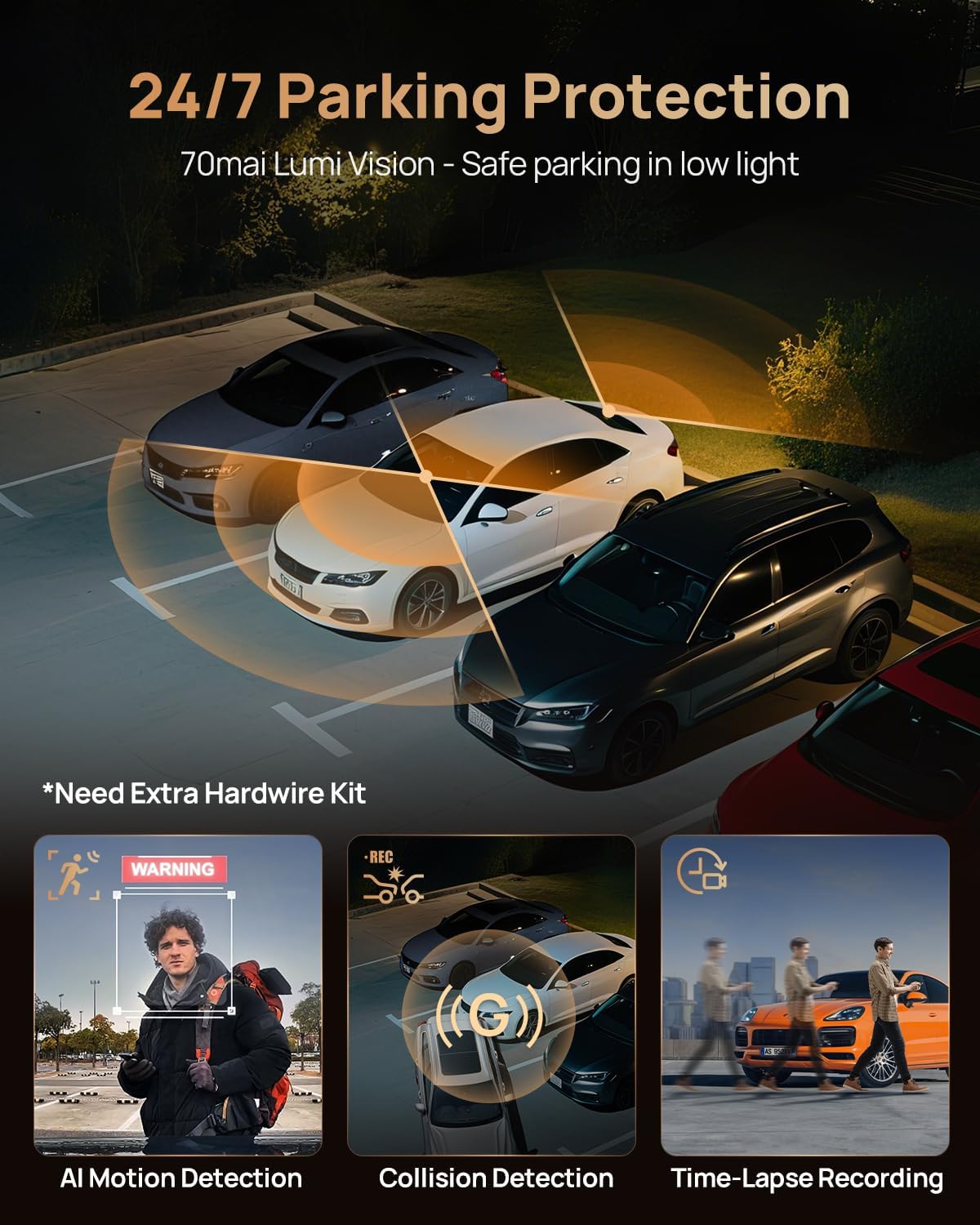
Image: Visual explanation of 24/7 parking protection, showing AI motion detection, collision detection, and time-lapse recording features.
4.3 Nattesynsteknologi
The 70mai T800 features 70mai Night Owl Vision and four 940nm infrared cabin cameras. These technologies enhance clarity in low-light conditions, reduce headlight glare, and automatically activate in darkness to capture details both outside and inside the vehicle.

Image: A visual comparison demonstrating the superior clarity of 70mai Night Owl Vision in dark environments compared to standard night vision.
4.4 HDR-optagelse
The 70mai T800 supports 3-channel HDR (High Dynamic Range) recording. This technology ensures balanced exposure in challenging lighting conditions, such as entering or exiting tunnels, under bridges, or during heavy rain, capturing critical details like license plates clearly.
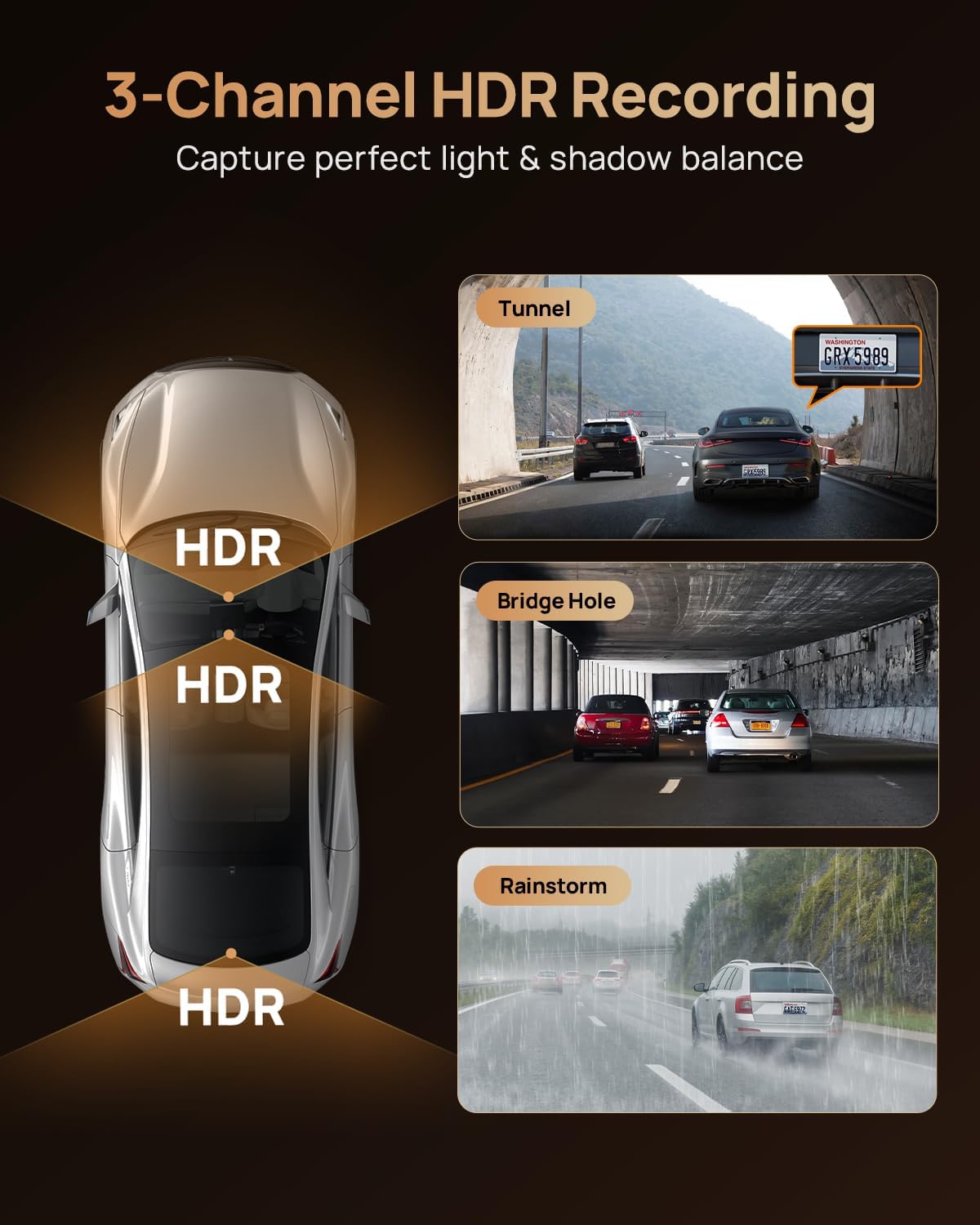
Image: An illustration demonstrating how 3-Channel HDR recording captures balanced light and shadow in scenarios like tunnels, under bridges, and during rainstorms.
4.5 Smart APP Control (Wi-Fi Connectivity)
Download the 70mai app from the App Store or Google Play. Connect your smartphone to the dash cam's Wi-Fi (5GHz support for faster downloads) to:
- View live footage from all three cameras.
- Download optagede videoer og fotos direkte til din telefon.
- Juster indstillingerne for dashcam.
- Instantly share footage til sociale medieplatforme.

Image: A smartphone displaying the 70mai application interface, highlighting features like live view, quick download, and instant sharing of recorded footage.
5. Vedligeholdelse
- Rengør linsen: Regularly wipe the camera lenses with a soft, lint-free cloth to ensure clear video quality. Avoid abrasive cleaners.
- Formater MicroSD-kort: It is recommended to format the MicroSD card every 2-4 weeks to maintain optimal performance and prevent data corruption. Back up any important files før formatering.
- Firmwareopdateringer: Check the 70mai app periodically for firmware updates. Keeping your dash cam's firmware updated ensures access to the latest features and bug fixes.
- Temperatur: Avoid exposing the dash cam to extreme temperatures for prolonged periods. The supercapacitor design provides enhanced durability in varying temperatures.
6. Fejlfinding
| Problem | Mulig løsning |
|---|---|
| Dashcam'et tænder ikke. |
|
| Video footage er sløret eller uklar. |
|
| MicroSD card error / Cannot record. |
|
| Parkeringstilstanden virker ikke. |
|
| Cannot connect to 70mai App via Wi-Fi. |
|
7. Specifikationer
| Feature | Detalje |
|---|---|
| Model | 70mai T800 |
| Kanaler | 3-Channel (Front, Rear, Interior) |
| Forreste kameraopløsning | 4K (3840×2160P) |
| Bagkameraopløsning | 4K (3840×2160P) |
| Opløsning på indvendigt kamera | 1080P |
| Billedsensorer | Dual Sony IMX678 STARVIS 2 |
| Night Vision teknologi | 70mai Night Owl Vision, 4x 940nm IR Lights (Interior) |
| HDR-understøttelse | 3-Channel HDR |
| Opbevaring | Up to 512GB MicroSD Card (512GB included) |
| Forbindelse | Wi-Fi 6 (5GHz), GPS |
| Parkeringstilstand | 24/7 Parking Guard (AI Motion Detection, Collision Detection, Time-Lapse Recording) - Requires Hardwire Kit UP03 |
| Strømkilde | superkondensator |
| ASIN | B0FMRJ6NXT |
| Dato først tilgængelig | 15. august 2025 |

Image: An infographic detailing the next-generation features of the dash cam, including Wi-Fi 6 5GHz, supercapacitor, dual STARVIS 2 IMX678 sensors, GPS, and the included 512GB SD card.
8. Garanti og support
8.1 Garantioplysninger
Your 70mai product is covered by a standard manufacturer's warranty. For specific warranty terms and conditions, including duration and coverage details, please refer to the warranty card included in your product packaging or visit the official 70mai webwebsted. Gem din købsbevis til garantikrav.
8.2 Kundesupport
For technical assistance, troubleshooting, or any inquiries regarding your 70mai dash cam, please contact 70mai customer support through their official webwebstedet eller kontaktoplysningerne i din produktdokumentation.
Official 70mai Store on Amazon: Visit the 70mai Store


