Indledning
Thank you for choosing the Tezousi 4K Night Vision Goggles YSY338. This manual provides detailed instructions for the proper setup, operation, and maintenance of your device. Please read this manual thoroughly before using the product to ensure optimal performance and longevity. Keep this manual for future reference.
Pakkens indhold
Kontroller venligst, at alle nedenstående varer er inkluderet i din pakke:
- Tezousi 4K Night Vision Goggles (Model YSY338)
- 32 GB TF-kort
- Type-C datakabel
- Nakkebælte
- Brugervejledning (dette dokument)
Produkt overview
The Tezousi YSY338 Night Vision Goggles are designed for enhanced visibility in low light and complete darkness. Featuring 4K resolution, 10X digital zoom, and a 4-inch HD display, these binoculars are suitable for various outdoor activities. The integrated 5000mAh battery ensures extended operation.
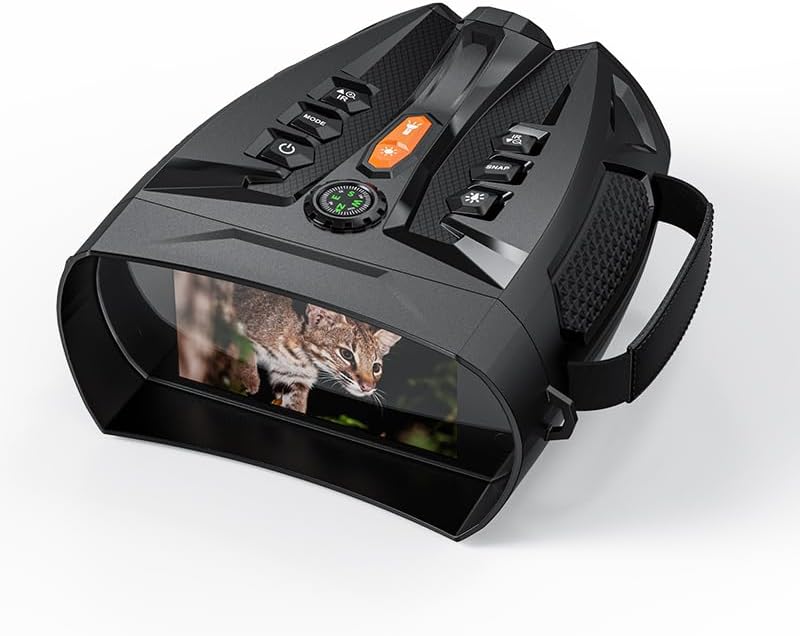
Figur 1: Tezousi 4K Night Vision Goggles YSY338. This image shows the black night vision device from an angled top-down perspective, highlighting its buttons, lens, and the integrated display showing a small wild cat.
Nøglefunktioner:
- 4K-opløsning: Optag billeder og videoer i høj opløsning.
- 10X digital zoom: Magnify distant objects for detailed observation.
- 4-tommer HD-skærm: Large, clear screen with 8 levels of adjustable brightness.
- 5000mAh batteri: Langvarig kraft til længerevarende brug.
- Infrarød (IR) belysning: Adjustable IR levels for clear vision in total darkness.
- Foto- og videooptagelse: Document your observations directly to the included 32GB TF card.
Opsætning
- Batteri installation: The device comes with 2 Lithium Ion batteries pre-installed. Ensure they are securely in place. If replacing, open the battery compartment and insert new batteries according to the polarity indicators.
- Indsættelse af TF-kort: Locate the TF card slot. Gently insert the included 32GB TF card until it clicks into place. Ensure the card is inserted correctly to avoid damage.
- Opladning af enheden: Connect the Type-C data cable to the device's charging port and the other end to a compatible USB power adapter (not included) or a computer. The charging indicator will illuminate. A full charge is recommended before first use.
- Attaching the Neck Belt: Securely attach the neck belt to the designated loops on the goggles for convenient and safe carrying.
Betjeningsvejledning
1. Tænd/sluk
- Tænd: Tryk og hold på Power-knap (usually marked with a circle and a vertical line) for a few seconds until the display illuminates.
- Sluk: Tryk og hold på Power-knap igen, indtil displayet slukker.
2. Valg af tilstand
- Tryk på MODE knap to cycle through available modes: Photo Mode, Video Mode, and Playback Mode. The current mode will be indicated on the display.
3. Adjusting Digital Zoom
- In Photo or Video Mode, use the Zoom In/Out buttons (often marked with '+' and '-' or similar icons) to adjust the digital magnification up to 10X.
4. Adjusting IR Illumination
- In low light or darkness, press the IR knap (often marked with an IR symbol or sun/moon icon) to activate the infrared illuminator. Repeated presses will cycle through different IR intensity levels.
5. Adjusting Screen Brightness
- The 4-inch HD display has 8 levels of adjustable brightness. Use the dedicated Knapper til justering af lysstyrke (refer to device specific markings) to set the display brightness suitable for your environment.
6. Optagelse af billeder og videooptagelse
- Foto: I fototilstand skal du indramme dit motiv og trykke på SNAP knap (or Shutter button) to capture an image.
- Video: I videotilstand skal du trykke på SNAP knap to start recording. Press it again to stop recording.
7. Afspilning
- In Playback Mode, use the navigation buttons (often marked with arrows) to browse through your captured photos and videos. Press the OK/Enter-knap til view et udvalgt element.
8. Dataoverførsel
- Connect the device to a computer using the Type-C data cable. The device should appear as a removable storage device, allowing you to transfer files fra TF-kortet til din computer.
Opretholdelse
- Rengøring af linser: Use a soft, lint-free cloth specifically designed for optical lenses to gently wipe the objective and eyepiece lenses. Avoid using abrasive materials or harsh chemicals.
- Rengøring af krop: Tør enhedens kabinet af med en blød,amp klæde. Nedsænk ikke enheden i vand.
- Batteripleje: For optimal battery life, avoid fully discharging the batteries frequently. Recharge the device regularly, especially if it will be stored for an extended period.
- Opbevaring: Store the night vision goggles in a cool, dry place, away from direct sunlight and extreme temperatures. Remove batteries if storing for very long periods to prevent leakage.
Fejlfinding
| Problem | Mulig årsag | Løsning |
|---|---|---|
| Enheden tænder ikke. | Low battery or depleted battery. Incorrect battery installation. | Charge the device fully. Check battery polarity and ensure they are properly seated. |
| Poor image quality / blurry vision. | Lenses are dirty. IR illuminator not active or set too low in darkness. Focus not adjusted. | Clean the lenses. Activate or increase IR intensity. Adjust the focus ring (if applicable) or digital zoom. |
| Cannot record photos or videos. | TF card is full. TF card not inserted correctly or faulty. Device is not in Photo/Video Mode. | Slet unødvendigt files or replace TF card. Reinsert TF card. Ensure device is in the correct mode. |
| Skærmen er for lys eller for svag. | Screen brightness setting is incorrect for ambient light. | Adjust the screen brightness using the dedicated buttons. |
Specifikationer
| Modelnummer | YSY338 |
| Mærke | Tezousi |
| Maksimal forstørrelse | 10x digital zoom |
| Objektiv linsediameter | 25 millimeter |
| Batterikapacitet | 5000 mAh (2 litium-ion-batterier medfølger) |
| Opbevaring | 32GB TF-kort (inkluderet) |
| Vise | 4-inch HD Display with 8 adjustable brightness levels |
| Varens vægt | 10.4 ounce |
| Farve | Sort |
| Pakkedimensioner | 5 x 3 x 2.7 tommer |
Garanti og support
For warranty information, technical support, or service inquiries, please refer to the warranty card included with your product or contact Tezousi customer service directly. Please have your model number (YSY338) and purchase details ready when contacting support.
Manufacturer: Tezousi