1. Introduktion
Welcome to the user manual for your new Lava A1 Music keypad mobile phone. This guide provides essential information on setting up, operating, maintaining, and troubleshooting your device. Please read this manual carefully to ensure proper use and to maximize the performance of your phone.
The Lava A1 Music is designed for reliable communication with features such as clear sound, long battery life, and user-friendly operation.
2. Sikkerhedsoplysninger
- Batterisikkerhed: Brug kun originale eller godkendte batterier og opladere. Kortslut ikke, punkter ikke eller udsæt ikke batteriet for ekstreme temperaturer. Bortskaf batterier korrekt.
- Kørselssikkerhed: Do not use your phone while driving. If necessary, use a hands-free accessory.
- Medicinsk udstyr: Hold en sikker afstand mellem din telefon og medicinsk udstyr som pacemakere. Kontakt din læge og producenten af det medicinske udstyr for at få specifikke retningslinjer.
- Fly: Turn off your phone when on an aircraft.
- Eksplosive miljøer: Sluk din telefon i områder med potentielt eksplosiv atmosfære, såsom tankstationer eller kemiske fabrikker.
- Vandtæthed: This device is not waterproof. Avoid exposure to liquids.
- Børn: Keep the phone and its accessories out of reach of small children.
3. Pakkens indhold
Når du åbner pakken, skal du kontrollere, at alle varer er til stede og i god stand:
- Lava A1 Music Mobile Phone
- Batteri
- Adapter (oplader)
- Brugervejledning (dette dokument)
4. Enhed overview
Familiarize yourself with the physical components of your Lava A1 Music phone.

Billede 4.1: Forside og bagside view of the Lava A1 Music mobile phone, showcasing its compact design and keypad.
The phone features a durable build with a comfortable keypad for easy dialing and navigation. The rear panel includes the speaker grille and the A1 Music branding.
Tastaturlayout

Billede 4.2: Detaljeret view of the Lava A1 Music keypad, highlighting the numerical and function keys.
- Navigationstast: Bruges til menunavigation og valg.
- Opkaldsnøgle: Initierer eller besvarer opkald.
- Afslut/Tænd/sluk-knap: Ends calls, returns to standby, or powers the phone on/off.
- Softkeys: Context-sensitive keys for menu options.
- Numerical Keys: Til opkald af numre og indtastning af tekst.
5. Opsætning
5.1 Isætning af SIM-kort og batteri
- Fjern bagdækslet: Gently pry open the back cover of the phone from the designated notch.
- Indsæt SIM-kort: Locate the SIM card slot(s). Insert your SIM card(s) into the slot(s) with the gold contacts facing down, ensuring they are correctly seated. This phone supports Dual SIM functionality.
- Indsæt batteri: Place the battery into the battery compartment, aligning the gold contacts on the battery with those in the phone.
- Udskift bagdæksel: Juster og tryk forsigtigt bagdækslet, indtil det klikker sikkert på plads.
5.2 Opladning af batteriet
Før første brug anbefales det at oplade batteriet helt.
- Tilslut opladeradapteren til en stikkontakt.
- Connect the other end of the charger to the phone's charging port.
- Batteriindikatoren på skærmen viser opladningsstatus.
- Når den er fuldt opladet, skal du frakoble opladeren.
The Lava A1 Music features a 1000mAh battery, providing up to 5 days of standby time under optimal conditions.
5.3 Tænd/sluk
- For at tænde: Tryk og hold på Afslut/Power-tast indtil skærmen lyser.
- For at slukke: Tryk og hold på Afslut/Power-tast until the power-off options appear, then select "Power Off".
6. Betjeningsvejledning
6.1 Foretage opkald
- From the standby screen, enter the phone number using the keypad.
- Tryk på Opkaldstast for at starte opkaldet.
- Tryk på for at afslutte et opkald Afslut/Power-tast.
6.2 Afsendelse af SMS-beskeder
- Gå til Menu > Beskeder > Skriv besked.
- Indtast din besked ved hjælp af tastaturet.
- Indtast modtagerens telefonnummer, eller vælg fra kontakter.
- Vælge Sende.
6.3 Bluetooth-forbindelse
The Lava A1 Music supports Bluetooth for wireless connectivity with compatible devices.
- Gå til Menu > Indstillinger > Forbindelse > Bluetooth.
- Slå Bluetooth til On.
- Vælge Parrede enheder or Søg efter ny enhed at forbinde.
6.4 Musikafspiller
Enjoy your favorite music with the phone's built-in music player and clear sound output.

Billede 6.1: Illustration of the powerful sound feature, indicating high-quality audio output for music and calls.
- Gå til Menu > Multimedier > Musikafspiller.
- Select a song from your storage to play.
- Use the navigation keys to control playback (play, pause, skip).
6.5 Torch Function
The phone includes an instant torch feature for convenience.
- To turn on the torch, press and hold the designated torch key (refer to your phone's keypad for exact key, often the '0' or a dedicated side button).
- Repeat the action to turn it off.
6.6 Auto Call Recording
The Lava A1 Music supports automatic call recording.
- Gå til Menu > Indstillinger > Opkaldsindstillinger.
- Locate and enable the Automatisk opkaldsoptagelse valgmulighed.
- Recorded calls will be saved in the phone's memory or on an inserted memory card.
6.7 Sprogsupport
The device supports 22 Indian languages, allowing you to operate the phone in your preferred language.
- Gå til Menu > Indstillinger > Telefonindstillinger > Sprog.
- Vælg det ønskede sprog fra listen.
6.8 Super Battery Mode
Activate Super Battery Mode to extend your phone's battery life when power is low.
- This mode typically optimizes background processes and display settings to conserve power.
- Access this feature through Menu > Indstillinger > Strømstyring or a similar path.
6.9 Display and Contact Photo Icons
The phone features a 2-inch display for clear viewing and supports contact photo icons for easy call verification.

Billede 6.2: The 2-inch display of the Lava A1 Music, showing clear visuals.
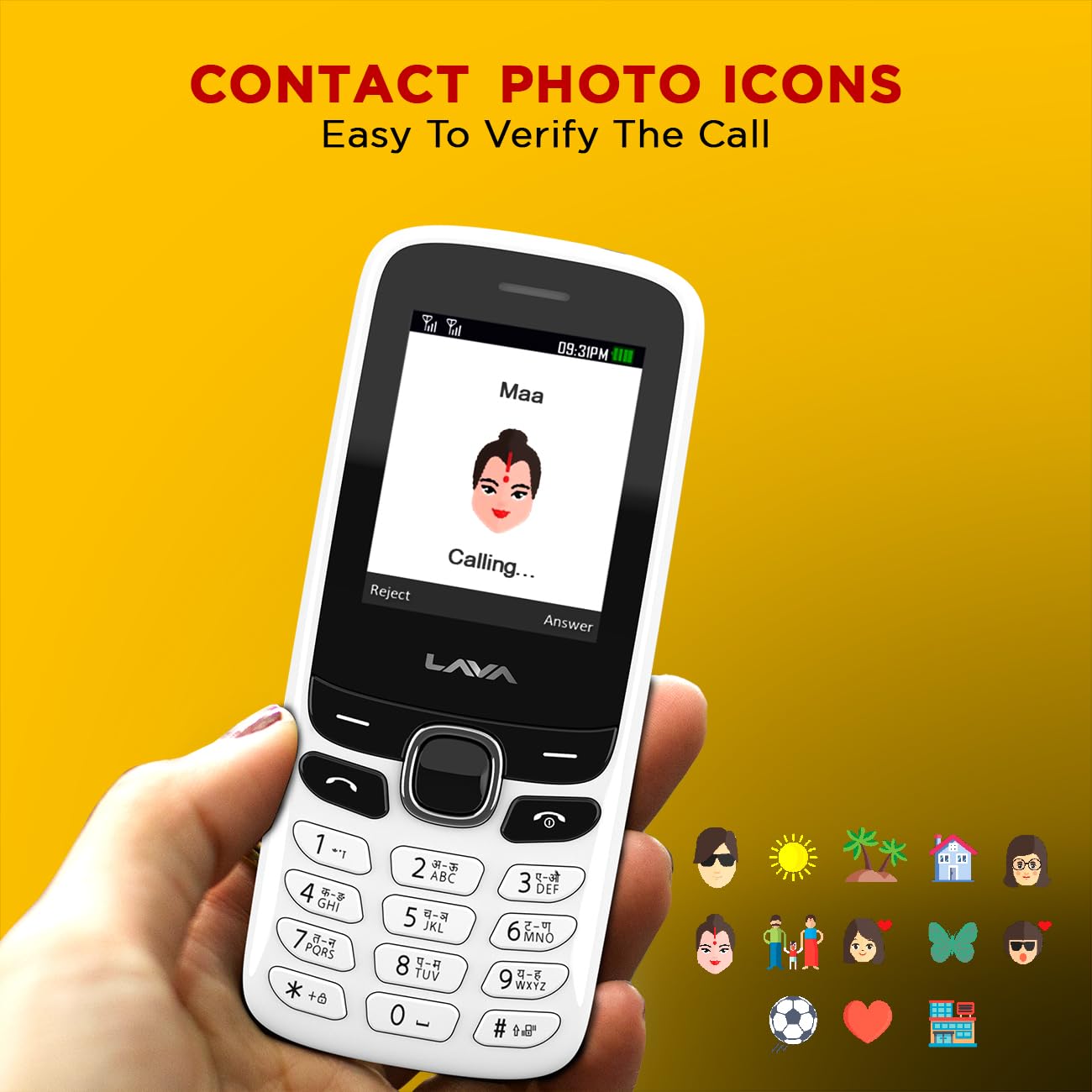
Billede 6.3: Example of contact photo icons on the Lava A1 Music, aiding in quick identification of callers.
7. Vedligeholdelse
7.1 Pleje af batterier
- Undgå at overoplade eller aflade batteriet helt ofte.
- Udsæt ikke batteriet for ekstrem varme eller kulde.
- Hvis telefonen ikke skal bruges i en længere periode, skal batteriet oplades til ca. 50%, inden den opbevares.
7.2 Rengøring af enheden
- Brug en blød, tør klud til at rengøre telefonens overflade.
- Undgå at bruge skrappe kemikalier, rengøringsopløsningsmidler eller stærke rengøringsmidler.
- Hold opladningsporten og lydstikket fri for støv og snavs.
7.3 Opbevaring
Opbevar telefonen et køligt og tørt sted, væk fra direkte sollys og ekstreme temperaturer.
8. Fejlfinding
This section addresses common issues you might encounter with your Lava A1 Music phone.
| Problem | Mulig løsning |
|---|---|
| Telefonen tænder ikke | Sørg for, at batteriet er opladet. Kontroller, om batteriet er isat korrekt. |
| Intet netværkssignal | Kontroller, om SIM-kortet er korrekt isat. Flyt til et område med bedre netværksdækning. Kontakt din tjenesteudbyder. |
| Kan ikke foretage eller modtage opkald | Check network signal. Ensure your SIM card is active. Verify call barring settings. |
| Batteriet aflades hurtigt | Reduce screen brightness. Close unused applications. Activate Super Battery Mode. |
| Tastaturet reagerer ikke | Restart the phone. Ensure no physical obstruction on the keys. |
Hvis problemet fortsætter efter at have prøvet disse løsninger, bedes du kontakte kundesupport.
9. Specifikationer
Detailed technical specifications for the Lava A1 Music mobile phone:
| Mærke | Lava |
| Modelnummer | A1 Music |
| Operativsystem | Android 10.0 |
| Skærmstørrelse | 2 tommer (5.08 cm) |
| Opløsning | 240 x 320 pixels |
| Batterikapacitet | 1000 mioampfør time (mAh) |
| Telefonens taletid | Op til 96 timer |
| Forbindelsesteknologier | USB, Bluetooth |
| Særlige funktioner | Dual SIM, Auto Call Recording, Instant Torch, 22 Indian Language Support, Super Battery Mode |
| Lydstik | 3.5 mm |
| Formfaktor | Bar |
| Produktdimensioner | 11.25 x 4.8 x 1.47 cm |
| Varens vægt | 70 g |
| Oprindelsesland | Indien |
| Hvad er der i æsken | Adapter |
10. Garanti og support
10.1 Garantioplysninger
Your Lava A1 Music mobile phone comes with a 1 års erstatningsgaranti from the date of purchase. This warranty covers manufacturing defects and ensures a replacement device in case of eligible issues. Please retain your purchase receipt as proof of purchase for warranty claims.
The warranty does not cover damages caused by misuse, accidents, unauthorized repairs, or normal wear and tear.
10.2 Kundesupport
For any technical assistance, warranty claims, or further inquiries, please contact Lava customer support. Refer to the official Lava website or your product packaging for the most current contact details, including phone numbers and service center locations.
Du kan også besøge embedsmanden Lava Store on Amazon for yderligere produktinformation og supportressourcer.


