1. Introduktion
This manual provides essential information for the safe and efficient use of your OPPO Reno 14F 5G smartphone. Please read this guide thoroughly before operating the device to ensure proper functionality and to understand its features. Keep this manual for future reference.
2. Pakkens indhold
Bekræft, at din produktpakke indeholder følgende varer:
- OPPO Reno 14F 5G Smartphone
- Headset
- SIM-bakkeudkaster
- USB-kabel (Type-C)
If any items are missing or damaged, please contact your retailer or OPPO customer support.
3. Enhed overview
Familiarize yourself with the physical components of your OPPO Reno 14F 5G.

Figur 3.1: Forside View. This image displays the front of the OPPO Reno 14F 5G smartphone, highlighting the display screen and the front-facing camera located at the top center.

Figur 3.2: Tilbage View. This image shows the rear of the OPPO Reno 14F 5G smartphone in Luminous Green, featuring the dual camera module and the OPPO branding.
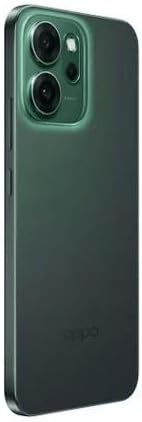
Figur 3.3: Side View. Dette billede illustrerer sideproffenfile of the OPPO Reno 14F 5G, indicating the location of the volume buttons, power button, and SIM card tray.
3.1. Knapper og porte
- Power knap: Located on the right side. Press and hold to power on/off or restart. Press briefly to lock/unlock the screen.
- Lydstyrkeknapper: Located on the left side. Press to adjust media volume, call volume, or notification volume.
- USB Type-C-port: Located at the bottom. Used for charging, data transfer, and connecting the included headset.
- SIM-kortbakke: Located on the side. Use the provided SIM ejector tool to open.
- Kameraer: Front-facing camera for selfies and video calls. Rear dual-camera system for high-quality photos and videos.
4. Opsætning
4.1. Opladning af enheden
Before first use, fully charge your OPPO Reno 14F 5G. Connect the USB cable to the USB Type-C port on the phone and the other end to a compatible power adapter. Plug the adapter into a power outlet.
4.2. Isætning af SIM-kortet
- Sluk for enheden.
- Locate the SIM card tray on the side of the phone (refer to Figure 3.3).
- Sæt SIM-kortudløserværktøjet i det lille hul på SIM-bakken, og tryk forsigtigt, indtil bakken springer ud.
- Placer dit/dine Nano-SIM-kort i bakken med guldkontakterne nedad. Sørg for, at de vender korrekt.
- Skub forsigtigt bakken tilbage i telefonen, indtil den klikker på plads.
4.3. Guide til første opstart og opsætning
Press and hold the Power button until the OPPO logo appears. Follow the on-screen instructions to complete the initial setup, which includes:
- Valg af sprog
- Opretter forbindelse til et Wi-Fi-netværk
- Setting up your Google account
- Configuring security features (fingerprint, face unlock, PIN/pattern)
- Transferring data from an old device (optional)
5. Betjening af enheden
5.1. Grundlæggende navigation
Your OPPO Reno 14F 5G runs on Android 14 and supports gesture navigation or traditional navigation buttons. You can configure your preferred navigation method in the Settings menu.
- Stryg op: Gå til startskærmen.
- Swipe Up and Hold: Open recent apps.
- Swipe from Left/Right Edge: Gå tilbage.
5.2. Foretage opkald og sende beskeder
Use the Phone app to make calls and the Messages app to send and receive SMS/MMS messages. Ensure your SIM card is active and has network coverage.
5.3. Brug af kameraet
Open the Camera app to capture photos and videos. The rear camera system offers various modes for different scenarios, while the front camera is ideal for selfies and video calls. Tap the shutter button to take a photo or record a video.
5.4. Forbindelse
- Wi-Fi: Opret forbindelse til trådløse netværk for at få internetadgang.
- Bluetooth: Pair with wireless headphones, speakers, or other Bluetooth-enabled devices.
- 5G: Utilize high-speed mobile data networks where available.
- GPS: Til lokationstjenester og navigation.
6. Vedligeholdelse
6.1. Rengøring af enheden
Use a soft, lint-free cloth to clean the screen and body of your phone. Avoid using harsh chemicals or abrasive materials, as these can damage the device's finish.
6.2. Batteripleje
For at forlænge batterilevetiden:
- Undgå ekstreme temperaturer.
- Brug den originale oplader og kabel.
- Do not leave the phone charging for extended periods after it's full.
6.3. Softwareopdateringer
Tjek regelmæssigt efter og installer softwareopdateringer for at sikre, at din enhed har de nyeste funktioner, sikkerhedsrettelser og forbedringer af ydeevnen. Gå til Indstillinger > Om enhed > Opdateret for at søge efter opdateringer.
6.4. Databackup
Regularly back up your important data (photos, contacts, documents) to a cloud service or a computer to prevent data loss.
7. Fejlfinding
Hvis du støder på problemer med din enhed, kan du bruge følgende almindelige løsninger:
| Spørgsmål | Løsning |
|---|---|
| Enheden tænder ikke | Sørg for, at batteriet er opladet. Tryk på tænd/sluk-knappen og hold den nede i mindst 10 sekunder for at fremtvinge en genstart. |
| Skærmen reagerer ikke | Force restart the device. If the issue persists, contact support. |
| Problemer med netværksforbindelse | Check if Airplane Mode is off. Restart the device. Reinsert the SIM card. Reset network settings (Settings > System settings > Back up and reset > Reset phone > Reset network settings). |
| Apps går ned eller fryser | Clear the app's cache and data (Settings > Apps > App management > [App Name] > Storage usage). Update the app. Uninstall and reinstall the app. |
| Batteriet tømmes hurtigt | Check battery usage in Settings to identify power-hungry apps. Reduce screen brightness. Disable unnecessary features like GPS, Bluetooth, or Wi-Fi when not in use. |
| Overophedning | Close background apps. Avoid using the phone while charging or in direct sunlight. If overheating persists, power off the device and allow it to cool. |
7.1. Fabriksindstilling
As a last resort for persistent software issues, you may perform a factory reset. This will erase all data on your phone. Back up your data before proceeding. Go to Settings > System settings > Back up and reset > Reset phone > Erase all data.
8. Specifikationer
Detailed technical specifications for the OPPO Reno 14F 5G smartphone:
| Feature | Detalje |
|---|---|
| Operativsystem | Android 14 |
| RAM-hukommelse installeret | 12 GB |
| Hukommelseslagringskapacitet | 256 GB |
| Forbindelsesteknologi | 5G |
| Cellulær teknologi | 5G |
| Wireless Provider | Låst op for alle udbydere |
| Batteristyrke | 6000 mAh |
| Varens vægt | 187 g |
| Pakkedimensioner | 18.3 x 9.9 x 5.9 cm |
| Lydstik | USB Type C |
| Farve | Luminous Green |
| Modelnavn | Reno 5G |
| Varemodelnummer | 6932169376945 |
9. Garanti og support
Your OPPO Reno 14F 5G smartphone is covered by a limited warranty. For detailed warranty terms and conditions, please refer to the warranty card included in your package or visit the official OPPO website. For technical support, service, or further assistance, please contact OPPO customer service through their official channels.


