1. Introduktion
This manual provides detailed instructions for the installation, operation, and maintenance of your Thermalright Peerless Assassin 140 Digital Black CPU Cooler. This high-performance air cooler features a magnetic digital display board, six heatpipes with AGHP technology, and dual fans for efficient heat dissipation. Please read this manual thoroughly before installation and use to ensure optimal performance and safety.

Image 1.1: The Thermalright Peerless Assassin 140 Digital Black CPU Cooler, showcasing its dual-tower design and integrated digital display.
2. Sikkerhedsoplysninger
- Always disconnect power from your computer before installing or performing maintenance on the CPU cooler.
- Håndter komponenterne forsigtigt for at undgå skader.
- Opbevares utilgængeligt for børn.
- Sørg for korrekt jording for at forhindre elektrostatisk udladning.
- Se manualerne til dit bundkort og din CPU for yderligere kompatibilitets- og installationsvejledninger.
3. Pakkens indhold
Kontroller, at alle komponenter er til stede, før installationen påbegyndes:
- Thermalright Peerless Assassin 140 Digital Black Heatsink
- 120 mm PWM blæser
- 140 mm PWM blæser
- Magnetic Digital Display Board
- Mounting Hardware for AMD (AM4/AM5) and Intel (LGA1851/1700/1150/1151/1155/1156/1200/2011/2066) platforms
- Y-adapter for connecting two fans
- Termisk pasta
- 9PIN USB Cable for Digital Display
4. Opsætning og installation
4.1. Kompatibilitetskontrol
Ensure your motherboard and PC case provide adequate clearance for the cooler. The cooler is compatible with the following CPU sockets:
- AMD: AM4, AM5
- Intel: LGA1851, LGA1700, LGA1150, LGA1151, LGA1155, LGA1156, LGA1200, LGA2011, LGA2066
Memory modules should have a height of 44mm or less to avoid interference with the cooler's design.

Image 4.1: Visual representation of CPU socket compatibility for the cooler.
4.2. Heatsink Mounting
Follow the specific instructions provided with the mounting hardware for your CPU socket type. The cooler includes dual-platform mounting grommets for secure installation. For AMD platforms, utilize the motherboard's original backplate as this product does not include one.

Image 4.2: The CPU cooler installed within a computer case, demonstrating memory and graphics card clearance.
4.3. Fan and Digital Display Installation
- Attach the 120mm and 140mm fans to the heatsink using the provided clips. The magnetic design of the top digital panel facilitates easy fan installation.
- Connect both fans to your motherboard's CPU fan headers, utilizing the included Y-adapter if only one header is available.
- Place the magnetic digital display board onto the top of the heatsink.
- Connect the digital display board to your motherboard's 9PIN USB interface using the provided cable. Ensure the wiring is secure for proper data communication and power supply.
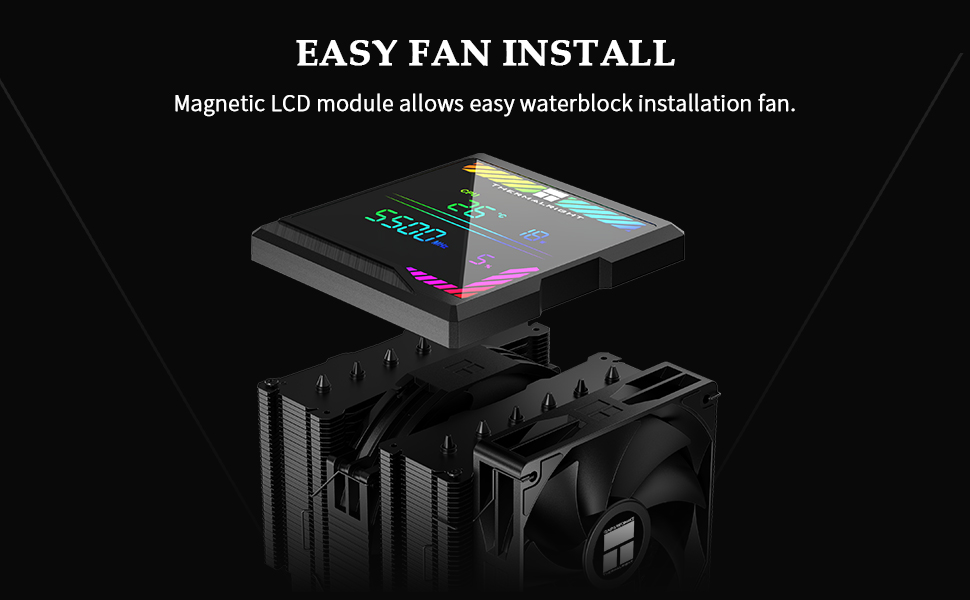
Image 4.3: The magnetic LCD module detaching from the heatsink, illustrating the ease of fan installation.
5. Betjeningsvejledning
5.1. Digital Display Board
The magnetic top cover ARGB digital display board provides real-time monitoring of CPU and graphics card temperature and utilization. The display can be customized for color switching based on temperature figures when used with the TRCC control software.

Billede 5.1: Et nærbillede view of the digital display board, showing CPU temperature, wattage, frequency, and utilization metrics.
5.2. TRCC Software
The TRCC Control Centre software allows you to monitor CPU and GPU temperature and occupancy, and adjust the color of the displayed text. Ensure the 9PIN USB interface is correctly connected before installing the software.
Download and install the TRCC software from the official Thermalright webwebsted: thermalright.com/support/download/
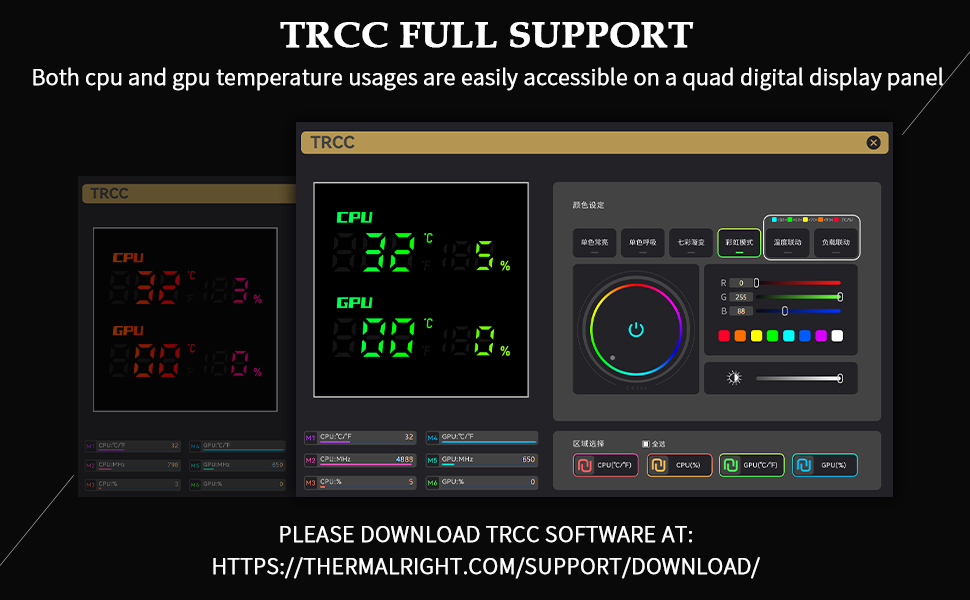
Image 5.2: The TRCC software interface, demonstrating CPU and GPU monitoring and color customization options.
5.3. PWM Fan Control
The included fans feature PWM (Pulse Width Modulation) intelligent temperature control. This automatically adjusts fan speed based on CPU temperature, optimizing cooling performance and reducing noise without manual intervention.
6. Vedligeholdelse
Regular maintenance ensures the longevity and optimal performance of your CPU cooler.
- Fjernelse af støv: Periodically clean dust from the heatsink fins and fan blades using compressed air or a soft brush. Ensure fans are not spinning during cleaning.
- Fan Cleaning/Replacement: The fans can be easily removed from the heatsink for thorough cleaning or replacement, thanks to the SS2 fasteners and magnetic top cover.
- Termisk pasta: If reinstalling the cooler or replacing the CPU, clean off old thermal paste and apply a fresh layer.
7. Fejlfinding
Hvis du støder på problemer med din CPU-køler, skal du overveje følgende:
- Ingen visning/forkerte aflæsninger: Verify that the 9PIN USB cable is securely connected to both the digital display board and the motherboard. Ensure TRCC software is installed and running correctly.
- Høje CPU-temperaturer: Check that the heatsink is properly mounted and making good contact with the CPU. Ensure thermal paste is correctly applied. Confirm fans are spinning and not obstructed. Verify fan cables are securely connected to the motherboard.
- For meget ventilatorstøj: Ensure fans are securely mounted and free from obstructions. Check for dust buildup on fan blades or heatsink fins. The fans feature S-FDB bearings designed for quiet operation; if noise persists, inspect for damage.
- Installationsproblemer: Double-check compatibility with your CPU socket and memory clearance. Refer to the installation steps and your motherboard manual.
8. Specifikationer
8.1. Generelle specifikationer
- Model: Peerless Assassin 140 Digital Black
- Samlet størrelse: 140 mm (L) x 160 mm (B) x 165 mm (H)
- Heatsink Material: Pure Copper Heatpipes, Aluminum Fins
- Heat Pipe Technology: 6x6mm AGHP (Anti-Gravity Heat Pipe) Version 5.0
- Vægt: 1.89 kilogram (ca. 4.17 pund)
8.2. Ventilatorspecifikationer
| Feature | TL-C12C-X28 V2 (120mm Fan) | TL-D14CB (140mm Fan) |
|---|---|---|
| Dimensioner | 120 mm x 120 mm x 28 mm | 140 mm x 140 mm x 27 mm |
| Nominel hastighed | 1850 o/min. ±10% (maks.) | 1500 o/min. ±10% (maks.) |
| Luftstrøm | 82 CFM | 77.8 CFM |
| Statisk tryk | 2.1 mm H2O (MAX) | 2.09 mm H2O (MAX) |
| Driftsstøj | ≤29.6 dB(A) | ≤25.6 dB(A) |
| Stik | 4PIN PWM | 4PIN PWM |
| Leje Type | S-FDB-leje | S-FDB-leje |
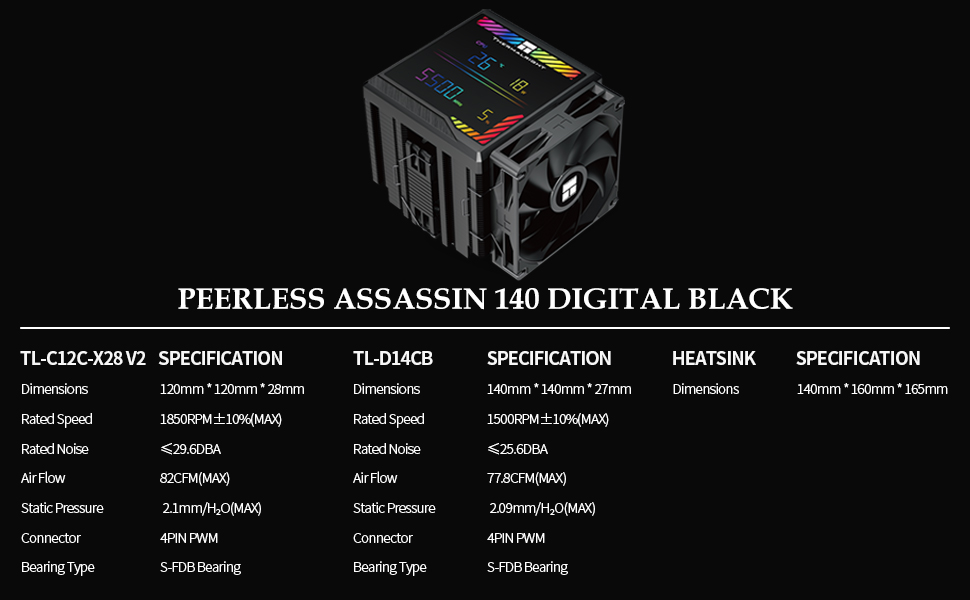
Image 8.1: A comprehensive table detailing the specifications of the fans and heatsink.
8.3. AGHP Heat Pipe Technology
The 6x6mm heat pipes incorporate Version 5.0 of AGHP (Anti-Gravity Heat Pipe) technology. This advanced design ensures optimal thermal performance regardless of the cooler's orientation (standing or lying), effectively counteracting the effects of gravity on heat transfer. The pure copper heat pipes combined with a precision reflow soldered micro-engraved copper base further optimize heat dissipation for modern high-performance CPUs.

Billede 8.2: En detaljeret view of the six 6mm AGHP heatpipes, highlighting the advanced heat transfer technology.
9. Garanti og support
For warranty information, technical support, or any inquiries regarding your Thermalright Peerless Assassin 140 Digital Black CPU Cooler, please visit the official Thermalright webwebstedet eller kontakt deres kundeserviceafdeling. Gem din købsbevis til garantikrav.


