Indledning
The BIGBEN EPOK REWIND+ BTTAPEBL is a portable cassette player and recorder designed to combine the classic audio experience of cassette tapes with modern Bluetooth 5.4 wireless technology. This device allows for both playback and recording of audio cassettes, offering versatile connectivity options including an integrated speaker, 3.5mm headphone jack, and bidirectional Bluetooth functionality. It features an auto-reverse mechanism for uninterrupted listening and is powered by a rechargeable USB-C battery.
Pakkens indhold
Før brug skal du sørge for, at alle varer er til stede i pakken:
- BIGBEN EPOK REWIND+ Cassette Player
- Vintage-style Wired Headphones (3.5mm jack)
- Blank Audio Cassette
- USB-C ladekabel
- Wooden Pencil (for manual tape winding)

The product packaging clearly displays the cassette player and its included accessories: headphones, a blank cassette, and a USB-C cable.

En overview of the BIGBEN EPOK REWIND+ components: the blue cassette player, orange-padded wired headphones, a blank audio cassette, and a wooden pencil.
Opsætning
1. Opladning af enheden
The EPOK REWIND+ features a built-in 1200mAh rechargeable battery. Before first use, fully charge the device.
- Connect the supplied USB-C charging cable to the USB-C port on the side of the player.
- Tilslut den anden ende af kablet til en standard USB-strømadapter (medfølger ikke) eller en computers USB-port.
- Opladningsindikatorlampen lyser. Når den er fuldt opladet, kan lampen skifte farve eller slukke, afhængigt af modellen.
2. Inserting a Cassette
- Locate the 'OPEN' switch or button on the player and slide/press it to open the cassette compartment door.
- Insert an audio cassette with the exposed tape facing towards the player's head mechanism. Ensure the cassette fits securely.
- Close the cassette compartment door firmly until it clicks into place.
3. Connecting Headphones (Optional)
For private listening, connect the included 3.5mm wired headphones or any compatible headphones to the 3.5mm headphone jack on the side of the player.

A user holding the EPOK REWIND+ cassette player while listening through wired headphones, demonstrating portable use.
Betjeningsvejledning
Basic Cassette Playback
- Insert a cassette as described in the Setup section.
- Tryk på SPIL knappen for at starte afspilningen.
- Adjust the volume using the rotary volume knob.
- Tryk på for at stoppe afspilningen STOP knap.
- Tryk på for at spole frem FF knap. Trykke STOP to cease fast forwarding.
- Tryk på for at spole tilbage REW knap. Trykke STOP to cease rewinding.
Auto-reverse funktion
The EPOK REWIND+ features an auto-reverse function, allowing continuous playback of both sides of a cassette without manual flipping.
- During playback, the player will automatically switch to the other side of the cassette once the current side ends.
- To manually reverse the tape direction, press the DIR (Direction) button.
Bluetooth Connectivity (5.4)
The device supports bidirectional Bluetooth 5.4, functioning as both a transmitter (TX) and a receiver (RX).
Transmitter Mode (TX): Streaming Cassette Audio to Bluetooth Headphones/Speakers
- Slide the Bluetooth mode selector switch to the TX position.
- Sørg for, at dine Bluetooth-hovedtelefoner eller -højttaler er i parringstilstand.
- The EPOK REWIND+ will automatically search for and connect to nearby Bluetooth audio devices. A successful connection will be indicated by a specific LED light pattern or audio cue.
- Begin cassette playback. The audio will now stream wirelessly to your connected Bluetooth device.
Receiver Mode (RX): Playing Smartphone Audio through the Player's Speaker/Headphones
- Slide the Bluetooth mode selector switch to the RX position.
- On your smartphone or other audio source, search for Bluetooth devices and select "EPOK REWIND+" to pair.
- Once connected, audio from your smartphone will play through the EPOK REWIND+'s integrated speaker or connected wired headphones.
Optagelse til kassettebånd
The EPOK REWIND+ allows recording from two sources: an integrated microphone or a Bluetooth audio source (in RX mode).
Recording from Integrated Microphone
- Insert a blank or recordable cassette.
- Tryk på REC (Record) button. The SPIL button will also engage simultaneously.
- Speak into the integrated microphone or place the player near the sound source you wish to record.
- Tryk på for at stoppe optagelsen STOP knap.
Recording from Bluetooth Source (Mixtape Creation)
- Insert a blank or recordable cassette.
- Set the Bluetooth mode selector switch to RX and pair your smartphone or audio source as described above.
- Start playing audio on your smartphone.
- Tryk på REC button on the EPOK REWIND+. The SPIL knappen vil også aktiveres.
- The audio from your smartphone will now be recorded onto the cassette.
- Tryk på for at stoppe optagelsen STOP knap.

En detaljeret view of the EPOK REWIND+ cassette player, highlighting the cassette window and control buttons for playback and recording.
Opretholdelse
Rengøring af enheden
- Brug en blød, tør klud til at tørre afspillerens yderside af.
- For the tape head and pinch rollers, use a cotton swab lightly dampened with isopropyl alcohol. Gently clean these components to ensure optimal sound quality and prevent tape damage. Perform this cleaning periodically, especially after extended use.
- Sørg for, at enheden er slukket og frakoblet enhver strømkilde før rengøring.
Kassettepleje
- Store cassettes in their cases to protect them from dust and physical damage.
- Avoid exposing cassettes to extreme temperatures or direct sunlight.
- If a tape becomes loose, use the included wooden pencil to manually wind the tape taut before inserting it into the player. Insert the pencil into one of the cassette's spools and rotate it gently.

A hand demonstrates the traditional method of using a pencil to manually wind a cassette tape, a useful technique for tape maintenance.
Batteripleje
- For at forlænge batteriets levetid bør du undgå at aflade batteriet helt ofte.
- If storing the device for an extended period, charge it to approximately 50% capacity.
Fejlfinding
- Ingen strøm: Ensure the device is charged. Connect the USB-C cable and check the charging indicator.
- No Sound from Cassette:
- Check if headphones are properly plugged in or if Bluetooth is connected (in TX mode).
- Sørg for, at lydstyrkeknappen er skruet op.
- Verify the cassette is inserted correctly and the tape is not tangled or damaged.
- Clean the tape head and pinch rollers.
- Bluetooth Not Connecting (TX Mode):
- Ensure the Bluetooth mode selector is in the TX position.
- Put your receiving Bluetooth device (headphones/speaker) into pairing mode.
- Flyt enhederne tættere på hinanden.
- Turn off and on both devices to reset Bluetooth.
- Bluetooth Not Connecting (RX Mode):
- Ensure the Bluetooth mode selector is in the RX position.
- On your smartphone, ensure Bluetooth is enabled and search for "EPOK REWIND+".
- Forget the device on your smartphone and re-pair if issues persist.
- Optagelsesproblemer:
- Ensure a recordable cassette is inserted and the record protection tabs are intact.
- Verify the audio source (microphone or Bluetooth in RX mode) is active and providing sound.
- Check microphone placement for clear voice recording.
Specifikationer
| Feature | Detalje |
|---|---|
| Mærke | Bigben |
| Modelnummer | BTTAPEBL |
| Forbindelse | Bluetooth 5.4 (Bidirectional TX/RX) |
| Lydudgang | Integrated Speaker, 3.5mm Headphone Jack |
| Indspilning | Integrated Microphone, Bluetooth (RX mode) |
| Særlige funktioner | Auto-reversering |
| Batteri | Rechargeable 1200mAh (USB-C charging) |
| Dimensioner (ca.) | 11 cm (Length) x 7.7 cm (Height) x 2.4 cm (Width) |
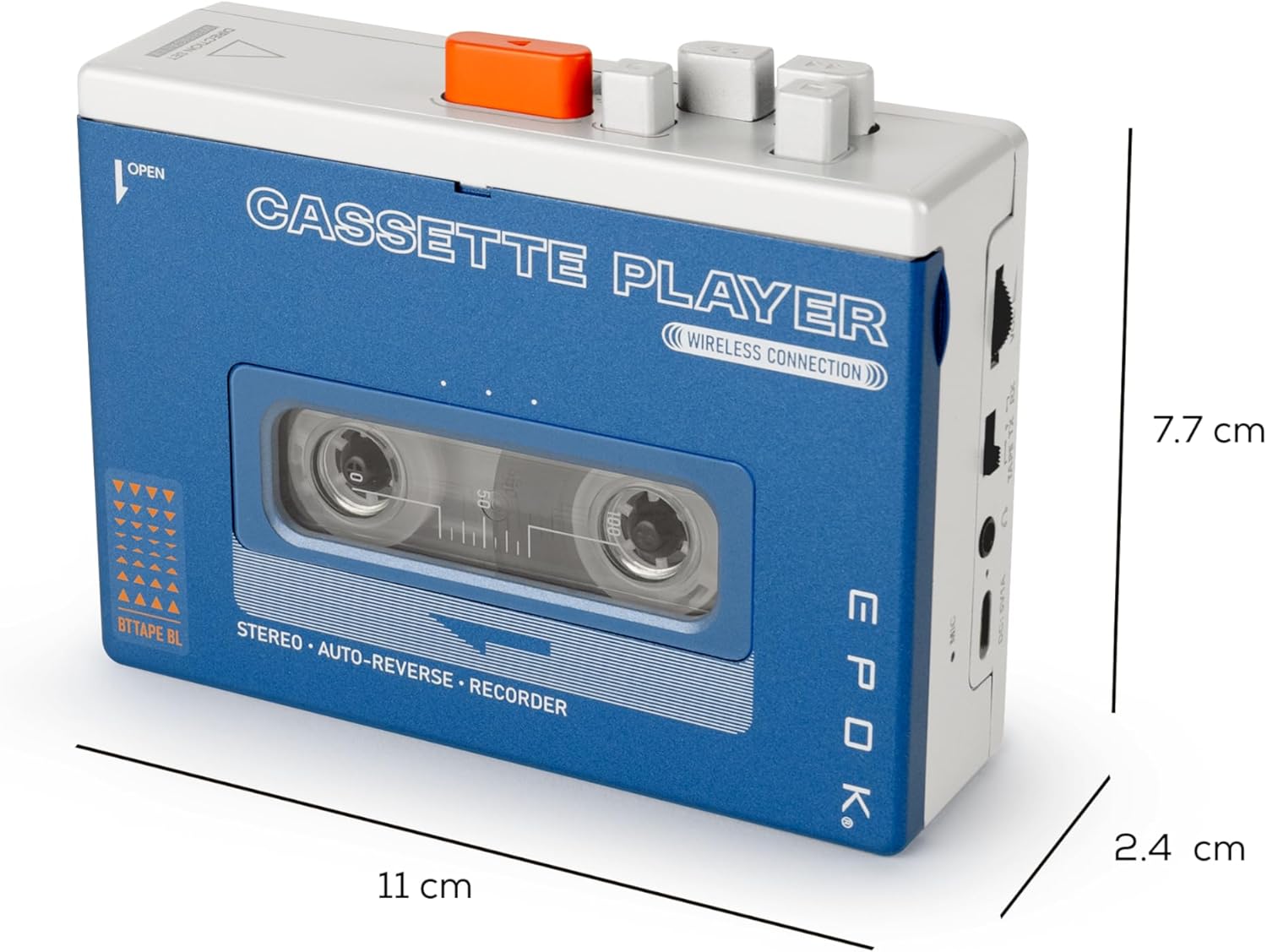
The EPOK REWIND+ cassette player shown with its approximate dimensions: 11 cm in length, 7.7 cm in height, and 2.4 cm in width.


