1. Introduktion
This manual provides essential information for the safe and efficient operation of your Haier QLED 4K UHD H55Q80FUX 55-inch Smart TV. Please read it thoroughly before using the product and retain it for future reference.
The Haier H55Q80FUX is a 55-inch QLED 4K UHD Smart TV featuring Google TV, Dolby Atmos, Dolby Vision, HDR 10+, a Smart Remote Control, Google Assistant, Bluetooth 5.1, DBX TV, and four HDMI 2.1 ports. It is designed for an immersive viewing and gaming experience with its frameless design and Gaming 120Hz DLG Accelerator.

Billede 1.1: Forside view of the Haier QLED 4K UHD H55Q80FUX 55-inch Smart TV.
2. Hvad er der i æsken
Sørg for, at alle følgende komponenter er til stede ved udpakning:
- Haier QLED 4K UHD H55Q80FUX 55-inch Smart TV
- Smart fjernbetjening
- Strømkabel
- Brugervejledning (dette dokument)
- TV Stand components (if applicable, for desktop placement)
3. Opsætning
3.1. Montering af stativ (valgfrit)
If you intend to place the TV on a surface, attach the provided stand according to the instructions in the quick start guide. Ensure all screws are securely fastened.
3.2. Vægmontering (valgfrit)
For wall mounting, use a VESA compatible bracket (300 x 300 mm) and follow the bracket manufacturer's instructions. Professional installation is recommended.
3.3. Tilslutning af strøm
Connect the power cable to the TV's power input and then to a suitable electrical outlet.
3.4. Initial Setup Wizard
Upon first power-on, the TV will guide you through the initial setup process, including language selection, network connection (Wi-Fi or Ethernet), Google account login, and channel scanning.

Image 3.1: Diagram showing the dimensions of the Haier H55Q80FUX TV with and without stand. Without stand: 122.6 cm (width) x 71.9 cm (height) x 8.8 cm (depth). With stand: 122.6 cm (width) x 77.7 cm (height) x 27.7 cm (depth).
4. Betjeningsvejledning
4.1. Smart fjernbetjening
The included Smart Remote Control allows for intuitive navigation of the Google TV interface. It features dedicated buttons for popular streaming services and a built-in microphone for voice commands.
4.2. Google TV-grænseflade
Google TV organizes your favorite apps, movies, and shows from various streaming services into a single, personalized interface. Navigate using the remote control's directional pad and select button.

Image 4.1: Screenshot of the Google TV interface displaying various streaming applications and content recommendations.
4.3. Google Assistant Voice Control
Press the Google Assistant button on your Smart Remote and speak into the microphone to control your TV, search for content, get information, and manage smart home devices.
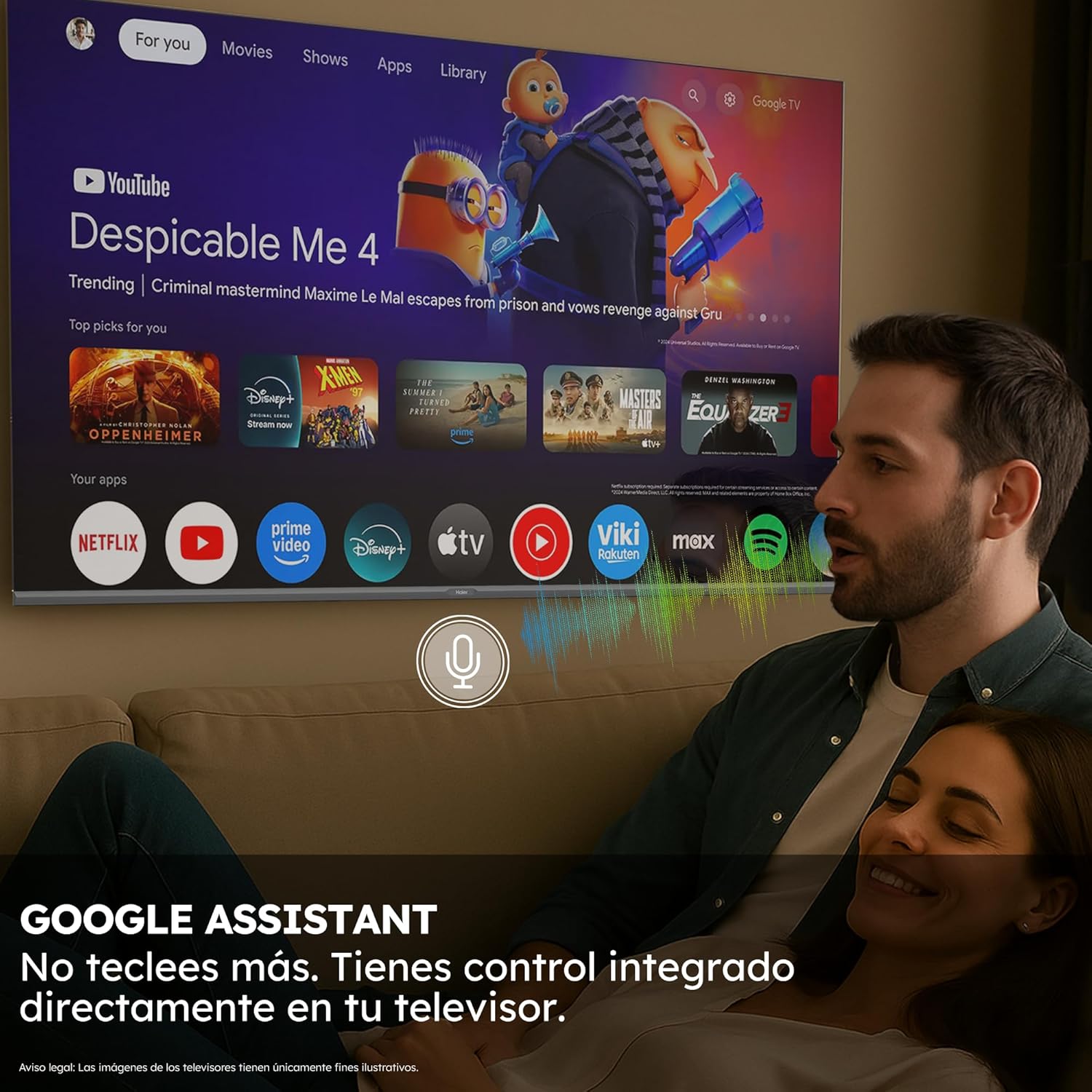
Image 4.2: A person using voice commands with the Google Assistant integrated into the Haier Smart TV.
4.4. Billed- og lydindstillinger
Access the TV settings menu to adjust picture modes (e.g., Standard, Vivid, Movie, Game), brightness, contrast, color, and sound settings (e.g., Standard, Music, Movie, Speech). The TV supports Dolby Atmos for immersive audio and Dolby Vision for enhanced picture quality.

Image 4.3: Diagram illustrating the layers of QLED technology, showing how Quantum Dots produce vibrant colors and enhanced brightness.

Image 4.4: Visual representation of Dolby Atmos and Dolby Vision, with a TV displaying a wave scene and sound ripples emanating from its base, symbolizing immersive audio and superior image quality.
4.5. Forbindelse
- HDMI 2.1: Connect gaming consoles, Blu-ray players, and other high-definition devices to the four HDMI 2.1 ports for optimal performance, especially for 4K 120Hz gaming.
- USB: Brug USB-portene til at afspille medier files fra eksterne lagerenheder.
- Bluetooth 5.1: Pair Bluetooth-enabled devices such as headphones, game controllers, or soundbars wirelessly.
- Wi-Fi/Ethernet: Connect to your home network for internet access and streaming services.

Image 4.5: Close-up of an HDMI 2.1 cable being connected to a TV port, highlighting the high-speed data transfer capabilities.
4.6. Spilfunktioner
The Haier H55Q80FUX is equipped with a Gaming 120Hz DLG Accelerator, which enhances motion clarity and response time for a smoother gaming experience in 2K resolution. HDMI 2.1 support further optimizes frame delivery for next-generation video games.

Image 4.6: Comparison of Gaming 120Hz vs. Standard 60Hz refresh rates, showing a blurred image at 60Hz and a clear, sharp image at 120Hz, demonstrating improved motion clarity for gaming.
4.7. MEMC Technology
Motion Estimation, Motion Compensation (MEMC) technology focuses on movement and maintains the sharpness of moving images, reducing motion blur in fast-paced scenes.
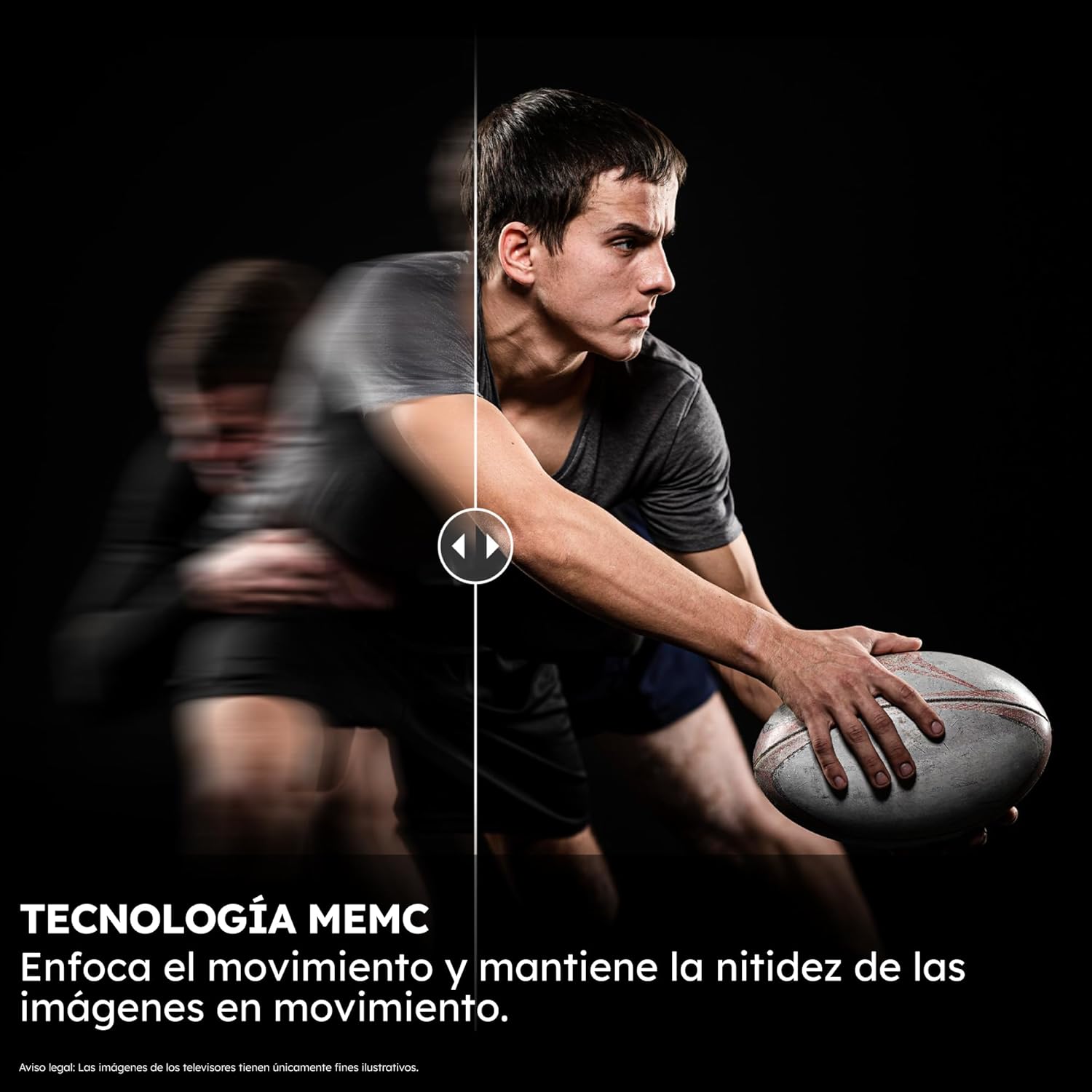
Image 4.7: Split image demonstrating MEMC technology, with one side showing motion blur and the other showing a clear, sharp image of a moving object.
5. Vedligeholdelse
5.1. Rengøring af skærmen
Tør forsigtigt skærmen af med en blød, fnugfri klud. Ved genstridige mærker, tør let afampRengør kluden med vand eller et specialiseret skærmrensemiddel. Undgå skrappe kemikalier eller slibende materialer.
5.2. Rengøring af TV-kabinettet
Use a soft, dry cloth to clean the TV's frame and back panel. Do not use liquid cleaners directly on the TV.
5.3. Softwareopdateringer
Ensure your TV's software is up to date for optimal performance and security. The TV may prompt you for updates, or you can check manually through the settings menu.
6. Fejlfinding
If you encounter issues with your Haier Smart TV, refer to the following common solutions:
- Ingen strøm: Sørg for, at strømkablet er korrekt tilsluttet til både tv'et og stikkontakten. Prøv en anden stikkontakt.
- Intet billede/lyd: Kontrollér inputkilden. Sørg for, at eksterne enheder er tændt og tilsluttet korrekt.
- Fjernbetjeningen reagerer ikke: Udskift batterierne i fjernbetjeningen. Sørg for, at der ikke er nogen forhindringer mellem fjernbetjeningen og tv'et.
- Problemer med netværksforbindelse: Genstart din router og dit modem. Tilslut tv'et til dit Wi-Fi-netværk igen, eller kontroller Ethernet-kabelforbindelsen.
- Problemer med billedkvaliteten: Adjust picture settings. Ensure the content source is of high quality.
For more complex issues, consult the Haier support webwebsted eller kontakt kundeservice.
7. Specifikationer
| Feature | Specifikation |
|---|---|
| Modelnummer | 36200116 |
| Skærmstørrelse | 55 tommer |
| Displayteknologi | QLED |
| Opløsning | 4K (3840 x 2160) |
| Opdateringshastighed | 60 Hz (Gaming 120Hz DLG Accelerator) |
| Særlige funktioner | Bluetooth 5.1, Dolby Atmos, Dolby Vision, GAMING 120HZ DLG ACCELERATOR, Google TV, QLED 4K UHD Technology |
| Forbindelse | Bluetooth, Ethernet, HDMI (x4, HDMI 2.1), USB, Wi-Fi |
| Dimensioner (uden stativ) | 122.6 x 71.9 x 8.8 cm |
| Dimensioner (med stativ) | 122.6 x 77.7 x 27.7 cm |
| Vægt | 11.8 kg |
| VESA Mount Kompatibilitet | 300 x 300 mm |
| Energieffektivitetsklasse | F |
| Strømforbrug (SDR) | 77 kWh/1000h |
| Strømforbrug (HDR) | 110 kWh/1000h |
| Operativsystem | Google TV |
| VÆDDER | 2 GB |
| ROM | 32 GB |

Image 7.1: EU Energy Label for Haier H55Q80FUX, showing energy efficiency class F and power consumption values. For more details, visit EPREL-database.
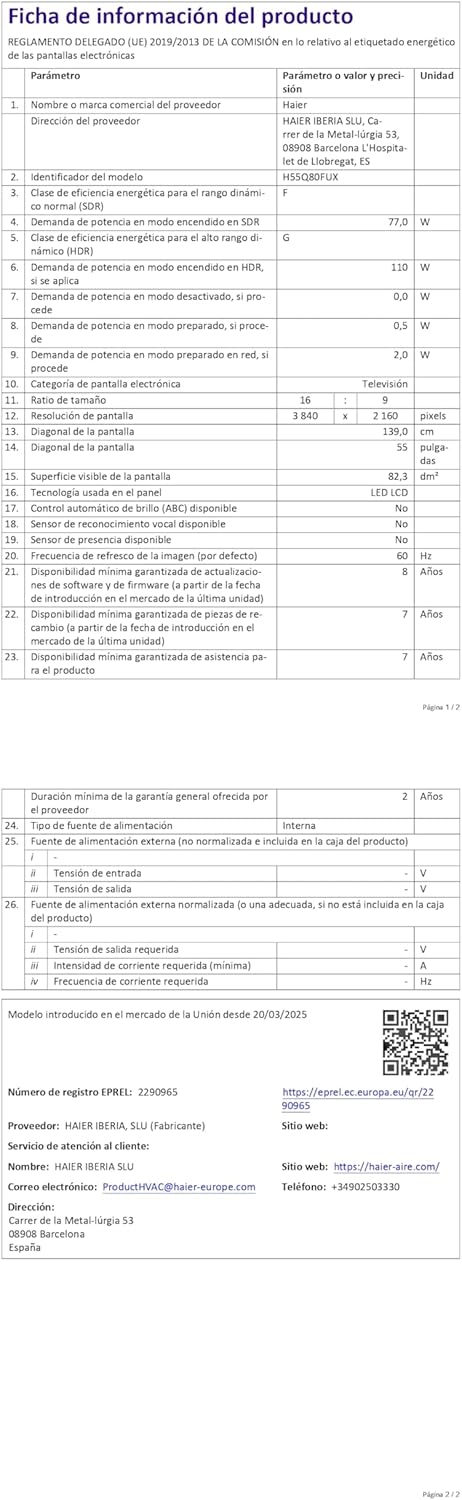
Image 7.2: Product information sheet for Haier H55Q80FUX, detailing various technical parameters. For more details, visit EPREL-database.

Image 7.3: Visual representation of the TV's internal components, highlighting 2GB RAM and 32GB ROM for enhanced performance and storage.
8. Garanti og support
8.1. Garantioplysninger
The Haier H55Q80FUX Smart TV comes with a minimum general warranty of 2 years from the date of purchase. Please retain your proof of purchase for warranty claims.
8.2. Kundesupport
For technical assistance, warranty service, or product inquiries, please contact Haier customer support:
- Fabrikant: Haier
- Kundeservice: HAIER IBERIA SLU
- E-mail: product.hvac@haier-europe.com
- Webwebsted: https://haier-sine.com/


