1. Introduktion
Welcome to the user manual for the MARSTEK 63A 110V Automatic/Manual Transfer Switch. This device is engineered to provide seamless power management by automatically or manually switching between primary (L1) and backup (L2) power sources. It features an LED display for real-time monitoring and incorporates comprehensive protection features to ensure the safety and reliability of your electrical system.
This manual provides essential information for the safe and efficient installation, operation, and maintenance of your transfer switch. Please read it thoroughly before installation and use.
2. Vigtige sikkerhedsoplysninger
Always follow basic safety precautions when installing, operating, and maintaining this product to reduce the risk of fire, electric shock, and injury to persons.
- Installationen skal udføres af en kvalificeret elektriker i overensstemmelse med alle lokale og nationale el-forskrifter.
- Disconnect all power sources before performing any installation, wiring, or maintenance.
- Betjen ikke kontakten, hvis den ser ud til at være beskadiget.
- Sørg for korrekt jording for at forhindre elektrisk stød.
- This device is designed for indoor use in a dry environment.
- Hold børn væk fra elektrisk udstyr.
3. Pakkens indhold
- 1 x MARSTEK 63A 110V Automatic/Manual Transfer Switch
- 1 x DIN Rail
- 1 x Brugermanual (dette dokument)
4. Produktet er slutview
The MARSTEK 63A 110V Automatic/Manual Transfer Switch is a compact device designed for reliable power source switching. It features an LED display for real-time voltage and operational status, and offers both automatic and manual control options.
Nøglefunktioner
- Automatic or Manual Switching: Seamless transfer between primary (L1) and backup (L2) power sources.
- Omfattende beskyttelse: Inkluderer overvoltage, undervoltage, og overstrømsbeskyttelse.
- Realtidsovervågning: High-definition LED display shows voltage og status.
- Nem installation: DIN rail mountable design.
- Bred anvendelse: Suitable for commercial, industrial, and residential backup power systems.
Produktdiagram

This image displays the main unit of the transfer switch, highlighting its compact design and the integrated LED display. The DIN rail is also shown, indicating its mounting method.
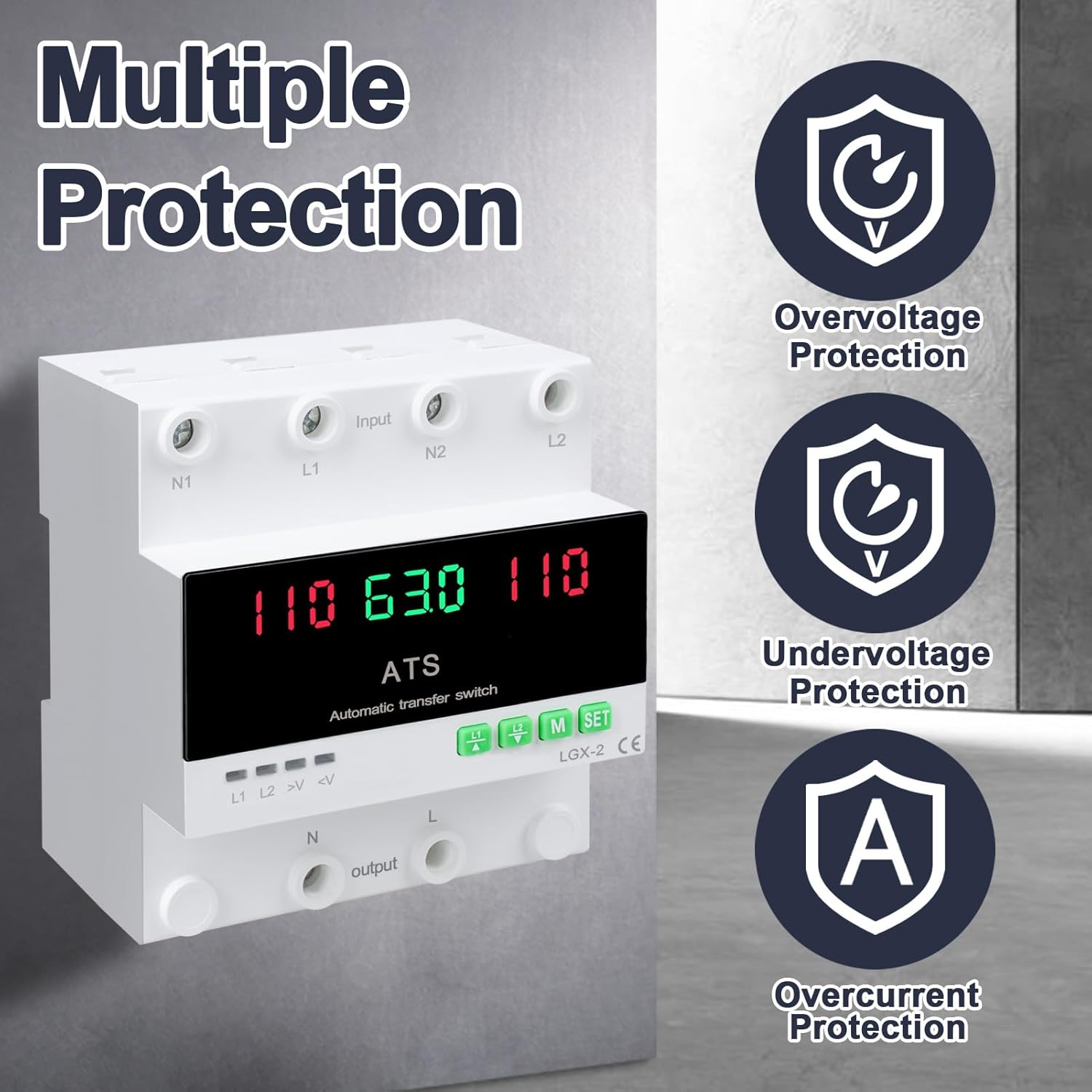
This image illustrates the built-in safety mechanisms of the transfer switch, emphasizing its capability to protect connected devices from electrical instability through overvoltage, undervoltage, and overcurrent safeguards.
5. Specifikationer
| Parameter | Værdi |
|---|---|
| Model | Dual Power 63A |
| Nuværende vurdering | 63 Amps |
| Operation Voltage | 120 volt |
| Driftstilstand | ON-AUTO-MANUAL |
| Produktmål (L x B x H) | 4.3 x 3.5 x 3.3 tommer |
| Vægt | 13.12 ounce |
| Kontakttype | Normalt lukket |
| Connector Type | Tilslut |
| Terminal | Skrue |
| Kredsløbstype | 2-vejs |
| Kontaktmateriale | Kobber |
| Nominel frekvens | 50/60Hz |
| Overvoltage Beskyttelsestærskel | AC140V |
| Undervoltage Beskyttelsestærskel | AC90V |
6. Opsætning og installation
Proper installation is crucial for the safe and reliable operation of the transfer switch. This device is designed for DIN rail mounting.
Før installation
- Ensure all power sources are disconnected at the main breaker before beginning installation.
- Kontroller, at voltage and current ratings of the transfer switch match your electrical system requirements.
- Prepare the installation location, ensuring it is dry, well-ventilated, and easily accessible.
Ledningsdiagram

This diagram illustrates the correct wiring connections for the transfer switch. It shows the input terminals for primary power (N1, L1) and backup power (N2, L2), and the output terminals (N, L) to the load. The diagram also labels the LED indicators for L1 output, L2 output, overvoltage, og undervoltage, as well as the menu/reset and manual ON/OFF buttons.
Installationstrin
- Mount the DIN rail securely in your electrical panel or enclosure.
- Attach the transfer switch onto the DIN rail.
- Connect the primary power source (N1, L1) to the designated input terminals.
- Connect the backup power source (N2, L2) to the designated input terminals.
- Connect the load (N, L) to the output terminals.
- Dobbelttjek alle forbindelser for tæthed og korrekthed.
- Once all wiring is complete and verified, restore power to the system.
7. Betjening
The MARSTEK transfer switch offers both automatic and manual operation modes.
Automatisk tilstand

In automatic mode, the switch prioritizes the primary power source (L1). If L1 fails or experiences voltage fluctuations (undervoltage eller overvoltage), the switch will automatically transfer the load to the backup power source (L2). When L1 is restored and stable, the switch will automatically transfer the load back to L1.
Manuel tilstand

The transfer switch can be manually operated using the buttons on the front panel.
- To close L1: Press the button labeled "L1" (often indicated by an up arrow or similar icon). Press again to open L1.
- To close L2: Press the button labeled "L2" (often indicated by a down arrow or similar icon). Press again to open L2.
In manual mode, the automatic transfer function is overridden. Ensure you understand the implications of manual switching before use.
LED Display and Indicators
The LED display provides real-time information about the system status.
- The main display shows voltage readings for the active power source.
- L1: Indicates L1 output is active.
- L2: Indicates L2 output is active.
- >V: Overvoltage indikatorlys.
- <V: Undervoltage indikatorlys.
- M: Menu selection/Reset button.
- SÆT: Manual ON/OFF button.
8. Vedligeholdelse
The MARSTEK transfer switch requires minimal maintenance.
- Kontrollér ledningsforbindelserne regelmæssigt for at sikre, at de er fastgjorte og fri for korrosion.
- Hold enheden ren og fri for støv og snavs. Brug en tør, blød klud til rengøring.
- Brug ikke slibende rengøringsmidler eller opløsningsmidler.
- Sørg for tilstrækkelig ventilation omkring enheden for at forhindre overophedning.
Warning: Always disconnect all power sources before performing any maintenance.
9. Fejlfinding
Dette afsnit indeholder løsninger på almindelige problemer, du kan støde på.
| Problem | Mulig årsag | Løsning |
|---|---|---|
| Enheden tænder ikke. | Ingen indgangsstrøm; forkert ledningsføring; intern fejl. | Check main breakers and power sources. Verify all wiring connections. If the problem persists, contact support. |
| Ingen automatisk overførsel. | Device in manual mode; power source within acceptable limits; fault in L1 or L2 detection. | Ensure the device is set to automatic mode. Check voltage levels of both L1 and L2. Contact support if automatic transfer fails despite correct settings. |
| Overvoltage (>V) or Undervoltage (<V) indicator lit. | Input voltage outside specified range. | Tjek voltage of the active power source. The device will automatically switch if the voltage is outside the set parameters (AC140V overvoltage, AC90V undervoltage). Address the power source issue. |
| Overcurrent protection triggered. | Load exceeds the 63A current rating. | Reduce the connected load. Ensure total current draw does not exceed 63 Amps. |
10. Garanti og support
For warranty information and technical support, please refer to the MARSTEK official webwebstedet eller kontakt din forhandler. Gem din købskvittering som købsbevis.
Manufacturer: JUXIANG
Mærke: MARSTEK


