Indledning
This user manual provides comprehensive instructions for the operation and maintenance of your LEMEGA MSY6 Stereo System. Please read this manual thoroughly before using the device to ensure proper functionality and to maximize your listening experience. The MSY6 combines a CD player, FM radio, Bluetooth audio streaming, USB player, and Aux-in capabilities, along with alarm and clock functions, all housed in an acoustic wood cabinet.
Hvad er der i æsken
- 1 x LEMEGA MSY6 CD Player FM Radio
- 1 x fjernbetjening
- 1 x lysnetadapter
- 1 x brugermanual
Produkt overview
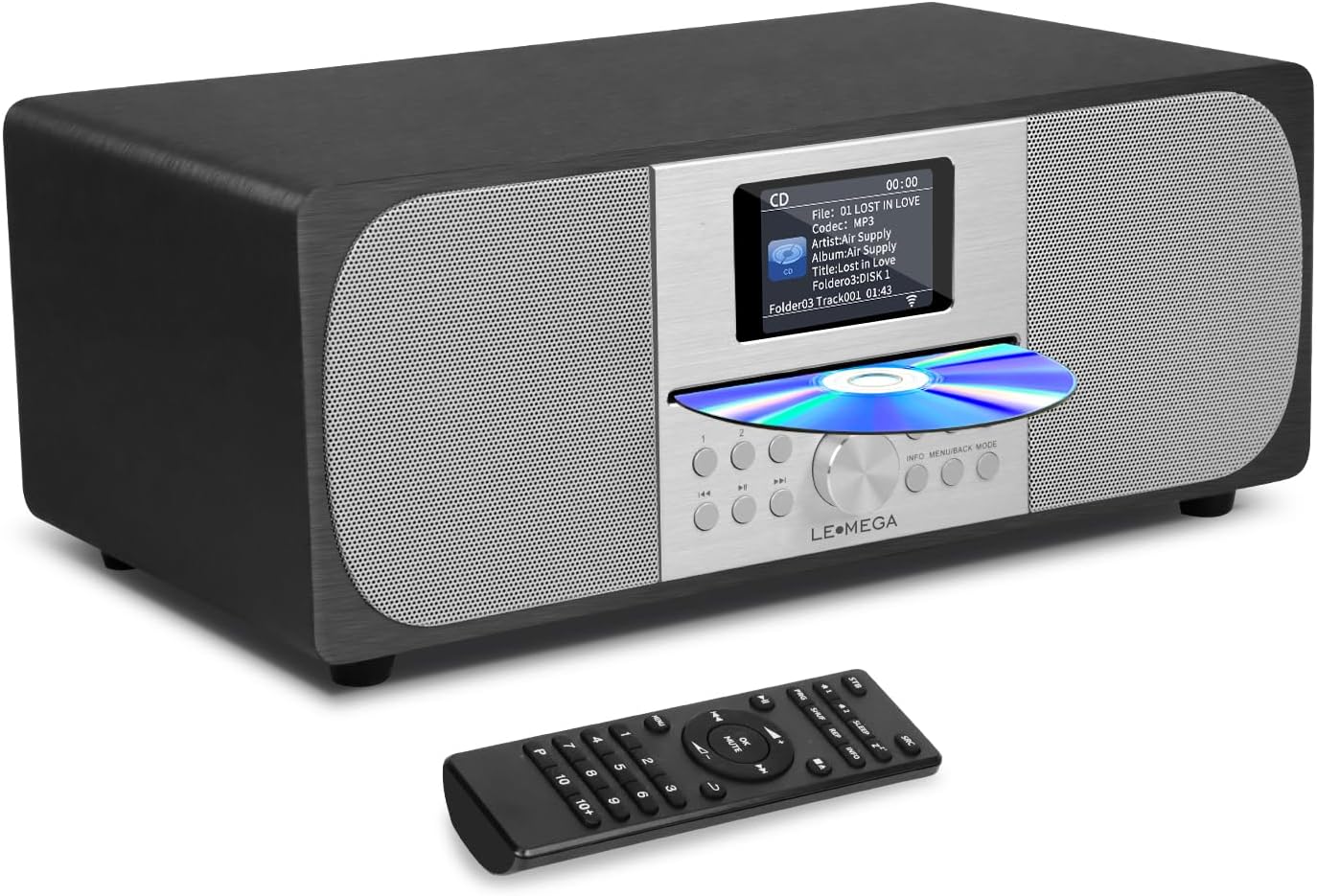
Figure 1: LEMEGA MSY6 Stereo System and Remote Control. The main unit features a central display, CD slot, and control buttons, flanked by speaker grilles. The remote control provides full functionality from a distance.
Opsætning
- Udpakning: Fjern forsigtigt alle komponenter fra emballagen. Gem emballagen til senere transport eller opbevaring.
- Placering: Place the MSY6 on a stable, flat surface, away from direct sunlight, heat sources, and excessive moisture. Ensure adequate ventilation around the unit.
- Strømtilslutning: Connect the supplied mains power adapter to the DC IN port on the rear of the MSY6. Plug the adapter into a suitable wall outlet.
- Antenna (FM): Extend the FM antenna fully for optimal radio reception. Adjust its position if reception is poor.
- Første gang tændt: Press the Power button on the unit or remote control to turn on the system. The display will illuminate.
Betjeningsvejledning
Grundlæggende betjening
- Tænd/sluk: Tryk på Magt knap.
- Lydstyrkekontrol: Drej på Volumenknap on the unit or use the VOL +/- knapper på fjernbetjeningen.
- Kildevalg: Tryk på MODE or SRC button to cycle through CD, FM, Bluetooth, USB, and Aux-in modes.
- Stum: Tryk på STUM knappen på fjernbetjeningen.
Betjening af cd-afspiller
- Indsæt CD: Gently insert a CD into the CD slot with the label side facing up. The system will automatically switch to CD mode and begin playback.
- Afspil/pause: Tryk på Afspil/pause knap.
- Spring spor over: Tryk på Næste/Forrige spor knapper (⏭ / ⏮).
- Hurtigt frem/tilbage: Tryk og hold på Næste/Forrige spor knapper.
- Stop: Tryk på Stop knap.
Betjening af FM-radio
- Vælg FM-tilstand: Tryk på MODE or SRC button until FM mode is selected.
- Automatisk scanning: Tryk og hold på Afspil/pause knappen for automatisk at scanne og gemme tilgængelige FM-stationer.
- Manuel indstilling: Brug Næste/Forrige spor knapper til at finjustere frekvensen.
- Gem forudindstillinger:
- Stil ind på den ønskede station.
- Tryk og hold på PROG button (or similar preset button).
- Brug Næste/Forrige spor knapperne til at vælge et forudindstillet nummer (1-20).
- Trykke OK or PROG igen for at bekræfte.
- Genkaldelse af forudindstillinger: Press the preset number buttons (1-9) on the remote or use the PROG knappen for at bladre gennem gemte stationer.
Bluetooth-betjening
- Vælg Bluetooth-tilstand: Tryk på MODE or SRC button until "Bluetooth" is displayed. The system will enter pairing mode.
- Parring af en enhed:
- On your Bluetooth-enabled device (smartphone, tablet, etc.), enable Bluetooth.
- Søg efter available devices. "LEMEGA MSY6" should appear in the list.
- Select "LEMEGA MSY6" to pair. Once connected, the display will indicate a successful connection.
- Bluetooth Headphone Connection (Exclusive to LEMEGA):
- Sørg for, at dine Bluetooth-hovedtelefoner er i parringstilstand.
- On the MSY6, navigate to the Bluetooth menu (refer to the display for specific menu options).
- Initiate a search for Bluetooth headphones.
- Select your headphones from the list to connect. Note: Headphones must support simple pairing or automatic handshake.
- Afspilningskontrol: Use the MSY6's controls or your connected device to play, pause, skip tracks, and adjust volume.
USB & Aux-in Operation
- USB-afspilning: Insert a USB flash drive into the USB port. The system will automatically switch to USB mode and begin playing compatible audio files (e.g., MP3). Use the playback controls as with CD mode.
- Aux-ind: Connect an external audio device (e.g., MP3 player, smartphone) to the AUX IN port using a 3.5mm audio cable (not supplied). Select AUX mode using the MODE or SRC button. Control playback from your external device.
Alarms, Clock & Sleep Timer
- Indstilling af ur: Access the system settings menu (usually via MENU or INFO button) to set the time and date.
- Dobbelte alarmer: The MSY6 supports two independent alarms.
- Navigate to the Alarm settings in the menu.
- Set the alarm time, source (FM radio or buzzer), and frequency (daily, weekdays, weekends).
- Juster alarmlydstyrken.
- Sleep timer: Tryk på SOVE button on the remote control repeatedly to cycle through sleep timer durations (e.g., 15, 30, 60, 90 minutes, OFF). The system will automatically turn off after the selected time.
Display & EQ Settings
- Farveskærm: The 2.4" full-color display shows radio station information, track details, and system settings.
- Equalizer (EQ): Access the EQ settings via the menu to customize the audio output. Choose from preset EQ modes or manually adjust bass and treble levels to suit your preference for music or speech.
Opretholdelse
- Rensning: Brug en blød, tør klud til at rengøre enhedens yderside. Brug ikke slibende rengøringsmidler, voks eller opløsningsmidler.
- CD-pleje: Hold cd'er i kanterne. Rengør snavsede cd'er med en blød, fnugfri klud, og tør af fra midten og udad.
- Ventilation: Sørg for, at ventilationsåbningerne ikke er blokeret for at forhindre overophedning.
- Opbevaring: Hvis enheden opbevares i længere tid, skal den tages ud af stikkontakten og opbevares et køligt og tørt sted.
Fejlfinding
| Problem | Mulig årsag | Løsning |
|---|---|---|
| Ingen strøm | Strømadapteren er ikke tilsluttet; stikkontakten er defekt. | Sørg for, at strømadapteren er korrekt tilsluttet og sat i en fungerende stikkontakt. |
| Ingen lyd | Lydstyrken er for lav; Lydløs aktiveret; Forkert kilde valgt. | Increase volume; Deactivate mute; Select correct audio source (CD, FM, BT, USB, AUX). |
| Dårlig FM -modtagelse | Antennen er ikke trukket ud eller placeret korrekt. | Fully extend and adjust the position of the FM antenna. Try relocating the unit. |
| Bluetooth-parringsfejl | Device too far; Bluetooth not enabled on device; MSY6 not in pairing mode. | Ensure devices are within range; Enable Bluetooth on your device; Put MSY6 into Bluetooth pairing mode. |
| CD springer over eller afspiller ikke | CD'en er snavset eller ridset; CD'en er isat forkert. | Clean the CD; Ensure CD is inserted label side up. Try a different CD. |
Specifikationer
| Feature | Detalje |
|---|---|
| Produktmål (L x B x H) | 14 x 8 x 5.5 tommer |
| Varens vægt | 8 pund |
| Modelnummer | MSY6 |
| Mærke | LEMEGA |
| Forbindelsesteknologi | Auxiliary, Bluetooth, Infrared, USB |
| Farve | Sort eg |
| Højttaler type | Stereoanlæg |
| Udgangseffekt | 100W |
| Vise | 2.4" fuldfarveskærm |
Garanti og support
LEMEGA products are designed and manufactured to the highest quality standards. For information regarding warranty coverage and customer support, please refer to the warranty card included with your product or visit the official LEMEGA website. You may also contact LEMEGA customer service directly for assistance with product registration, troubleshooting, or service inquiries.
LEMEGA US Seller: LEMEGA US


