Indledning
This manual provides detailed instructions for the installation, operation, and maintenance of your Alpine ILX-W670-S 7-inch Double-DIN Digital Multimedia Receiver with Backup Bullet Camera. Please read this manual thoroughly before using the product to ensure proper operation and to prevent damage.
Sikkerhedsoplysninger
Always observe the following safety precautions to prevent injury or damage to the unit and vehicle:
- Betjen ikke enheden på en måde, der distraherer dig fra kørslen. Prioritér altid trafiksikkerhed.
- Ensure all wiring is correctly connected to prevent short circuits or electrical hazards. Incorrect wiring can cause fire or damage.
- Kontakt en professionel til installation, hvis du er usikker på nogle trin.
- Hold lydstyrken på et niveau, der gør det muligt at høre lyde udefra, f.eks. lyde fra udrykningskøretøjer.
- Enheden må ikke skilles ad eller ændres. Dette kan forårsage skade og ugyldiggøre garantien.
Pakkens indhold
Bekræft at alle varer er til stede i pakken:
- Alpine ILX-W670-S Digital Multimedia Receiver
- BULCAMC-1 Backup Bullet Camera
- Ledningsnet og stik
- Monteringshardware
- Brugervejledning (dette dokument)

Figur 1: Alpine ILX-W670-S Digital Multimedia Receiver with included Backup Bullet Camera. The image displays the 7-inch touchscreen receiver unit, the compact bullet-style backup camera, and a small key fob accessory.
Opsætning
Installation af modtager
The ILX-W670-S is designed for standard double-DIN vehicle openings. Its shallow-mount chassis is beneficial for vehicles with limited dash space. Professional installation is recommended for optimal performance and safety.
- Forberedelse: Frakobl køretøjets negative batteripol, før du påbegynder elektrisk arbejde.
- Montering: Secure the receiver into the double-DIN opening using the provided mounting hardware. Ensure it is firmly seated.
- Ledningsforbindelser:
- Connect the main power harness (constant 12V, accessory 12V, ground).
- Connect speaker wires to the vehicle's speaker system.
- Connect the backup camera input cable.
- Connect the USB and AUX input cables as needed.
- For steering wheel control integration, connect the SWC adapter via the 3.5mm mini jack.
- Hvis du bruger ekstern amplifiers, connect the 4V pre-outs (front, rear, subwoofer).
- Test: Reconnect the battery and perform a basic function test before fully reassembling the dashboard.
Installation af backup kamera
The BULCAMC-1 bullet camera provides a wide-angle view for enhanced safety when reversing.

Figur 2: Nærbillede view of the BULCAMC-1 Backup Bullet Camera. This image highlights the compact design and mounting bracket of the camera, which is designed for discreet installation.
- Monteringssted: Choose a central location at the rear of the vehicle, typically near the license plate, that offers a clear, unobstructed view.
- Sikker montering: Drill necessary holes (if required) and securely mount the camera using the provided hardware. Ensure the camera is aimed correctly.
- Ledningsføring:
- Connect the camera's power wire to the vehicle's reverse light circuit (12V) so it activates when the vehicle is in reverse.
- Run the video signal cable from the camera to the camera input on the ILX-W670-S receiver.
- Vandtætning: Ensure all connections are properly sealed, as the camera is IP67-68 waterproof rated.
Betjeningsvejledning
Tænd/sluk
The unit will power on automatically when the vehicle's ignition is turned to the accessory or on position. To turn off the unit, turn off the vehicle's ignition.
Touchscreen -grænseflade
The ILX-W670-S features a responsive 6.75-inch touchscreen display with 800 x 480 resolution. The home screen is customizable, allowing you to arrange icons and even upload your own background image. The key illumination can be set to one of five colors (red, green, blue, amber, white).
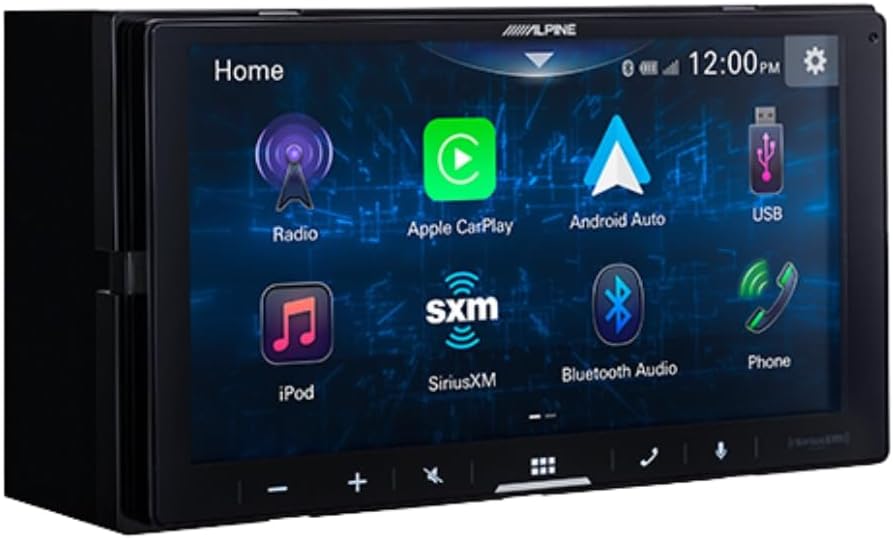
Figur 3: Alpine ILX-W670-S home screen displaying various application icons. This image shows the customizable interface with options for Radio, Apple CarPlay, Android Auto, USB, iPod, SiriusXM, Bluetooth Audio, and Phone.
Lydfunktioner
- Equalizer: Utilize the 13-band graphic EQ to fine-tune audio frequencies to your preference.
- Tidskorrektion: The 6-channel time correction feature allows for precise adjustment of sound delivery to each speaker, optimizing the sound stage.
- Crossovers: Adjust front, rear, and subwoofer crossovers to manage frequency distribution to your speakers.
- Sound Boost Menu: Access dedicated controls for bass, mid-bass, and subwoofer output.
- Understøttede lydformater: The unit supports AAC, FLAC, MP3, and WMA audio playback.
Forbindelse
- Apple CarPlay og Android Auto: Connect your compatible smartphone via USB for wired access to navigation, music, messaging, and other apps directly on the receiver's screen.

Figur 4: Alpine ILX-W670-S display showing the Apple CarPlay interface. This image illustrates the integration of smartphone applications like Phone, Music, Maps, Messages, and Podcasts onto the receiver's screen.
- Bluetooth: Pair your smartphone for hands-free calling and wireless audio streaming.
- SiriusXM-Ready: The unit is compatible with SiriusXM satellite radio (requires a separate SiriusXM Connect Vehicle Tuner and subscription).
- AUX-indgang: Connect external audio devices using the 3.5mm auxiliary input.
- USB-indgang: Use the USB port for media playback or smartphone connectivity.
- Ratbetjening (SWC): Integrate with your vehicle's factory steering wheel controls using a compatible adapter connected to the 3.5mm mini jack.
Videoafspilning
The receiver supports various video formats including MP4, MKV, MOV, H.264, FLV, MPEG-4, and AVC. Video playback is typically restricted while the vehicle is in motion for safety reasons.
Backup Camera Operation
When the vehicle is shifted into reverse, the display will automatically switch to the camera view, providing a 155-degree wide-angle perspective. The camera has a low light sensitivity of 0.5 lux, ensuring visibility in various lighting conditions.
Opretholdelse
- Rengøring af skærm: Brug en blød, fnugfri klud til forsigtigt at tørre berøringsskærmen af. Ved genstridige pletter, tør let afampRengør kluden med vand eller et skærmsikkert rengøringsmiddel. Undgå slibende materialer eller barske kemikalier.
- Generel pleje: Keep the unit free from dust and debris. Ensure all connections remain secure.
- Kamerarensning: Periodically clean the camera lens with a soft cloth to ensure a clear view.
Fejlfinding
| Problem | Mulig årsag | Løsning |
|---|---|---|
| Ingen strøm til enheden | Blown fuse; incorrect wiring; loose power connection. | Kontroller køretøjets sikringer og enhedens sikring. Kontroller strøm- og jordforbindelser. Sørg for, at tændingen er tændt. |
| Ingen lydudgang | Volume too low; mute activated; speaker wires disconnected; incorrect audio source selected. | Increase volume. Check if mute is active. Verify speaker wiring. Select the correct audio source. |
| Apple CarPlay/Android Auto opretter ikke forbindelse | Faulty USB cable; phone not compatible; software issue; phone settings. | Use a high-quality, certified USB cable. Ensure your phone's OS is updated. Check phone settings for CarPlay/Android Auto permissions. Restart phone and receiver. |
| Bakkameraet viser ikke | Camera power issue; video cable disconnected; vehicle not in reverse. | Ensure vehicle is in reverse. Check camera power connection (to reverse lights). Verify video cable connection to the receiver. |
| Touchscreen reagerer ikke | Midlertidig softwarefejl; skærmskade. | Restart the unit (turn vehicle off and on). If issue persists, contact support. |
Specifikationer
Alpine ILX-W670-S Digital Multimedia Receiver
- Vise: 6.75-inch capacitive touchscreen (800 x 480 resolution)
- Nøglebelysning: 5-color customizable (red, green, blue, amber, white)
- Amplivligere: Built-in 16W RMS / 45W peak x 4 channels
- Lydbehandling: 13-band graphic EQ, 6-channel time correction, Sound Boost menu, Front/Rear/Subwoofer crossovers
- Pre-outs: 3 pairs (Front, Rear, Subwoofer) at 4V
- Indgange: 1x AUX (3.5mm), 1x USB, 1x Camera, SWC adapter via 3.5mm mini jack
- Forbindelse: Wired Apple CarPlay, Wired Android Auto, Bluetooth (hands-free calling & audio streaming), SiriusXM-ready
- Understøttede lydformater: AAC, FLAC, MP3, WMA
- Understøttede videoformater: MP4, MKV, MOV, H.264, FLV, MPEG-4, AVC
- Dimensioner: 8.75 x 6 x 7 tommer (Produkt)
- Vægt: 3.4 pund
BULCAMC-1 Backup Bullet Camera
- Sensor: CMOS
- Opløsning: 420 linjer
- Minimum belysning: 0.5 lux
- View Vinkel: 155 grader
- Vandtæt vurdering: IP67-68
- Driftstemperatur: -30 til 70 ℃ (-22 til 158 ℉)
Garantioplysninger
Alpine products are manufactured to high-quality standards. For specific warranty terms and conditions, please refer to the warranty card included with your product or visit the official Alpine webwebsted. Gem din købsbevis til garantikrav.
Støtte
For further assistance, technical support, or to download the latest firmware updates, please visit the official Alpine website kl www.alpine-usa.com. You may also contact Alpine customer service directly for personalized support.


