
Indledning
The GEEKOM A5 Mini PC is a compact yet powerful computing solution designed for a wide range of applications, from daily productivity and multitasking to casual gaming and multimedia consumption. It features an AMD Ryzen 7 5825U processor, integrated Vega 8 Graphics, ample memory, and fast storage, all within a durable and space-saving design.
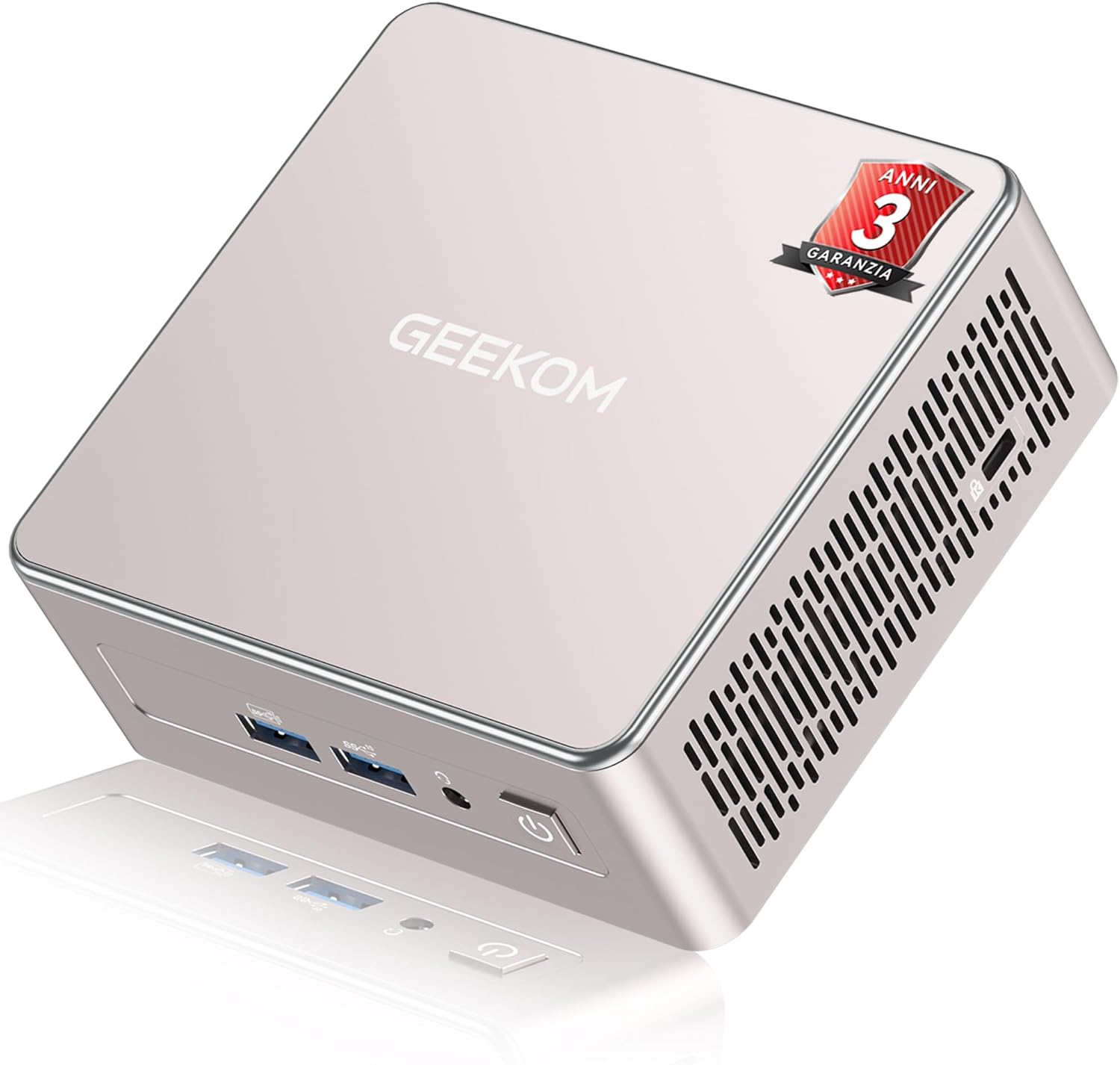
Image: The GEEKOM A5 Mini PC, a compact and powerful computing device.
This manual provides essential information for setting up, operating, maintaining, and troubleshooting your GEEKOM A5 Mini PC to ensure optimal performance and longevity.
Opsætningsvejledning
1. Pakkens indhold
Før du begynder, skal du sørge for, at alle varer er til stede i pakken:
- GEEKOM A5 Mini PC
- Brugervejledning
- VESA Mount
- HDMI kabel
- Strømadapter

Image: All components included in the GEEKOM A5 Mini PC package, including the Mini PC, user guide, VESA mount, HDMI cable, and power adapter.
2. Tilslutning af eksterne enheder
Connect your monitor, keyboard, and mouse to the Mini PC using the available ports. The GEEKOM A5 offers a variety of connectivity options:
- USB 3.2 Gen 2 Type-C-porte (x2): For high-speed data transfer and display output (up to 8K).
- HDMI 2.0-porte (x2): For display output (up to 4K@60Hz).
- USB 3.2 Gen 2 Type-A-porte (x3): Til tilslutning af forskellige USB-enheder.
- USB 2.0 Type-A-porte (x2): Til tilslutning af forskellige USB-enheder.
- 2.5G RJ45 LAN-port: Til kabelbaseret netværksforbindelse.
- 3.5 mm hovedtelefonstik: Til lydudgang.
- SD-kortlæser: Til læsning af SD-hukommelseskort.
- Kensington Lock Slot: Af sikkerhedsmæssige årsager.

Image: Detailed diagram showing the various input/output ports on the GEEKOM A5 Mini PC, including USB, HDMI, LAN, and audio jacks.
3. Tænder
After connecting all necessary peripherals, plug the power adapter into the DC input port on the Mini PC, then connect it to a power outlet. Press the power button located on the front of the device to turn it on.
The GEEKOM A5 comes with Windows 11 Pro pre-installed, offering a ready-to-use experience. It also supports dual-boot configurations and simplified installation of Linux/Ubuntu distributions.

Image: The GEEKOM A5 Mini PC displaying the Windows 11 Pro logo, indicating its pre-installed operating system, with icons for Ubuntu and Linux also shown, highlighting multi-OS compatibility.
Betjeningsvejledning
1. Grundlæggende betjening
To turn on the Mini PC, press the power button. To turn it off, use the shutdown option within the operating system. For a forced shutdown, press and hold the power button for several seconds. It is recommended to always shut down the system properly to prevent data loss.
2. Netværk og forbindelse
The GEEKOM A5 supports advanced wireless and wired connectivity:
- Wi-Fi 6: Provides faster wireless speeds (up to 2.4Gbps) and improved performance in crowded network environments.
- Bluetooth 5.2: Offers faster connection speeds and lower latency for connecting wireless peripherals like headphones, keyboards, and mice.
- 2.5G LAN: For a stable and high-speed wired internet connection, ideal for gaming and large file overførsler.
The 360-degree Wi-Fi coverage and 3D stereo antenna ensure an ultra-stable connection without electromagnetic interference.

Image: The GEEKOM A5 Mini PC surrounded by wireless devices, illustrating its support for Bluetooth 5.2 and Wi-Fi 6, with a diagram highlighting its 3D stereo antenna for stable network experience.
3. Skærmkonfiguration
The Mini PC supports up to four displays simultaneously, making it suitable for complex multitasking environments. It can output up to 4K resolution via HDMI 2.0 ports and an impressive 8K resolution via the USB 3.2 Gen 2 Type-C ports.

Image: A GEEKOM A5 Mini PC connected to multiple monitors, demonstrating its capability for quad display output up to 8K resolution via USB-C and 4K via HDMI, suitable for design, gaming, video, and work.
Opretholdelse
1. Lagerplads og hukommelsesudvidelse
The GEEKOM A5 offers flexible expansion options to meet your growing needs:
- VÆDDER: 16GB DDR4 3200MT/s SODIMM, expandable up to 64GB.
- Primary SSD: 1TB M.2 2280 PCIe Gen4x4 SSD, expandable up to 2TB.
- Secondary SSD: One M.2 2242 SATAIII SSD slot, expandable up to 1TB.
- HDD: One 2.5" 7mm SATA HDD slot, expandable up to 2TB.
These options allow for significant upgrades to both speed and storage capacity.

Billede: Intern view of the GEEKOM A5 Mini PC showing the slots for M.2 PCIe SSD, DDR4 RAM, M.2 SATA SSD, and a 2.5-inch SATA HDD, illustrating its extensive expansion capabilities.
2. Kølesystem
The Mini PC features the IceBlast 2.0 efficient cooling system. This design includes larger fans and an all-copper heat sink to effectively reduce internal temperatures and maintain high PC performance, even under load.

Image: Diagram illustrating the IceBlast 2.0 cooling system of the GEEKOM A5, highlighting larger fans, dual copper heat pipes, and an all-copper heat sink for efficient heat dissipation.
3. Generel rengøring
To ensure optimal performance and longevity, regularly clean the exterior of the Mini PC with a soft, dry cloth. Avoid using liquid cleaners or abrasive materials. Ensure ventilation openings are clear of dust and debris.
Fejlfinding
This section addresses common issues you might encounter with your GEEKOM A5 Mini PC. For more complex problems, please refer to the support section.
Ingen strøm / Systemet starter ikke
- Sørg for, at strømadapteren er korrekt tilsluttet både mini-pc'en og en fungerende stikkontakt.
- Kontroller, at stikkontakten fungerer ved at tilslutte en anden enhed.
- Prøv en anden stikkontakt, hvis en tilgængelig.
Ingen skærmudgang
- Check that the HDMI or USB-C cable is securely connected to both the Mini PC and the monitor.
- Sørg for, at skærmen er tændt og indstillet til den korrekte inputkilde.
- Prøv et andet skærmkabel eller en anden skærm, hvis det er muligt.
Problemer med netværksforbindelse
- For Wi-Fi, ensure the Wi-Fi adapter is enabled in Windows settings and you are connected to the correct network.
- For wired LAN, ensure the Ethernet cable is securely connected to both the Mini PC and your router/modem.
- Genstart din router/modem.
Specifikationer
| Feature | Detalje |
|---|---|
| Mærke | GEEKOM |
| Model | A5 |
| Processor | AMD Ryzen 7 5825U (8 kerner, 16 tråde, op til 4.5 GHz) |
| Grafik | AMD Radeon Vega 8-grafikkort (1900 MHz) |
| VÆDDER | 16GB DDR4 (kan udvides til 64GB) |
| Opbevaring | 1TB PCIe 4x4 SSD (expandable to 2TB), M.2 2242 SATA SSD slot (up to 1TB), 2.5" SATA HDD slot (up to 2TB) |
| Operativsystem | Windows 11 Pro |
| Forbindelse | Wi-Fi 6, Bluetooth 5.2, 2.5G LAN |
| Havne | 2x USB 3.2 Gen 2 Type-C, 2x HDMI 2.0, 3x USB 3.2 Gen 2 Type-A, 2x USB 2.0 Type-A, 1x 2.5G RJ45 LAN, 1x 3.5mm Headphone Jack, 1x SD Card Reader |
| Dimensioner | 11.7 x 11.2 x 4.92 cm |
| Vægt | 500 g |
Garanti og support
GEEKOM offers comprehensive support for your A5 Mini PC:
- 3-års garanti: Includes 1 year of free replacement and 2 years of free repairs.
- Online support: 24-timers kundeservice tilgængelig.

Image: A graphic illustrating GEEKOM's global customer support presence, highlighting 3-year warranty and online assistance.
Kontakt Support
For assistance, you can:
- Contact the seller on Amazon: Access your Amazon account, find your order, click "Get help," and request product assistance.
- Send an email to the support team: pan.he@geekom.tw

Image: A visual representation of GEEKOM's warranty and support options, including contact methods.


