1. Introduktion
Tak for købetasing the WOLFANG Portable Projector WP05. This device is designed to provide a versatile and immersive viewing experience with its Android 11 operating system, high-definition resolution, and portable design. This manual provides essential information for setting up, operating, and maintaining your projector. Please read it thoroughly before use to ensure optimal performance and safety.
2. Sikkerhedsoplysninger
Please observe the following safety precautions to prevent damage to the projector and ensure user safety:
- Se ikke direkte ind i projektorlinsen, når lamp er tændt.
- Sørg for korrekt ventilation omkring projektoren for at forhindre overophedning.
- Brug kun den strømadapter, der følger med projektoren.
- Hold projektoren væk fra vand, fugt og brandfarlige materialer.
- Forsøg ikke selv at skille projektoren ad eller reparere den. Kontakt kvalificeret servicepersonale for at få hjælp.
- Opbevares utilgængeligt for børn.
3. Pakkens indhold
Bekræft at alle varer er til stede i din pakke:
- WOLFANG Portable Projector WP05
- Remote Control (with Air Mouse function)
- Strømadapter
- Brugermanual

Billede: Forside view of the WOLFANG Portable Projector WP05 retail box, showing the product name and a graphic of the projector.
4. Produktet er slutview
Familiarize yourself with the components of your WOLFANG Portable Projector WP05.
Image: The WOLFANG Portable Projector WP05 shown from the front, highlighting its compact cylindrical design and lens.
Nøglefunktioner:
- HD 1080P Resolution: Supports 1920 x 1080P resolution for clear visuals.
- Android 11 OS: Built-in operating system with access to over 5,000 applications.
- Automatisk keystone-korrektion: ±45° auto vertical keystone correction for image alignment.
- 180° drejelig stativ: Flexible projection angle for walls, ceilings, or floors.
- Dobbeltbånds Wi-Fi 6: Supports 2.4G and 5G networks for stable and fast streaming.
- Bluetooth 5.2: Til tilslutning af eksterne lydenheder.
- Indbygget Hi-Fi højttaler: Integrated 3W speaker for audio output.
- Kompakt og bærbar: Weighs approximately 0.6KG for easy transport.

Image: The WOLFANG Portable Projector WP05 being placed into a backpack, illustrating its compact and portable design with dimensions of 6.14 inches in length and 3.74 inches in width.
5. Opsætning
5.1 Placering
Position the projector on a stable, flat surface. The 180° rotatable stand allows for flexible projection angles, including walls, ceilings, or floors.

Image: The WOLFANG Portable Projector WP05 projecting onto a ceiling, demonstrating its 180-degree rotatable stand for versatile viewing stillinger.
5.2 Strømtilslutning
- Tilslut strømadapteren til projektorens strømindgang.
- Sæt strømadapteren i en stikkontakt.
- Tryk på tænd/sluk-knappen på projektoren eller fjernbetjeningen for at tænde den.
5.3 Fokus- og Keystone-korrektion
The projector features automatic vertical keystone correction and manual focus adjustment.
- Automatisk lodret keystone: The projector automatically adjusts vertical image distortion.
- Manuel fokus: Rotate the focus ring on the projector to achieve a clear image.
- Manual 4-Corner Correction: For more precise adjustments, navigate to the settings menu to manually adjust each corner of the projection.
- Zoom funktion: Adjust the projection size from 50% to 100% via the settings.

Image: A diagram illustrating the auto vertical keystone correction, manual 4-corner correction, and 50-100% zoom features of the WOLFANG Portable Projector WP05, along with a close-up of the manual focus ring.
6. Betjeningsvejledning
6.1 Remote Control with Air Mouse
The included remote control features an Air Mouse function for easy navigation.
- Turn on the remote control's Air Mouse mode (refer to remote control instructions for specific button).
- Shake the remote control to activate the on-screen cursor.
- Use the directional buttons and OK button for menu navigation and selection.

Image: A hand holding the WOLFANG Portable Projector WP05 remote control, with an inset showing how to activate the Air Mouse function and use the OK and arrow buttons for navigation on a projected Netflix screen.
6.2 Android 11 OS and Built-in Apps
The projector runs on Android 11, providing access to a wide range of applications.
- Upon startup, you will see the Android home screen.
- Pre-installed apps include Netflix, YouTube, Prime Video, and access to the Google Play Store for additional downloads.
- Customize your desktop wallpaper and organize your apps as desired.

Image: The WOLFANG Portable Projector WP05 projecting a screen displaying various streaming service logos like Netflix, YouTube, Prime Video, HBO Max, and the Google Play Store icon, indicating built-in Android app functionality.
Image: A projected screen from the WOLFANG Portable Projector WP05 showing a customizable Android interface with icons for Netflix, YouTube, ScreenCast, File Manager, HDMI, Settings, App Store, Music, and Play Store, emphasizing its 'Customized Personal Cinema' capabilities.
6.3 Skærmspejling
The projector supports fast screen mirroring via Wi-Fi 6 for iOS, Android, and Windows devices.
- Miracast: Til Android- og Windows-enheder.
- Airplay: Til iOS-enheder.
- Ensure your device and the projector are connected to the same Wi-Fi network.
- Select the appropriate screen mirroring option from the projector's menu.
- Initiate screen mirroring from your mobile device or computer.

Image: The WOLFANG Portable Projector WP05 projecting a dynamic image, with icons for Miracast and Airplay, and a smartphone displaying content being mirrored to the projector, highlighting its WiFi 6 fast screen mirroring capability.
7. Forbindelse
7.1 Wi-Fi-forbindelse
The projector supports dual-band Wi-Fi 6 (2.4G and 5G) for stable internet access and screen mirroring.
- Gå til Indstillinger on the projector's home screen.
- Vælge Netværk og internet.
- Tænd Wi-Fi, og vælg det ønskede netværk fra listen.
- Indtast adgangskoden, hvis du bliver bedt om det, og opret forbindelse.
7.2 Bluetooth-forbindelse
Connect external Bluetooth speakers or headphones for enhanced audio.
- Gå til Indstillinger on the projector's home screen.
- Vælge Tilsluttede enheder or Bluetooth.
- Slå Bluetooth til.
- Sæt din Bluetooth -enhed i parringstilstand.
- Vælg din enhed fra listen over tilgængelige enheder, der skal parres.
7.3 HDMI and USB Connections
The projector includes HDMI and USB ports for connecting various external devices.
- HDMI: Connect devices such as laptops, gaming consoles, TV sticks, or Blu-ray players. Select the HDMI input source from the projector's menu.
- USB: Connect USB drives to play media files directly. Select the USB input source from the projector's menu.
8. Vedligeholdelse
Regular maintenance helps prolong the life of your projector.
- Rengøring af linser: Brug en blød, fnugfri klud, der er specielt designet til optiske linser, til forsigtigt at tørre projektorlinsen af. Brug ikke slibende rengøringsmidler.
- Fjernelse af støv: Use a soft brush or compressed air to clean dust from the ventilation openings.
- Opbevaring: Når projektoren ikke er i brug, skal den opbevares køligt og tørt, væk fra direkte sollys og ekstreme temperaturer.
9. Fejlfinding
Hvis du støder på problemer, kan du se følgende almindelige problemer og løsninger:
| Problem | Mulig løsning |
|---|---|
| Ingen strøm | Ensure the power adapter is securely connected to the projector and a working power outlet. |
| Intet billede | Check if the projector is powered on. Verify the input source (HDMI, USB, etc.) is correctly selected. |
| Sløret billede | Adjust the manual focus ring on the projector. Ensure the projection surface is flat. |
| Image distorted | The projector has auto vertical keystone correction. For further adjustment, use manual 4-corner correction in settings. |
| Ingen lyd | Check the volume settings on the projector and the connected source device. Ensure external Bluetooth speakers are properly paired. |
| Fjernbetjening virker ikke | Kontrollér batterierne i fjernbetjeningen. Sørg for, at der ikke er nogen forhindringer mellem fjernbetjeningen og projektoren. |
10. Specifikationer
Technical specifications for the WOLFANG Portable Projector WP05:
| Feature | Detalje |
|---|---|
| Mærke | WOLFANG |
| Model | WP05 |
| Skærmopløsning | 1920 x 1080 (Fuld HD) |
| Aspektforhold | 16:9, 4:3 |
| Operativsystem | Android 11 |
| Forbindelsesteknologi | Wi-Fi 6 (2.4G/5G), Bluetooth 5.2 |
| Hardware-interface | HDMI, USB |
| Særlige funktioner | Built-in Smart System, Auto Keystone Correction, 180° Rotation |
| Maksimal billedstørrelse | 300 tommer |
| Varens vægt | 635 gram |
| Pakkedimensioner | 17.8 x 16.4 x 11.3 cm |
11. Garanti og support
11.1 Garantioplysninger
The WOLFANG Portable Projector WP05 comes with a 24 måneders garanti from the date of purchase. Please retain your proof of purchase for warranty claims. The warranty covers manufacturing defects and malfunctions under normal use. It does not cover damage caused by misuse, accidents, unauthorized repairs, or natural disasters.
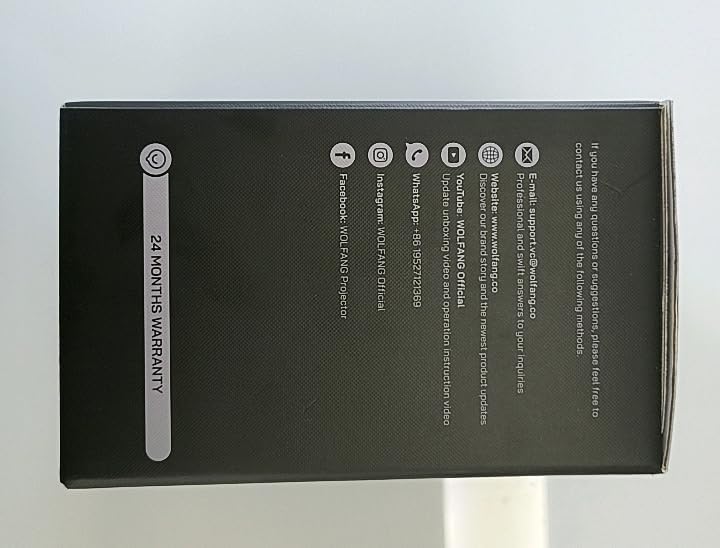
Billede: Side view of the WOLFANG Portable Projector WP05 box, clearly displaying a '24 MONTHS WARRANTY' badge and contact information.
11.2 Kundesupport
For any questions, suggestions, or support needs, please contact WOLFANG customer service using the following methods:
- E-mail: support.tvc@wolfang.co
- Webwebsted: www.wolfang.co
- YouTube: WOLFANG Official (for instruction videos and product updates)
- WhatsApp: +86 19527121353
- Instagram: WOLFANG Officiel
- Facebook: WOLFANG Projector


