1. Introduktion
Thank you for choosing the Bestier Criss Cross Office Chair H200671A. This manual provides essential information for the safe assembly, operation, and maintenance of your new chair. Please read these instructions thoroughly before use and retain them for future reference.
2. Sikkerhedsoplysninger
To ensure safe operation and prevent injury, please observe the following warnings:
- Når armlænene er lagt fladt i en vinkel på 180°, er det ikke tilladt at stå eller placere tunge genstande på armlænene.
- Sørg for, at alle skruer og bolte er forsvarligt fastspændt, inden stolen tages i brug. Kontroller med jævne mellemrum og efterspænd efter behov.
- Brug ikke stolen på ujævne overflader.
- Overskrid ikke den anbefalede maksimale vægt på 350 pund.
3. Pakkens indhold
Bekræft, at alle nedenstående komponenter er til stede i din pakke. Hvis der mangler eller er beskadigede dele, bedes du kontakte kundesupport.

Image: All chair components laid out for assembly.
- Backrest Cushion (A)
- Seat Cushion (B)
- Footrest Cushion (C)
- Armrests (E x2)
- Chair Base (T)
- Casters (J x5)
- Gas Lift Cylinder (I)
- Gas Lift Cover (O)
- Mechanism (F)
- Footrest Frame (R)
- Side Covers (D x2)
- Screws, Washers, and Allen Wrench (Various sizes, K, N, S, L, M, P)
4. Opsætning og montering
Follow these steps to assemble your Bestier Criss Cross Office Chair. It is recommended to have a second person for assistance during certain steps.
Videovejledning til montering
Video: Detailed assembly instructions for the Bestier Criss Cross Chair.
- Saml stolebasen: Attach the five legs to the central hub of the chair base (T) using the provided screws (S). Insert the casters (J) into the ends of each leg.
- Installer gasliften: Place the gas lift cylinder (I) into the center hole of the assembled chair base. Cover it with the gas lift cover (O).
- Attach the Mechanism: Secure the mechanism (F) to the underside of the seat cushion (B) using the specified screws (L). Ensure the "FRONT" arrow on the mechanism aligns with the front of the seat.
- Connect armlæn: Attach the armrests (E) to the sides of the seat cushion (B) and the backrest cushion (A) using the appropriate screws (M). Pay attention to the orientation of the armrests.
- Fastgør ryglænet til sædet: Secure the backrest cushion (A) to the seat cushion (B) using the remaining screws (M).
- Installer fodstøtte: Attach the footrest frame (R) to the underside of the seat cushion (B) using screws (K). Then, attach the footrest cushion (C) to the footrest frame.
- Mount the Seat to the Base: Carefully place the assembled seat onto the gas lift cylinder. Press down firmly to ensure it is securely seated.
- Afsluttende kontrol: Ensure all connections are tight and the chair functions correctly before use.
5. Betjeningsvejledning
Justerbare armlæn
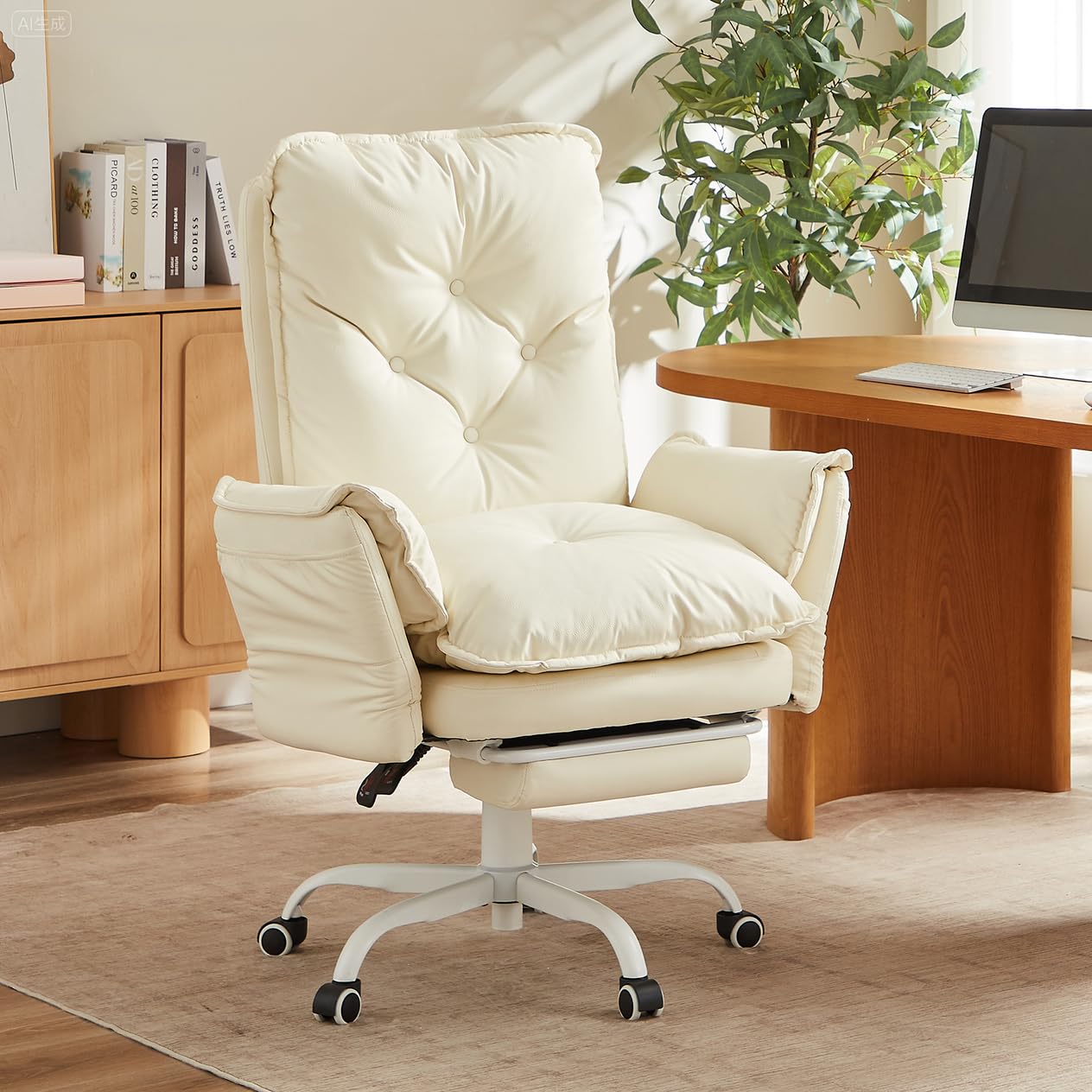
Image: Armrests can be adjusted from 90° to 180° to expand seat width.
The chair features unique flip-up armrests that can be adjusted from 90° to 180°. To adjust, gently push the armrest inward, flatten it to 180°, and then raise it to lock at your desired angle. When flattened, the seat width extends from 16" to 46", providing ample space for sitting cross-legged or sharing with pets.
Reclining Function and Height Adjustment
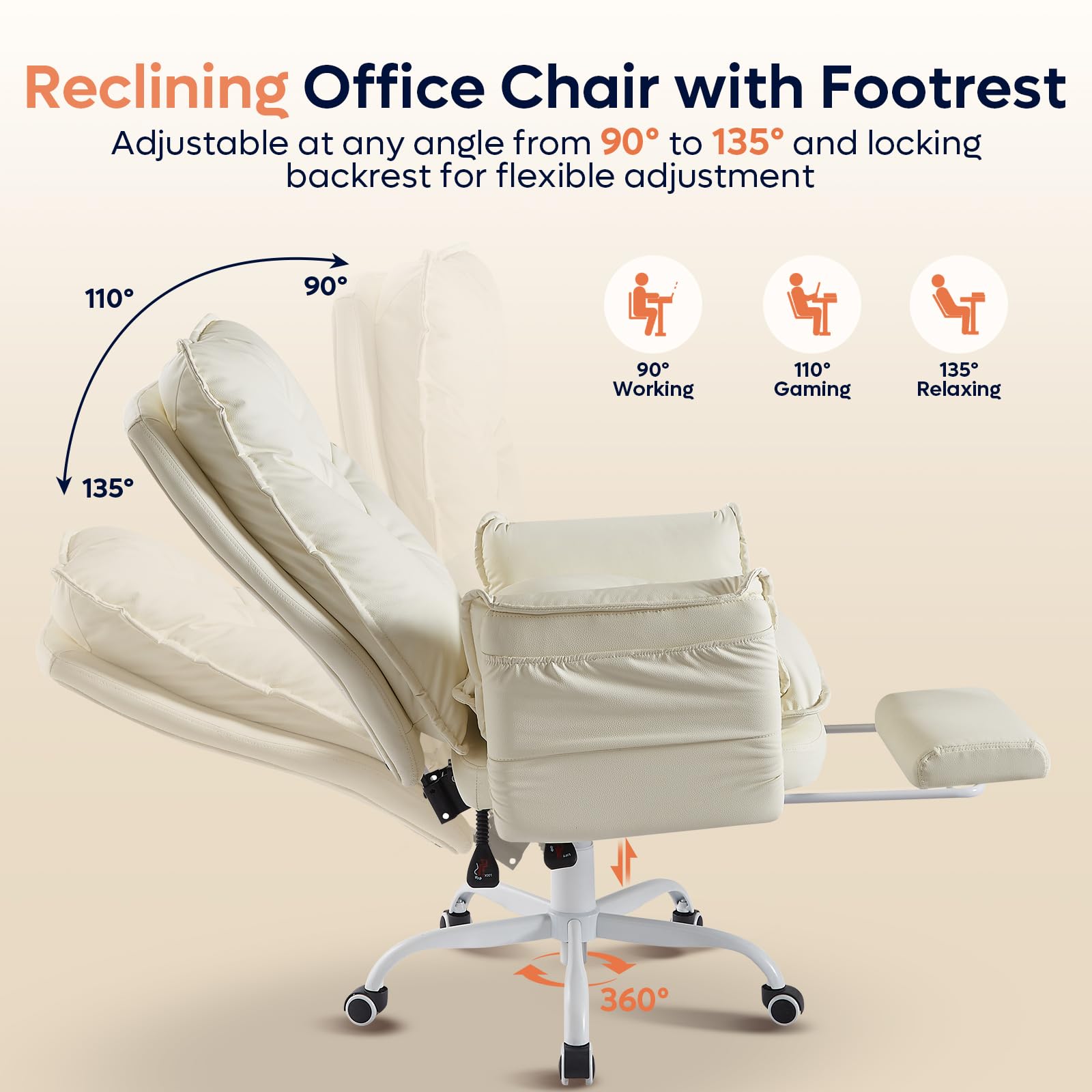
Image: Reclining positions from 90° to 135° and 360° swivel.
The thick backrest can be adjusted within a range of 90° to 135°. Use the lever located under the seat to recline the backrest to your preferred angle for working, gaming, or resting. The same lever also controls the seat height, offering a 4-inch adjustment range to match various desk heights.
Udtrækkelig fodstøtte
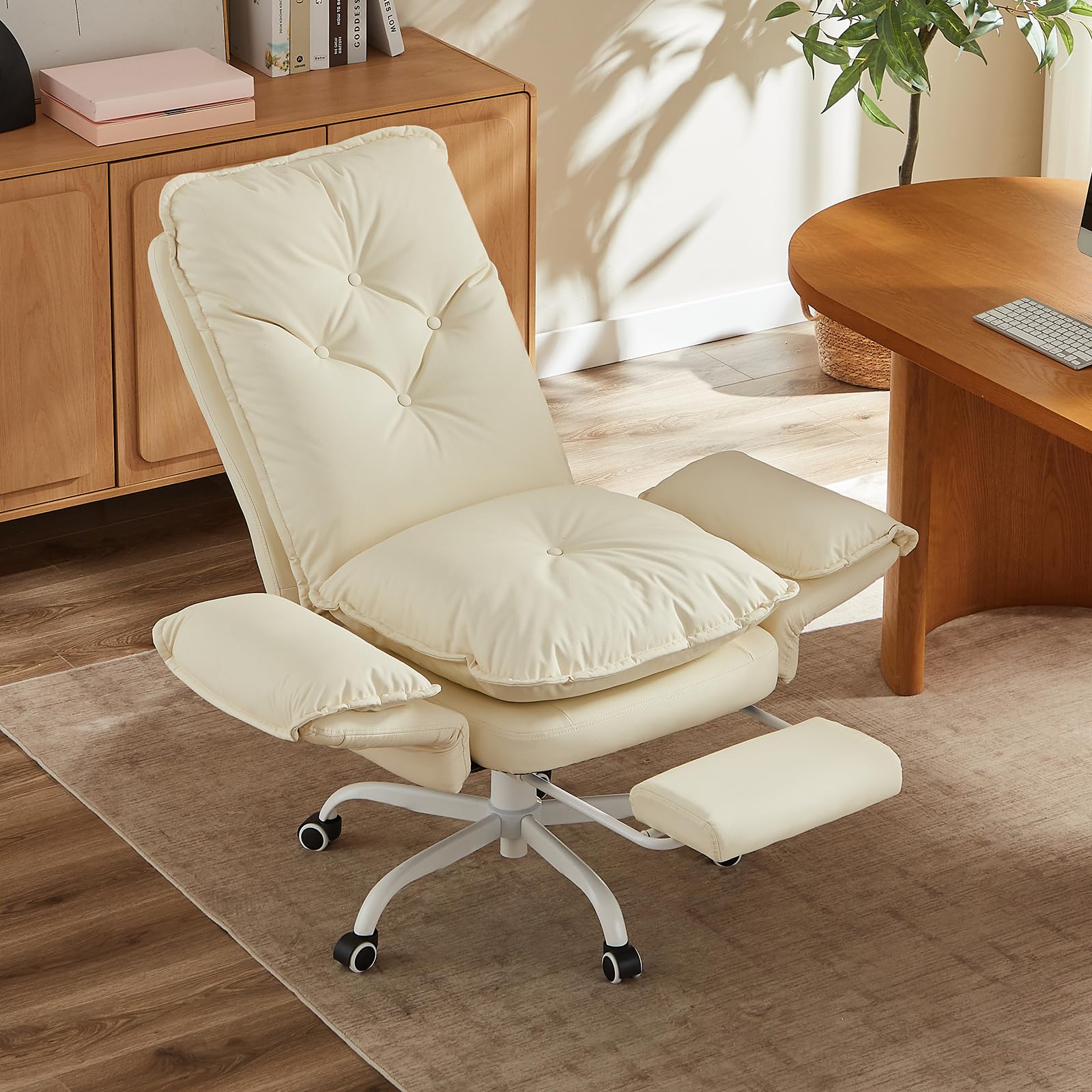
Image: The retractable footrest provides leg support for relaxation.
The chair includes a padded retractable footrest. To extend, pull the footrest out from under the seat. To retract, push it back in until it is fully stored. This feature allows you to stretch out and relax while reclining.
360° Swivel and Casters
The chair is equipped with 5 silent and smooth 360° rolling casters, allowing for easy mobility across your workspace. The chair also features a full 360° swivel for convenient movement and access.
Sidelommer
Two side pockets are integrated into the armrests, providing convenient storage for small items like remote controls, phones, or magazines, keeping them within easy reach.
Feature Overview Video
Video: Overståetview of the Bestier Cross Legged Office Chair features, including armrests, recline, and footrest.
6. Vedligeholdelse
Korrekt pleje vil forlænge din stols levetid og udseende:
- Rensning: Tør af med annonceamp cloth. Avoid harsh chemicals that may damage the PU leather surface.
- Pudepleje: The removable seat cushion allows for effortless daily cleaning and maintenance.
- Hardware: Kontrollér regelmæssigt alle skruer og bolte for at sikre, at de forbliver stramme. Spænd efter behov for at opretholde stabiliteten.
7. Fejlfinding
Hvis du støder på problemer med din stol, kan du bruge følgende almindelige løsninger:
- Stolen føles ustabil: Check that all assembly screws are securely tightened. Ensure the chair is on a flat, even surface.
- Gasliften justerer ikke højden: Ensure the height adjustment lever is fully engaged or disengaged as required. If the issue persists, the gas lift may need replacement.
- Hældningsfunktionen virker ikke: Verify that the recline lock lever is disengaged. Check for any obstructions in the reclining mechanism.
- Footrest not extending/retracting smoothly: Check for any obstructions in the footrest mechanism. Ensure it is pulled or pushed along its tracks correctly.
For further assistance, please contact Bestier customer support.
8. Specifikationer
| Feature | Detalje |
|---|---|
| Mærke | Bestier |
| Modelnavn | H200671A |
| Farve | Beige |
| Materiale | Faux Leather, Memory Foam |
| Produktdimensioner | 18.11" D x 20.47" B x 42.91" H |
| Sædehøjde | 18.11 tommer |
| Sædedybde | 18.11 tommer |
| Sæde Længde | 20.47 tommer |
| Rygstil | Høj Ryg |
| Særlige funktioner | Flippable Armrests, Reclining, Side Pocket |
| Liggende stillinger | 4 (90° til 135°) |
| Maksimal vægtanbefaling | 350 pund |
| Produktplejevejledning | Tør Clean |
| Varens vægt | 51.5 pund |
| UPC | 840408642330 |
9. Garanti og support
Bestier is committed to providing high-quality products and customer satisfaction. While specific warranty details are not provided in this manual, we offer a hassle-free purchase experience.
If you have any concerns before purchasing or after receiving your package, please do not hesitate to contact Bestier customer support. We aim to reply to all inquiries within 24 hours to ensure you receive prompt and helpful assistance.
For assembly questions, you may also refer to the installation video provided in the Setup section.


