1. Introduktion
Tak for købetasing the Lumoday Wood Grain Digital Alarm Clock. This compact and stylish alarm clock features a clear LCD display, dual alarms, a snooze function, a convenient backlight, and unique encouragement messages to start and end your day positively. Its Scandinavian wood grain design seamlessly blends into any room environment.

Figur 1: Forside view of the Lumoday Digital Alarm Clock.
2. Pakkens indhold
- Lumoday Wood Grain Digital Alarm Clock (Model LMD-9W)
- Brugermanual
3. Opsætning
3.1 Batteriinstallation
The Lumoday Digital Alarm Clock is battery-operated, offering flexibility in placement without being tied to an outlet. It requires two AAA batteries (not included).
- Find batterirummet på bagsiden af uret.
- Skub batteridækslet op.
- Isæt to AAA-batterier, og sørg for at polariteten (+/-) vender korrekt.
- Luk batteridækslet forsvarligt.
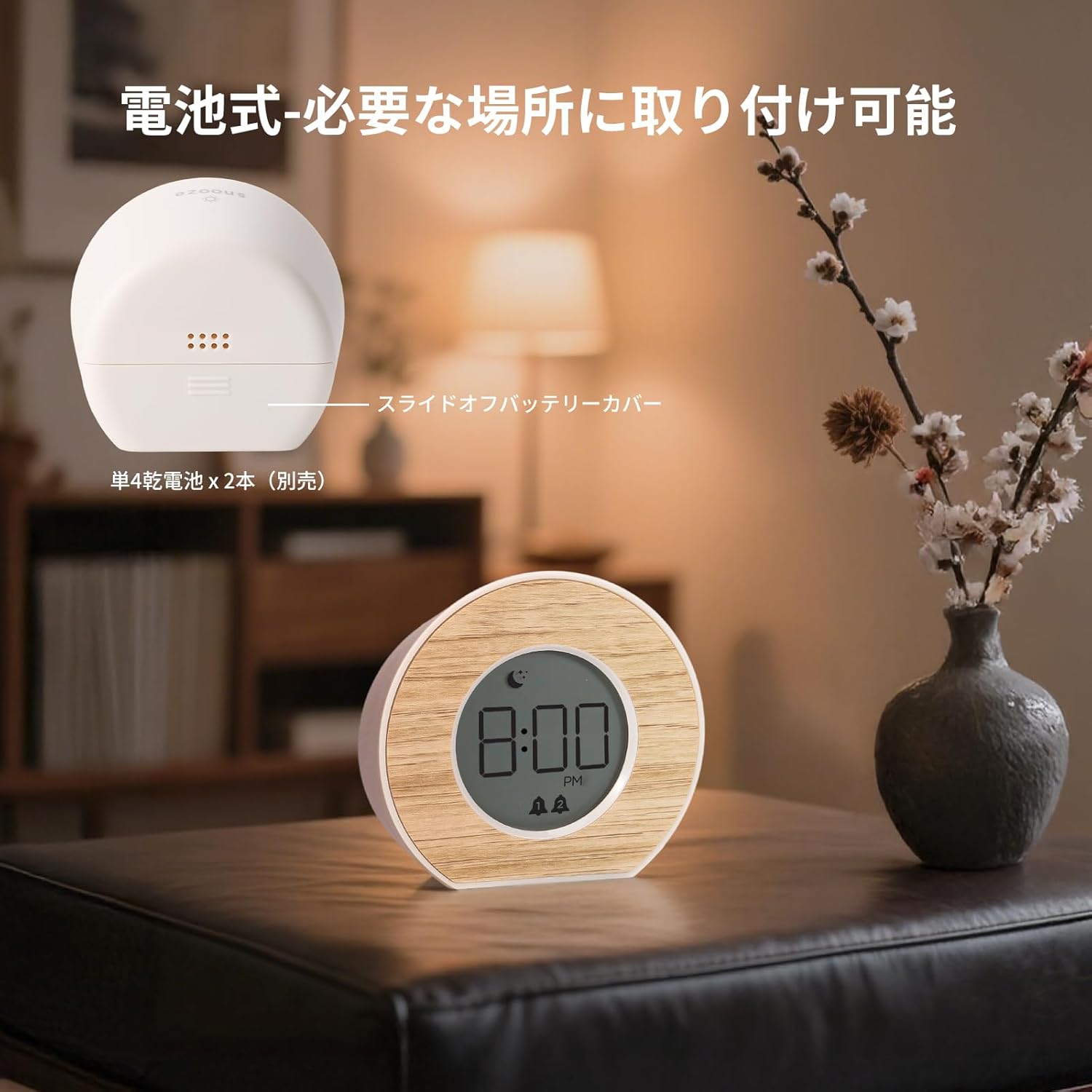
Figur 2: Bagside view med batterirum og betjeningsknapper.
3.2 Indstilling af starttidspunkt
After installing batteries, the clock will power on. Use the buttons on the back to set the current time.
- Tryk på TIDSINDSTILLING knappen for at gå ind i tidsindstillingstilstand.
- Brug HR knappen for at justere timen.
- Brug MIN knappen for at justere minutter.
- Trykke TIDSINDSTILLING igen for at bekræfte og afslutte.
4. Betjeningsvejledning
4.1 Dual Alarm Setting
This clock features two independent alarms, allowing you to set different wake-up times for weekdays and weekends, or for two different users.
- For at indstille Alarm 1: Tryk på ALARM 1 SÆT knap. Brug HR og MIN to adjust the time. Press ALARM 1 SÆT igen for at bekræfte.
- For at indstille Alarm 2: Tryk på ALARM 2 SÆT knap. Brug HR og MIN to adjust the time. Press ALARM 2 SÆT igen for at bekræfte.
- To activate/deactivate an alarm: Press the corresponding ALARM 1 TIL/FRA or ALARM 2 TIL/FRA button. An alarm icon (bell 1 or bell 2) will appear on the display when active.

Figure 3: Setting the alarm time on the clock.
4.2 Snooze -funktion
When an alarm sounds, gently press the top of the clock to activate the snooze function. The alarm will pause and sound again after a set interval.
- Snooze intervals can be set to 5, 10, 15, or 30 minutes. Refer to the back panel diagram for the snooze setting button.
- To stop the alarm completely, press any other button on the back of the clock.
4.3 Aktivering af baggrundsbelysning
The clock features a gentle backlight for easy viewunder dårlige lysforhold.
- To activate the backlight, gently press the top of the clock. The backlight will illuminate for approximately 5 seconds.
- This feature allows you to check the time without disturbing your sleep with bright light.

Figure 4: Backlight activated by pressing the top of the clock.
4.4 Encouragement Message Display
To reset your mood and receive a positive message, double-tap the top of the display.
- Double-tap the top of the clock. A random encouragement message will appear on the display.
- Messages like "Have a nice day!" are designed to provide a positive start to your day or a calming end to your night.

Figure 5: Encouragement messages displayed on the clock face.
5. Vedligeholdelse
- Rengør uret med en blød, tør klud. Brug ikke slibende rengøringsmidler eller opløsningsmidler.
- Undgå at udsætte uret for ekstreme temperaturer, direkte sollys eller høj luftfugtighed.
- Hvis uret ikke skal bruges i længere tid, skal batterierne fjernes for at forhindre lækage.
6. Fejlfinding
| Problem | Mulig årsag | Løsning |
|---|---|---|
| Uret tænder ikke. | Batterierne er døde eller forkert installeret. | Udskift batterierne med nye, og sørg for korrekt polaritet. |
| Alarmen lyder ikke. | Alarmen er ikke aktiveret, eller lydstyrken er for lav. | Ensure the alarm is turned ON (bell icon visible). Check battery level. |
| Backlight does not activate. | Batteries are low or the top press was not firm enough. | Replace batteries. Press the top of the clock more firmly. |
| Tiden er unøjagtig. | Batterierne er lave. | Replace batteries and reset the time. |
7. Specifikationer
- Modelnummer: LMD-9W
- Mærke: Lumoday
- Materiale: Acrylonitril Butadien Styren (ABS)
- Farve: Wood Grain Warm Gray
- Skærmtype: LCD
- Strømkilde: Battery operated (2 x AAA batteries, not included)
- Produktdimensioner: 9.4 cm (bredde) x 8.7 cm (højde)
- Produktvægt: 101.5 gram
- Funktioner: Dual Alarm, Snooze Function (5/10/15/30 min), 5-second Backlight, Encouragement Message Display
- Værelsestype: Indendørs (soveværelse, stue, kontor)
- Stil: skandinavisk
8. Garanti og support
For warranty information or technical support, please refer to the product packaging or contact your retailer. Keep your purchase receipt for warranty claims.


