Indledning
Tak for købetasing the Matbip Multi-Platform Wireless Gaming Controller. This controller is designed to enhance your gaming experience across various platforms, including Nintendo Switch, Android, iOS, and PC. It features advanced functions such as TURBO burst, macro programming, customizable RGB lighting, and HD vibration, providing precise control and immersive feedback. Please read this manual carefully before use to ensure proper operation and to fully utilize all features.
Produkt overview
Familiarize yourself with the various components and buttons of your Matbip controller.
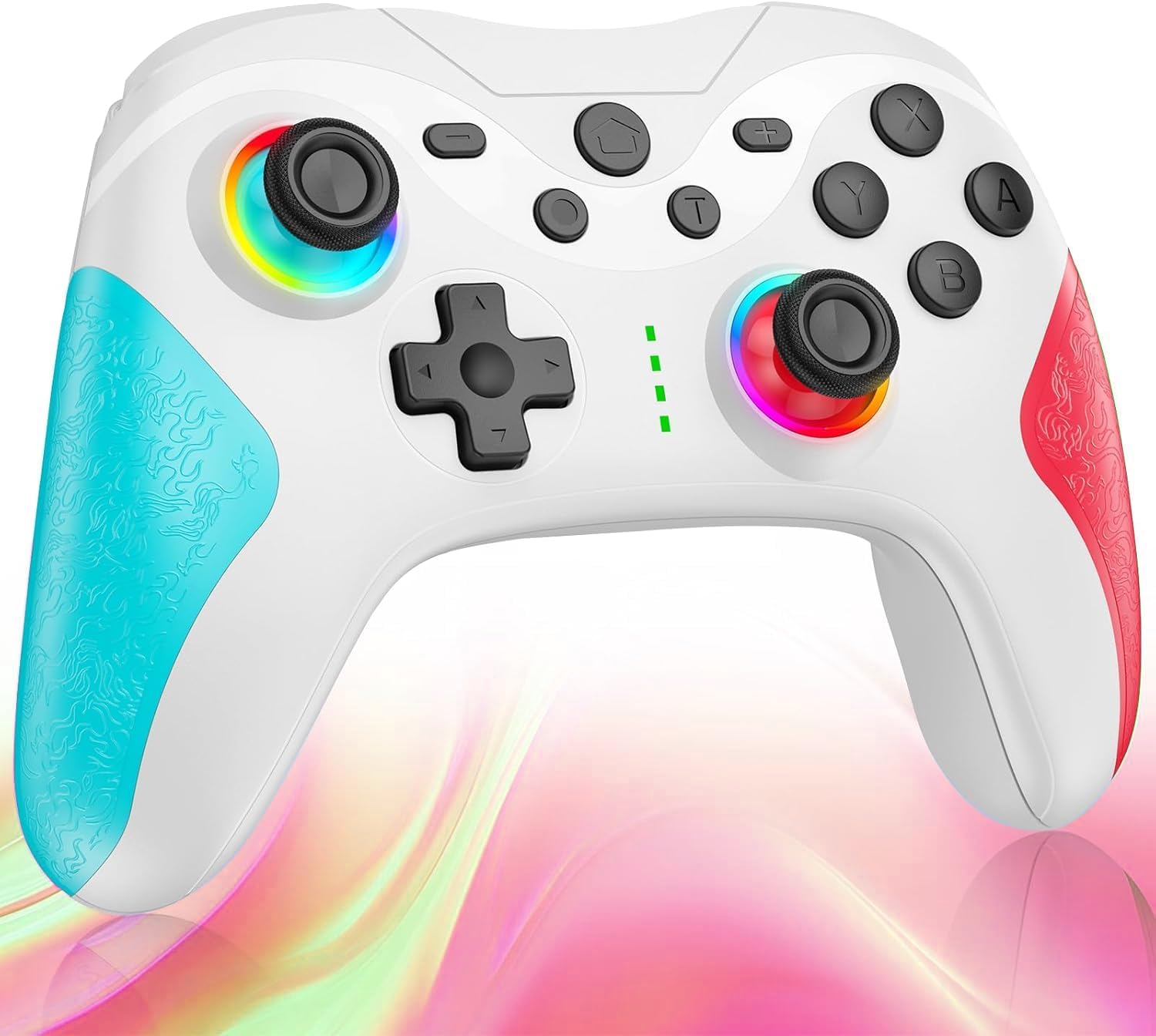
Billede: Front view of the Matbip Multi-Platform Wireless Gaming Controller. It features a white body with blue textured grips on the left and red textured grips on the right. The joysticks are illuminated with a rainbow RGB light. Standard buttons (A, B, X, Y), a D-pad, and central function buttons (Home, Plus, Minus, T) are visible.
Nøglekomponenter:
- Venstre/højre joysticks: For directional control, with customizable RGB lighting.
- D-Pad: Til præcis retningsbestemt input.
- Handlingsknapper (A/B/X/Y): Standard knapper til spilinput.
- Shoulder Buttons (L/R/ZL/ZR): Top-mounted trigger and bumper buttons.
- Bagknapper: Additional programmable buttons on the rear for strategic gameplay.
- Hjemknappen: Vender tilbage til systemets startskærm.
- Plus (+) / Minus (-) knapper: System-specific function buttons.
- T Button (TURBO): Activates and manages the TURBO burst function.
- Opladningsport: USB-C port til opladning.
- Indikatorlys: Vis forbindelsesstatus og batteriniveau.
Opsætning
1. Opladning af controlleren
Before first use, fully charge the controller. Connect the provided USB-C cable to the controller's charging port and the other end to a USB power source (e.g., console, PC, or USB wall adapter). The indicator lights will show charging status and turn off when fully charged.
2. Parring med enheder
The controller supports Bluetooth wireless connection across multiple platforms.
Til Nintendo Switch:
- On the Switch HOME Menu, select Controllere > Skift greb/rækkefølge.
- Tryk og hold på Hjem-knap on the Matbip controller for 3-5 seconds until the indicator lights flash rapidly.
- Når de er parret, vil indikatorlampen(erne) på controlleren forblive lyse konstant.
For Android/iOS Devices:
- Aktiver Bluetooth på din Android- eller iOS-enhed.
- Tryk og hold på Hjem-knap on the Matbip controller for 3-5 seconds until the indicator lights flash rapidly.
- On your device's Bluetooth settings, select the controller (e.g., "Matbip Controller") from the list of available devices to pair.
Til pc (Windows):
- Ensure your PC has Bluetooth enabled. Go to Indstillinger > Enheder > Bluetooth og andre enheder.
- Klik Tilføj Bluetooth eller anden enhed > Bluetooth.
- Tryk og hold på Hjem-knap on the Matbip controller for 3-5 seconds until the indicator lights flash rapidly.
- Select the controller from the list of devices to pair.
Betjeningsvejledning
TURBO Burst Function:
The TURBO function allows for rapid, automatic button presses, ideal for combat games.
- For at aktivere TURBO: Tryk og hold på T knap, then press the desired action button (e.g., A, B, X, Y, L, R, ZL, ZR). The button will now continuously activate when held down.
- Sådan justeres TURBO-hastigheden: Mens du holder T knap, flytte right joystick up or down to cycle through 3 different burst speeds.
- Sådan deaktiverer du TURBO: Tryk og hold på T knap, og tryk derefter på den samme handlingsknap igen.
Makro funktion:
Program a sequence of button presses to a single back button for complex actions.
- Specific instructions for macro programming will be detailed in the full manual. Generally, this involves entering a programming mode, pressing the sequence, and assigning it to a back button.
RGB-belysning, der kan tilpasses:
The joysticks feature 9-color RGB lighting to enhance your gaming atmosphere.
- To change RGB color/mode: Press a specific button combination (e.g., T + Left Joystick click) to cycle through different colors and lighting effects.
HD Vibration Adjustment:
Adjust the intensity of the HD vibration feedback to your preference (4 levels).
- To adjust vibration: Press a specific button combination (e.g., T + D-Pad Up/Down) to cycle through the 4 vibration levels.
Gyrosensor:
The high-precision gyro sensor enables intuitive motion control in supported games.
- The gyro sensor is automatically active when connected to a compatible device (e.g., Nintendo Switch) and used in games that support motion controls.
Sleep Wake-up Function:
The controller supports waking up your Nintendo Switch console from sleep mode.
- When the Switch is in sleep mode, simply press the Hjem-knap on the controller to wake it up and reconnect.
Opretholdelse
Korrekt vedligeholdelse sikrer din controllers levetid og optimale ydeevne.
- Rensning: Brug en blød, tør klud til at tørre controlleren af. Ved genstridigt snavs, tør letampRengør kluden med vand. Brug ikke skrappe kemikalier eller slibende rengøringsmidler.
- Opbevaring: Opbevar controlleren et køligt, tørt sted væk fra direkte sollys, ekstreme temperaturer og fugtighed.
- Batteripleje: Avoid fully discharging the battery frequently. If storing for a long period, charge the controller to about 50% every few months.
- Undgå dråber: Beskyt controlleren mod fald og stød, som kan beskadige de interne komponenter.
Fejlfinding
If you encounter issues with your controller, please refer to the following common solutions:
| Problem | Mulig løsning |
|---|---|
| Controlleren tænder ikke. | Sørg for, at controlleren er opladet. Tilslut den til en strømkilde med USB-C-kablet. |
| Controller does not pair. | Ensure Bluetooth is enabled on your device. Make sure the controller is in pairing mode (flashing lights). Try restarting both the controller and the device. |
| Inputforsinkelse eller afbrydelse. | Ensure there are no strong wireless interferences nearby. Move closer to the device. Re-pair the controller. |
| Knapper eller joysticks reagerer ikke. | Try resetting the controller (refer to the full manual for reset instructions, usually a small pinhole button). Ensure no debris is obstructing the buttons. |
| Vibrationen virker ikke. | Check if vibration is enabled in the game or system settings. Adjust the vibration intensity on the controller. |
Specifikationer
| Feature | Detalje |
|---|---|
| Produktdimensioner | 10 x 15 x 6.5 cm |
| Vægt | 300 g |
| Forbindelse | Bluetooth trådløs |
| Kompatibilitet | Nintendo Switch, Android, iOS, PC (Windows) |
| Særlige funktioner | TURBO Burst, Macro Function, 9-Color RGB Lighting, 4-Level HD Vibration, Gyro Sensor, Back Buttons, Sleep Wake-up |
| ASIN | B0FHWRK7CQ |
| Udgivelsesdato | 16. juli 2025 |
Garanti og support
Matbip is committed to providing high-quality products and customer satisfaction. This product comes with a standard manufacturer's warranty. For detailed warranty information, please refer to the documentation included with your purchase or contact Matbip customer support.
If you require further assistance, have questions, or encounter issues not covered in this manual, please contact our customer support team. A Japanese instruction manual is included with the product to ensure ease of use for first-time users.
Kontaktoplysninger: Please refer to the packaging or the official Matbip webwebstedet for de mest opdaterede kontaktoplysninger til kundesupport.


