1. Introduktion
This manual provides detailed instructions for the setup, operation, maintenance, and troubleshooting of your ATTACK SHARK X8 SE Wireless Gaming Mouse. Designed for performance and comfort, the X8 SE features tri-mode connectivity, a high-precision sensor, and a lightweight design for an optimal gaming experience.

Billede: Top view of the ATTACK SHARK X8 SE Wireless Gaming Mouse in Berry color.
2. Pakkens indhold
Sørg venligst for, at alle varer er til stede i din pakke:
- ATTACK SHARK X8 SE Wireless Gaming Mouse
- USB-C ladekabel
- 2.4 GHz trådløs modtager
- Brugervejledning (dette dokument)
3. Opsætning og tilslutning
The X8 SE mouse offers three connectivity modes: Wired, 2.4GHz Wireless, and Bluetooth. Choose the mode that best suits your needs.
3.1. Opladning af musen
Before first use, it is recommended to fully charge the mouse. Connect the provided USB-C cable to the mouse's charging port and to a USB power source (e.g., computer USB port, USB wall adapter). The LED indicator will show charging status.

Image: The underside of the mouse, illustrating the USB-C charging port and the power/mode switch.
3.2. Kablet tilstand
Connect the USB-C cable directly from the mouse to your computer's USB port. The mouse will function immediately and charge simultaneously.
3.3. 2.4 GHz trådløs tilstand
- Locate the 2.4GHz wireless receiver, typically stored in a compartment on the underside of the mouse.
- Sæt modtageren i en ledig USB-port på din computer.
- Switch the mode selector on the bottom of the mouse to the 2.4GHz wireless icon.
- Musen burde oprette forbindelse automatisk.

Image: Visual representation of the three connectivity modes: Wired, 2.4GHz Wireless, and Bluetooth.
3.4. Bluetooth-tilstand
- Switch the mode selector on the bottom of the mouse to the Bluetooth icon.
- The mouse will enter pairing mode (LED may flash).
- Gå til Bluetooth-indstillinger på din computer, og søg efter nye enheder.
- Select "ATTACK SHARK X8 SE" from the list of available devices to pair.
4. Betjening af musen
4.1. DPI-justering
The mouse features a PixArt PAW3311 gaming sensor with adjustable DPI from 50 to 25,000. Use the dedicated DPI button (usually on the underside or top of the mouse, depending on configuration) to cycle through preset DPI levels. The LED indicator may change color to signify the current DPI setting.
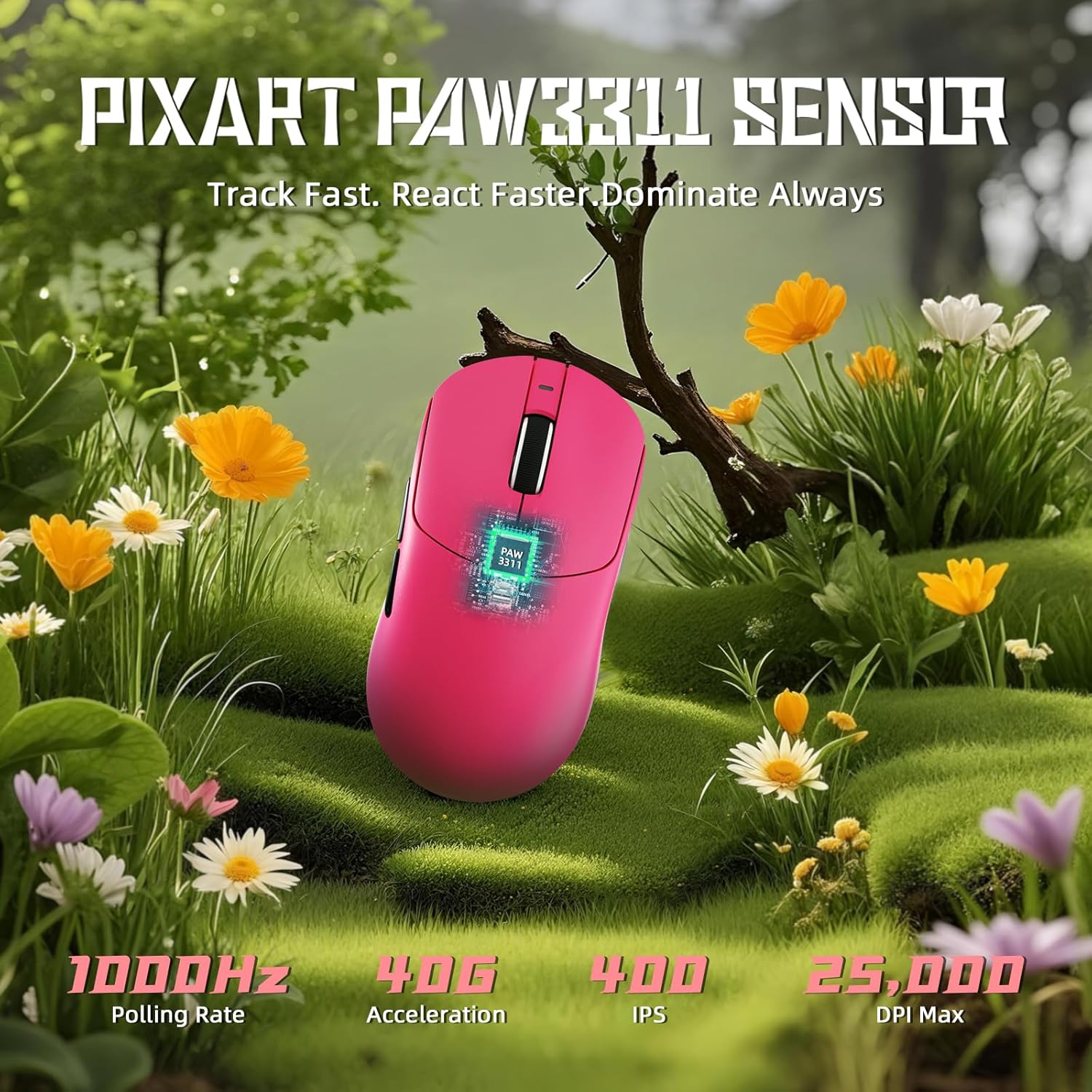
Image: Diagram illustrating the PixArt PAW3311 sensor and its performance metrics.
4.2. Afstemningsrate
The X8 SE supports a 1KHz (1000Hz) polling rate in both wired and 2.4GHz wireless modes, ensuring responsive and accurate cursor movements.
4.3. Customizable Buttons and Software
The mouse features programmable buttons. To customize button functions, DPI settings, polling rate, macro recording, and key mapping, utilize the cloud-driven web driver. Access the driver via the official ATTACK SHARK website. This eliminates the need for traditional software installation.
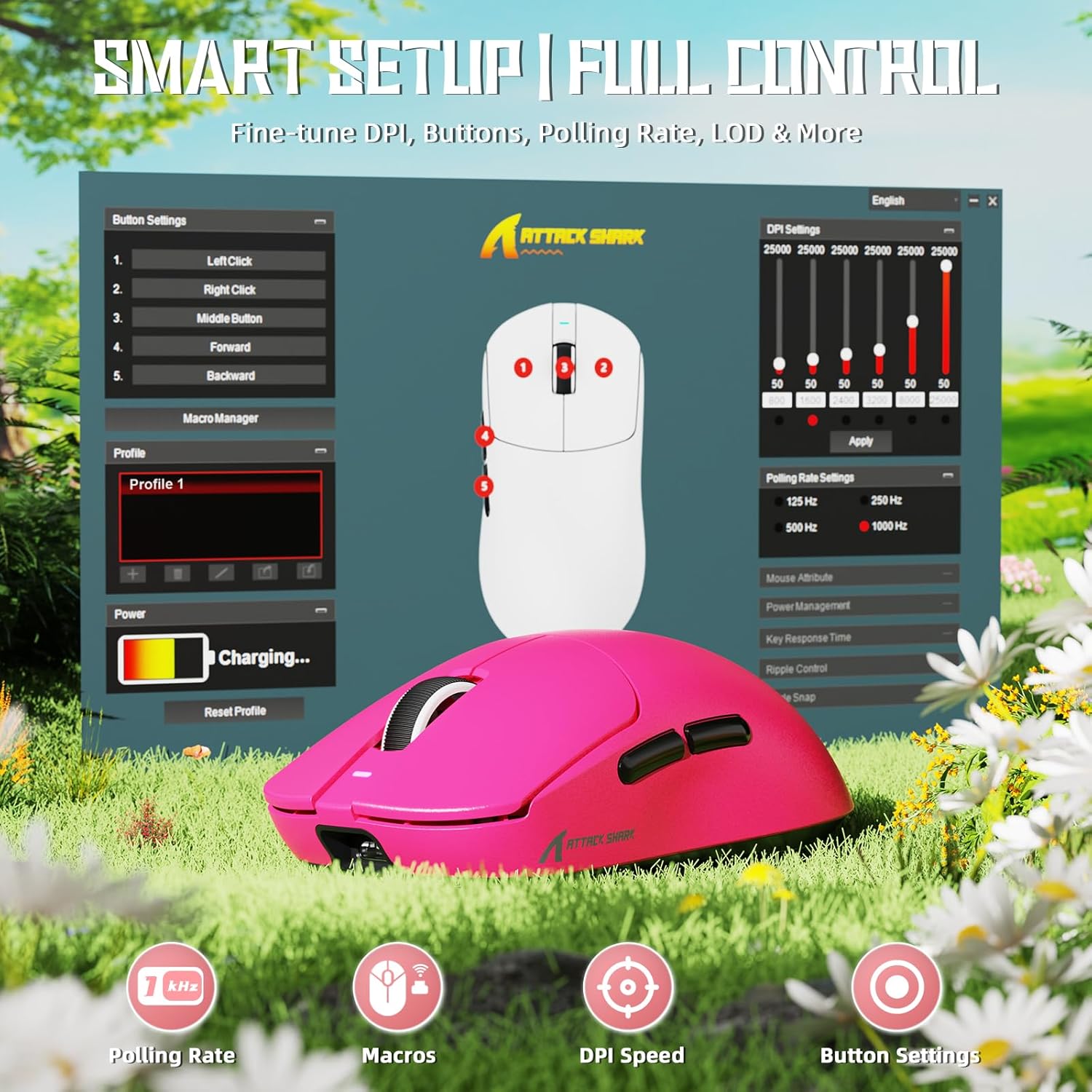
Image: Screenshot of the cloud-based driver interface for advanced customization.
4.4. Ergonomi og grebstile
The X8 SE is designed for users with medium to large hands, offering a comfortable grip for various styles including palm, claw, and fingertip grips.

Image: Illustration demonstrating palm, claw, and fingertip grip styles on the mouse.
5. Vedligeholdelse
5.1. Rensning
Brug en blød, tør klud til at rengøre musen. Til genstridigt snavs kan du bruge en let tør klud.amp cloth with mild soap can be used, ensuring no liquid enters the mouse. The Nano-ice coating is designed to resist sweat and maintain a clean feel.

Image: The mouse's Nano-ice coating helps maintain a clean surface.
5.2. Batteripleje
The X8 SE features a 500mAh large-capacity battery. For optimal battery life, avoid fully discharging the mouse frequently. Recharge when the battery indicator suggests low power. A single charge can last up to 300 hours of intermittent use.
5.3. Mouse Feet
The mouse is equipped with PTFE anti-slip footpads for smooth gliding. If the glide performance degrades over time, replacement mouse feet may be available from the manufacturer.
6. Fejlfinding
6.1. Musen reagerer ikke
- Kablet tilstand: Sørg for, at USB-C-kablet er korrekt tilsluttet til både musen og computeren. Prøv en anden USB-port.
- 2.4 GHz trådløs tilstand: Ensure the 2.4GHz receiver is plugged in and the mouse is switched to 2.4GHz mode. Try re-pairing by unplugging and re-plugging the receiver, then cycling the mouse power.
- Bluetooth-tilstand: Ensure Bluetooth is enabled on your computer and the mouse is in Bluetooth mode. Re-pair the device through your computer's Bluetooth settings.
- Batteri: Check if the mouse battery is charged. Connect the charging cable and observe the charging indicator.
6.2. Problemer med markørbevægelse
- Rengør musesensorområdet på undersiden af musen.
- Sørg for at bruge musen på en passende overflade (f.eks. en musemåtte).
- Adjust the DPI settings to a comfortable level.
- If using wireless modes, ensure there are no significant obstructions or sources of interference between the mouse and the receiver/computer.
6.3. Cloud Driver Not Accessible
- Sørg for, at din computer har en aktiv internetforbindelse.
- Bekræft det rigtige URL for the ATTACK SHARK cloud driver.
- Prøv en anden web browser.
7. Specifikationer
| Feature | Detalje |
|---|---|
| Model | X8SE |
| Sensor | PixArt PAW3311 Gaming Sensor |
| DPI rækkevidde | 50 - 25,000 dpi |
| Afstemningsfrekvens | 1000Hz (1KHz) |
| Forbindelse | Kablet (USB-C), 2.4 GHz trådløs, Bluetooth |
| Vægt | Cirka 55g |
| Batterikapacitet | 500mAh |
| Batterilevetid | Up to 300 hours (intermittent use) |
| Mikroafbrydere | HUANO (80 Million Clicks lifespan) |
| Acceleration | 40G |
| Sporingshastighed | 400 IPS |
| Dimensioner | Cirka 4.96 x 2.5 x 1.6 tommer (125.5 x 63 x 40 mm) |

Image: Comparative technical specifications for the ATTACK SHARK X8 series, including the X8 SE model.
8. Garanti og support
ATTACK SHARK products are designed for reliability and performance. For warranty information, technical support, or to access the cloud driver, please visit the official ATTACK SHARK webwebsted eller kontakt deres kundeservice.
Officiel ATTACK SHARK-butik: ATTACK SHARK Butik på Amazon


