1. Produktet er slutview
The XIAOMI Poco C85 is a 4G LTE smartphone designed for reliable performance and an immersive user experience. It features a large 6.9-inch display, a powerful octa-core processor, and a 50MP AI dual camera system. The device is equipped with a 6000 mAh battery for extended usage.
Inspired by the "dancing aurora at night," the design of the Poco C85 captures the beauty of the northern lights with flowing light and shadow, offering a unique premium look.
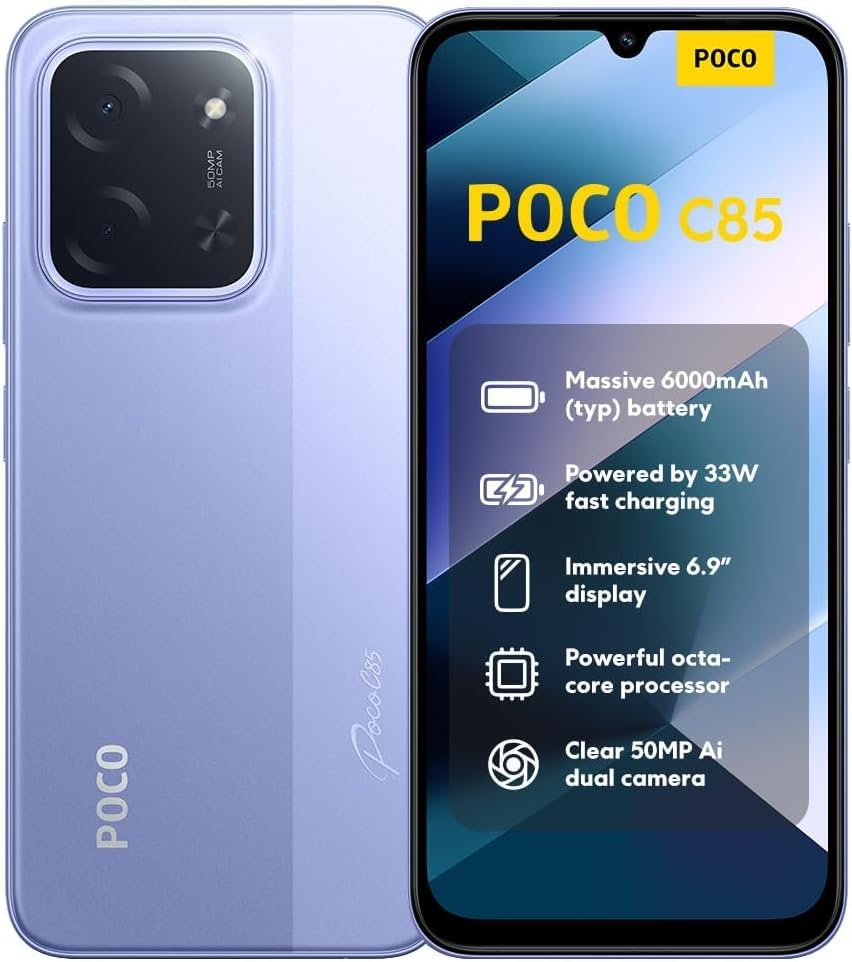
Billede: Forside og bagside view of the XIAOMI Poco C85, showcasing its design and highlighted features.
2. Indledende opsætning
2.1. Pakkens indhold
Før du starter, skal du sørge for at alle varer er til stede i kassen:
- XIAOMI Poco C85 Smartphone
- Telefon etui
- USB Type-C Cable (Note: A wall charger is not included and must be purchased separately.)
2.2. Installation af SIM-kort og Micro SD-kort
The Poco C85 supports Dual Nano SIM cards and one Micro SD card for expandable storage.
- Find SIM-kortbakken på siden af enheden.
- Indsæt SIM-kortudløserværktøjet (medfølger ikke) i det lille hul på SIM-bakken for at åbne det.
- Place your Nano SIM card(s) and/or Micro SD card into the designated slots on the tray. Ensure the gold contacts are facing down.
- Sæt forsigtigt SIM-kortbakken tilbage i telefonen, indtil den klikker på plads.
2.3. Opladning af enheden
The device comes with a 6000mAh battery. It supports 33W fast charging. A charger is not included in the box.
- Tilslut USB Type-C-kablet til opladningsporten i bunden af telefonen.
- Connect the other end of the cable to a compatible USB wall adapter (sold separately).
- Lad enheden oplades helt før første brug.
2.4. Network Compatibility (USA Users)
IMPORTANT: For users in the USA, the XIAOMI Poco C85 is primarily compatible with T-Mobile, Mint Mobile, Tello, and Ultra Mobile networks. It is NOT compatible with Verizon, AT&T, Xfinity, Boost, Virgin, Visible, Cricket, or other CDMA carriers.
Ensure your carrier is compatible before attempting to activate the device. Outside the USA, the phone supports 4G VoLTE worldwide unlocked dual Nano SIM.

Image: Network compatibility chart for the Poco C85, detailing supported and unsupported carriers in the USA and global compatibility.
3. Betjening af din enhed
3.1. Tænd/sluk
- Sådan tænder du: Tryk på tænd/sluk-knappen, og hold den nede, indtil XIAOMI-logoet vises.
- Sådan slukker du: Tryk på tænd/sluk-knappen og hold den nede, og vælg derefter "Sluk" fra indstillingerne.
- Sådan genstarter du: Tryk på tænd/sluk-knappen og hold den nede, og vælg derefter "Genstart" fra indstillingerne.
3.2. Display og navigation
The Poco C85 features a 6.9-inch Dot Drop display with a resolution of 1600x720 and a refresh rate of up to 120Hz for smooth visuals. It includes TÜV Rheinland certifications for Low Blue Light, Circadian Friendly, and Flicker Free, enhancing eye comfort.
- Touchskærm: Navigate the interface by tapping, swiping, pinching, and spreading.
- Startskærm: Få adgang til dine apps, widgets og notifikationer.
- Indstillinger: Customize your device by accessing the Settings app.
3.3. Kamerafunktioner
The device is equipped with a 50MP AI dual main camera and an 8MP front camera.

Image: Close-up of the rear camera module on the Poco C85, showing the 50MP AI dual camera setup.
- Tager billeder: Open the Camera app, select your desired mode (e.g., Photo, Portrait, HDR), and tap the shutter button.
- Videooptagelse: The rear camera supports 1080p HD video recording at 30 fps and 720p HD video recording at 30 fps. The front camera also supports these resolutions.
- Særlige funktioner: Utilize features like Film Camera, HDR mode, Soft-light ring (for front camera), Portrait mode, and Time-lapse.
3.4. Sikkerhedsfunktioner
- Bageste fingeraftrykssensor: Register your fingerprints in Settings > Password & Security for quick and secure unlocking.
- AI-ansigtslåsning: Konfigurer ansigtsgenkendelse for nem oplåsning.
3.5. Forbindelse
- Wi-Fi: Connect to wireless networks via Settings > Wi-Fi. Supports 2.4GHz and 5GHz bands.
- Bluetooth: Pair with Bluetooth devices (e.g., headphones, speakers) via Settings > Bluetooth. Supports Bluetooth 5.1.
- GPS: Integreret GPS, AGPS, GLONASS, Beidou og Galileo for præcise positionsbestemmelsestjenester.
- Lydstik: Et 3.5 mm hovedtelefonstik er tilgængeligt til kablet lydtilbehør.
4. Vedligeholdelse og pleje
- Rensning: Brug en blød, fnugfri klud til at rengøre skærmen og enhedens kabinet. Undgå skrappe kemikalier.
- Vand- og støvmodstand: The device has an IP64 rating, meaning it is resistant to splash and dust under specific laboratory conditions. This is not permanent resistance and may decrease over time with normal wear. Do not immerse the device in water.
- Batteripleje: For at forlænge batteriets levetid skal du undgå at udsætte enheden for ekstreme temperaturer. Oplad enheden regelmæssigt, men undgå at overoplade den i længere perioder.
- Softwareopdateringer: Keep your device's operating system updated to ensure optimal performance and security. Check for updates in Settings > About phone > System updates.
5. Fejlfinding af almindelige problemer
5.1. Enheden tændes ikke
- Sørg for, at batteriet er opladet. Tilslut enheden til en strømkilde i mindst 15 minutter.
- Tryk og hold tænd/sluk-knappen nede i 10-15 sekunder for at fremtvinge en genstart.
5.2. Problemer med netværksforbindelse
- Verify your SIM card is correctly inserted.
- Check if your carrier is compatible with the Poco C85 (refer to Section 2.4).
- Genstart enheden.
- Slå flytilstand til og fra.
- Check network settings in Settings > SIM cards & mobile networks.
5.3. Apps der går ned eller fryser
- Luk og åbn appen igen.
- Ryd appens cache og data i Indstillinger > Apps > [Appnavn] > Lagerplads.
- Sørg for, at appen er opdateret til den nyeste version.
- Genstart enheden.
5.4. Fingerprint Sensor Not Working
- Sørg for, at din finger er ren og tør.
- Re-register your fingerprints in Settings > Password & Security.
- Sørg for, at sensorområdet er rent.
6. Produktspecifikationer
The following table outlines the key technical specifications for the XIAOMI Poco C85 smartphone:
| Feature | Specifikation |
|---|---|
| Modelnummer | C85 (25078PC3EG) |
| Operativsystem | Xiaomi HyperOS baseret på Android 15 |
| Processor | MediaTek Helio G81-Ultra Octa-core (Max CPU frequency: 2.0GHz) |
| Vise | 6.9-inch Dot Drop display, 1600x720 resolution, up to 120Hz refresh rate |
| VÆDDER | 8 GB |
| Opbevaring | 256 GB (kan udvides via Micro SD) |
| Bagkamera | 50MP AI dual camera (f/1.8) |
| Forreste kamera | 8 MP (f/2) |
| Batterikapacitet | 6000 mAh (typisk) |
| Opladning | 33W fast charging support (charger not included) |
| Forbindelse | Wi-Fi (2.4 GHz/5 GHz), Bluetooth 5.1, GPS, AGPS, GLONASS, Beidou, Galileo |
| Havne | USB Type-C, 3.5 mm hovedtelefonstik |
| Sikkerhed | Bageste fingeraftrykssensor, AI-ansigtslåsning |
| Pakkedimensioner | 7.36 x 3.74 x 1.73 tommer |
| Varens vægt | 6 ounce |
| Vand/støv modstand | IP64 klassificeret |

Image: Certification screen on the Poco C85, showing regulatory compliance details.
7. Support- og garantioplysninger
For further assistance, please refer to the official XIAOMI support channels. You can visit the XIAOMI-butik på Amazon for produktinformation og supportressourcer.
Warranty information is typically provided with your purchase documentation. Please retain your proof of purchase for warranty claims.


