Indledning
This manual provides detailed instructions for the OUKITEL C2 Android 14 smartphone. Please read this guide thoroughly to ensure proper usage and to maximize your device's capabilities. Keep this manual for future reference.
Pakkens indhold
Bekræft, at alle varer er til stede i din produktpakke:
- OUKITEL C2 smartphone
- 10W hurtig oplader
- USB Type-C datakabel
- SIM Card Ejector Tool (SIM pin)
- Skærmbeskytter (forudmonteret eller inkluderet)
- Smartphone etui
- Brugermanual

Image: Contents of the OUKITEL C2 retail package.
Enhed overview
The OUKITEL C2 features a lightweight and slim design, weighing approximately 198g and measuring 9.3mm in thickness. It is equipped with a 6.52-inch HD+ display and a triple camera system on the rear.
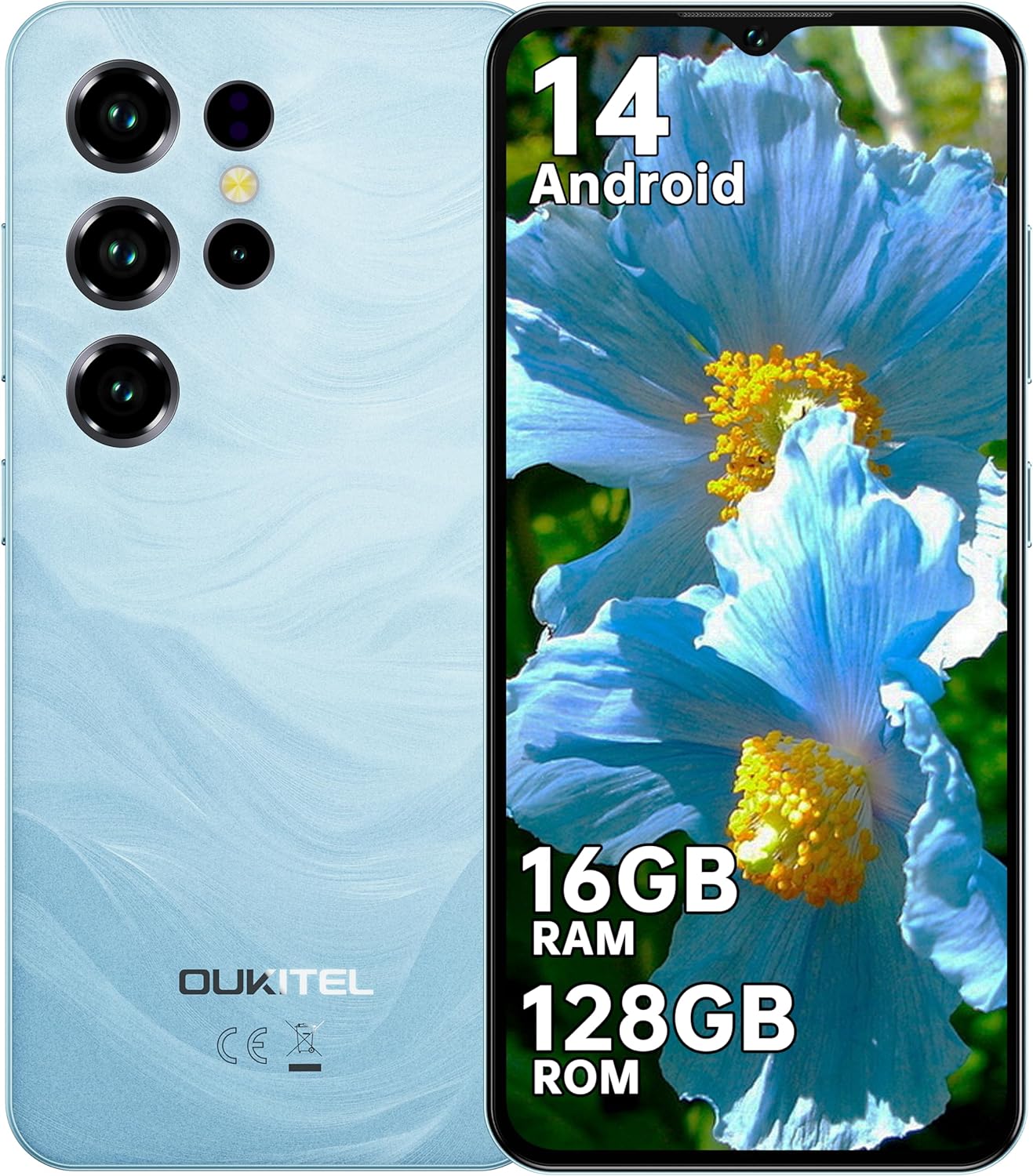
Billede: Foran og bagpå view of the OUKITEL C2 smartphone.
Fysiske egenskaber:
- Vise: 6.52-inch HD+ Waterdrop Notch Display (540x1200 resolution, 209 PPI, 450 nits brightness, 20:9 aspect ratio, 93% screen-to-body ratio).
- Bagkamera: 13MP Main Camera.
- Forreste kamera: 5MP frontkamera.
- Porte: USB Type-C for charging and data transfer, 3.5mm Headphone Jack.
- SIM slot: Supports Dual Nano SIM or Nano SIM + TF card for expandable storage up to 1TB.
- Sensorer: Face Unlock, GPS, GLONASS, Beidou, Galileo.

Image: Key features and ports of the OUKITEL C2 smartphone.
Opsætning
1. Inserting SIM Card and TF Card:
- Find SIM-kortbakken på siden af enheden.
- Sæt SIM-kortudkastningsværktøjet i det lille hul ved siden af bakken, og tryk forsigtigt, indtil bakken springer ud.
- Place your Nano SIM card(s) and/or TF card into the designated slots on the tray. Ensure the gold contacts face downwards.
- Skub forsigtigt bakken tilbage i enheden, indtil den flugter med siden.

Image: SIM and TF card installation guide.
2. Initial Power On and Setup:
- Tryk på tænd/sluk-knappen, og hold den nede, indtil OUKITEL-logoet vises.
- Følg vejledningen på skærmen for at vælge dit sprog, oprette forbindelse til et Wi-Fi-netværk og konfigurere din Google-konto.
- Configure security settings such as Face Unlock or a PIN/pattern/password.

Image: Wi-Fi connectivity and Face Unlock features.
Betjeningsvejledning
Grundlæggende navigation:
- Power knap: Press to turn the screen on/off. Press and hold to power off or restart the device.
- Lydstyrkeknapper: Juster medielydstyrke, opkaldslydstyrke og notifikationslydstyrke.
- Berøringsskærmbevægelser: Tryk for at vælge, swipe for at rulle, knib for at zoome.
Android 14-funktioner:
The OUKITEL C2 runs on Android 14, offering enhanced performance, intuitive operation, and robust privacy protection. Key features include:
- Improved system performance and application launch speeds.
- Customizable user interface, lock screen, and application icons.
- Advanced security features with real-time threat detection and encrypted data.
- Seamless device connectivity and file deling.

Image: Android 14 operating system interface.
Kamerabrug:
The OUKITEL C2 is equipped with a 13MP main camera and a 5MP front camera, suitable for daily photography and video calls. It supports various shooting modes:
- Panorama
- Portræt
- Skønhedstilstand
- HDR
- Professionel tilstand
To take a photo or record a video, open the Camera app and select your desired mode. Tap the shutter button to capture an image or start/stop video recording.

Billede: Eksamples of photos taken with the OUKITEL C2's main and front cameras.
Batteristyring
The OUKITEL C2 features a 5000mAh large-capacity battery, providing extended usage times. It supports 10W fast charging.
- Opladning: Connect the USB Type-C cable to the phone and the 10W fast charger to a power outlet. The device can charge up to 80% in approximately 2.5 hours.
- OTG omvendt opladning: The OUKITEL C2 supports OTG (On-The-Go) reverse charging, allowing it to act as a temporary power bank for other electronic devices.
- Battery Life Estimates:
- Continuous Talk Time: Up to 35 hours
- Musikafspilning: Op til 35 timer
- Videoafspilning: Op til 10 timer
- Standbytid: Op til 18 dage

Image: Battery capacity and charging features of the OUKITEL C2.

Image: OTG reverse charging capability.
Forbindelse
- 4G dobbelt SIM-kort: The device supports 4G dual SIM cards, allowing you to use two different network providers simultaneously.
- Wi-Fi: Supports Wi-Fi 5 (2.4GHz/5GHz) for high-speed internet access.
- GPS: Integrated satellite navigation system (GPS+GLONASS+Beidou+Galileo) for accurate positioning, ideal for outdoor activities and navigation.
- 3.5 mm lydstik: Allows direct connection to FM radio and wired headphones.
Opretholdelse
- Rensning: Brug en blød, fnugfri klud til at rengøre telefonens skærm og kabinet. Undgå at bruge skrappe kemikalier eller slibende materialer.
- Softwareopdateringer: Søg regelmæssigt efter og installer systemopdateringer for at sikre optimal ydeevne og sikkerhed. Gå til Indstillinger > System > Systemopdatering.
- Lagerstyring: Ryd periodisk unødvendigt files and applications to maintain sufficient storage space. The device supports up to 1TB expandable storage via TF card.
- Batteripleje: Avoid extreme temperatures. Do not fully discharge the battery frequently.
Fejlfinding
| Problem | Løsning |
|---|---|
| Enheden tænder ikke. | Sørg for, at batteriet er opladet. Tilslut opladeren, og vent et par minutter, før du forsøger at tænde den igen. Hvis den ikke reagerer, skal du trykke på tænd/sluk-knappen og holde den nede i 10-15 sekunder for at fremtvinge en genstart. |
| Dårligt netværkssignal eller ingen service. | Check if the SIM card is correctly inserted. Ensure you are within network coverage. Try restarting the device. Verify network settings in Settings > Network & internet > SIMs. |
| Applikationer er langsomme eller går ned. | Close background applications. Clear app cache (Settings > Apps > [App Name] > Storage & cache > Clear cache). Ensure sufficient free storage space. Restart the device. |
| Batteriet aflades hurtigt. | Reduce screen brightness. Close unused apps running in the background. Disable Wi-Fi, Bluetooth, or GPS when not in use. Check battery usage in Settings > Battery to identify power-hungry apps. |
| Face Unlock not working. | Ensure your face is well-lit and clearly visible to the front camera. Re-register your face data in Settings > Security > Face unlock. |
Specifikationer
| Feature | Detalje |
|---|---|
| Mærke | OUKITEL |
| Modelnavn | OUKITEL C2 |
| Operativsystem | Android 14 |
| VÆDDER | 16 GB (4 GB fysisk + 12 GB virtuel) |
| Intern opbevaring | 128 GB |
| Udvidelig opbevaring | Op til 1 TB via TF-kort |
| Skærmstørrelse | 6.52 tommer |
| Skærmopløsning | 540 x 1200 (HD+) |
| Hovedkamera | 13 MP |
| Forreste kamera | 5 MP |
| Batterikapacitet | 5000mAh |
| Opladning | 10W hurtig opladning |
| Forbindelse | 4G Dual SIM, Wi-Fi 5 (2.4GHz/5GHz), Bluetooth, GPS (GPS+GLONASS+Beidou+Galileo) |
| Havne | USB Type-C, 3.5 mm hovedtelefonstik |
| Dimensioner | 20.9 x 12.3 x 7 cm |
| Vægt | 198 g (kun enhed), 430 g (pakke) |
Garanti og support
OUKITEL provides the following support for the C2 smartphone:
- Returpolitik: 30-day unconditional return policy.
- Garanti: 2 års garanti.
- Teknisk support: Long-term technical support.
- Kundeservice: 24/7 online kundeservice.
For further assistance, please contact OUKITEL customer service through their official channels or the retailer where the product was purchased.


