1. Introduktion
This manual provides essential information for the proper setup, operation, and maintenance of your SANSUI ES-22X3AH 22-inch FHD 120Hz Monitor. This monitor is designed to deliver clear visuals for professional work, home use, and entertainment, featuring a 1920x1080 resolution, 120Hz refresh rate, and Adaptive Sync technology.
Nøglefunktioner omfatter:
- Full HD-klarhed: 1920x1080 resolution with 100% sRGB color accuracy and HDR mode for detailed visuals.
- Smooth Visual Performance: 120Hz refresh rate and Adaptive Sync technology for reduced motion blur.
- Øjenkomfort: Anti-flicker technology, low blue light emission, and anti-glare coating to minimize eye strain.
- Fleksibel tilslutning: Dual HDMI 1.4 ports and VESA mount compatibility.
2. Pakkens indhold
Kontroller venligst, at alle varer er til stede i pakken:
- SANSUI ES-22X3AH 22-inch Monitor
- Monitorstativ (base og hals)
- Strømadapter
- Strømledning
- HDMI kabel
- Brugervejledning (dette dokument)
Note: Contents may vary slightly depending on region or retailer.
3. Opsætningsvejledning
3.1 Samling af stativet
- Tag forsigtigt skærmens og stativets komponenter ud af emballagen.
- Fastgør stativets hals til skærmpanelet. Sørg for, at den klikker sikkert på plads, eller at den er fastgjort med skruer, hvis de medfølger.
- Fastgør stativets base til stativets hals med fingerskruen eller andre fastgørelseselementer.
- Placer den samlede skærm på en stabil, plan overflade.
Image: Monitor with Stand Assembly

The SANSUI ES-22X3AH monitor fully assembled with its stand, ready for use.
3.2 VESA-montering (valgfrit)
The monitor supports a 75x75 mm VESA mount for wall or arm installation. To use a VESA mount:
- Remove the pre-assembled stand from the monitor.
- Fastgør din VESA-kompatible montering til de fire skruehuller på bagsiden af skærmen.
- Ensure the mount is securely fastened according to the mount manufacturer's instructions.
Image: Monitor Rear with VESA Mount Points and Dimensions

Detaljeret view of the monitor's rear panel, highlighting the VESA mounting pattern and tilt capabilities.
3.3 Tilslutning til en enhed
The monitor features dual HDMI 1.4 ports and a DC power input.
- Connect the power adapter to the DC input port on the monitor, then plug the power cord into an electrical outlet.
- Connect one end of the included HDMI cable to an HDMI port on your computer or other video source.
- Connect the other end of the HDMI cable to one of the HDMI input ports on the monitor.
- Power on your computer and the monitor. The monitor should automatically detect the input signal.
Image: Monitor Connectivity Ports
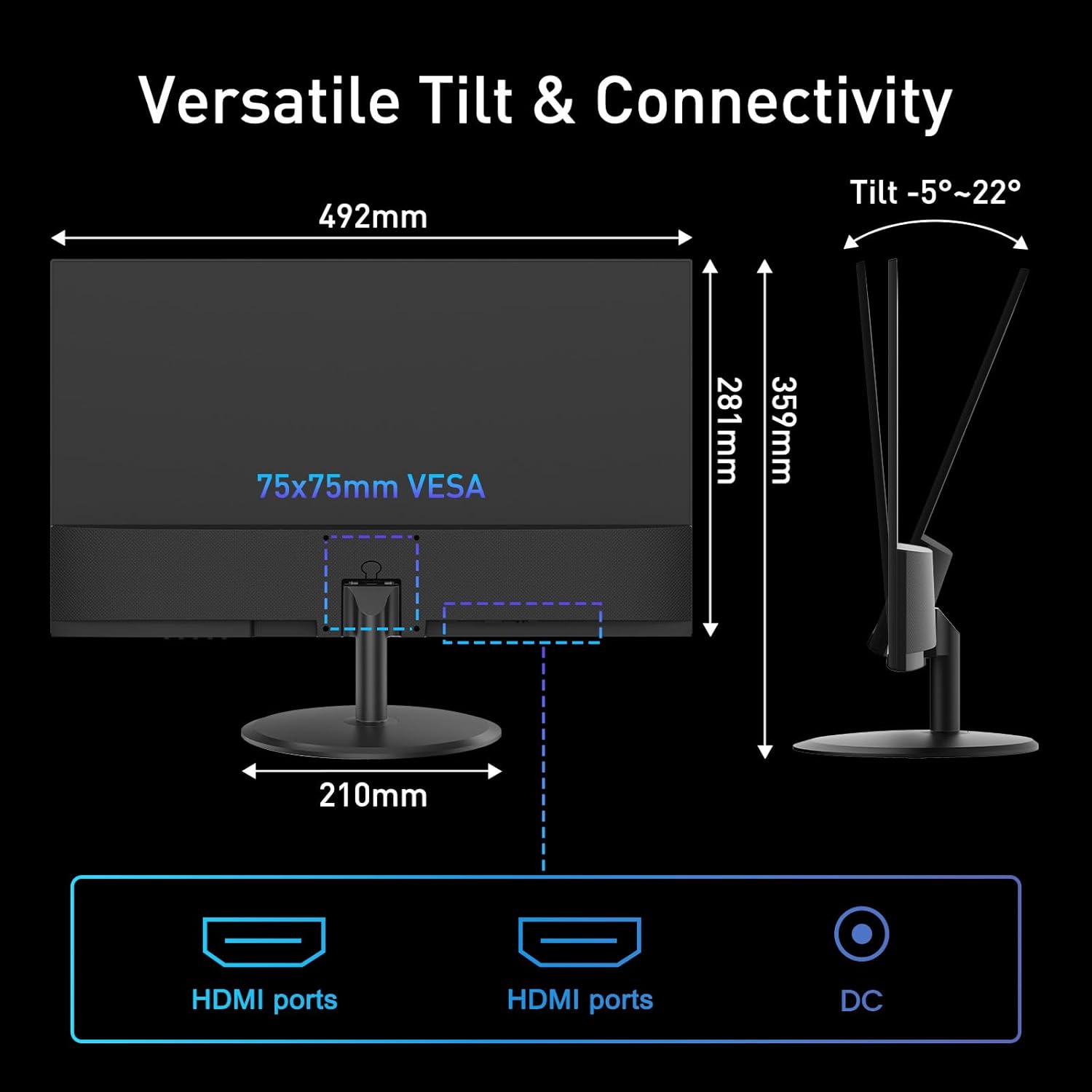
Illustration of the monitor's connectivity options, including HDMI and DC power ports.
4. Betjeningsvejledning
4.1 Tænd/sluk
Tryk på tænd/sluk-knappen, som normalt er placeret nederst til højre eller bag på skærmen, for at tænde eller slukke skærmen. Strømindikatorlampen lyser, når skærmen er tændt.
4.2 On-Screen Display (OSD) menu
The OSD menu allows you to adjust various monitor settings. Use the control buttons (joystick or individual buttons) typically found on the back or bottom of the monitor to navigate the menu.
- Lysstyrke/kontrast: Adjust image luminance and distinction.
- Farveindstillinger: Rediger farvetemperatur, farvetone og mætning.
- Indgangsvalg: Manually switch between HDMI inputs.
- Billedtilstand: Select preset display modes (e.g., Standard, Game, Movie).
- Adaptiv synkronisering: Enable or disable Adaptive Sync for smoother visuals.
- HDR-tilstand: Activate High Dynamic Range for enhanced contrast and color.
4.3 Nøglefunktioner
4.3.1 120Hz Refresh Rate
The 120Hz refresh rate provides smoother motion and reduced input lag, beneficial for fast-paced content and general desktop use. Ensure your connected device is configured to output at 120Hz for optimal performance.
Image: High Refresh Rate Visual

Visual representation of the monitor's 120Hz refresh rate, ensuring ultra-fluid visuals.
4.3.2 Adaptiv synkronisering
Adaptive Sync technology synchronizes the monitor's refresh rate with your graphics card's frame rate, eliminating screen tearing and stuttering for a more fluid visual experience. This feature is automatically enabled when supported by your graphics card and enabled in the OSD.
Image: Adaptive Sync vs. Conventional Display

Demonstration of Adaptive Sync technology providing tear-free and smooth visuals compared to a conventional display.
4.3.3 HDR (High Dynamic Range)
HDR mode enhances the contrast and color accuracy of compatible content, providing deeper blacks, brighter whites, and a wider range of colors. Enable HDR through the OSD menu or your operating system settings for supported media.
Image: HDR Clarity Comparison
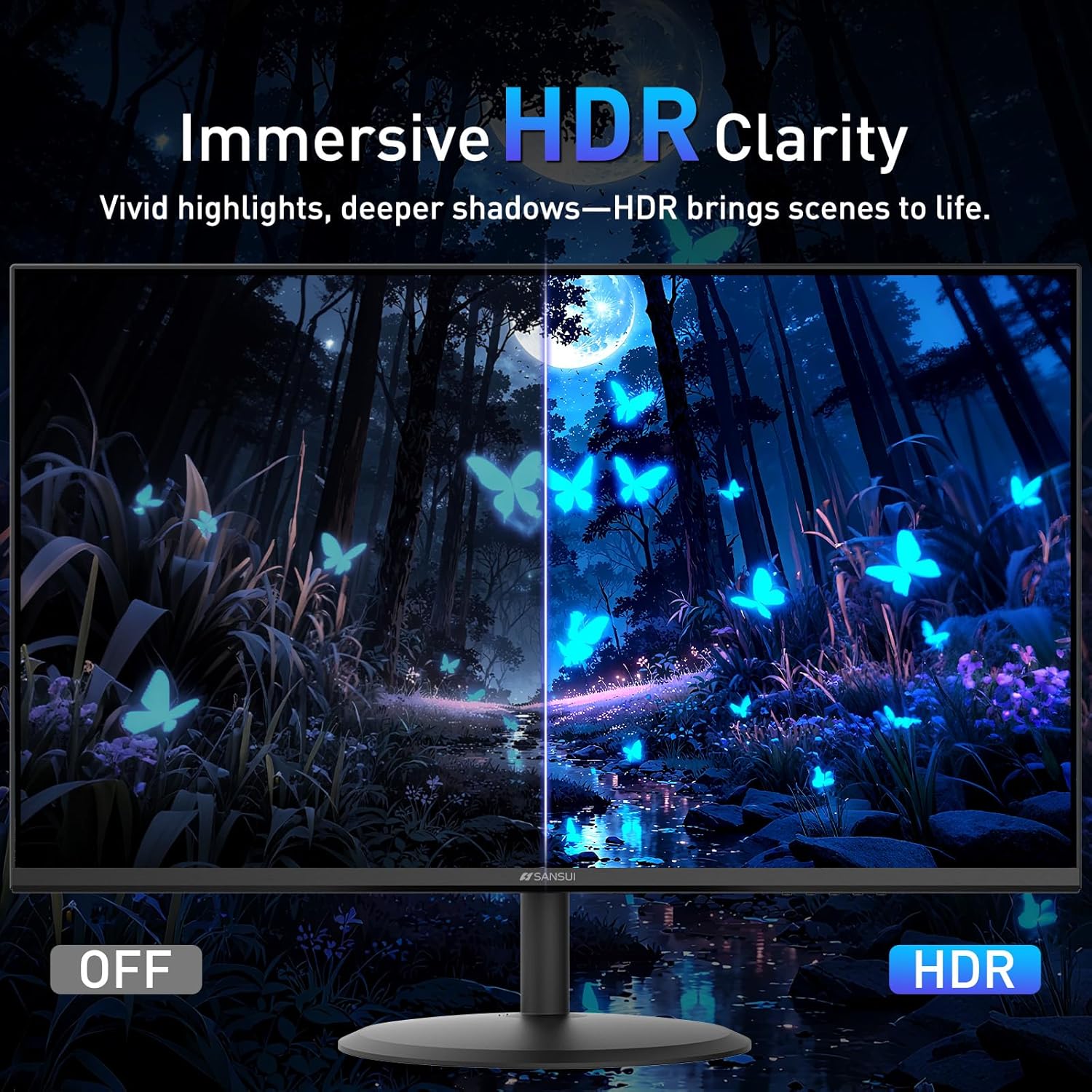
Visual comparison demonstrating the enhanced clarity and color depth provided by HDR mode.
4.3.4 Øjenplejefunktioner
The monitor incorporates several features to reduce eye strain during prolonged use:
- Anti-flimmer: Reduces screen flickering that can cause eye fatigue.
- Lavt blåt lys: Filtrerer skadelige blå lysudledninger.
- Anti-refleksbelægning: Minimizes reflections on the screen surface.
Image: Eye Care & Comfort Viewing
Depiction of the monitor's eye care features contributing to comfortable viewunder længerevarende brug.
5. Vedligeholdelse
5.1 Rengøring af monitoren
To ensure the longevity and optimal performance of your monitor, follow these cleaning guidelines:
- Sluk altid skærmen og tag stikket ud af stikkontakten inden rengøring.
- Brug en blød, fnugfri klud lidt damprengøres med vand eller en specialiseret skærmrengøringsopløsning.
- Gently wipe the screen surface and the monitor casing. Undgå at påføre for stort tryk.
- Do not use abrasive cleaners, alcohol, ammonia, or petroleum-based solvents, as these can damage the screen or casing.
- Never spray cleaning solution directly onto the screen.
5.2 Opbevaring
Hvis skærmen opbevares i længere tid, skal du sørge for, at den er slukket, at stikket er taget ud af stikkontakten, og at den opbevares et køligt og tørt sted, væk fra direkte sollys og ekstreme temperaturer. Brug den originale emballage, hvis tilgængelig, for at opnå den bedste beskyttelse.
6. Fejlfinding
If you encounter issues with your SANSUI ES-22X3AH monitor, refer to the following common problems and solutions:
| Problem | Mulig årsag | Løsning |
|---|---|---|
| Intet billede på skærmen | Skærmen er ikke tændt; Forkert indgang valgt; Løst videokabel. | Ensure power cable is connected and monitor is on. Select correct input source via OSD. Check HDMI cable connection. |
| Billedet er sløret eller forvrænget | Forkert opløsning; problemer med grafikdriveren. | Set display resolution to 1920x1080. Update graphics drivers on your computer. |
| Skærmen flimrer | Uoverensstemmelse i opdateringshastighed; Defekt kabel. | Sørg for, at opdateringshastigheden er indstillet til 120 Hz i din computers skærmindstillinger. Prøv et andet HDMI-kabel. |
| Ingen lyd (hvis eksterne højttalere er tilsluttet) | Monitor does not have built-in speakers; Audio output not configured. | This monitor does not have built-in speakers. Ensure your external speakers are properly connected and selected as the audio output device on your computer. |
| Adaptiv synkronisering virker ikke | Feature not enabled; Incompatible graphics card. | Enable Adaptive Sync in the monitor's OSD menu and your graphics card control panel. Ensure your graphics card supports Adaptive Sync. |
If the problem persists after trying these solutions, please contact SANSUI customer support.
7. Specifikationer
Below are the technical specifications for the SANSUI ES-22X3AH monitor:
- Modelnummer: ES-22X3AH
- Skærmstørrelse: 22 tommer
- Paneltype: Not specified (typically VA or IPS for 4000:1 contrast)
- Opløsning: 1920 x 1080 (FHD 1080p)
- Aspektforhold: 16:9
- Opdateringshastighed: 120 Hz
- Kontrastforhold: 4000:1
- Billedets lysstyrke: 250 Candela pr. kvadratmeter (nits)
- Farveskala: 100 % sRGB
- Forbindelse: 2 x HDMI 1.4 ports (up to 120Hz), DC Power Input
- VESA montering: 75 x 75 mm
- Justering af hældning: -5° til 22°
- Produktdimensioner: 8.27 x 19.37 x 14.13 tommer
- Varens vægt: 6.64 pund
- Funktioner til øjenpleje: Anti-flicker, Low Blue Light, Anti-glare coating
- Adaptiv synkronisering: Understøttet
- HDR: Understøttet
- Fabrikant: EXPRESS LUCK INDUSTRIAL(ZHONGSHAN)LIMITED
8. Garanti og support
8.1 Garantioplysninger
SANSUI provides a money-back and free replacement warranty for your monitor within 30 days from the order date. Please retain your proof of purchase for warranty claims.
8.2 Teknisk support
Lifetime technical support is available for your SANSUI monitor. For assistance with setup, troubleshooting, or any other inquiries, please contact SANSUI customer service. You can typically find contact information on the SANSUI official webhjemmeside eller gennem din forhandler.
Image: Lifetime Technical Support

Overview of SANSUI's commitment to customer satisfaction, including warranty and support services.


