1. Introduktion
This manual provides essential information for the safe and effective use of your FLEXISPOT V9-Max-AR Exercise Bike with 2D Desktop. Please read all instructions carefully before assembly and operation. Retain this manual for future reference.
Vigtige sikkerhedsoplysninger
- Sørg for, at alle dele er forsvarligt fastgjort før hver brug.
- Overskrid ikke den anbefalede maksimale vægt på 300 pund.
- Hold børn og kæledyr væk fra motionscyklen under brug.
- Rådfør dig med en læge, før du starter et nyt træningsprogram.
- Use the product on a stable, level surface.
2. Produktet er slutview og komponenter
The FLEXISPOT V9-Max-AR is a versatile exercise bike designed for indoor use, featuring an integrated 2D adjustable desktop. It combines a stationary bike with a functional workspace, allowing for simultaneous exercise and productivity.

Figure 2.1: User operating the FLEXISPOT V9-Max-AR Exercise Bike with the desktop in use.
Key features include an 8-level quiet magnetic resistance system, an LCD display for tracking workout metrics, and a robust design supporting up to 300 lbs. The adjustable seat and desktop accommodate various user heights and preferences.
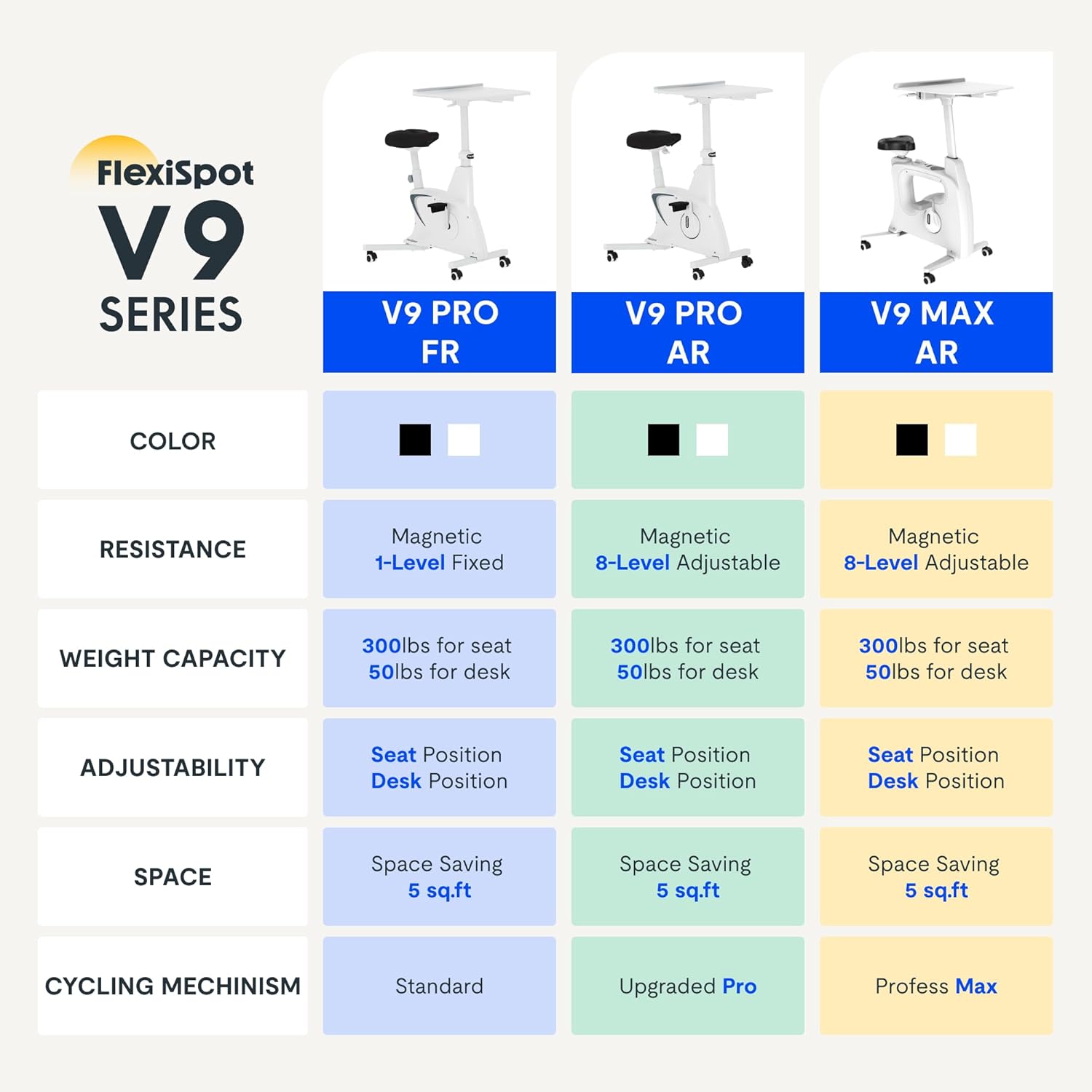
Figure 2.2: Comparison of FlexiSpot V9 series models, highlighting features like resistance and adjustability.
Hovedkomponenter:
- Main Frame with Flywheel and Resistance Mechanism
- Justerbart sæde
- Adjustable Desktop
- Pedaler
- LCD Display Console
- Transport hjul
3. Opsætning og montering
The FLEXISPOT V9-Max-AR is designed for quick and straightforward assembly, typically requiring about 10 minutes.
Monteringstrin:
- Pak alle komponenter ud, og kontroller dem med pakkelisten.
- Attach the front and rear stabilizers to the main frame using the provided screws.
- Install the pedals, ensuring the left pedal is tightened counter-clockwise and the right pedal clockwise.
- Mount the seat post and seat onto the main frame, securing them firmly.
- Attach the desktop support column to the main frame.
- Secure the desktop to its support column.
- Insert batteries into the LCD display (batteries not included) and connect the sensor wire.
- Ensure all screws and connections are tightened before first use.

Figure 3.1: Illustration of adjustable components for personalized setup.
4. Betjeningsvejledning
Adjusting Seat and Desktop:
- Sædehøjde: Use the quick-release lever located on the seat post to adjust the seat to a comfortable height. Ensure your leg has a slight bend at the knee when the pedal is at its lowest point.
- Desktop Height: The desktop can be adjusted vertically. Locate the adjustment lever beneath the desktop and raise or lower the desktop to your desired working height.
- Desktop Depth: The desktop can also be adjusted horizontally (forward/backward) to optimize your working posture.
Modstandsniveauer:
The V9-Max-AR features 8 levels of quiet magnetic resistance. Rotate the resistance knob, located below the desktop, clockwise to increase resistance and counter-clockwise to decrease it.

Figure 4.1: LCD display and resistance control knob.
Brug af LCD-skærmen:
The built-in LCD display monitors your workout statistics. It tracks:
- Tid
- Hastighed
- Afstand
- Kalorier forbrændt
- Total Distance Covered (Odometer)
- Rotationshastighed
Press the button on the display to cycle through different metrics or hold it to reset values (refer to display specific instructions for exact operation).
Using the 2D Desktop:
The spacious desktop (20" x 22.8") is designed to hold a laptop, notebook, mobile phone, or water cup. It provides a stable surface for working or entertainment while exercising.

Figure 4.2: Desktop in use for studying or working.
Portabilitet:
Equipped with movable silent wheels, the exercise bike can be easily relocated within your home or office. Simply tilt the bike and roll it to your desired position.
5. Vedligeholdelse
Regular maintenance ensures the longevity and optimal performance of your FLEXISPOT V9-Max-AR Exercise Bike.
- Rensning: Tør cyklen regelmæssigt af med enamp klud og mildt rengøringsmiddel. Undgå slibende rengøringsmidler eller opløsningsmidler.
- Inspektion: Periodically check all bolts, nuts, and moving parts for tightness. Tighten any loose components immediately.
- Smøring: No specific lubrication is required for the magnetic resistance system.
- Opbevaring: Opbevar cyklen et tørt, køligt sted væk fra direkte sollys og ekstreme temperaturer.
6. Fejlfinding
Dette afsnit omhandler almindelige problemer, du kan støde på med din motionscykel.
| Problem | Mulig årsag | Løsning |
|---|---|---|
| LCD-skærm virker ikke | Batterierne er døde eller forkert installeret. | Replace batteries (AAA, not included) or ensure correct polarity. |
| Ustabil eller vaklende cykel | Løse bolte eller ujævn overflade. | Check and tighten all assembly bolts. Ensure the bike is on a flat, stable surface. |
| Modstanden ændrer sig ikke | Problem med modstandsmekanismer. | Ensure the resistance knob is properly engaged. If the issue persists, contact customer support. |
| Knirkende eller usædvanlige lyde | Loose components or friction. | Inspect all connections and tighten any loose parts. Ensure no foreign objects are interfering with moving parts. |
7. Specifikationer
Detailed specifications for the FLEXISPOT V9-Max-AR Exercise Bike:
- Model: V9-Max-AR (Exercise Bike with Desk)
- Mærke: FLEXISPOT
- Farve: Sort
- Modstandsmekanisme: Magnetisk
- Antal modstandsniveauer: 8
- Maksimal vægtanbefaling: 300 pund
- Produktmål (D x B x H): 37.6 cm x 23.2 cm x 47.2 cm
- Skrivebordsdimensioner: Cirka 20 x 22.8 cm
- Minimum Height (Seat): 29.6 tommer
- Maximum Height (Overall): 47.2 Inches (desktop height can go up to 47.2")
- Strømkilde: Pedaldrevet (ikke-elektrisk)
- Drivsystem: Bælte
- Speciel funktion: Adjustable Seat, Adjustable Desktop
- Anbefalede anvendelser: Indendørs
- Space Occupied: Cirka 5 kvm

Figur 7.1: Produktdimensioner.
8. Garanti og support
FLEXISPOT is committed to providing quality products and customer satisfaction.
- Returnerer: Dette produkt er berettiget til 30 dages nem returret. Se venligst din købsplatforms returpolitik for yderligere oplysninger.
- Garanti: For specific warranty terms and conditions, please refer to the official FLEXISPOT webwebstedet eller kontakt deres kundesupport direkte.
- Kundesupport: For any questions, assistance, or troubleshooting not covered in this manual, please contact FLEXISPOT customer support. Contact information can typically be found on the manufacturer's webwebstedet eller din købsdokumentation.
9. Yderligere oplysninger
While no specific official product videos were provided in the product data, users may find helpful assembly or usage guides on the manufacturer's official website or their authorized channels. Always ensure the source is official for accurate information.


