1. Introduktion
The Aoocci BX Motorcycle Carplay system is an advanced dashboard solution designed to enhance your riding experience with smart features and comprehensive safety functions. This manual provides detailed instructions for the proper installation, operation, and maintenance of your device, ensuring optimal performance and longevity.
Key features include Smart Blind Spot Detection (BSD), wireless Apple CarPlay, Android Auto, Huawei HiCar, dual 1080P dash cameras with audio sync, built-in external 5Hz GPS navigation, real-time tire pressure and temperature monitoring, and a durable IP68 waterproof design. The system also offers loop recording, emergency lock, and a parking mode with voltage guard for enhanced security.
2. Hvad er der i æsken
Upon opening your Aoocci BX package, please verify that all the following components are included:
- Motorcycle Dash Cam Main Unit
- For- og bagkameraer
- Bracket and TPMS (Tire Pressure Monitoring System)
- Controller and 64GB TF Card
- Wiring Harness & Power Cable
- Accessories and Tools (including cable ties, cleaning cloth, screwdriver, etc.)
- Millimeter Wave Radar & GPS Module

Image: All components included in the Aoocci BX Motorcycle Carplay package.
Video: An unboxing demonstration showing the contents of the Aoocci BX Motorcycle Carplay package.
3. Nøglefunktioner
3.1. Smart Blind Spot Detection (BSD)
The Aoocci BX integrates a 24GHz mmWave radar system for real-time detection of vehicles in your left, right, and rear blind spots. This feature provides smart alerts through audible beeps and on-screen red frames, automatically switching camera views for immediate visual confirmation. It covers a detection distance of 20 meters, a width of 9 meters, and a 75° angle, significantly enhancing safety during urban traffic, highway cruising, and lane changes.

Image: Visual representation of the Smart Blind Spot Detection (BSD) system's coverage and alert mechanism.
3.2. Wireless CarPlay, Android Auto, and HiCar
Connect your smartphone wirelessly to the Aoocci BX via Bluetooth or dual-band Wi-Fi (2.4G/5G). This enables seamless access to navigation, calls, music, and messages through Apple CarPlay, Android Auto, and Huawei HiCar. The connection is stable and supports most major phone brands globally, eliminating the need for physical cables.

Image: The Aoocci BX display showcasing wireless connectivity with CarPlay, Android Auto, and HiCar.
3.3. Loop Recording and Emergency Lock
The system features emergency lock and loop recording functions. In the event of a crash or sudden impact, the built-in G-sensor automatically locks and protects the footage from being overwritten. Combined with continuous loop recording, the Aoocci BX ensures that critical footage is always saved, providing valuable evidence for accident claims or legal support.

Image: Illustration of the loop recording and emergency lock functions, highlighting how footage er sikret.
3.4. Dual 1080P Cameras + Audio Sync
Capture both front and rear views in crisp 1080P HD with wide 140° angles. This allows for clear recording of road conditions, potential hazards, and scenic rides. The system also records ambient sound, synchronizing audio with your visuals for a complete record. A 64GB microSD card is included to begin recording immediately.

Image: Demonstration of the dual 1080P camera system, capturing both front and rear perspectives.
3.5. Built-in External 5Hz GPS for Navigation
The Aoocci BX features a physical external GPS module, providing superior accuracy and stability compared to internal alternatives. With a 5Hz refresh rate (updates every 0.2 seconds), it ensures precise, real-time speed and location tracking, even at high speeds, for reliable navigation.

Image: The Aoocci BX display showing real-time GPS navigation.
3.6. 5.5” Display & 1000nit IPS Touchscreen Auto-Brightness
The ultra-bright 5.5” IPS display (1000nit) automatically adjusts its brightness based on ambient light conditions. This auto-brightness function ensures a safer and more comfortable viewing experience in various conditions, including sun, shade, or night riding.
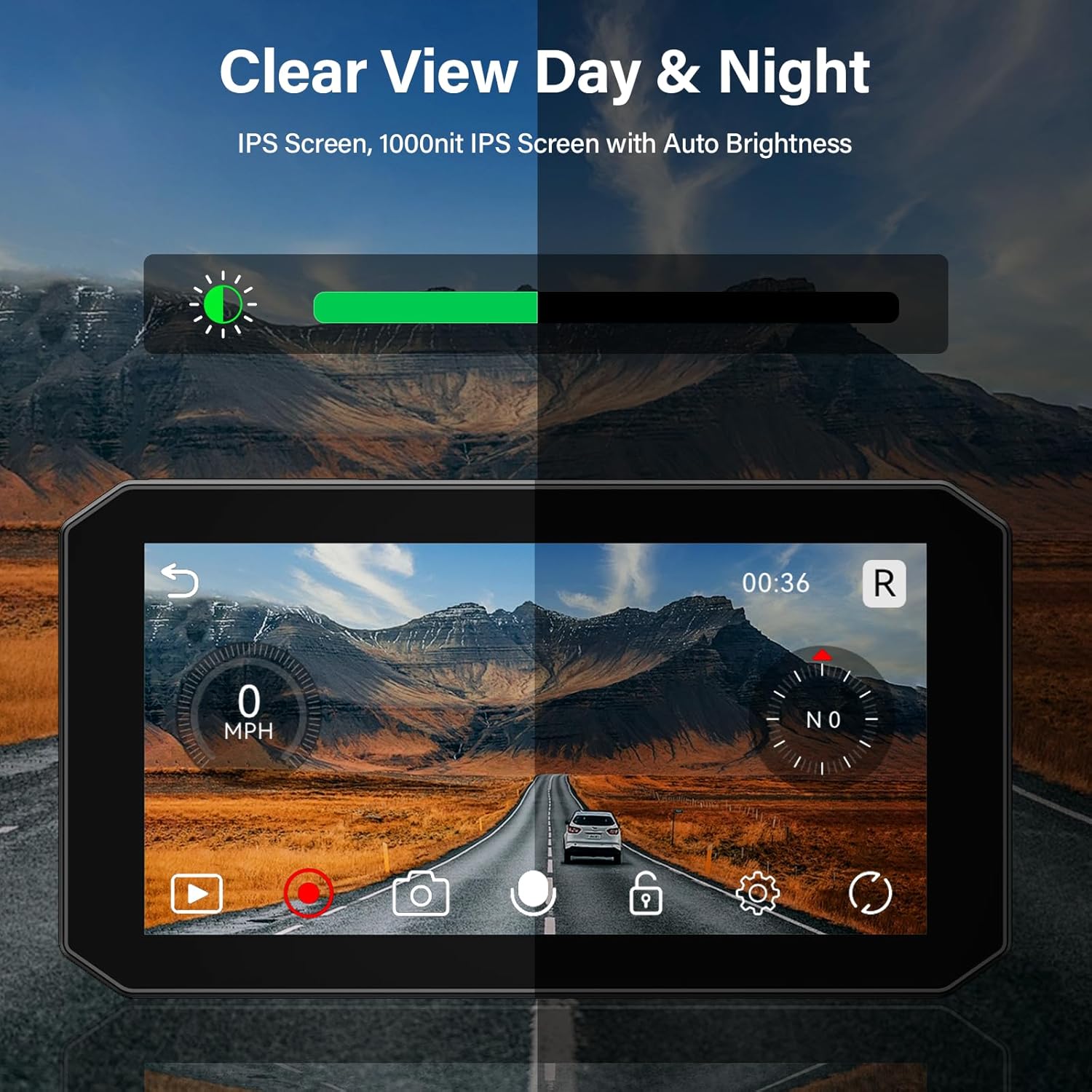
Image: The display demonstrating its auto-brightness feature for clear visibility day and night.
3.7. Tire Pressure and Temperature Monitoring (TPMS)
The dash cam supports dual-channel tire pressure and temperature monitoring for both front and rear wheels. You can customize high/low alerts and switch between PSI/bar and °C/°F units. This feature helps prevent tire blowouts, improves fuel efficiency, and extends tire life, which is crucial for touring and sport riding.

Image: The Aoocci BX display showing real-time tire pressure and temperature monitoring.
3.8. Parking Mode & Voltage Guard
The BX Motorcycle dash cam protects your motorbike even when parked. If a bump or movement is detected, the built-in G-sensor automatically records and locks the footage. Voltage guard feature prevents battery drain by shutting off the system once voltage drops to 11.8V, ensuring your bike's battery remains charged.

Image: Visual summary of G-sensor emergency lock, GPS tracking, loop recording, and 24-hour parking monitor.
3.9. IP68 Vandtæt
The Aoocci BX is designed with an IP68 waterproof rating, ensuring reliable performance in various weather conditions, including heavy rain. This robust construction protects the device from water and dust ingress, making it suitable for all-weather riding.

Image: The Aoocci BX operating in rainy conditions, demonstrating its IP68 waterproof capability.
4. Opsætningsvejledning
4.1. Montering af hovedenheden
- Choose a secure and visible location on your motorcycle's dashboard or handlebars for the main unit.
- Attach the quick-release mount to the chosen location using the provided bracket and tools. Ensure it is firmly secured and does not obstruct your view eller kontroller.
- Slide the main unit onto the quick-release mount until it clicks into place.
4.2. Kamerainstallation
- Mount the front camera securely at the front of your motorcycle, ensuring a clear, unobstructed view af vejen forude.
- Mount the rear camera at the back of your motorcycle, providing a clear view of traffic behind you.
- Connect the camera cables to the main unit's designated ports. Route cables neatly and securely to avoid interference with moving parts or exposure to damage.
4.3. Strømtilslutning
- Connect the power cable to your motorcycle's battery or a suitable 12V power source, following the wiring diagram in the detailed manual. Ensure proper polarity (red to positive, black to negative).
- Connect the power cable to the main unit.
4.4. TPMS Sensor Installation
- Install the TPMS sensors onto your tire valve stems (front and rear). Ensure they are tightened securely to prevent air leakage.
- The sensors will automatically pair with the main unit once powered on.
4.5. Første opstart og indstillinger
- Turn on your motorcycle's ignition. The Aoocci BX unit should power on automatically.
- Follow the on-screen prompts to complete the initial setup, including language selection, time zone, and date.
- Insert the provided 64GB TF card into the designated slot.
5. Betjeningsvejledning
5.1. Navigering i grænsefladen
The 5.5-inch IPS touchscreen allows for intuitive control. Swipe left/right or tap icons to access different functions such as Carplay/Android Auto, Dash Cam view, GPS, TPMS, and Settings.
5.2. Wireless Connectivity (CarPlay/Android Auto/HiCar)
- On the Aoocci BX, navigate to the CarPlay/Android Auto/HiCar section.
- Aktiver Bluetooth og Wi-Fi på din smartphone.
- Søg efter the Aoocci BX device in your phone's Bluetooth settings and pair.
- Once paired via Bluetooth, the system will prompt you to connect via Wi-Fi for full functionality. Accept the connection.
- Your phone's interface will now be mirrored on the Aoocci BX display, allowing access to compatible apps.
5.3. Dash Cam Operation
- Automatisk optagelse: The dash cam automatically begins recording when the device is powered on.
- Loop-optagelse: Footage is recorded in continuous loops. When the memory card is full, the oldest unlocked files overskrives.
- Nødlås: In case of a collision or sudden braking, the G-sensor will automatically lock the current recording to prevent it from being overwritten. You can also manually lock a recording by pressing the designated button on the wired remote or touchscreen.
- Parkeringsmonitor: When the motorcycle is parked and the system detects a bump, it will automatically record a short video. Ensure the voltage guard is enabled to prevent battery drain.
5.4. Smart BSD Usage
The BSD system operates automatically. When a vehicle enters your blind spot, the system will provide visual alerts on the screen (red frame) and audible beeps. The display may automatically switch to the relevant camera view for immediate awareness.
5.5. GPS-navigation
Utilize the external GPS module for accurate speed and location data. When connected to CarPlay/Android Auto/HiCar, your phone's navigation applications will use this precise GPS data for real-time routing and speed display.
5.6. TPMS Monitoring
The TPMS section on the display shows real-time tire pressure and temperature for both front and rear wheels. Configure high/low pressure and temperature alerts in the settings menu. An alarm will sound if readings fall outside the set parameters.
5.7. Wired Remote Control
The wired remote provides quick access to common functions without touching the screen:
- Toggle Front/Rear Camera: Skift mellem front- og bagkamera views.
- Telefonsvarer: Accept incoming calls when connected via CarPlay/Android Auto.
- Opdelt skærm: Activate or deactivate split-screen view for simultaneous display of multiple functions.

Image: The wired remote control and its functions for easy operation.
6. Vedligeholdelse
6.1. Rensning
Regularly clean the display screen and camera lenses with a soft, lint-free cloth. For stubborn smudges, slightly dampen the cloth with water. Avoid using harsh chemicals or abrasive materials that could damage the surfaces.
6.2. Firmwareopdateringer (OTA)
The Aoocci BX supports Over-The-Air (OTA) updates. Connect the device to a Wi-Fi network and check for available firmware updates in the settings menu. Keeping your firmware updated ensures optimal performance, new features, and bug fixes.

Image: The mobile application interface for WiFi playback and OTA updates.
6.3. Opbevaring
When not in use for extended periods, store the device in a cool, dry place away from direct sunlight and extreme temperatures. The device is designed to withstand extreme temperatures from -20°C to 70°C (-4°F to 158°F) during operation.

Image: The Aoocci BX demonstrating reliable performance across a wide range of temperatures.
7. Fejlfinding
| Problem | Mulig årsag | Løsning |
|---|---|---|
| Enheden tænder ikke. | No power connection; Blown fuse; Battery voltage for lavt. | Check power cable connections; Inspect and replace fuse if necessary; Ensure motorcycle battery is charged (above 11.8V). |
| CarPlay/Android Auto opretter ikke forbindelse. | Bluetooth/Wi-Fi off on phone; Incorrect pairing; Interference. | Ensure phone's Bluetooth/Wi-Fi is on; Forget device on phone and re-pair; Move away from strong electromagnetic interference. |
| Kameraer optager eller viser ikke video. | Loose camera connection; TF card full or corrupted; Incorrect settings. | Check camera cable connections; Format TF card (backup important files first); Verify recording settings in menu. |
| TPMS readings are inaccurate or missing. | Sensors not paired; Low sensor battery; Incorrect installation. | Re-pair TPMS sensors; Replace sensor batteries; Ensure sensors are tightly installed. |
| BSD alerts are inconsistent. | Radar obstructed; Environmental factors (heavy rain/fog). | Ensure radar sensor is clean and unobstructed; Performance may be affected in severe weather. |
8. Specifikationer
| Attribut | Detalje |
|---|---|
| Produktdimensioner | 5.94 x 1.26 x 3.22 tommer |
| Varens vægt | 3.96 pund |
| Forbindelsesteknologier | Bluetooth, Wi-Fi (2.4G/5G) |
| Særlige funktioner | App Control, Blind Spot Detection (BSD), Built-In External 5Hz GPS, Loop Recording, Parking Monitor, TPMS |
| Videooptagelsesopløsning | Dual 1080p |
| Vise | 5.5" IPS Touchscreen, 1000nit Auto-Brightness |
| Vandtæt vurdering | IP68 |
| Driftstemperatur | -20°C til 70°C (-4°F til 158°F) |
| Inkluderet opbevaring | 64GB TF Card (supports up to 256GB) |
| Fabrikant | Aoocci |
| Modelnavn | BX |
| Orientering | For & Bag |
| Type køretøjstjeneste | Motorcykel |
| Monteringstype | Dashboard montering |
9. Garanti og support
9.1. Garantioplysninger
The Aoocci BX Motorcycle Carplay system comes with a 12-month quality guarantee from the date of purchase. This warranty covers manufacturing defects and malfunctions under normal use. Please retain your proof of purchase for warranty claims.
9.2. Kundesupport
For technical assistance, troubleshooting, or any inquiries regarding your Aoocci BX device, please contact our customer support team. We offer 24-hour online support and email assistance, along with lifetime technical support.
- Online support: Refer to the official Aoocci webwebsted for live chat eller indsendelse af supportbilletter.
- E-mail support: Contact us via the email address provided in your product packaging or on the official webwebsted.
Please provide your model number (BX) and a detailed description of the issue when contacting support to ensure prompt and efficient service.


