1. Introduktion
This manual provides detailed instructions for the proper setup, operation, and maintenance of your TOMLOV TriL107 3-Lens Digital Microscope. Please read this manual thoroughly before using the device to ensure optimal performance and longevity. Keep this manual for future reference.
2. Sikkerhedsoplysninger
- Do not expose the microscope to extreme temperatures, humidity, or corrosive substances.
- Avoid direct exposure of the lenses to strong light sources, which may damage the sensor.
- Hold enheden væk fra vand og andre væsker.
- Do not attempt to disassemble or repair the microscope yourself. Contact customer support for assistance.
- Sørg for, at strømadapteren er kompatibel med dit lokale lydniveau.tage.
- Opbevares utilgængeligt for børn, medmindre det er under opsyn af en voksen.
3. Pakkens indhold
Bekræft, at alle nedenstående varer er inkluderet i din pakke:
- 7-Inch 3-Lens HDMI Digital Microscope (1 unit)
- 12.6-Inch Adjustable Stand (1 unit)
- 64GB Micro SD Card (1 unit - pre-installed)
- Slides Bottom Light (1 unit)
- Fjernbetjening (1 enhed)
- USB Cable (2 units)
- HDMI-kabel (1 enhed)
4. Produktet er slutview
The TOMLOV TriL107 features a versatile design with three interchangeable lenses and a high-resolution display for various observation needs.
Nøglekomponenter:
- 7-tommer IPS-skærm: Provides a clear, wide-angle view af forstørrede objekter.
- Rotating Lens Barrel: Allows for quick switching between the 1000X, 1500X, and 2500X lenses.
- Fokusknap: Adjusts the focus for clear images.
- Justerbart stativ: Provides stability and allows for height adjustments, especially useful for whole coin viewing.
- Integreret belysningssystem: Includes 12 main LED lights, 2 gooseneck side lights, and a slide bottom light for optimal illumination.
- Kontrolknapper: For power, menu navigation, photo/video capture, and zoom.
- Porte: HDMI and USB for external display connectivity.

Figur 1: Overview of the three specialized lenses for diverse observation needs.
5. Opsætningsvejledning
5.1 Montering
- Pak forsigtigt alle komponenter ud af kassen.
- Attach the microscope unit to the adjustable stand, securing it with the provided knob.
- Connect the gooseneck side lights to the base and position them as needed.
- Place the slide bottom light on the base if required for your observation.
5.2 Tænd/sluk
- Connect the microscope to a power source using one of the provided USB cables. The device contains a rechargeable Lithium Ion battery.
- Press and hold the power button on the microscope's display unit to turn it on or off.
5.3 Micro SD-kort
The 64GB Micro SD card is pre-installed in the microscope. This card is essential for storing photos and videos. Ensure it is securely in place before operation.
6. Betjeningsvejledning
6.1 Lens Selection
The TriL107 features a rotating lens barrel for easy switching between the three lenses. Simply rotate the barrel to select the desired magnification lens (1000X, 1500X, or 2500X).
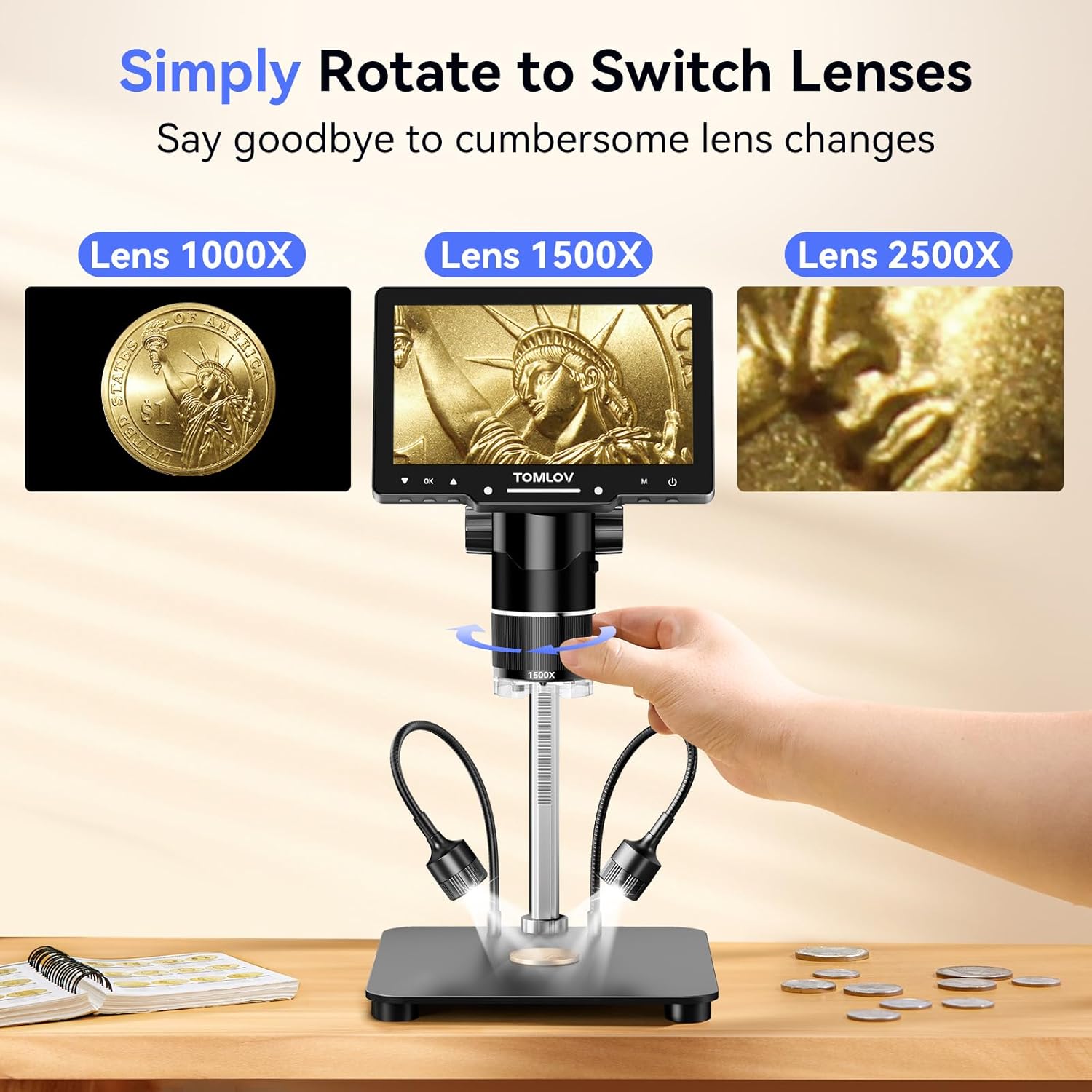
Figure 2: Rotating the lens barrel to select different magnification lenses.
6.2 Fokusering
Place the object you wish to observe on the base. Adjust the height of the microscope unit using the stand's adjustment knob, then fine-tune the focus by rotating the focus wheel on the lens barrel until the image on the screen is clear.
Video 1: Demonstrates the focusing process and lens switching for the TOMLOV TriL107 digital microscope.
6.3 Magnification Lenses
- 1000X Lens (2X-1000X): Ideal for observing coins, stamps, and other larger specimens. The adjustable 12.6-inch stand allows for a full view of entire coins.
- 1500X Lens (10X-1500X): Designed for intricate tasks such as PCB soldering and watch repair. Offers a longer working distance and a larger base for a stable workspace.
- 2500X Lens (2000X-2500X): Suitable for observing biological slides and microscopic details. Note: The optimal observation distance for this lens is 3mm-4mm, requiring the lens to be very close to the object for clear images.

Figure 3: Coin observation using the 1000X lens.

Figure 4: Soldering with the 1500X lens.

Figure 5: Biological slide observation with the 2500X lens.
6.4 Justering af belysning
The microscope features a comprehensive lighting system:
- 12 Built-in LED Lens Lights: Provide direct illumination from around the lens.
- 2 Gooseneck Side Lights: Adjustable lights for angled illumination, reducing shadows.
- Slide Bottom Light: For observing transparent specimens from below.
All lights can be dimmed and charged independently using their respective controls to achieve optimal viewbetingelser.

Figure 6: The versatile lighting system of the microscope.
6.5 Foto- og videooptagelse
The microscope supports one-button photo capture and video recording. Use the dedicated buttons on the display unit or the wireless remote control to initiate these functions. All captured media is saved to the pre-installed 64GB Micro SD card.
6.6 External Display Connection (HDMI & USB)
Connect the microscope to a larger screen (PC or TV) using the provided HDMI or USB cables for real-time viewing and presentations. This allows for collaborative observation and detailed examination on a larger display.

Figure 7: Connecting the microscope to external displays.
6.7 Trådløs fjernbetjening
The included wireless remote control allows for convenient adjustment of magnification, photo capture, and video recording without touching the microscope. This minimizes screen shaking and sample disturbance, ensuring stable observations.
7. Vedligeholdelse
7.1 Rengøring
- Linser: Use a soft, lint-free cloth specifically designed for optical surfaces. For stubborn smudges, a small amount of lens cleaning solution can be applied to the cloth (not directly to the lens).
- Skærm: Wipe the IPS screen gently with a soft, dry microfiber cloth. Avoid harsh chemicals.
- Legeme: Clean the microscope body and stand with a slightly damp cloth. Ensure no moisture enters any openings.
7.2 Opbevaring
When not in use, store the microscope in a clean, dry, and dust-free environment. Use the original packaging or a protective case to prevent damage.
8. Fejlfinding
| Problem | Mulig årsag | Løsning |
|---|---|---|
| Intet billede på skærmen | Device not powered on; low battery; loose cable connection. | Ensure device is powered on. Charge the battery. Check USB cable connection. |
| Billedet er sløret | Incorrect focus; incorrect working distance for lens; dirty lens. | Adjust the focus knob. Ensure correct working distance for the selected lens (especially 2500X). Clean the lens. |
| No image on external display | Incorrect cable connection; wrong input selected on TV/PC. | Check HDMI/USB cable connections. Select the correct input source on your TV/PC. |
| Kan ikke optage billeder/videoer | SD card full or not inserted correctly; SD card error. | Check SD card status. Ensure it is inserted correctly. Format the SD card (this will erase all data). |
| Lys virker ikke | Lights not turned on; low battery for independent lights. | Turn on the lights. Charge the independent gooseneck lights if applicable. |
9. Specifikationer
| Feature | Detalje |
|---|---|
| Modelnavn | TriL107 |
| Vise | 7-inch IPS Screen (178 Degrees Real Angle of View) |
| Forstørrelse | Up to 2500X (2X-1000X, 10X-1500X, 2000X-2500X) |
| Foto opløsning | 30 MP |
| Video opløsning | 2K |
| Belysningssystem | 12 Built-in LED, 2 Gooseneck Side Lights, Slide Bottom Light |
| Opbevaring | 64 GB Micro SD-kort (medfølger) |
| Produktion | HDMI, USB |
| Kompatible enheder | Laptop, Personal Computer, Television |
| Stativhøjde | 12.6 tommer (justerbar) |
| Grundmål | 7 x 8 tommer |
| Materiale | Aluminiumslegering |
| Farve | Sort |
| Varens vægt | 3.31 pund (ca. 1500 gram) |
| Batteri | 1 lithium-ion batteri (medfølger) |
| Voltage | 5 volt |
10. Garanti og support
10.1 Garantioplysninger
Your TOMLOV TriL107 Digital Microscope is covered by a manufacturer's warranty. Please refer to the warranty card included in your package or visit the official TOMLOV webhjemmeside for detaljerede garantivilkår.
10.2 Kundesupport
For technical assistance, troubleshooting, or any inquiries regarding your product, please contact TOMLOV customer support. Contact details can typically be found on the TOMLOV webwebsted eller i produktemballagen.


