1. Introduktion
This manual provides detailed instructions for the RUIZU D18 MP3 Player. Please read it carefully to ensure proper use and to fully utilize all features of your device. Keep this manual for future reference.
The RUIZU D18 is a versatile MP3 player featuring Bluetooth 5.3 connectivity, a 2.4-inch display, metal housing, HiFi sound quality, touch buttons, an integrated speaker, FM radio, and voice recording capabilities. It supports MicroSD cards up to 128GB for expanded storage.
2. Pakkens indhold
Tjek venligst pakken for følgende varer:
- RUIZU D18 MP3 Player
- USB-C ladekabel
- Brugervejledning (dette dokument)
- (Headphones may be included depending on package variant)
3. Produktet er slutview
Familiarize yourself with the device's physical features and controls.

Billede 3.1: Forside og bagside view of the RUIZU D18 MP3 Player, showcasing its sleek design and metal housing.

Billede 3.2: Nærbillede view of the RUIZU D18 MP3 Player highlighting its curved brilliance and metallic edge, with a visible integrated speaker grille.

Billede 3.3: Diagram illustrating the physical features of the RUIZU D18 MP3 Player, including the 2.4-inch curved TFT color display, touch buttons, volume controls, lock/power button, USB-C port, 3.5mm headphone jack, and integrated speaker. Dimensions are approximately 11cm length, 5cm width, and 1cm thickness.
3.1. Knapper og porte
- 2.4-inch Curved TFT Color Display: Main screen for navigation and content viewing.
- Touch-knapper: Located below the screen for navigation and playback control.
- Lydstyrkeknapper: Dedikerede knapper til justering af lydstyrken.
- Lock/On/Off Button: Used to power the device on/off and lock the screen.
- USB-C-port: Til opladning og dataoverførsel.
- 3.5mm Plug Jack: Til tilslutning af kablede hovedtelefoner.
- Integreret højttaler: Til lydafspilning uden hovedtelefoner.
- Micro SD -kortplads: Til udvidelse af lagerplads op til 128 GB.
4. Opsætning
4.1. Opladning af enheden
Before first use, fully charge the MP3 player. Connect the provided USB-C cable to the device's USB-C port and the other end to a USB power adapter (not included) or a computer's USB port. A full charge takes approximately 2.5 hours.
The battery provides up to 48 hours of playback with headphones (screen off) or 6.5 hours in Bluetooth mode.
4.2. Tænd/sluk
- For at tænde: Press and hold the Lock/On/Off button until the screen lights up.
- For at slukke: Press and hold the Lock/On/Off button until the power-off option appears on the screen, then confirm.
- Sådan låser/låser du skærmen op: Briefly press the Lock/On/Off button during operation.
4.3. Installation af et MicroSD-kort
The device has 32GB of internal memory. To expand storage, you can insert a MicroSD card (up to 128GB, sold separately) into the designated slot. Ensure the card is inserted correctly until it clicks into place.

Billede 4.1: Visual representation of the 32GB internal memory and support for up to 128GB MicroSD card, alongside the device's long battery life (up to 50 hours playing time indicated).
5. Betjeningsvejledning
5.1. Grundlæggende navigation
Use the touch buttons below the screen to navigate through menus. The central button typically acts as "Enter" or "Select," while the surrounding buttons are for directional movement (up, down, left, right) and "Back" or "Menu."
5.2. Musikafspilning
The RUIZU D18 supports various audio formats including MP3, WMA, APE, FLAC, and WAV. It features a professional noise cancellation chip for clear, detailed sound.
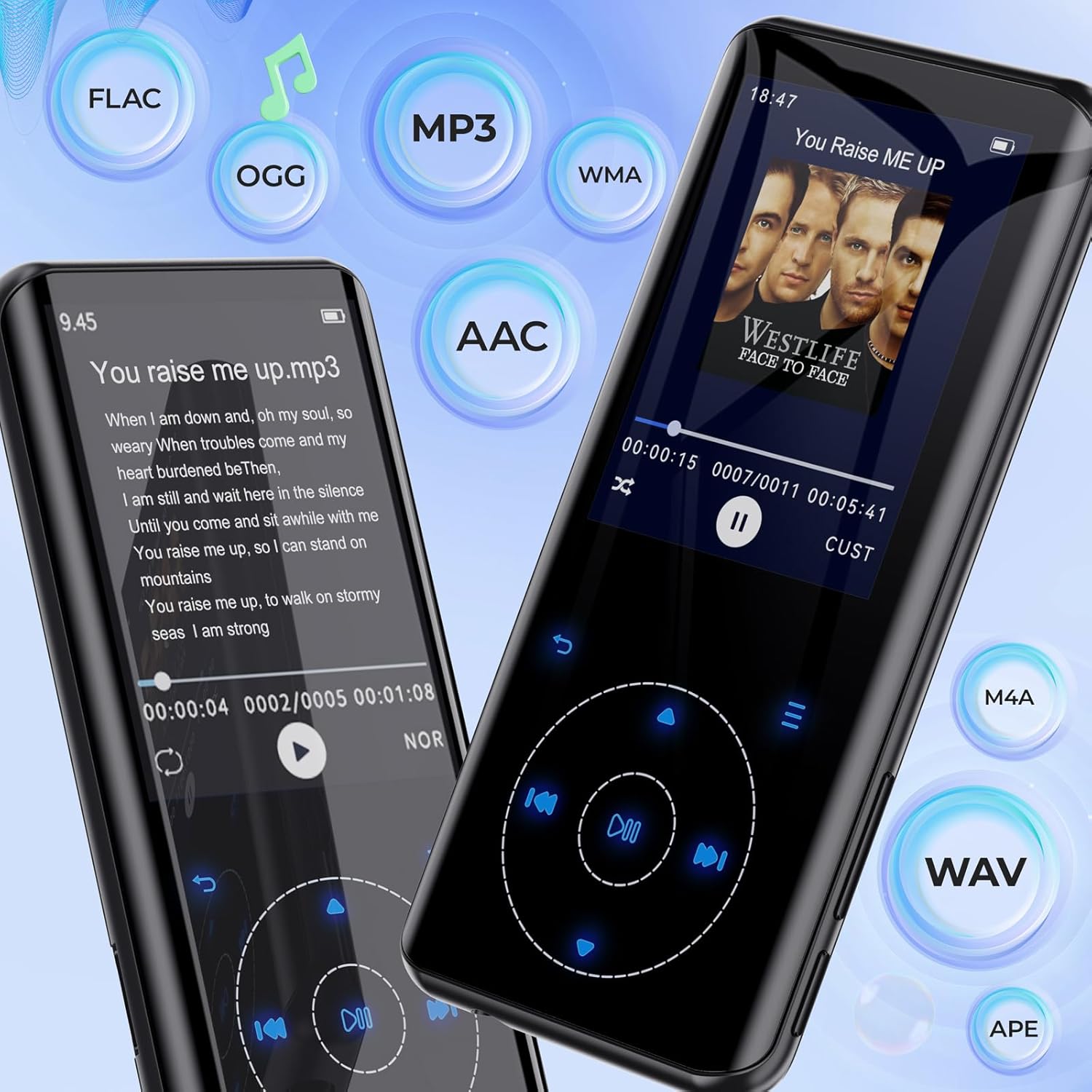
Billede 5.1: The RUIZU D18 MP3 Player showcasing its compatibility with various audio formats such as FLAC, MP3, WMA, AAC, M4A, WAV, and APE, along with lyric display functionality.
- From the main menu, select "Music."
- Browse your music by "All Songs," "Artists," "Albums," "Genres," or "Playlists."
- Vælg en sang for at starte afspilningen.
- During playback, use the touch buttons to play/pause, skip tracks, or adjust volume.
5.2.1. Equalizer and Playback Options
Access the equalizer settings to customize sound profiles. The player also supports A-B repeat, shuffle, and lyric display.

Billede 5.2: Flere views of the RUIZU D18 MP3 Player's music interface, highlighting features like adding bookmarks, repeat modes (all songs, resume, A-B repeat), shuffle, album/genre/playlist browsing, and a graphic equalizer display.
5.3. Bluetooth-parring
The device features Bluetooth 5.3 for stable and fast wireless connections to headphones or speakers. It includes a memory function to automatically reconnect to previously paired devices.

Billede 5.3: The RUIZU D18 MP3 Player demonstrating its Bluetooth 5.3 capability, indicating a stable and faster connection with an auto-reconnect function for paired devices like wireless earbuds.
- From the main menu, select "Bluetooth."
- Slå Bluetooth til.
- Afspilleren vil scanne efter tilgængelige enheder.
- Select your desired Bluetooth device from the list to pair.
- Once paired, audio will stream wirelessly.
5.4. FM Radio
Listen to your favorite radio stations. Headphones must be connected to act as an antenna for optimal reception.
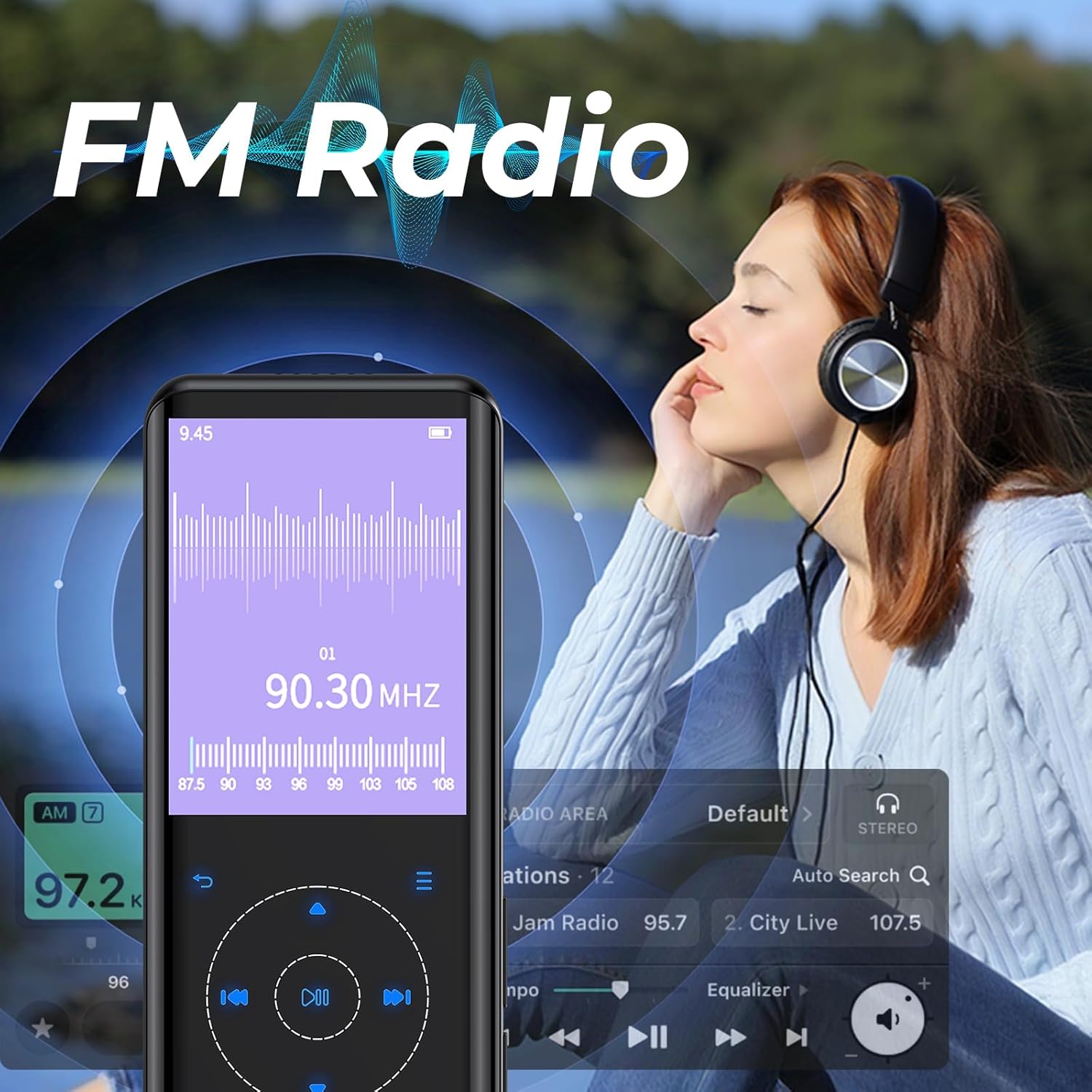
Billede 5.4: The RUIZU D18 MP3 Player displaying its FM Radio interface, showing frequency tuning and station presets. A user is shown enjoying the radio with headphones.
- Connect wired headphones (required for antenna).
- From the main menu, select "FM Radio."
- Use the auto-search function to find and save available stations.
- Navigate through saved stations or manually tune to a frequency.
5.5. Stemmeoptagelse
The integrated voice recorder allows you to capture audio notes or lectures.
- From the main menu, select "Recorder."
- Vælg "Start stemmeoptagelse" for at begynde.
- Press the appropriate button to stop and save the recording.
5.6. Andre funktioner
The RUIZU D18 offers several additional features:
- E-book Reader (TXT): Læs tekst filedirekte på enheden.
- Video Playing (AVI/AMV): Watch supported video formats.
- Foto Viewer (JPG/BMP): View billede files.
- Vækkeur: Indstil alarmer.
- Skridttæller: Spor dine skridt.
- Kalender: View den aktuelle dato.
- Stopur: Use as a timer.
- Sleep timer: Automatically turn off the device after a set period.
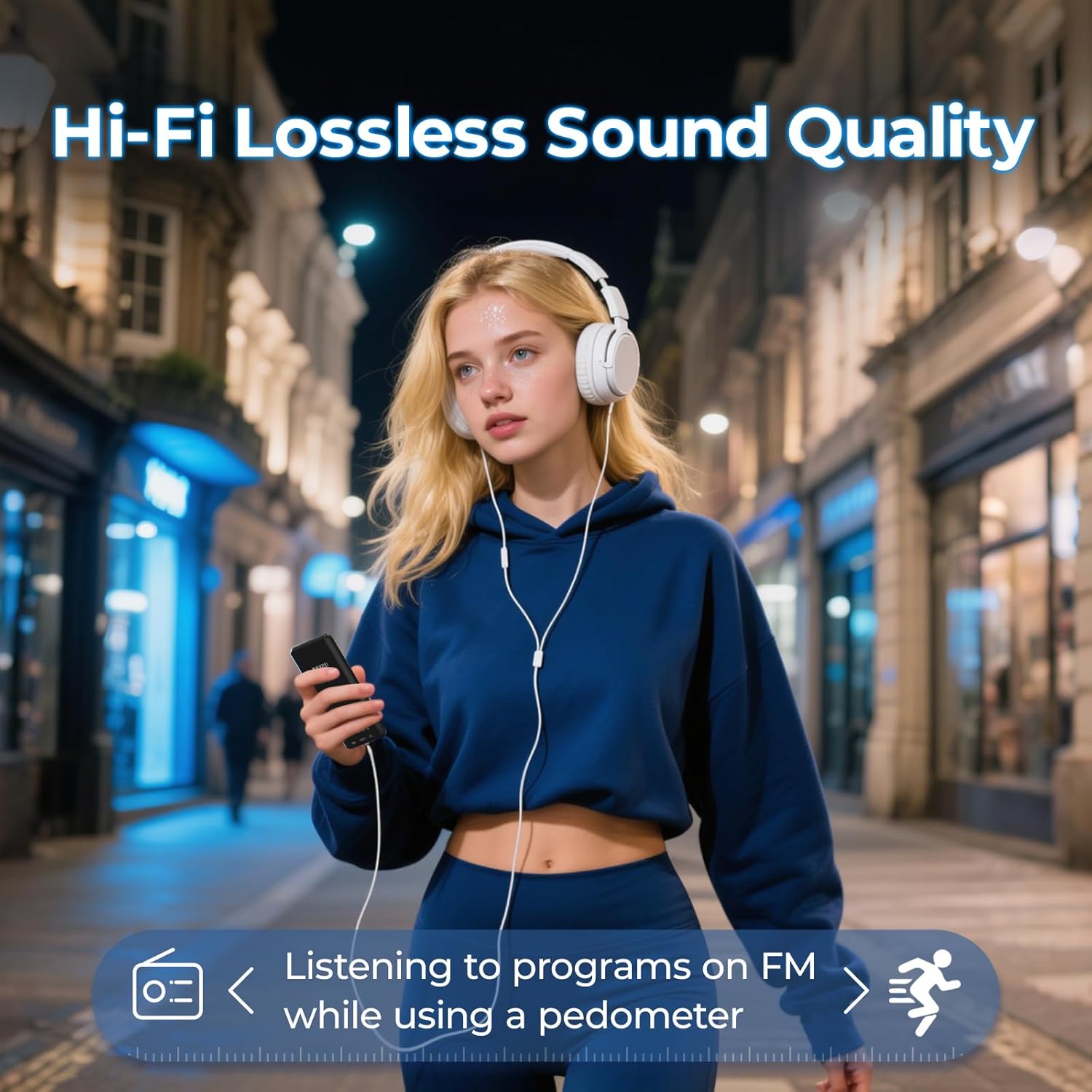
Billede 5.5: A user enjoying music with the RUIZU D18 MP3 Player, highlighting its Hi-Fi lossless sound quality and the integrated pedometer function for tracking activity while listening to FM radio.
6. Vedligeholdelse
- Hold enheden tør. Fugt kan beskadige elektroniske komponenter.
- Undgå ekstreme temperaturer.
- Rengør skærmen og kabinettet med en blød, tør klud. Brug ikke skrappe kemikalier.
- Beskyt enheden mod fald og stød.
- Forsøg ikke selv at skille enheden ad eller reparere den. Dette vil ugyldiggøre garantien.
7. Fejlfinding
7.1. Device Will Not Turn On
- Sørg for, at batteriet er opladet. Tilslut enheden til en strømkilde i mindst 30 minutter.
- Try pressing and holding the Lock/On/Off button for 10-15 seconds to perform a hard reset.
7.2. Kan ikke oprette forbindelse via Bluetooth
- Ensure Bluetooth is enabled on both the MP3 player and the target device.
- Make sure the target device is in pairing mode.
- Flyt enhederne tættere på hinanden.
- Slet tidligere parringer på begge enheder, og prøv at parre igen.
- Some Bluetooth devices may have compatibility issues.
7.3. Ingen lyd
- Kontroller lydstyrken.
- If using headphones, ensure they are properly plugged in or paired via Bluetooth.
- Test with different headphones or speakers.
- Sørg for lyden file format er understøttet.
7.4. MicroSD Card Not Detected
- Ensure the MicroSD card is inserted correctly and fully.
- Prøv at indsætte kortet igen.
- Test with a different MicroSD card to rule out card issues.
- Ensure the card is formatted to a compatible file system (f.eks. FAT32).
8. Specifikationer
| Modelnummer | D18 |
| Mærke | RUIZU |
| Intern hukommelse | 32 GB |
| Udvidbar hukommelse | Op til 128 GB (MicroSD-kort, medfølger ikke) |
| Bluetooth version | 5.3 |
| Vise | 2.4-tommer TFT-farveskærm |
| Understøttede lydformater | MP3, WMA, APE, FLAC, WAV, AAC, M4A, OGG |
| Understøttede videoformater | AVI, AMV |
| Understøttede billedformater | JPG, BMP |
| Batteritype | Lithium polymer |
| Opladningstid | Ca. 2.5 timer |
| Playback Time (Headphones, Screen Off) | Op til 48 timer |
| Playback Time (Bluetooth Mode) | Op til 6.5 timer |
| Produktdimensioner | 0.39 x 1.97 x 4.33 tommer (ca. 1 x 5 x 11 cm) |
| Varens vægt | 7 ounce |
9. Garanti og support
Specific warranty information is not provided in this manual. Please refer to the product packaging or the retailer's webwebstedet for detaljer vedrørende garantidækning og vilkår.
For technical support or further assistance, please contact RUIZU customer service through the official RUIZU webwebstedet eller platformen, hvor produktet blev købt.


