Indledning
Thank you for choosing the BOTSLAB 4K Dash Cam Front and Rear. This advanced dual-camera system provides crystal-clear 4K front and 1080P rear resolution, powered by a STARVIS 2 sensor for superior low-light performance. It features voice control, built-in GPS, WDR night vision, and a wide 170° front and 150° rear viewing angle to enhance your driving safety and record crucial moments. This manual provides detailed instructions for setup, operation, and maintenance to ensure optimal performance of your dash cam.
Hvad er der i æsken
- BOTSLAB 4K Dash Cam (Front Unit)
- Bagkamera
- 64 GB MicroSD-kort
- Bil oplader
- Ladekabel
- Installationsværktøj
- Hurtig guide
- Brugermanual
Nøglefunktioner
- 4K+1080P Ultra HD with STARVIS 2 Sensor: Dual cameras deliver stunning 4K front + 1080P rear resolution for crystal-clear footage capture. The STARVIS 2 sensor excels in low-light scenes with vivid true-to-life colors, capturing every frame in ultra-sharp detail—clearly recording license plates, road signs, and surroundings—day and night.
- 170°+150° Wide-Angle Blind Spot Killer: The dash cam's 170° front and 150° rear wide-angle lenses enhance driving safety by expanding your view, allowing you to monitor multiple lanes and anticipate hazards.
- Håndfri stemmestyring: Effortlessly control the dash cam by simply saying commands like “Take photo” or “Video start” to stay focused on the road and minimize distractions.
- Superior nattesyn: The front camera’s F1.5 aperture and the rear’s F2.0 aperture deliver vibrant, detailed footage even in low-light conditions, ensuring safe and secure driving after dark.
- Problemfri installation: The sleek design allows for seamless installation, effortlessly complementing any vehicle interior with straightforward peel-and-stick wiring.
- Indbygget GPS: Integrated GPS for seamless trip tracking and accurate location data.
- 5GHz WiFi: Fast wireless connectivity for app control and video transfer.
- 24H Parking Mode: Provides continuous surveillance when parked (requires hardwire kit, not included).
Opsætning og installation
Follow these steps for proper installation of your BOTSLAB Dash Cam:
- Vælg monteringssted: Select a spot on your windshield for the front camera that does not obstruct your view. Typically, this is behind the rearview mirror. For the rear camera, mount it on the rear windshield.
- Ren overflade: Ensure the mounting surface is clean and dry before attaching the adhesive mount.
- Attach Front Camera: Peel off the protective film from the adhesive mount and firmly press the front dash cam onto the chosen spot on the windshield. Hold for 30 seconds to ensure strong adhesion.
- Tilslut strøm: Route the power cable neatly along the windshield edge and dashboard, using the included installation tool to tuck it into crevices. Plug the car charger into your vehicle's cigarette lighter socket and connect the charging cable to the dash cam.
- Installer bakkamera: Attach the rear camera to the rear windshield using its adhesive mount. Connect the rear camera cable to the main front unit. Route this cable carefully to avoid interference.
- Indsæt MicroSD-kort: Insert the provided 64GB MicroSD card into the designated slot on the dash cam. Ensure it clicks into place.
- Tænd og test: Start your vehicle. The dash cam should power on automatically and begin recording. Check the display to ensure both front and rear camera feeds are visible.
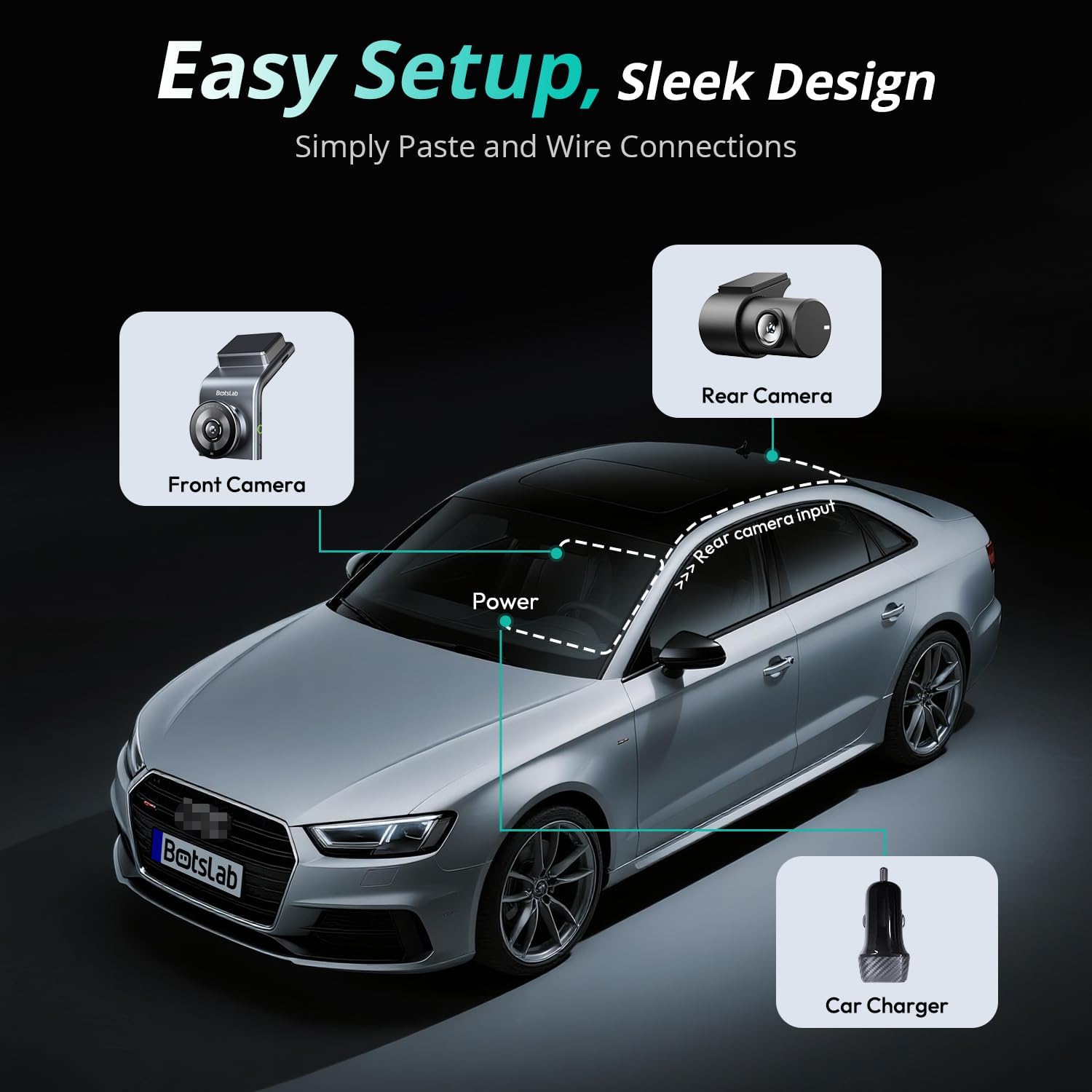
Figure 1: Easy Setup and Wiring Diagram. This image illustrates the simple peel-and-stick wiring for the front camera, rear camera, and connection to the car charger.
Video 1: Installation and Feature Overview. This video demonstrates the easy installation process of the BOTSLAB G300H Plus dash cam, including mounting the front and rear cameras and connecting power. It also highlights key features such as 4K+1080P resolution, voice control, and parking protection.
Betjeningsvejledning
Automatic Recording and Loop Recording
Once powered on, the dash cam automatically begins recording. It utilizes loop recording, continuously overwriting the oldest footage when the memory card is full, ensuring uninterrupted recording. Important footage can be locked to prevent overwriting.
Stemmekontrol
The BOTSLAB Dash Cam supports hands-free voice commands for common functions. Simply speak the command clearly:
- "Take photo": Captures a still image.
- "Video start": Begins recording video.
- Other commands may be available; refer to the quick guide for a complete list.

Figure 2: Hands-Free Voice Control. This image demonstrates how to use simple voice commands to operate the dash cam, allowing the driver to maintain focus on the road.
App Control and Instant Preview (5GHz WiFi)
Download the BOTSLAB App from your smartphone's app store. Connect your phone to the dash cam's 5GHz WiFi network to access features such as:
- Levende view of front and rear cameras.
- Playback recorded videos and photos.
- Download footage directly to your phone.
- Adjust dash cam settings.
- Share captured moments to social media.

Figure 3: Capture, Edit, and Share via Botslab App. This image shows the mobile application interface, allowing users to manage and share their dash cam footage nemt.
Built-in GPS and Trip Tracking
The integrated GPS module records your driving route, speed, and location data. This information can be viewed and tracked via the BOTSLAB App, providing a comprehensive record of your journeys with Google Maps precision.
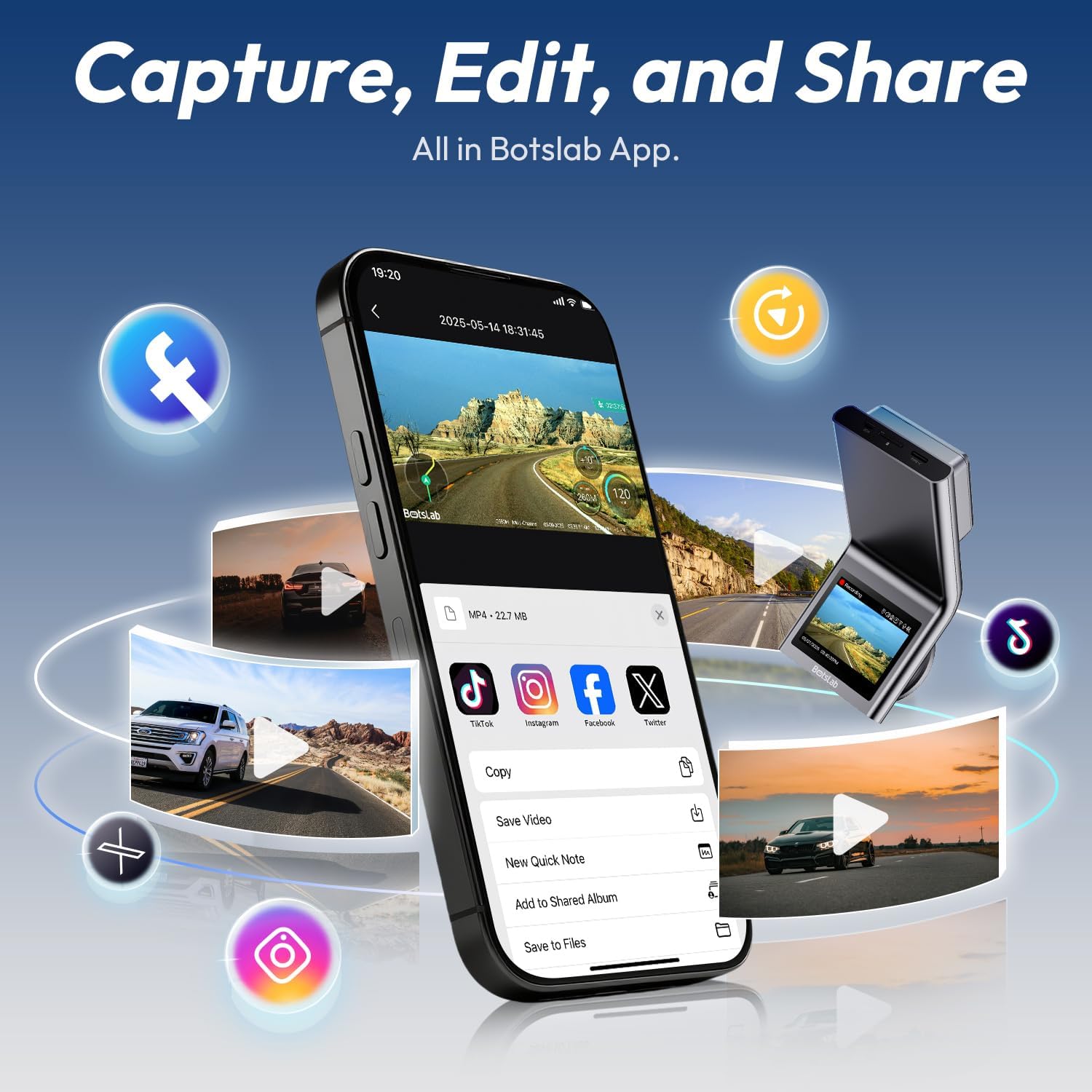
Figure 4: Seamless Trip Tracking with Integrated GPS. This image demonstrates the dash cam's ability to track and display driving routes on a map through the companion app.
24H Parking Mode (Requires Hardwire Kit)
For continuous surveillance when your vehicle is parked, the 24H Parking Mode can be activated. This feature requires a separate hardwire kit (not included) to provide constant power to the dash cam. The parking mode includes:
- Time-lapse-optagelse: Records at a low frame rate to save storage space while capturing extended periods.
- Collision-Detected Recording: Automatically initiates a 1-minute recording upon detecting a collision or impact, even when the vehicle is off.
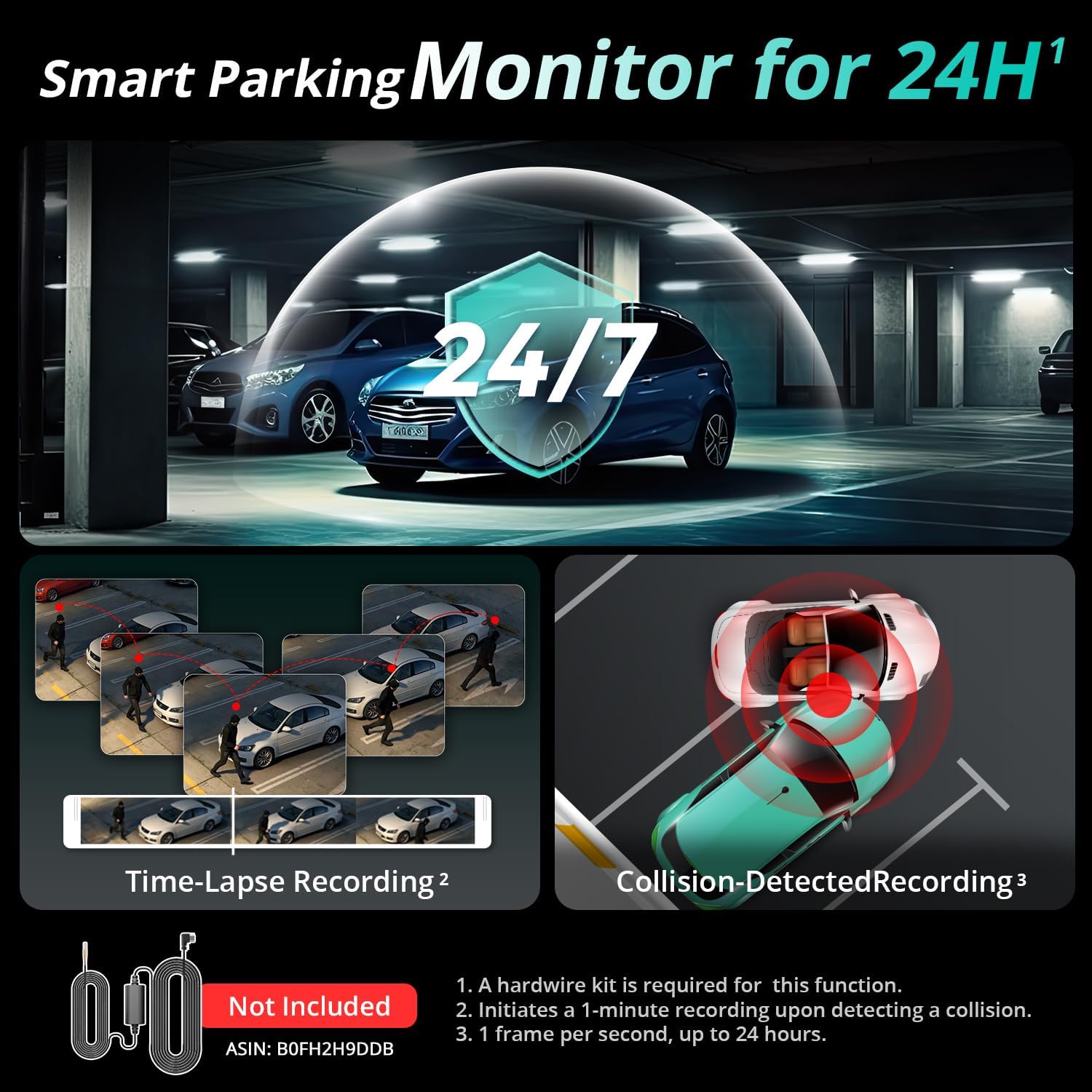
Figure 5: Smart Parking Monitor for 24H. This image illustrates the comprehensive parking surveillance features, including time-lapse and collision-triggered recording.
Advanced Imaging: STARVIS 2 Sensor & Wide Angle Lenses
The dash cam's STARVIS 2 sensor ensures exceptional image clarity and color accuracy, especially in challenging lighting conditions. Coupled with the 170° front and 150° rear wide-angle lenses, it minimizes blind spots and captures a broad view af vejen.
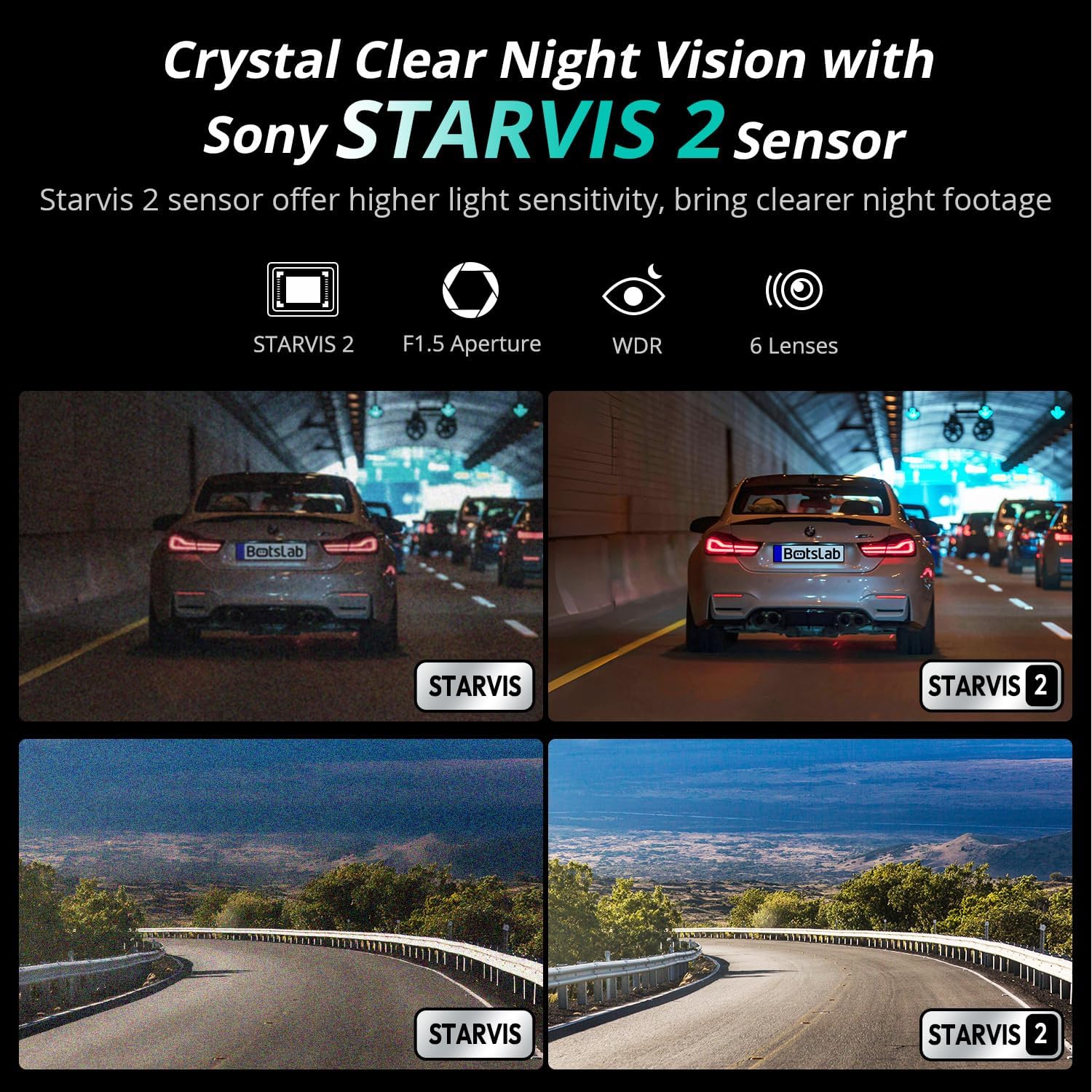
Figure 6: Crystal Clear Night Vision with Sony STARVIS 2 Sensor. This image highlights the superior low-light performance of the dash cam, providing clear footage even in dark conditions.

Figure 7: Expanded Vision for Safer Driving. This image illustrates the wide field of view provided by the 170° front and 150° rear lenses, reducing blind spots.
Opretholdelse
- Rene linser: Regularly wipe the camera lenses with a soft, lint-free cloth to ensure clear recordings. Avoid abrasive materials.
- Formater MicroSD-kort: Format the MicroSD card monthly to prevent data corruption and ensure optimal recording performance. Back up any important files før formatering.
- Firmwareopdateringer: Check the BOTSLAB App periodically for firmware updates. Keeping your dash cam's firmware up-to-date ensures the best performance and access to new features.
- Temperatur: Avoid exposing the dash cam to extreme temperatures for prolonged periods. While designed for automotive environments, prolonged direct sunlight in hot climates can affect longevity.
Fejlfinding
| Problem | Mulig årsag | Løsning |
|---|---|---|
| Dashcam'et tænder ikke. | No power supply; loose connection; faulty charger. | Check car charger connection and vehicle's cigarette lighter socket. Try a different USB port or charger. Ensure vehicle ignition is on. |
| Optagelse stopper eller footage er korrupt. | MicroSD card full or corrupted; low-quality MicroSD card; card error. | Format the MicroSD card regularly. Use a high-endurance, reputable brand MicroSD card (Class 10 or U3 recommended). Replace the card if issues persist. |
| Problemer med WiFi-forbindelse med appen. | Incorrect WiFi password; phone too far from dash cam; app glitch. | Ensure correct WiFi password. Move phone closer to dash cam. Restart both dash cam and phone. Reinstall the BOTSLAB App. |
| Dårlig videokvalitet om natten. | Dirty lens; extreme low light conditions; incorrect settings. | Clean the camera lens. Ensure WDR (Wide Dynamic Range) is enabled in settings. While STARVIS 2 is excellent, extreme darkness can still limit visibility. |
| Stemmestyringen svarer ikke. | Loud background noise; unclear pronunciation; feature disabled. | Speak clearly and directly towards the dash cam. Reduce background noise. Check settings in the BOTSLAB App to ensure voice control is enabled. |
Specifikationer
| Feature | Detalje |
|---|---|
| Modelnavn | G300H Plus-Front and Rear |
| Videooptagelsesopløsning | Front: 4K (2160p), Rear: 1080P |
| Billedsensor | STARVIS 2 Sensor |
| Lensåbning | Front: F1.5, Rear: F2.0 |
| Viewi vinkel | Foran: 170°, Bagpå: 150° |
| Forbindelsesteknologi | Wi-Fi (5GHz), Built-in GPS |
| Særlige funktioner | App Control, G-Sensor, Night Vision, Voice Control, 24H Parking Mode (requires hardwire kit) |
| Inkluderet opbevaring | 64 GB MicroSD-kort |
| Produktdimensioner | 2.28 x 4.13 x 0.45 tommer |
| Varens vægt | 1.1 pund |
| Monteringstype | Forrudemontering |
Garanti og support
BOTSLAB is committed to providing excellent customer service and product support. Your BOTSLAB Dash Cam comes with:
- 365-Day Professional Service: Comprehensive support for one year from purchase.
- Livstids teknisk hjælp: Ongoing technical assistance for the lifespan of your product.
- 30 dages gratis returnering: Hassle-free returns within 30 days of purchase.
- 24/7 kundesupport: Dedicated support available around the clock for any inquiries or issues.
For further assistance, please visit the official BOTSLAB webwebsted eller kontakt kundesupport direkte.


